
1. Introduction
The TOOLTOP ET32 is a versatile digital circuit breaker finder designed for electrical safety inspection. It accurately identifies correct circuit breakers, performs GFCI testing, NCV voltage detection, wiring tests, and voltage measurements. Equipped with a clear VA color screen and adjustable sensitivity, it is an essential tool for electricians and DIY enthusiasts.
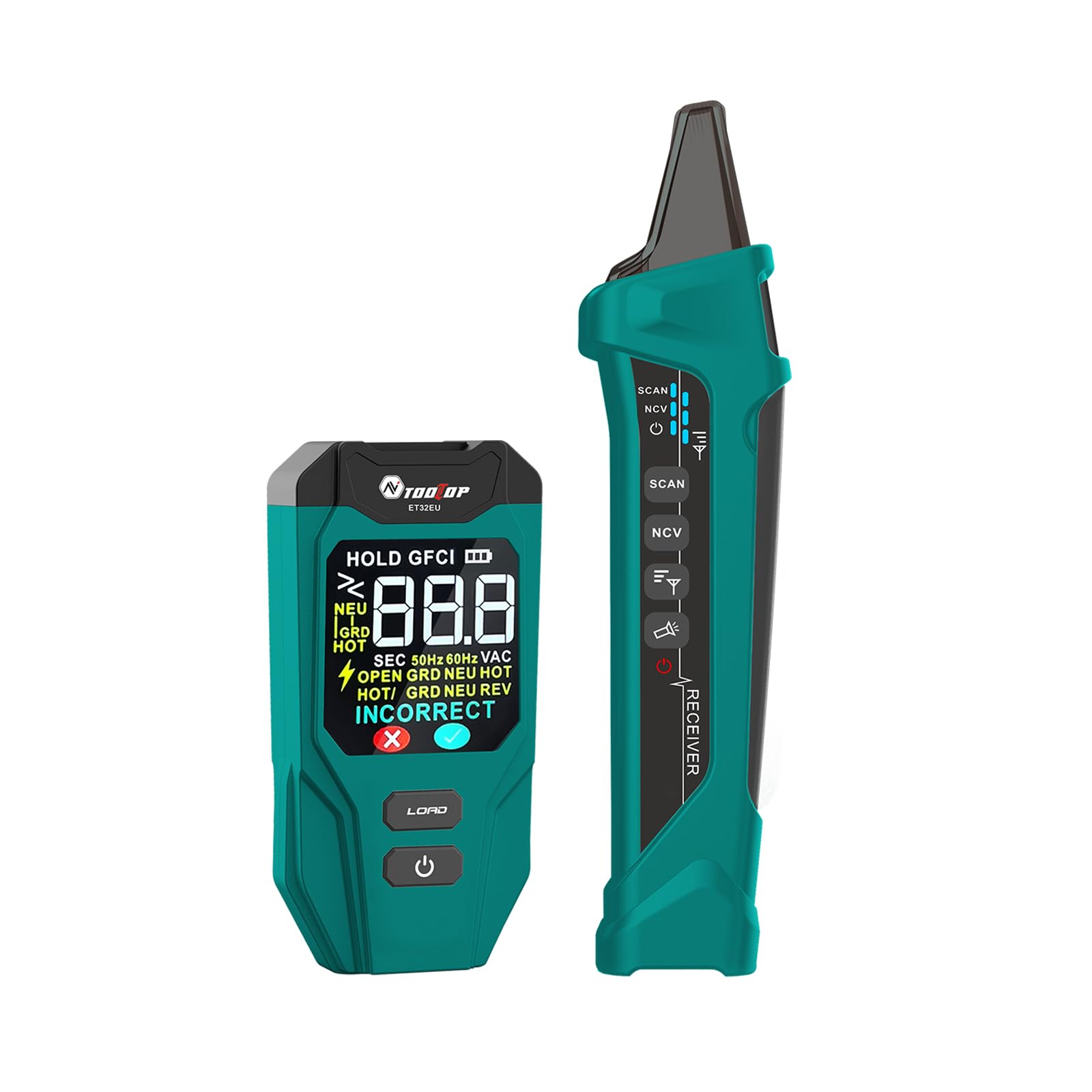
Image 1.1: The TOOLTOP ET32 device, showing its main unit and receiver, with key functions listed on the display.
2. Product Features
- Optimized GFCI Testing: Accurately displays GFCI trip time for enhanced electrical outlet evaluation.
- Clear VA Color Screen: Equipped with a vibrant VA color screen for easy data viewing in diverse lighting conditions.
- Circuit Phase Analysis: Detects correct, reversed, missed, or crossed circuit phases for reliable inspection.
- Flashlight Integration: Includes an LED flashlight for use in low-light environments during testing.
- Adjustable Sensitivity: Allows fine-tuning to accommodate various operational requirements.
- NCV Function: Non-Contact Voltage detection for safety.
- Beeper Indication: Provides audible alerts during operation.
- Lithium Cell: Rechargeable internal battery for convenience.
- Auto Power Off: Conserves battery life.

Image 2.1: Visual representation of the key features of the TOOLTOP ET32.
3. Safety Information
Please read and understand all safety instructions before operating the TOOLTOP ET32. Failure to follow these instructions may result in electric shock, fire, or serious injury.
- Always assume circuits are live until proven otherwise.
- Do not use the device if it appears damaged or is not operating correctly.
- Do not attempt to open or repair the device. Refer all servicing to qualified personnel.
- Wear appropriate personal protective equipment (PPE) when working with electricity.
- Keep the device dry and clean.
- This device is intended for use by trained and competent individuals.
4. Components Included
The package for the TOOLTOP ET32 typically includes the following items:
- TOOLTOP ET32 Transmitter Unit
- TOOLTOP ET32 Receiver Unit
- Type-C Charging Cable
- User Manual
- Storage Pouch (may vary by package)
5. Setup and Charging
5.1 Initial Charging
The TOOLTOP ET32 features a rechargeable lithium battery. Before first use, fully charge both the transmitter and receiver units using the provided Type-C charging cable. Connect the cable to a standard USB power adapter (not included) and the charging port on each unit. The charging indicator will show the charging status.
5.2 Powering On/Off
To power on the device, press and hold the power button on both the transmitter and receiver units. To power off, press and hold the power button again. The device also features an auto power-off function to conserve battery life after a period of inactivity.
6. Operating Instructions
6.1 Circuit Breaker Finding (Scan Mode)
This function helps identify the correct circuit breaker for a specific outlet or fixture.
- Step 1: Learn Mode (Scan Once)
Plug the transmitter unit into the outlet you wish to test. Turn on the receiver unit. Press the 'SCAN' button on the receiver. Move the receiver along the circuit breakers in the electrical panel. The receiver will emit a sound or visual indication as it learns the circuit. Ignore initial indications during this learning phase.
- Step 2: Locate Mode (Scan Again)
After the learning phase, press the 'SCAN' button again. Move the receiver along the circuit breakers. The receiver will now pinpoint the correct circuit breaker with clear flashing lights and beeps, indicating the specific breaker connected to the tested outlet.

Image 6.1: Illustration of the two-step process for using the Scan Mode to identify circuit breakers.
6.2 GFCI Testing
The GFCI test function measures the trip time of Ground Fault Circuit Interrupter outlets.
- Plug the transmitter unit into the GFCI outlet to be tested.
- Ensure the transmitter is powered on.
- Press the 'GFCI' button on the transmitter. The LCD will display the time taken for the GFCI to trip in seconds.
- A 'CORRECT' indication signifies normal operation. Refer to the 'Understanding Display Indications' section for other messages.

Image 6.2: Performing a GFCI test with the TOOLTOP ET32 transmitter.
6.3 NCV (Non-Contact Voltage) Testing
The NCV function allows for detection of live AC voltage without direct contact.
- Turn on the receiver unit.
- Select the NCV mode on the receiver.
- Bring the tip of the receiver close to the wire, outlet, or electrical component you wish to test.
- The receiver will indicate the presence of AC voltage through visual (flashing light) and audible (beeping) signals. The intensity of the signal may vary with voltage strength and proximity.

Image 6.3: Using the NCV function to detect live circuits without contact.
6.4 Wiring Test and Voltage Measurement
When the transmitter is plugged into an outlet, it automatically performs a wiring test and displays the measured voltage on its VA color screen. The display will indicate the wiring status (e.g., CORRECT, OPEN GROUND, HOT/GND REV) and the AC voltage.
6.5 Adjustable Sensitivity
The receiver unit features adjustable sensitivity for the NCV and circuit breaker finding functions. This allows for fine-tuning to avoid false positives or to detect signals in challenging environments. Refer to the receiver's controls for adjusting sensitivity levels.
6.6 Flashlight Function
The receiver unit includes an integrated LED flashlight. Activate the flashlight by pressing the dedicated button (or a combination of buttons, refer to device markings) to illuminate dark work areas.
7. Understanding Display Indications
The VA color screen on the transmitter provides clear indications of wiring status and test results. Below are common messages and their meanings:
| Indication | Meaning |
|---|---|
| CORRECT | Wiring is correct (Hot, Neutral, Ground are properly connected). |
| HOT & GND REV | Hot and Ground wires are reversed. |
| OPEN HOT | The Hot wire is open (disconnected). |
| OPEN NEU | The Neutral wire is open (disconnected). |
| OPEN GRD | The Ground wire is open (disconnected). |
| HOT ON NEU WITH HOT OPEN | Indicates a complex wiring fault where hot is present on neutral and hot is open. |
| GFCI SEC | Displays the trip time in seconds during a GFCI test. |

Image 7.1: Examples of LCD status indications for different wiring conditions and GFCI test results.
8. Maintenance
8.1 Cleaning
Wipe the device with a dry, soft cloth. Do not use abrasive cleaners or solvents. Ensure the device is powered off and disconnected from any power source before cleaning.
8.2 Storage
Store the TOOLTOP ET32 in a cool, dry place, away from direct sunlight and extreme temperatures. If storing for extended periods, ensure the battery is partially charged (around 50%) to prolong its lifespan.
9. Troubleshooting
| Problem | Possible Cause | Solution |
|---|---|---|
| Device does not power on. | Low battery. | Charge the device using the Type-C cable. |
| Inaccurate circuit breaker detection. | Interference from other circuits; sensitivity too high/low. | Adjust the receiver's sensitivity. Ensure no other devices are drawing heavy current on adjacent circuits. Repeat the 'Scan Once To Learn' step. |
| GFCI test fails or shows unexpected results. | Faulty GFCI outlet; incorrect usage. | Ensure the GFCI outlet is functional. Re-read GFCI testing instructions. If the issue persists, consult a qualified electrician. |
| NCV detection is inconsistent. | Low battery; sensitivity setting; external interference. | Charge the device. Adjust NCV sensitivity. Ensure the tip is close to the live conductor. |
10. Specifications

Image 10.1: Detailed product parameters and specifications for the TOOLTOP ET32.
| Parameter | Value |
|---|---|
| Model | ET32 |
| Detection Distance | 0 ~ 3 cm |
| GFCI Device Test | Shows GFCI Trip Time |
| Learning Mode | Supported |
| Circuit Phase Detection | Correct/Reversed/Missed/Crossed |
| Adjustable Sensitivity | Yes |
| Flashlight | Integrated LED |
| NCV Range | AC90V ~ 1000V 50/60Hz |
| Color VA Screen | 38mm × 39mm |
| Low Battery Detection Function | Yes |
| Auto Power Off | Yes |
| Operating Temperature | 0 ~ 50 °C (32°F ~ 122°F) |
| Storage Temperature | -20 ~ 50 °C (-4°F ~ 122°F) |
| Relative Humidity | <90% (Non-Condensing) |
| Operating Voltage (Transmitter) | 90V~120V AC 50/60Hz | 210V~230V AC 50/60Hz |
| Dimensions | 245 × 145 × 65mm |
| Weight | Approximately 570g |
| Battery | 3.7V rechargeable lithium battery (Transmitter/Receiver) |
| Package Contents | Gift Box/Manual/Tool kit/Transmitter/Receiver/Type-C charging cable |
11. Warranty and Support
The TOOLTOP ET32 comes with a standard manufacturer's warranty. Please refer to the warranty card included in your package for specific terms and conditions. For technical support, troubleshooting assistance, or warranty claims, please contact the retailer or manufacturer directly through their official support channels.

