
Ouotoo Y207
Ouotoo Ultra-Thin Magnetic Power Bank 5000mAh Instruction Manual
Model: Y207
Introduction
This manual provides instructions for the safe and efficient use of your Ouotoo Ultra-Thin Magnetic Power Bank 5000mAh. This portable battery pack features 15W Qi fast wireless charging and 20W USB-C PD wired charging, designed for compatibility with iPhone 12 through 17 series. Its compact design and strong magnetic connection offer convenient power on the go.
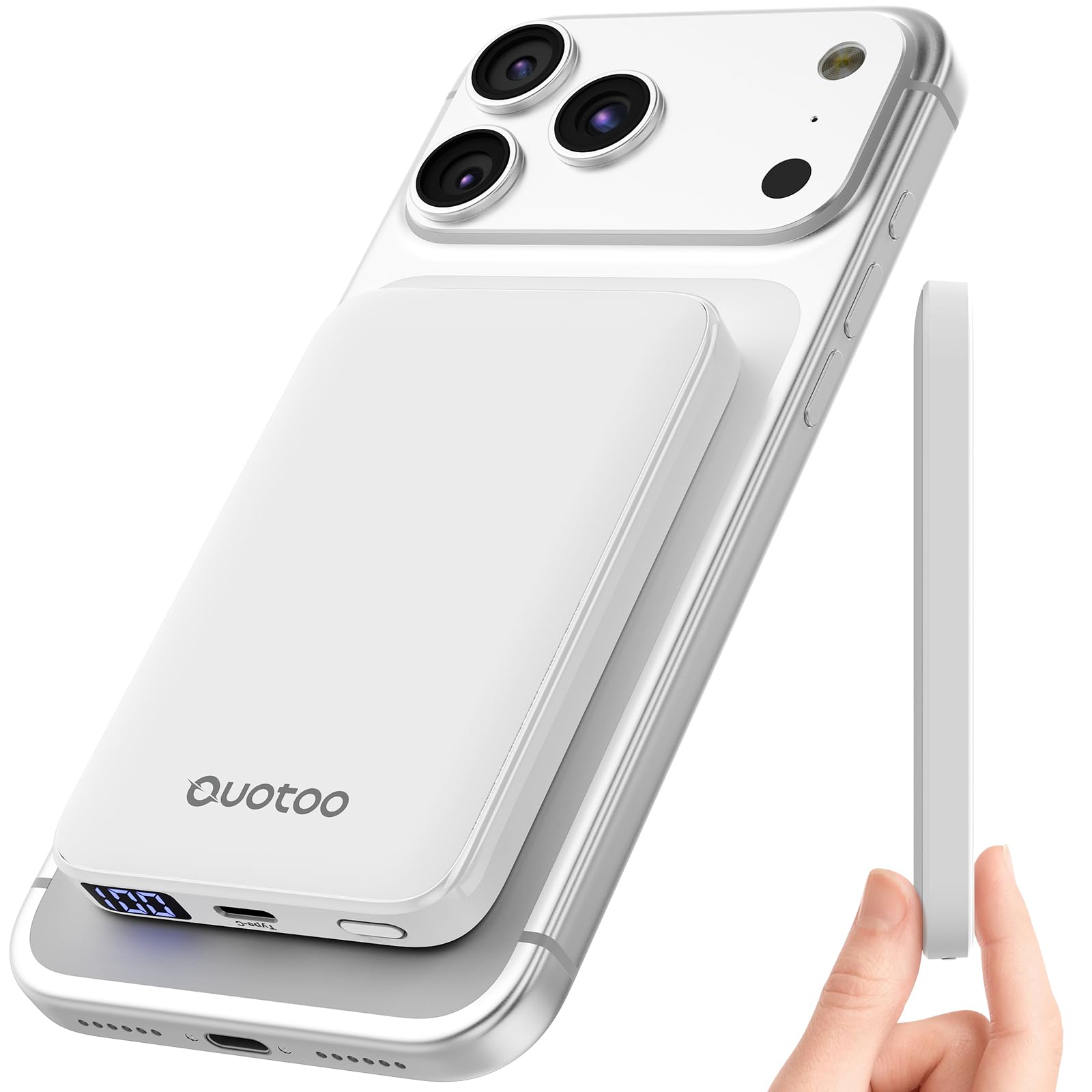
Figure 1: Ouotoo Ultra-Thin Magnetic Power Bank (White)
Key Features
- Ultra-Thin Design: At 0.55 inches (14mm) thin and weighing 128g, it is designed for portability, fitting easily into pockets or bags.
- 5000mAh Capacity: Provides sufficient power for daily use, offering approximately 80% charge for an iPhone 12 or 70% for an iPhone 16 Pro Max. FAA-approved for carry-on luggage.
- Fast Charging: Supports 15W magnetic wireless charging and 20W USB-C Power Delivery (PD) wired charging.
- Dual Device Charging: Capable of charging two devices simultaneously (one wirelessly, one via USB-C).
- Strong Magnetic Connection: Equipped with 18 reinforced N52 magnets for a secure attachment to MagSafe-compatible iPhone models (12-17 series) and cases (up to 3mm thickness).
- Smart Safety Protection: Integrated intelligent chip protects against overcharging, overheating, overcurrent, and short circuits. Features Foreign Object Detection (FOD).
- LED Power Indicator: A 4-LED display shows the remaining battery charge.

Figure 2: Magnetic attachment for wireless charging.

Figure 3: Ultra-thin design for enhanced portability.

Figure 4: Internal technology for enhanced safety and performance.
Setup
Initial Charging of the Power Bank
Before first use, fully charge your Ouotoo Magnetic Power Bank. Use a USB-C cable (included) and a compatible power adapter (not included) to connect the power bank to a power source. The LED display will indicate the charging progress. A full charge is indicated when the display shows 100%.
- Connect the provided USB-C to USB-C cable to the power bank's USB-C port.
- Connect the other end of the cable to a USB-C power adapter (e.g., a 20W PD adapter for fastest charging).
- The LED indicator will show the current charge level and increase as it charges.
- Once fully charged, disconnect the power bank from the power source.
Figure 5: USB-C port and LED display for charging the power bank.
Operating Instructions
Wireless Charging (MagSafe Compatible)
The power bank supports 15W magnetic wireless charging for compatible iPhone models (iPhone 12 series and newer) and MagSafe-compatible cases.
- Ensure your iPhone is MagSafe compatible or has a MagSafe-compatible case (maximum 3mm thickness).
- Align the power bank with the back of your iPhone. The magnets will automatically snap it into place.
- Charging will begin automatically. The LED display on the power bank will show its remaining charge.
- To stop charging, simply detach the power bank from your iPhone.

Figure 6: Wireless charging via magnetic attachment.
Wired Charging (USB-C PD)
For devices requiring wired charging, use the USB-C port for up to 20W Power Delivery (PD) fast charging.
- Connect one end of a USB-C to USB-C cable (included) to the power bank's USB-C port.
- Connect the other end of the cable to your device's charging port.
- Charging will commence automatically.
- Disconnect the cable when your device is charged or when you wish to stop charging.

Figure 7: Wired charging using the USB-C port.
Charging Two Devices Simultaneously
The power bank can charge one device wirelessly and another device via the USB-C port at the same time.
- Attach your MagSafe-compatible iPhone to the power bank for wireless charging.
- Connect a second device (e.g., AirPods, another smartphone) to the power bank's USB-C port using a suitable cable.
- Both devices will charge concurrently.

Figure 8: Simultaneous charging of two devices.
LED Power Indicator
The 4-LED display on the side of the power bank indicates the remaining battery percentage. Each LED represents approximately 25% of the charge. When charging, the LEDs will illuminate to show progress.

Figure 9: LED display indicating battery level.
Official Product Videos
Video: MagSafe Charger - Honest Review
This video demonstrates the magnetic attachment and charging process of the Ouotoo power bank with an iPhone.
Video: Portable charging made easy!
A demonstration of the power bank's ease of use for portable charging.
Video: Out with the kids? Try this battery pack!
This video showcases the power bank's utility for on-the-go charging during daily activities.
Video: A MUST HAVE Ouotoo Wireless Magnetic Charger
A video highlighting the benefits and features of the Ouotoo wireless magnetic charger.
Maintenance
- Cleaning: Use a soft, dry cloth to clean the surface of the power bank. Avoid using harsh chemicals or abrasive materials.
- Storage: Store the power bank in a cool, dry place away from direct sunlight and extreme temperatures.
- Battery Care: To prolong battery life, fully charge the power bank at least once every three months if not in regular use. Avoid fully discharging the battery frequently.
- Avoid Water: Do not expose the power bank to water or excessive moisture.
- Handle with Care: Avoid dropping or subjecting the power bank to strong impacts.
Troubleshooting
Power Bank Not Charging
- Check Cable: Ensure the USB-C cable is securely connected to both the power bank and the power adapter. Try a different USB-C cable.
- Check Power Adapter: Verify that the power adapter is functioning correctly and plugged into a live outlet. Use a power adapter with sufficient output (e.g., 20W PD).
- Power Bank Status: Check the LED display on the power bank. If it's completely off, the battery might be deeply discharged. Leave it connected for a longer period.
Device Not Charging Wirelessly
- Magnetic Alignment: Ensure the power bank is perfectly aligned with the MagSafe area on your iPhone or MagSafe-compatible case.
- Case Compatibility: If using a case, ensure it is MagSafe-compatible and its thickness does not exceed 3mm. Remove the case to test if it's the issue.
- Foreign Object Detection (FOD): The power bank has FOD. Ensure there are no metal objects (keys, coins, credit cards) between the power bank and your phone, as this will prevent charging.
- Power Bank Charge: Verify the power bank has sufficient charge using its LED display.
Device Not Charging via USB-C
- Cable Connection: Ensure the USB-C cable is firmly connected to both the power bank and your device. Try a different USB-C cable.
- Device Compatibility: Confirm your device supports charging via its USB-C port.
- Power Bank Charge: Verify the power bank has sufficient charge using its LED display.
Slow Charging
- Power Adapter (for power bank): When charging the power bank itself, use a high-wattage USB-C PD adapter (e.g., 20W or higher) for optimal speed.
- Cable Quality: Use high-quality USB-C cables that support fast charging.
- Simultaneous Charging: If charging two devices simultaneously, the charging speed for each device may be slightly reduced.
- Environmental Factors: Extreme temperatures can affect charging efficiency. Ensure the power bank and device are in a suitable environment.
Specifications
| Brand | Ouotoo |
| Model Number | Y207 |
| Battery Capacity | 5000 Milliamp Hours (mAh) |
| Wireless Charging Output | 15W Qi Fast Wireless Charging |
| Wired Charging Output | 20W USB-C Power Delivery (PD) |
| Compatible Devices | iPhone 12, 13, 14, 15, 16, 17 All Series |
| Dimensions (L x W x Thickness) | 3.81" x 2.51" x 0.57" (14mm) |
| Weight | 128g |
| Special Features | Digital Display, Lightweight, Pocket Size, Ultra Slim, Wireless Charging, Strong Magnetic Snap, Smart Safety Protection (Overcharging, Overheating, Overcurrent, Short Circuit, FOD) |
| Power Source | Battery-powered |
| Number of Ports | 1 (USB-C) |
Warranty and Support
The Ouotoo Ultra-Thin Magnetic Power Bank comes with a one-year warranty period from the date of purchase, as stated in the product specifications. This warranty covers manufacturing defects and quality issues under normal use.
For any quality issues or support inquiries, please contact Ouotoo customer service. Refer to the product packaging or the retailer's website for specific contact details. Ouotoo aims to provide 24-hour service for customer assistance.
Note: The product feature bullets mention a "Three year warranty", while the specifications list a "1 year warranty period". Please refer to the official product documentation or contact the manufacturer for the most accurate warranty information.
Ask a question about this manual
Ask about setup, troubleshooting, compatibility, parts, safety, or missing instructions. Manuals+ will review the question and use this page’s manual context to help answer it.