
Introduction
Thank you for choosing the Lamicall Foldable Quick-Release Bike Phone Mount. This manual provides essential information for the proper installation, operation, and maintenance of your device. Please read these instructions carefully before use to ensure optimal performance and safety.
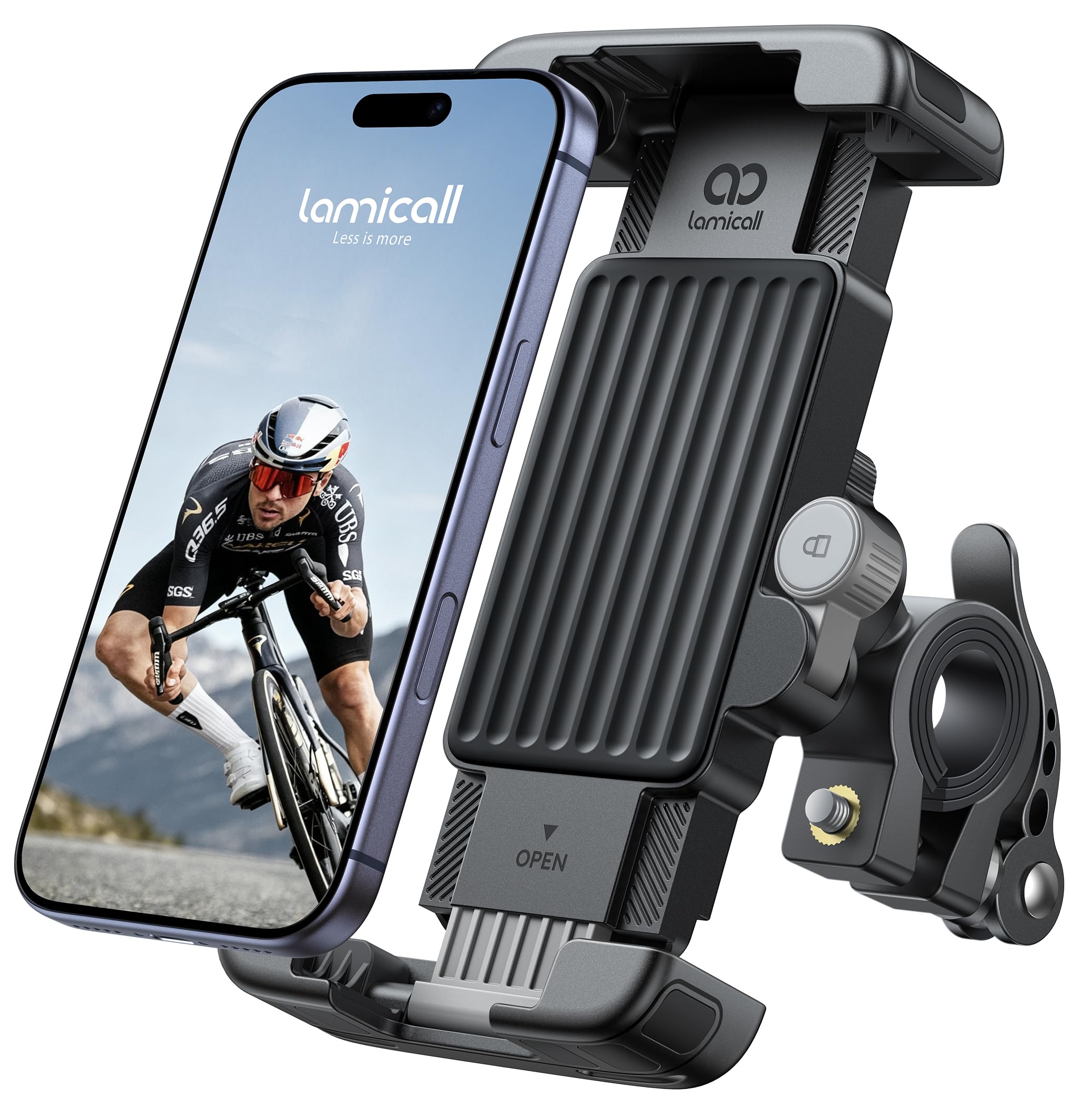
Image: The Lamicall Foldable Quick-Release Bike Phone Mount in its assembled state.
Product Features
- Quick-Release Clamp: Designed for fast and easy mounting on handlebars with a diameter of 15mm to 40mm. Compatible with various vehicles including bicycles, motorcycles, scooters, strollers, treadmills, and wheelchairs.
- Front-Mounted Security Latch: An innovative latch positioned at the front allows for quick visual confirmation of the locked state, ensuring your phone is securely held.
- Foldable Design: Unique four-corner foldable panel reduces the main body thickness to just 19mm when folded, offering a compact profile.
- Full Silicone Protection: Extensive silicone coverage on the front and reinforced inner/outer silicone pads at all four corners provide comprehensive protection against scratches, shocks, and damage to your device.
- 360° Rotation: A rotating ball joint allows for easy adjustment of the phone's viewing angle to any comfortable position, supporting one-hand operation for navigation or calls.
- Wide Compatibility: Supports smartphones from 4.7 to 7 inches in screen size and up to 15mm in thickness.
Package Contents
- 1 x Lamicall Foldable Quick-Release Bike Phone Mount (Model BCSP21-EU-GY)
Installation Guide
Follow these steps to securely attach the phone mount to your vehicle's handlebar:
- Identify Handlebar Compatibility: Ensure your handlebar has a diameter between 15mm and 40mm. The quick-release clamp is designed to fit this range.
- Open the Quick-Release Clamp: Locate the quick-release lever on the mount. Open it to expand the clamp.
- Position the Mount: Place the open clamp around your handlebar at the desired location.
- Secure the Clamp: Close the quick-release lever firmly until it clicks into place. Ensure the mount is stable and does not rotate freely on the handlebar.
- Adjust Angle (Optional): Loosen the adjustment knob on the ball joint, set the desired angle, and then tighten the knob to fix the position.

Image: Illustration of the easy installation process and compatibility with handlebars ranging from 15-30mm for scooters, bikes, motorcycles, indoor bikes, pushchairs, and treadmills.
Operating Instructions
Using your Lamicall phone mount is simple and secure:
- Insert Your Phone: Gently pull open the spring-loaded arms of the phone holder. Place your smartphone into the holder, ensuring it sits snugly against the silicone pads. The arms will automatically adjust to grip your phone.
- Engage the Security Latch: Once your phone is in place, flip the front-mounted security latch outwards with your finger. This action securely locks the phone into the clamping arms, preventing accidental release, especially on bumpy rides or during sudden stops.
- Adjust Viewing Angle: The mount features a 360° rotating ball joint. Loosen the small knob on the side of the ball joint, adjust your phone to the desired portrait or landscape orientation and viewing angle, then tighten the knob to secure it.
- Release Your Phone: To remove your phone, first disengage the front-mounted security latch by pushing it inwards. Then, gently pull the spring-loaded arms apart to release your phone.

Image: A hand demonstrating the quick 1-second lock and release mechanism of the phone mount, ensuring phone protection on bumpy roads.

Image: A person riding a bicycle, demonstrating the 360° rotation feature of the phone mount, allowing easy viewing from any angle.
Compatibility
The Lamicall Foldable Quick-Release Bike Phone Mount is designed for broad compatibility:
- Handlebar Diameter: 15mm to 40mm.
- Compatible Vehicles: Bicycles, motorcycles, scooters, strollers, treadmills, wheelchairs, and similar vehicles with appropriate handlebars.
- Compatible Phone Sizes: Smartphones with screen sizes from 4.7 inches to 7 inches.
- Maximum Phone Thickness: Up to 15mm (including phone case).
- Examples of Compatible Phone Models:
- iPhone Series: iPhone 17 Air, 17, 17 Pro, 17 Pro Max, iPhone 16, 16 Pro, 16 Pro Max, 16 Plus, iPhone 15/14/13/12/11/XS/XR/X/8/7/6 Series.
- Samsung Galaxy Series: S25 Ultra, S25+, S25, S25 FE, S24/S23/S22/A55/A54/A35/A34/A16/A15 and all S/A series.
- Google Pixel Series: Pixel 9, 8, 7, 6, 5, 4 series.
- Other Brands: Motorola and other phones within the specified size and thickness limits.

Image: Diagram illustrating the phone mount's compatibility with large 6-7 inch smartphones and phones with thick cases, showing models like iPhone XR, iPhone 13, iPhone 17 Pro Max, and Samsung S26 Ultra.
Maintenance
To ensure the longevity and optimal performance of your phone mount, follow these maintenance guidelines:
- Cleaning: Wipe the mount regularly with a soft, damp cloth to remove dust and dirt. Avoid using harsh chemicals or abrasive cleaners, which can damage the silicone and plastic components.
- Check for Wear: Periodically inspect the quick-release clamp, security latch, and silicone pads for any signs of wear, cracks, or damage. If any part appears compromised, discontinue use and contact customer support.
- Lubrication: The moving parts of the quick-release mechanism and ball joint are designed for smooth operation and generally do not require lubrication. If movement becomes stiff, ensure no dirt or debris is obstructing the mechanism.
- Storage: When not in use for extended periods, store the mount in a cool, dry place away from direct sunlight and extreme temperatures. The foldable design allows for compact storage.

Image: Close-up view highlighting the silicone protection features of the phone mount, designed to provide all-round protection for the device.
Troubleshooting
If you encounter any issues with your Lamicall phone mount, refer to the following common problems and solutions:
- Mount is loose on handlebar:
Solution: Ensure the quick-release clamp is fully closed and tightened. If the handlebar is too thin, consider using additional rubber shims (not included) to achieve a tighter fit, though the mount is designed for 15-40mm diameters. - Phone is not secure in the holder:
Solution: Verify that the front-mounted security latch is fully engaged. Ensure your phone's dimensions (including case) are within the compatible range (4.7-7 inches screen, up to 15mm thickness). - Phone mount rotates freely after adjustment:
Solution: Make sure the knob on the 360° rotating ball joint is tightened sufficiently after adjusting the angle. - Difficulty inserting/removing phone:
Solution: Ensure the front-mounted security latch is disengaged before attempting to insert or remove the phone. The spring-loaded arms require a firm but gentle pull to open.
Specifications
| Model Number | BCSP21-EU-GY |
| Brand | Lamicall |
| Material | Silicone |
| Mounting Type | Handlebar |
| Compatible Handlebar Diameter | 15mm - 40mm |
| Compatible Phone Size | 4.7 - 7 inches (screen size) |
| Max Phone Thickness | 15mm |
| Special Features | Quick-Release Clamp, Front Latch, Foldable Panel, Silicone Protection, 360° Rotation |
| Vehicle Service Type | Bicycle, Motorcycle |
| Package Dimensions | 18.6 x 18.4 x 2.6 cm |
| Item Weight | 250 grams |
| Country of Origin | China |
Warranty and Support
Lamicall products are manufactured to high-quality standards. For any questions, concerns, or support needs regarding your Lamicall Foldable Quick-Release Bike Phone Mount, please contact Lamicall customer service through the retailer where you purchased the product or visit the official Lamicall website for contact information.
Please retain your proof of purchase for warranty claims.
