
Introduction
The TYPONOS PM240 Label Maker is a portable thermal label printer designed for various labeling needs in home, office, and small business environments. It offers inkless printing, smart app integration, and multi-system compatibility for efficient and organized labeling.
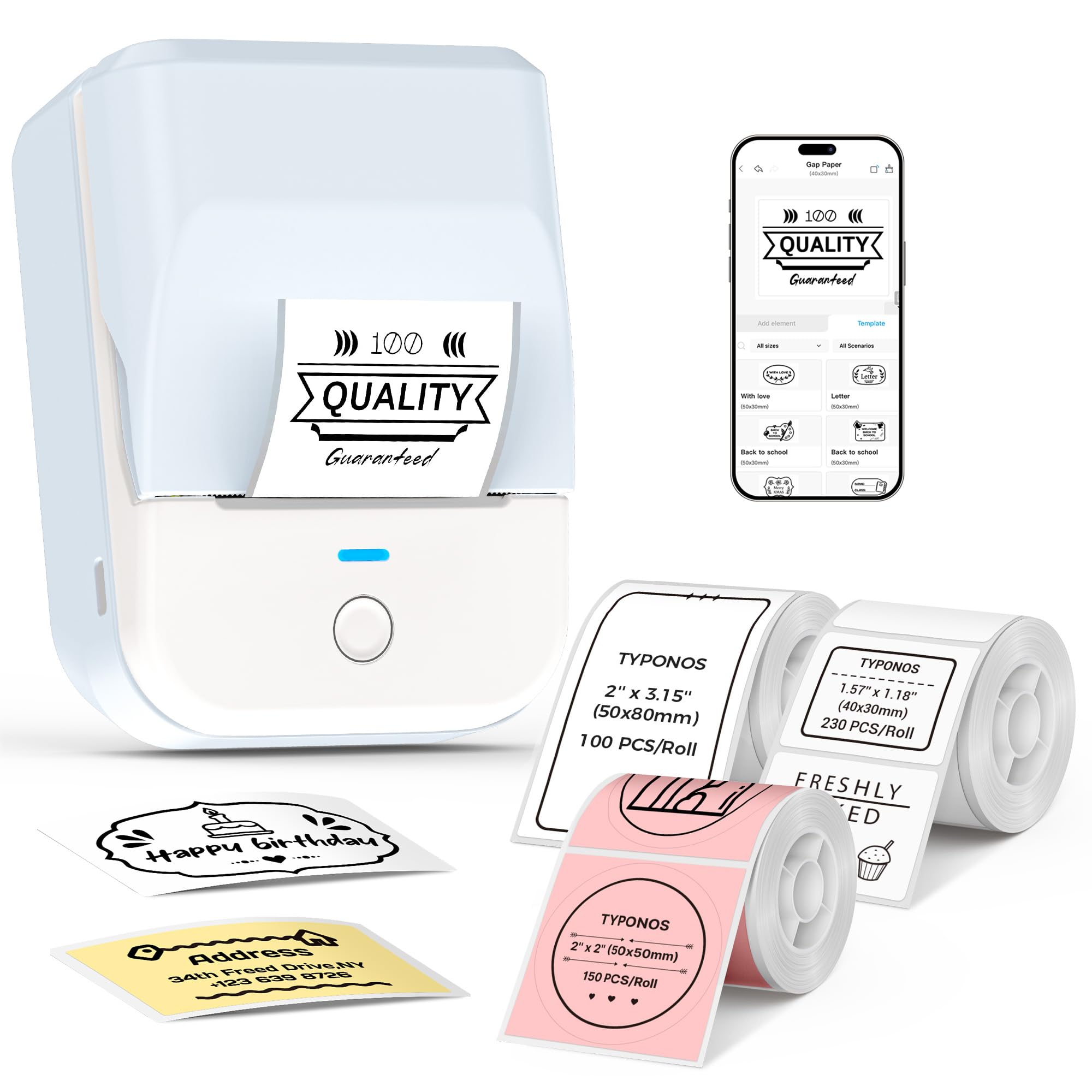
Image: The TYPONOS PM240 Label Maker, a compact and portable thermal printer.
Package Contents
Please verify that all items listed below are included in your package:
- 1 x TYPONOS PM240 Label Maker (Light Blue)
- 1 x USB Type-C Cable
- 1 x User Manual
- 3 x Label Rolls:
- 1 roll 40x30mm white (230 pcs)
- 1 roll 50x80mm white (100 pcs)
- 1 roll 50x50mm round pink (150 pcs)

Image: Contents of the TYPONOS PM240 package. For an installation video, scan the QR code in the physical manual or visit labelnize.com/pages/software-driver-download?pm240.
Product Features
- High-Definition Thermal Printing: Produces crisp, clear labels at 203 DPI without the need for ink or toner.
- Smart Labelnize App: Features over 2500 icons, 3800 templates, and 430 fonts. Supports Excel import, batch printing, AI text-to-image, and OCR text recognition.
- Automatic Label Recognition: Built-in RFID chip in compatible TYPONOS labels allows the app to automatically detect label size, eliminating manual setup.
- Multi-System Compatibility: Connects via Bluetooth to iOS and Android phones/tablets, and via USB to Mac and Windows PCs.
- Portable and Rechargeable: Compact design (8.5D x 11.7W x 5.9H cm, 207g) with a built-in 1500mAh battery, offering up to 100 days of standby time per full charge.
- Auto Paper Rewind: Designed to prevent label waste and ensure smooth printing.
- Durable Labels: TYPONOS labels are waterproof, oil-resistant, tear-resistant, and BPA-free.

Image: The PM240's compact design and key features.
Setup
1. App Installation (Mobile Devices)
- Download the "Labelnize" app from the App Store (iOS) or Google Play Store (Android).
- Ensure Bluetooth is enabled on your mobile device.
2. Label Roll Installation
- Open the upper cover of the label maker.
- Insert the label roll into the holder. Ensure the label side faces upwards.
- Pull out 2-3mm of the label paper, leaving it exposed outside the printer slot.
- Close the cover firmly.
- Turn on the printer. The device will automatically detect the label size if using TYPONOS labels with RFID chips.

Image: Visual guide for installing the label roll.
3. Connecting to Device
- For Phones/Tablets (Bluetooth):
- Turn on the PM240 label maker.
- Open the Labelnize app on your device.
- Follow the in-app instructions to connect via Bluetooth.
- For PC (USB):
- Turn on the PM240 label maker.
- Visit the official Labelnize website (labelnize.com) to download the necessary driver and software.
- Install the driver and software on your PC.
- Connect the PM240 to your PC using the supplied USB Type-C cable. Use a direct USB port on your PC, avoiding multi-port adapters.
Note: Bluetooth and USB connections cannot be active simultaneously.

Image: Multi-system compatibility for the PM240 label maker.
Operating Instructions
1. Printing via Labelnize App (Mobile)
- Ensure the label maker is connected via Bluetooth.
- Open the Labelnize app.
- Select a template or create a new label design using the available icons, fonts, and borders.
- Customize text, images, QR codes, or barcodes as needed.
- Preview your label.
- Tap the "Print" button to send the label to the PM240.

Image: Customizing labels using the Labelnize app.
2. Printing via PC Software
- Ensure the label maker is connected via USB and the driver/software are installed.
- Open the Labelnize software on your PC.
- Design your label or import data (e.g., from Excel for batch printing).
- Adjust print settings as required.
- Initiate printing from the software.

Image: Steps for connecting and printing from a computer.
Maintenance
- Cleaning: Regularly clean the print head with an alcohol wipe to ensure optimal print quality. Ensure the device is off and cool before cleaning.
- Storage: Store the label maker and label rolls in a cool, dry place away from direct sunlight.
- Battery Care: Charge the device regularly to maintain battery health. Avoid fully discharging the battery for extended periods.
Troubleshooting
- Device not connecting (Bluetooth/USB):
- Ensure only one connection type (Bluetooth or USB) is active.
- For Bluetooth, check if the device is powered on and discoverable. Restart the app and device.
- For USB, ensure the driver is installed and the cable is connected directly to a PC port.
- Printing errors or blank labels:
- Verify the label roll is installed correctly, with the printable side facing the print head.
- Ensure the green liner sticker on TYPONOS labels is not removed, as this can cause detection issues.
- Check if the label roll is compatible with the PM240.
- Device powers off automatically:
- The device has an auto power-off feature (default 30 minutes of inactivity). This can be adjusted (15/30/60 mins) or disabled via the Labelnize app settings.
- Poor print quality:
- Clean the print head.
- Ensure you are using compatible TYPONOS PM240 labels.
- Check the label roll for any damage or wrinkles.
Specifications
| Feature | Detail |
|---|---|
| Brand | TYPONOS |
| Model Name | PM240 |
| Product Dimensions | 8.5D x 11.7W x 5.9H cm |
| Item Weight | 0.2 kg (207g) |
| Connectivity Technology | Bluetooth, USB Type-C |
| Printing Technology | Thermal |
| Printer Output | Monochrome |
| Max Print Resolution | 203 dots per inch (DPI) |
| Max Print Speed | 40 pages per minute (B&W) |
| Initial Page Print Time | 3 seconds |
| Compatible Devices | PC (Mac, Windows), Smartphones (iOS, Android), Tablets |
| Control Method | App, Push Button |
| Battery Capacity | 1500mAh (Rechargeable) |
| Standby Time | Up to 100 days per full charge |
| Maximum Media Size | 50x80mm |
| Supported Label Sizes | 40x30mm, 50x50mm, 50x80mm (square, round, transparent) |
| Special Features | Auto Paper Rewind, Bluetooth Connection, RFID Chip (Label Auto-Recognition), Supports transparent labels. |
| Country of Origin | China |
Warranty Information
The TYPONOS PM240 Label Maker comes with a 1-year limited warranty. Please refer to the warranty card included in your package for full details regarding coverage and terms.
Support
For technical assistance, troubleshooting, or any product-related inquiries, please contact TYPONOS customer support:
Email: support@typonos.com