
1. Introduction
This manual provides instructions for the assembly, operation, and maintenance of your DUMOS Wooden Baby Push Walker. Please read all instructions carefully before use and retain this manual for future reference.

Image 1.1: The DUMOS Wooden Baby Push Walker with a child, illustrating its overall dimensions.
2. Safety Information
WARNING: Adult assembly required. Keep all unassembled parts and hardware out of reach of children. Ensure all fasteners are securely tightened before use.
- Always supervise children when they are using the push walker.
- Ensure the walker is used on a flat, stable surface.
- Regularly check all components for wear or damage. Discontinue use if any part is broken or missing.
- Keep small parts away from children to prevent choking hazards.

Image 2.1: A child using the DUMOS Wooden Baby Push Walker under adult supervision, emphasizing its safe design features.
3. What's in the Box
Verify that all components are present before beginning assembly:
- Main Walker Frame Components
- Wheels and Axles
- Activity Panel (with Clock, Shape Sorter, Flip Boards, Fun Maze, Rotating Gears, Rolling Drum, Turntable, Mirror)
- Counting Beads Bar
- Assembly Hardware (screws, nuts, etc.)
- Assembly Tool (screwdriver)
4. Assembly Instructions
Follow these steps to assemble your DUMOS Wooden Baby Push Walker. Adult assembly is required.
- Unpack all components and verify against the 'What's in the Box' list.
- Attach the side panels to the main activity board using the provided screws. Ensure they are securely fastened.
- Install the wheels onto the axles and attach them to the side panels.
- Secure the handle/counting beads bar to the top of the side panels.
- Double-check all screws and connections to ensure they are tight and stable.
Pro Tip: Some screws may require a power drill with a low torque setting for easier and more secure fastening, as hand-tightening might not be sufficient.
Video 4.1: Official assembly guide for the DUMOS Wooden Baby Push Walker, demonstrating step-by-step instructions.

Image 4.2: Visual representation of the assembly process, highlighting key connection points.
5. Operating Instructions
5.1 Adjustable Speed Control
The DUMOS Wooden Baby Push Walker features an adjustable speed knob located on the rear wheel assembly. This allows you to control the resistance of the wheels, providing a safer and more controlled walking experience for beginners and adapting as your child gains confidence.
- To Increase Resistance (Slower Speed): Turn the knob clockwise. This is recommended for early walkers to prevent the walker from moving too quickly.
- To Decrease Resistance (Faster Speed): Turn the knob counter-clockwise. Adjust as your child's walking ability improves.
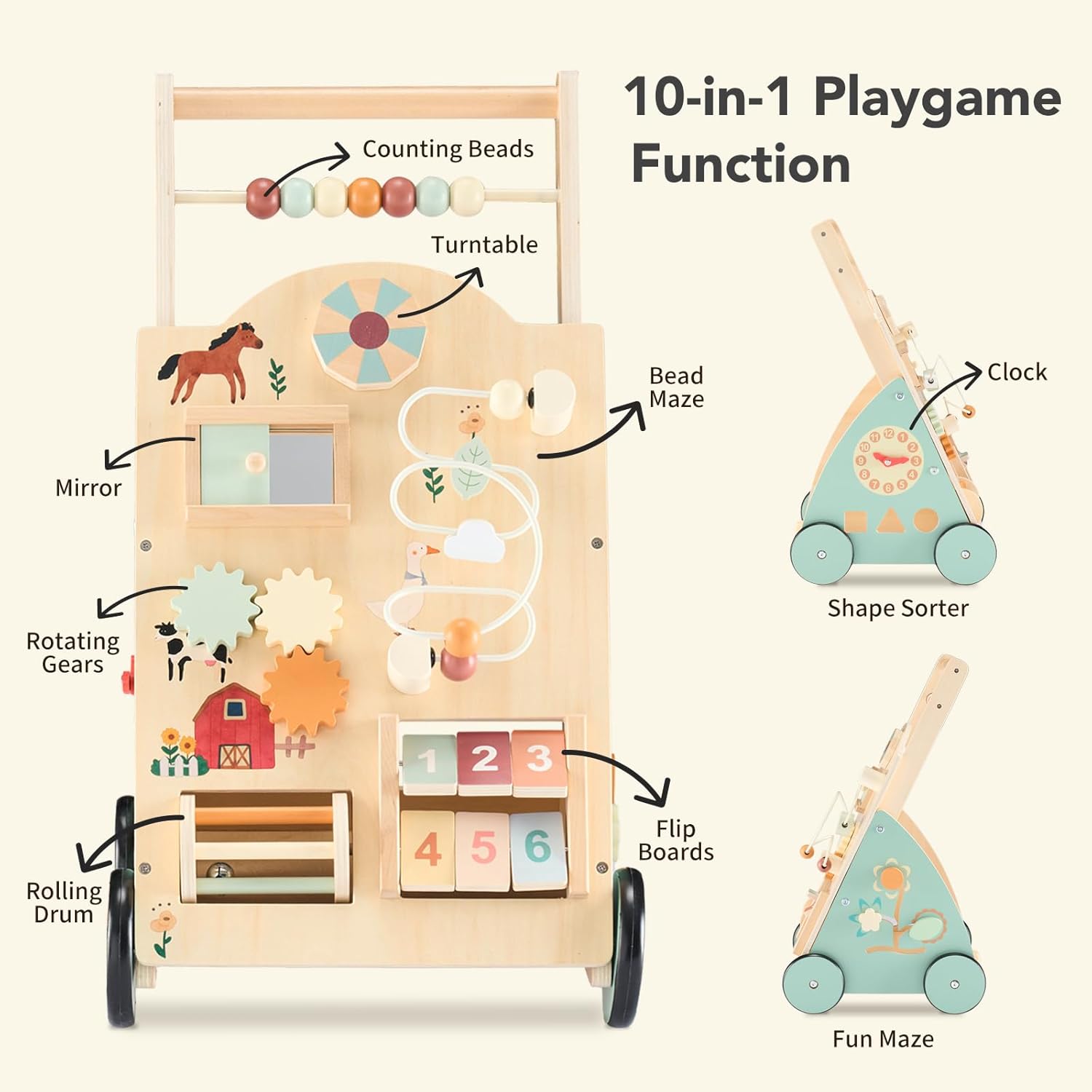
Image 5.1: Detail of the speed adjustment knob and the anti-slip, noise-free rubber wheels.

Image 5.2: The speed adjustment knob and the convenient storage space for toys.
5.2 10-in-1 Activity Panel
The front panel of the walker features multiple interactive elements designed to engage and develop your child's motor skills and cognitive abilities:
- Counting Beads: Slide the colorful beads along the bar to practice counting and fine motor skills.
- Turntable: Spin the circular element for sensory engagement.
- Mirror: A small mirror for self-recognition and interaction.
- Rotating Gears: Turn the interlocking gears to understand cause and effect.
- Rolling Drum: Spin the drum for auditory and tactile stimulation.
- Bead Maze: Guide beads through the winding maze to develop hand-eye coordination.
- Flip Boards: Flip the numbered boards to learn numbers and practice dexterity.
- Fun Maze: Navigate small pieces through a simple maze.
- Clock: Move the clock hands to learn about time concepts.
- Shape Sorter: Insert the included shapes into their corresponding slots to learn shapes and problem-solving.

Image 5.3: Detailed view of the 10-in-1 activity panel and its various interactive elements.

Image 5.4: Another perspective of the Montessori activity panel, highlighting individual features.
Video 5.5: Overview of the DUMOS Wooden Baby Push Walker, showcasing its various interactive features and design.
6. Maintenance
- Cleaning: Wipe the walker with a damp cloth and mild soap. Do not use harsh chemicals or abrasive cleaners. Dry thoroughly immediately after cleaning.
- Storage: Store the walker in a dry place away from direct sunlight and extreme temperatures to prevent wood warping or damage.
- Inspections: Periodically check all screws and connections for tightness. Tighten as necessary. Inspect for any splinters, cracks, or loose parts.
7. Troubleshooting
- Walker moves too fast/slow: Adjust the speed control knob on the rear wheel assembly as described in Section 5.1.
- Wheels are squeaky or stiff: Check for any debris caught in the wheels. Ensure the wheel axles are properly secured. A small amount of food-grade lubricant can be applied to the axle if needed, but avoid contact with child's hands or mouth.
- Activity panel elements are stuck: Check for any obstructions. Ensure all parts are clean and free from dust or grime.
- Unstable during use: Verify that all assembly screws are securely tightened. Ensure the walker is used on a flat, even surface.
8. Specifications
| Brand Name | DUMOS |
| Model Number | DO-XBC5661-WD |
| Material Type | Wood |
| Color | Wood |
| Item Dimensions (L x W x H) | 12.52 x 12.4 x 21.85 inches |
| Manufacturer Minimum Age | 12 Months |
| Included Components | Clock, Shape Sorter, Flip Boards, Fun Maze, Rotating Gears, Rolling Drum, Turntable, Mirror |
| Educational Objective | Dexterity Skill, Hand-Eye Coordination, Motor Skill, Number Recognition, Sensory Skill |
9. Warranty and Support
For warranty information or customer support, please refer to the contact details provided with your purchase or visit the official DUMOS website. Keep your proof of purchase for any warranty claims.