
1. Getting Started
1.1 Package Contents
Ensure all items are present in your OPPO F33 5G package:
- OPPO F33 5G Smartphone
- Phone Case
- Power Adapter (80W SUPERVOOC)
- USB Type-C Cable
- SIM Tray Ejector
- Screen Protector (pre-applied or in box)
- Quick Start Guide
- Safety Guide
1.2 Device Layout
Familiarize yourself with the physical components of your OPPO F33 5G.
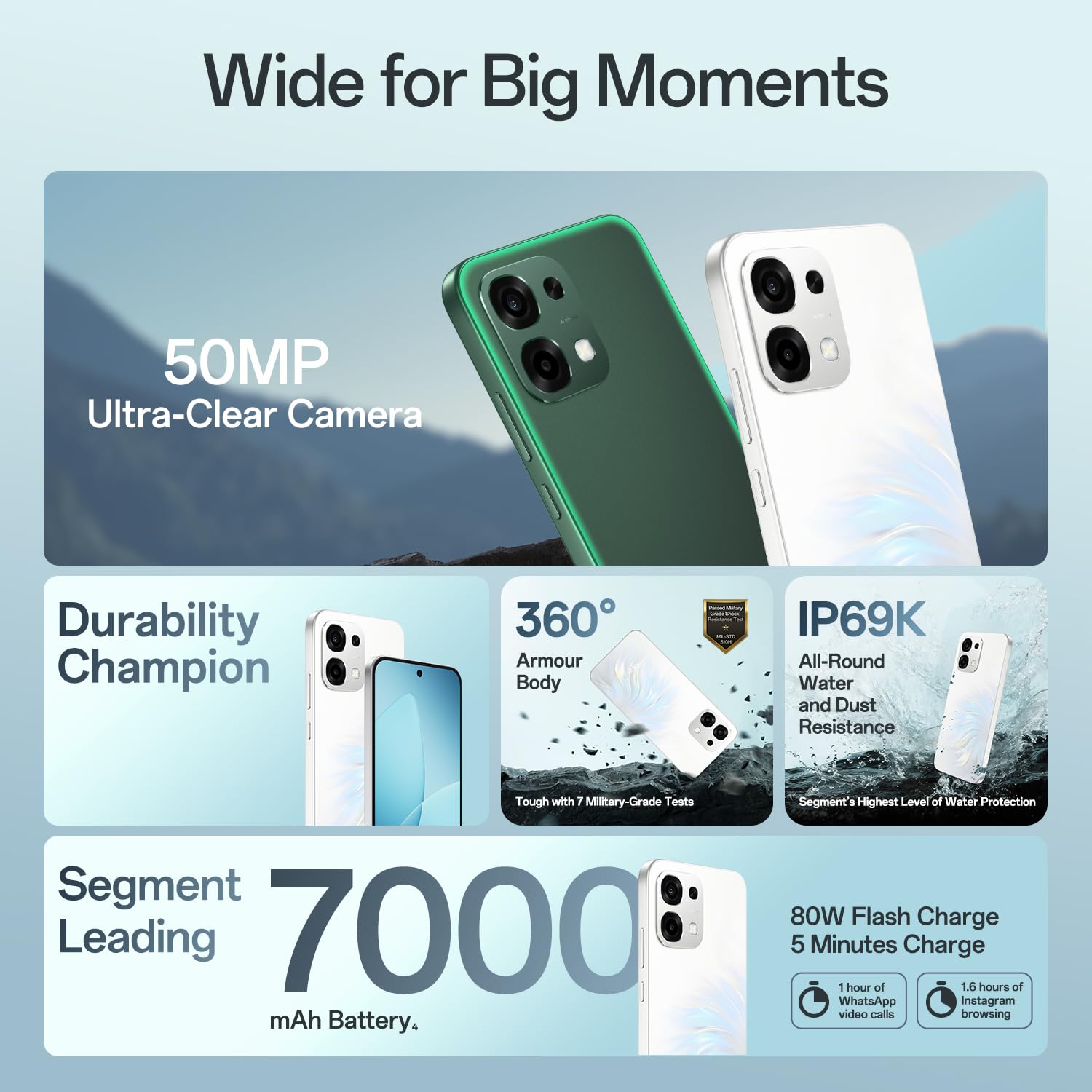
Figure 1.1: Front view of the OPPO F33 5G Smartphone, showing the display and front camera.

Figure 1.2: Back view of the OPPO F33 5G Smartphone, highlighting the 50MP AI camera module.
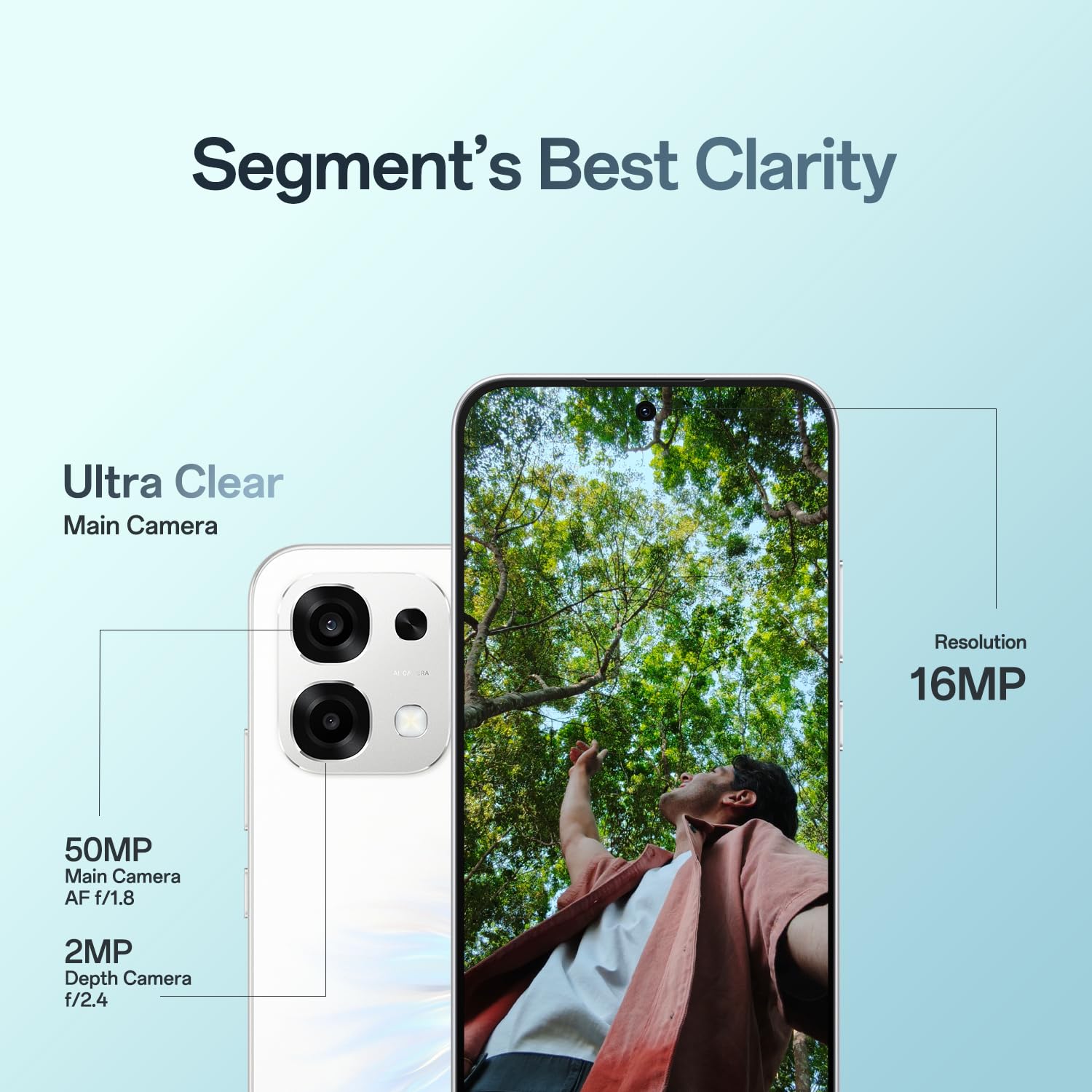
Figure 1.3: Side view of the OPPO F33 5G Smartphone, illustrating the SIM card tray location.
1.3 Inserting SIM Cards
- Locate the SIM card tray on the side of the device.
- Insert the SIM ejector tool into the small hole next to the tray and press gently until the tray pops out.
- Place your Nano-SIM cards into the designated slots on the tray. Ensure the gold contacts face downwards.
- Carefully reinsert the tray into the phone.
1.4 Powering On/Off and Initial Charge
- Power On: Press and hold the Power button until the OPPO logo appears.
- Power Off: Press and hold the Power button, then select 'Power Off' on the screen.
- Charging: Connect the USB Type-C cable to the phone's charging port and the 80W SUPERVOOC power adapter. Plug the adapter into a power outlet. The phone supports fast charging.
2. Operating Your Device
2.1 Basic Navigation
The OPPO F33 5G runs on Android 15 with ColorOS 16, offering an intuitive user interface. Use gestures or navigation buttons for home, back, and recent apps.

Figure 2.1: ColorOS 16 interface, demonstrating the Dual-Engine Smoothness System for reduced lag and improved performance.
2.2 Camera Features
The OPPO F33 5G is equipped with a versatile camera system.
- 50MP AI Main Camera: Capture high-resolution photos with AI enhancements for optimal clarity and detail.
- 16MP Front Camera: Designed for clear selfies and video calls.
- 2MP Depth Camera: Assists in creating portrait effects with blurred backgrounds.

Figure 2.2: Detailed view of the OPPO F33 5G camera system, including the 50MP main camera and 2MP depth camera.
2.3 AI Features
Leverage the integrated AI capabilities for enhanced productivity and creativity.
- AI Writer: Assists in drafting text and clarifying ideas.
- AI Ultra-clear Document: Helps organize and digitize documents efficiently.
- AI Portrait Glow: Enhances portrait photos with improved lighting and effects.
- AI Eraser 2.0: Allows for intelligent removal of unwanted objects from photos.
- AI Pop Out: Enables creative photo editing by isolating subjects.

Figure 2.3: Illustration of AI Writer for text generation and AI Ultra-clear Document for digitizing documents.

Figure 2.4: Examples of AI Portrait Glow and AI Eraser 2.0 for photo enhancement.

Figure 2.5: Demonstration of the AI Pop Out feature, allowing subjects to be isolated and rearranged.
2.4 Battery Management
The OPPO F33 5G features a large 7000mAh battery and 80W SUPERVOOC fast charging.
- Optimized Charging: The device intelligently manages charging to prolong battery lifespan.
- Power Saving Modes: Utilize various power saving modes to extend battery life when needed.

Figure 2.6: Information on the 7000mAh battery and 80W Flash Charge, highlighting quick charging benefits.
2.5 Connectivity
The device supports 5G cellular technology, Wi-Fi, and Bluetooth for seamless connectivity.

Figure 2.7: Visual representation of the OPPO F33 5G maintaining strong signal in challenging environments like elevators, hills, and narrow lanes.
3. Maintenance
3.1 Cleaning Your Device
- Use a soft, lint-free cloth to clean the screen and body.
- Avoid using harsh chemicals or abrasive materials.
- For stubborn smudges, slightly dampen the cloth with water or a screen cleaner designed for electronics.
3.2 Software Updates
Regularly check for and install software updates to ensure optimal performance, security, and access to new features. Go to Settings > About device > Software update.
3.3 Battery Care
- Avoid exposing the device to extreme temperatures.
- Do not fully discharge the battery frequently.
- Use only the original OPPO charger and cable for optimal charging and battery health.
3.4 Durability Features
The OPPO F33 5G is built with enhanced durability features.
- IP69K Water and Dust Resistance: Provides protection against high-pressure, high-temperature water jets and dust ingress.
- Military-Grade Shock Resistance (MIL-STD 810H): Designed to withstand drops and impacts.
- 360° Armour Body: Features a solid metal body with anti-drop guard, airbag protection, and extra tough screen glass.

Figure 3.1: The OPPO F33 5G showcasing its IP69K water and dust resistance, capable of withstanding submersion and continuous soak.

Figure 3.2: The OPPO F33 5G's 360° Armour Body, highlighting its military-grade shock resistance and protective features.
4. Troubleshooting
4.1 Common Issues and Solutions
| Issue | Possible Solution |
|---|---|
| Device not turning on | Ensure the battery is charged. Connect to the charger for at least 10 minutes. If unresponsive, press and hold the Power button and Volume Up button simultaneously for 10-15 seconds to force restart. |
| Battery draining quickly | Check for background apps consuming power. Reduce screen brightness. Enable power saving mode. Limit location services. |
| Network connectivity problems | Toggle Airplane Mode on and off. Restart the device. Check SIM card insertion. Contact your network provider if the issue persists. |
| Camera not working | Restart the camera app or the device. Clear the camera app's cache and data (Settings > Apps > Camera > Storage). Ensure no other app is using the camera. |
| Apps freezing or crashing | Close and reopen the app. Clear the app's cache and data. Update the app to the latest version. If the issue is widespread, consider a factory reset (backup data first). |
If you encounter issues not listed here or if the suggested solutions do not resolve the problem, please contact OPPO customer support.
5. Specifications
Key technical specifications for the OPPO F33 5G Smartphone:
| Feature | Detail |
|---|---|
| Brand | OPPO |
| Model Name | F33 |
| Operating System | Android 15 (with ColorOS 16) |
| RAM Memory Installed Size | 8 GB |
| Memory Storage Capacity | 128 GB |
| Colour | Pearl White |
| SIM Card Slot Count | Dual SIM |
| Connector Type | USB Type C |
| Form Factor | Slate |
| Product Features | Dual SIM, Expandable Memory, Fast Charging Support, Rugged Body, Stereo Speakers |
| Camera Flash Type | LED |
| Battery Power | 7000 mAh |
| Item Weight | 204 Grams |
| Item Dimensions | 16.3 x 7.8 x 0.8 Centimeters |
| Display Type | AMOLED |
| Wireless Provider | Unlocked for All Carriers |
| Cellular Technology | 5G |
| Network Connectivity Technology | Bluetooth, Wi-Fi |
| Model Year | 2026 |
6. Warranty Information
The OPPO F33 5G comes with a limited warranty:
- Handset: 12 Months from the date of purchase.
- Adapter & Cable: 6 Months from the date of purchase.
Please retain your proof of purchase for warranty claims. The warranty covers manufacturing defects and does not cover damage caused by misuse, accidents, unauthorized repairs, or normal wear and tear.
7. Support
For further assistance, please contact OPPO customer support:
- Hotline: 18001032777 (Available 9:00 - 22:00 Mon-Sun, including holidays)
- WhatsApp: +91-9871502777
You can also visit one of the 580+ authorized service centers for in-person support, repairs, software updates, service inquiries, and device diagnostics.

Figure 7.1: Overview of OPPO's customer support services, including contact numbers and available service centers.
Manufacturer Contact Information: OPPO Mobiles India Pvt Ltd, 5th FLOOR, Tower B, BUILDING, N-8, DLF Cyber City, DLF Phase 2, Gurugram, Haryana 122002.


