
1. Introduction
The NAFYRE N11 Pro is a compact and advanced 4K UHD GPS drone designed for both beginners and experienced users. It features a 90-minute total flight time with three included batteries, a 4K adjustable camera with 5G FPV for real-time video transmission, and intelligent flight modes such as Auto Return, Follow Me, Tap Fly, and Point of Interest. Equipped with brushless motors for stable and quiet operation, this drone offers a long control range and dual positioning systems (GPS for outdoor, Optical Flow for indoor) for enhanced flight stability and precision. Weighing under 0.55 lbs (249g), it is exempt from FAA registration in the United States, making it highly portable and convenient for capturing aerial adventures.
2. Package Contents
Verify that all items listed below are present in your package:
- NAFYRE N11 Pro Drone
- Remote Control
- 3 x Flight Batteries
- Propellers (spare set included)
- Carrying Case
- Screwdriver
- Screws
- User Manual

Image: The NAFYRE N11 Pro drone, remote controller, three flight batteries, spare propellers, and a compact carrying case.
Video: Unboxing the NAFYRE N11 Pro GPS Drone, demonstrating the contents of the package and initial setup steps.
3. Getting Started (Setup)
3.1 Battery Charging and Installation
Before first use, fully charge all flight batteries using the provided charging cable. Insert the charged battery into the drone until it clicks securely into place. Ensure the battery is properly seated to prevent power loss during flight.
3.2 Propeller Installation
Attach the propellers to the motor shafts. Match the propeller type (A or B) to the corresponding motor arm as indicated in the manual or on the drone itself. Secure them firmly with the provided screws and screwdriver.
3.3 Remote Control Preparation
Install the required batteries (not included) into the remote control. Extend the phone holder and ensure it is secure if you plan to use your smartphone for FPV viewing.
3.4 Connecting to the App (Wi-Fi)
Download the official NAFYRE drone app from your device's app store. Power on the drone and your remote control. On your smartphone, go to Wi-Fi settings and connect to the drone's Wi-Fi network. Open the app and follow the on-screen prompts to establish a connection and begin flight.
3.5 Calibration
Before each flight, perform a compass calibration to ensure accurate GPS positioning. Follow the instructions in the app or the remote control's display for the calibration procedure. This typically involves rotating the drone horizontally and vertically.
Video: A detailed user guide video for the N11 Pro Drone, covering connection, calibration, and basic flight preparation.
4. Basic Flight Operations
4.1 Take-off and Landing
After successful calibration and GPS lock (for outdoor flight), press the one-key take-off button on the remote or in the app. The drone will automatically ascend to a safe height. To land, press the one-key landing button, and the drone will descend and land automatically. Manual take-off and landing can be performed using the throttle stick.
4.2 Basic Controls
Familiarize yourself with the remote control sticks:
- Left Stick (Throttle/Yaw): Push up/down to ascend/descend. Push left/right to rotate the drone left/right (yaw).
- Right Stick (Pitch/Roll): Push up/down to move forward/backward (pitch). Push left/right to move sideways left/right (roll).
Practice these controls in an open, safe area before attempting advanced maneuvers.
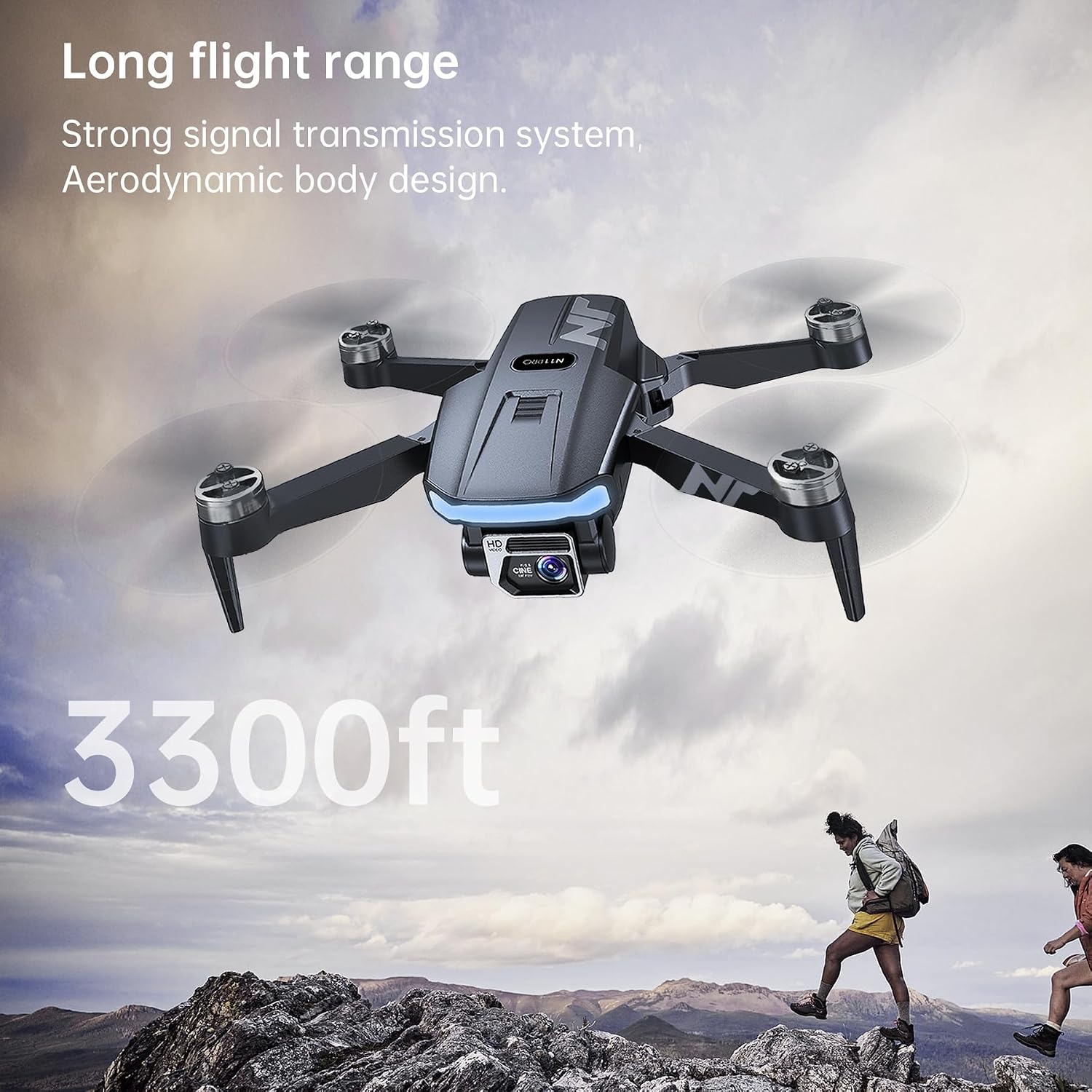
Image: The NAFYRE N11 Pro drone in flight, showcasing its aerodynamic design and long flight range capabilities.
Video: Demonstrating the N11 Pro GPS Drone's ease of use and suitability for beginners, including basic flight maneuvers.
5. Advanced Features (Smart Flight Modes)
The N11 Pro drone includes several intelligent flight modes to enhance your flying experience:
5.1 GPS Positioning and Auto Return (RTH)
The drone utilizes GPS for precise outdoor positioning and stable hovering. The Auto Return to Home (RTH) function ensures the drone returns to its take-off point under various conditions:
- One-key RTH: Initiated manually by pressing the RTH button on the remote or in the app.
- Low Power RTH: The drone automatically returns when the battery level is critically low.
- Out of Control RTH: The drone returns automatically if it loses signal connection with the remote control.

Image: The NAFYRE N11 Pro drone performing an intelligent Return to Home (RTH) maneuver, guided by GPS positioning.
5.2 Follow Me Mode
In Follow Me mode, the drone will automatically track and follow the subject (typically the remote controller or smartphone) at a set distance and altitude, capturing dynamic footage without manual control.
5.3 Tap Fly (Waypoint Flight)
Plan a flight path by tapping desired waypoints on the map within the app. The drone will then fly along this predefined route, allowing you to focus on camera control.
5.4 Point of Interest (Orbit Flight)
Select a point of interest on the map, and the drone will orbit around it at a specified radius and altitude, capturing cinematic circular footage.
Video: An overall flight test of the NAFYRE N11 Pro GPS Drone, showcasing its stability and various flight capabilities.
6. Camera Operation
The NAFYRE N11 Pro is equipped with an advanced 4K UHD camera for high-quality aerial photography and videography.
6.1 Capturing Photos and Videos
Use the dedicated buttons on the remote control or the in-app interface to capture 4K photos and videos. The camera features a 90° adjustable wide-angle lens, allowing you to change the camera angle during flight for optimal shots.
6.2 Live View (5G FPV)
Experience a stable, real-time video feed directly to your smartphone via 5G FPV (First Person View) technology. This allows for precise framing and monitoring of your flight path and captured content.

Image: Close-up of the NAFYRE N11 Pro's advanced EIS 4K UHD camera, highlighting its 90-degree adjustable wide-angle lens and 5G FPV capabilities.
7. Maintenance and Care
Proper maintenance ensures the longevity and optimal performance of your NAFYRE N11 Pro drone.
7.1 Cleaning the Drone
After each flight, especially in dusty or sandy environments, gently wipe the drone's body and camera lens with a soft, dry cloth. Avoid using harsh chemicals or solvents. Ensure no debris is lodged in the motors or propeller mechanisms.
7.2 Propeller Inspection and Replacement
Regularly inspect propellers for any cracks, bends, or damage. Damaged propellers can affect flight stability and efficiency. Replace them immediately using the spare propellers and screwdriver provided in the package. Ensure propellers are installed correctly (A to A, B to B).
7.3 Battery Care
Store batteries in a cool, dry place away from direct sunlight and extreme temperatures. Do not overcharge or over-discharge batteries. If storing for an extended period, charge them to approximately 50-60% capacity. Discontinue use if batteries show signs of swelling or damage.
8. Troubleshooting
If you encounter issues with your NAFYRE N11 Pro drone, refer to the following common problems and solutions:
- Drone does not power on: Ensure the battery is fully charged and correctly installed. Check for any visible damage to the battery or drone's power port.
- No connection to remote control/app: Verify both the drone and remote are powered on. Ensure your phone's Wi-Fi is connected to the drone's network. Re-pair the remote with the drone if necessary (refer to the app or quick start guide for pairing instructions).
- Unstable flight/Drifting: Perform a compass calibration before flight. Check if propellers are damaged or incorrectly installed. Ensure you are flying in an open area away from strong magnetic interference.
- Poor video transmission (FPV): Ensure your smartphone is connected to the drone's 5G Wi-Fi network. Fly within the recommended control range. Avoid areas with high Wi-Fi interference.
- GPS signal loss: Ensure you are flying outdoors in an open area with a clear view of the sky. Avoid flying near tall buildings or dense foliage that can obstruct GPS signals.
- Auto Return (RTH) not working: Ensure GPS signal is strong (sufficient satellites locked) before initiating RTH. Check battery level; RTH may not activate if the battery is too low to complete the return journey.
For further assistance, please contact NAFYRE customer support.
9. Safety Guidelines
Adhering to these safety guidelines is crucial for a safe and enjoyable flight experience.
- Pre-flight Checks: Always inspect the drone, remote control, and batteries for any damage before each flight. Ensure propellers are securely attached and free from obstructions.
- Flight Environment: Fly in open areas, away from people, animals, buildings, trees, and power lines. Avoid flying in strong winds, rain, snow, or fog.
- Maintain Visual Line of Sight: Always keep the drone within your visual line of sight during flight.
- Respect Privacy: Be mindful of others' privacy when operating the drone and its camera.
- Battery Safety: Use only original NAFYRE batteries and chargers. Do not puncture, disassemble, or expose batteries to extreme heat.
- FAA Registration Exemption: The NAFYRE N11 Pro weighs under 249g (0.55 lbs), making it exempt from FAA registration requirements in the United States for recreational use. However, always check local regulations and laws regarding drone operation in your specific area.
- Age Recommendation: This product is recommended for users aged 14 and above.

Image: The NAFYRE N11 Pro drone, emphasizing its lightweight design (under 249g) which exempts it from FAA registration.
10. Product Specifications
| Brand | NAFYRE |
| Model Name | N11 Pro |
| Item Weight | 180 Grams (under 249g) |
| Dimensions (L x W x H) | 4.7"L x 2.9"W x 1.9"H |
| Video Capture Resolution | 4K UHD |
| Effective Still Resolution | 8.80 Megapixels |
| Connectivity Technology | Wi-Fi (5G FPV) |
| Special Features | GPS, Auto Return, Follow Me, Optical Flow, Brushless Motor, Tap Fly, Point of Interest |
| Battery Capacity | 2000 mAh (Lithium Ion) |
| Total Flight Time | Up to 66 minutes (with 3 batteries) |
| Maximum Range | 3328 Feet |
| Age Range (Description) | 14+ |
11. Support Information
For technical support, warranty claims, or any inquiries regarding your NAFYRE N11 Pro drone, please contact the manufacturer or seller directly.
Manufacturer: NAFYRE
Seller: WingTech Innovations
Refer to your purchase documentation or the product packaging for specific contact details. Keep your proof of purchase for warranty purposes.


