
1. Product Overview
The KEPEAK Wireless Doorbell Camera with Monitor provides a secure and convenient way to monitor your front door. This system operates without the need for WiFi or a smartphone application, offering a straightforward user experience. It features a 4.3-inch display, two-way audio communication, infrared night vision, and local storage capabilities.

Image: The KEPEAK Wireless Doorbell Camera and its indoor monitor, highlighting key features like record, snapshot, and no motion alerts.
2. Package Contents
Please verify that all items are present in your package:
- Doorbell x 1
- Indoor Monitor x 1
- Type C Charging Cable x 1
- Mounting Adhesive x 1
- Screw Kit x 1
- User Manual x 1

Image: A visual representation of all components included in the KEPEAK Wireless Doorbell Camera package.
3. Setup and Installation
3.1 Powering the Devices
The doorbell unit has an 800 mAh battery, and the monitor has a 400 mAh built-in backup battery. For stable daily use, it is recommended to keep the monitor plugged in via the Type-C charging cable. A power adapter is not included.

Image: The indoor monitor connected to a power outlet via a Type-C cable for continuous operation.

Image: Illustration of the doorbell's dual power options: internal battery or external power via Type-C cable.
3.2 Wireless Installation
The doorbell is designed for easy wireless installation. You can choose to mount it using the provided adhesive or screws. No complex wiring or drilling is required.
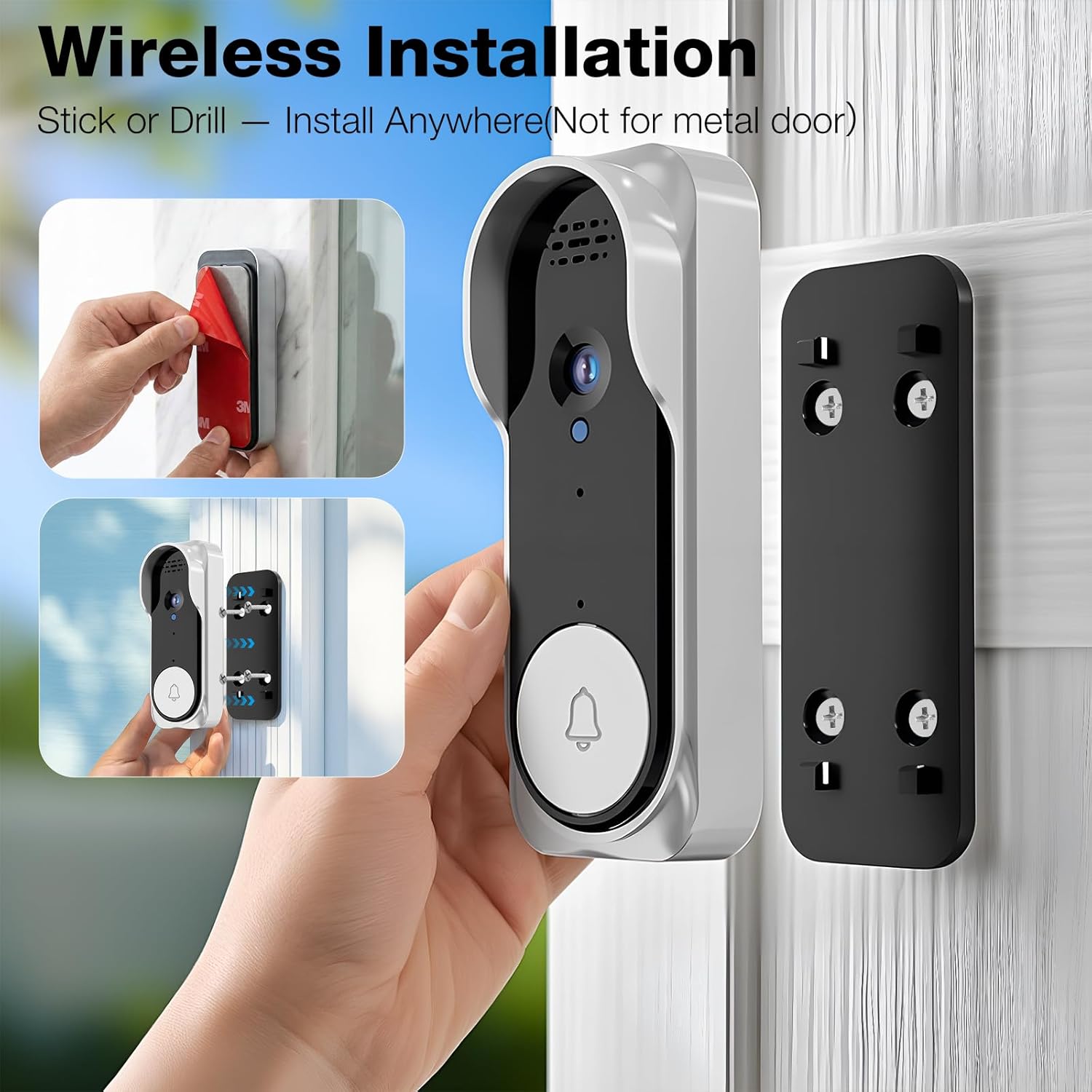
Image: Demonstrates two installation methods: using adhesive backing or screws to mount the doorbell.
3.3 Pairing the Doorbell and Monitor
The system uses a 2.4GHz Bluetooth connection for one-click pairing between the doorbell and the indoor monitor. Ensure both devices are powered on and within range for successful pairing.

Image: Diagram showing the wireless connection between the doorbell and monitor within a home environment, emphasizing 2.4GHz Bluetooth pairing.
3.4 Installation Environment Considerations
For optimal performance, consider the following:
- Avoid Metal Surfaces: Do not install the doorbell camera on metal doors or metal walls, as this can significantly interfere with the wireless signal strength.
- Proximity to Router: Place the indoor monitor near your router for a stable connection, especially in detached houses (within 10m of the door, avoiding walls for best signal).
- Wall Obstructions: In apartments, keep the monitor within 5m of the door to minimize wall obstructions. Concrete walls can reduce signal strength.

Image: An illustration warning against installing the doorbell camera on metal doors or walls due to signal interference.

Image: Diagrams illustrating recommended installation distances and monitor placement relative to the doorbell and router for both detached houses and apartments.
4. Operating Instructions
4.1 Using the 4.3-inch HD Display
The indoor monitor features a 4.3-inch HD display, providing a clear view of visitors at your door. The simple interface allows for easy monitoring and interaction.

Image: A person viewing a visitor on the 4.3-inch HD screen of the indoor monitor, showcasing clear details and natural colors.
4.2 Two-Way Audio Communication
Engage in real-time conversations with visitors at your door using the two-way audio feature. This enhances security and convenience, allowing you to speak with guests without opening the door.

Image: An illustration demonstrating the two-way audio function, showing a visitor at the door and a user communicating via the indoor monitor.
4.3 Night Vision
The doorbell camera is equipped with infrared night vision, providing clear black-and-white images in low-light conditions. This ensures continuous monitoring and communication with visitors, day or night.

Image: A comparison showing the doorbell camera's view during the day and its clear black-and-white image at night using infrared night vision.
4.4 Recording and Snapshots
The doorbell allows you to capture video recordings or still snapshots of visitors. Refer to the monitor's interface for specific buttons or options to initiate recording or take a snapshot.
4.5 Local Storage and Video Playback
This doorbell camera supports external storage via a microSD card (not included). Insert a microSD card into the designated slot on the monitor to store video recordings and snapshots without any subscription fees. You can then view these recordings directly on the monitor.
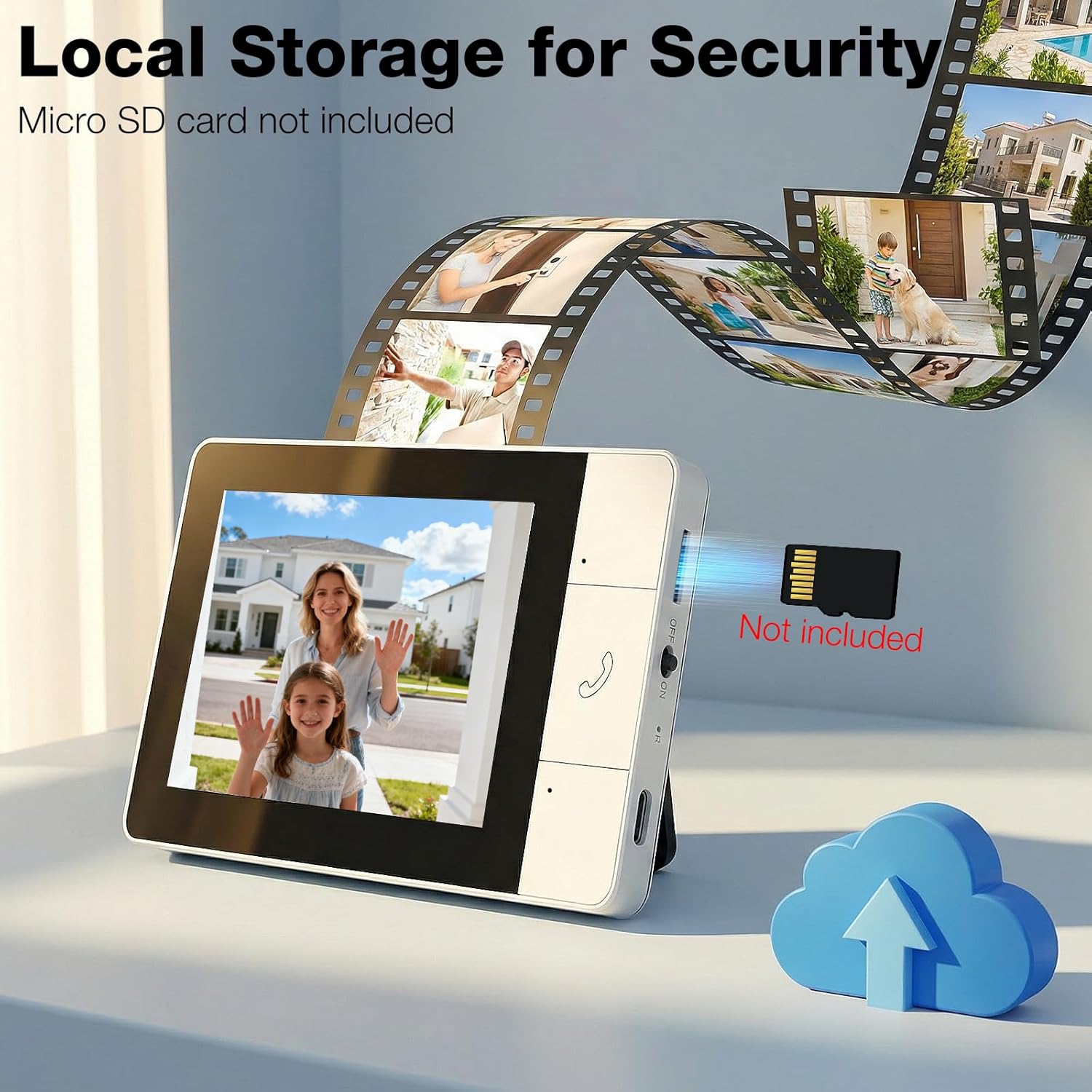
Image: The indoor monitor displaying a video, with an arrow pointing to the microSD card slot, indicating local storage for security.

Image: A user viewing recorded video directly on the indoor monitor, demonstrating the video playback feature.
4.6 Product Video Demonstration
Video: An official product video demonstrating the features and usage of the KEPEAK Doorbell Camera Wireless with Monitor.
5. Maintenance
To ensure the longevity and optimal performance of your KEPEAK Wireless Doorbell Camera and Monitor, follow these maintenance guidelines:
- Cleaning: Use a soft, dry cloth to clean the doorbell camera lens and the monitor screen. Avoid abrasive cleaners or solvents.
- Battery Charging: Regularly charge the doorbell unit's 800 mAh battery. For the indoor monitor, keep it plugged in for stable daily use, as its 400 mAh battery is primarily for emergency backup.
- MicroSD Card: If using a microSD card for local storage, periodically check its capacity and format it if necessary to maintain recording quality and free up space.
- Environmental Protection: While the doorbell is designed for outdoor use, protect it from extreme weather conditions if possible to extend its lifespan.
6. Troubleshooting
If you encounter issues with your KEPEAK Wireless Doorbell Camera and Monitor, please refer to the following common solutions:
| Problem | Possible Cause / Solution |
|---|---|
| No image on monitor / Poor video quality |
|
| Monitor not charging |
|
| No two-way audio |
|
| Recordings not saving |
|
| Doorbell not ringing |
|
7. Specifications
| Feature | Detail |
|---|---|
| Brand | KEPEAK |
| Model Name | SDJJMLNT601A-NEW3-27US |
| Connectivity Technology | Wireless (2.4Ghz Bluetooth) |
| Special Feature | 2-Way Audio |
| Indoor/Outdoor Usage | Indoor (Monitor), Outdoor (Doorbell) |
| Mount Type | Wall Mount |
| Power Source | Battery Powered |
| Video Capture Format | AVI |
| Video Capture Resolution | 720p |
| Item Dimensions | 7 x 4 x 2.5 inches |
| Doorbell Battery Capacity | 800 mAh |
| Monitor Backup Battery Capacity | 400 mAh |
| Display Size | 4.3-inch |
8. Warranty and Support
For warranty information and customer support, please refer to the documentation included with your product or visit the official KEPEAK website. Keep your purchase receipt for warranty claims.