
Introduction
The Denon AVR-X2900H is a 7.2-channel AV receiver designed to deliver high-quality audio and video performance for home theater systems. It features 95 watts per channel, support for Dolby Atmos and DTS:X for immersive 3D audio, and advanced HDMI connectivity for 4K and 8K video. This receiver also includes HEOS multi-room streaming, Wi-Fi, and Bluetooth capabilities, along with Audyssey MultEQ XT room correction for optimized sound. This manual provides essential information for setting up, operating, maintaining, and troubleshooting your AVR-X2900H receiver.
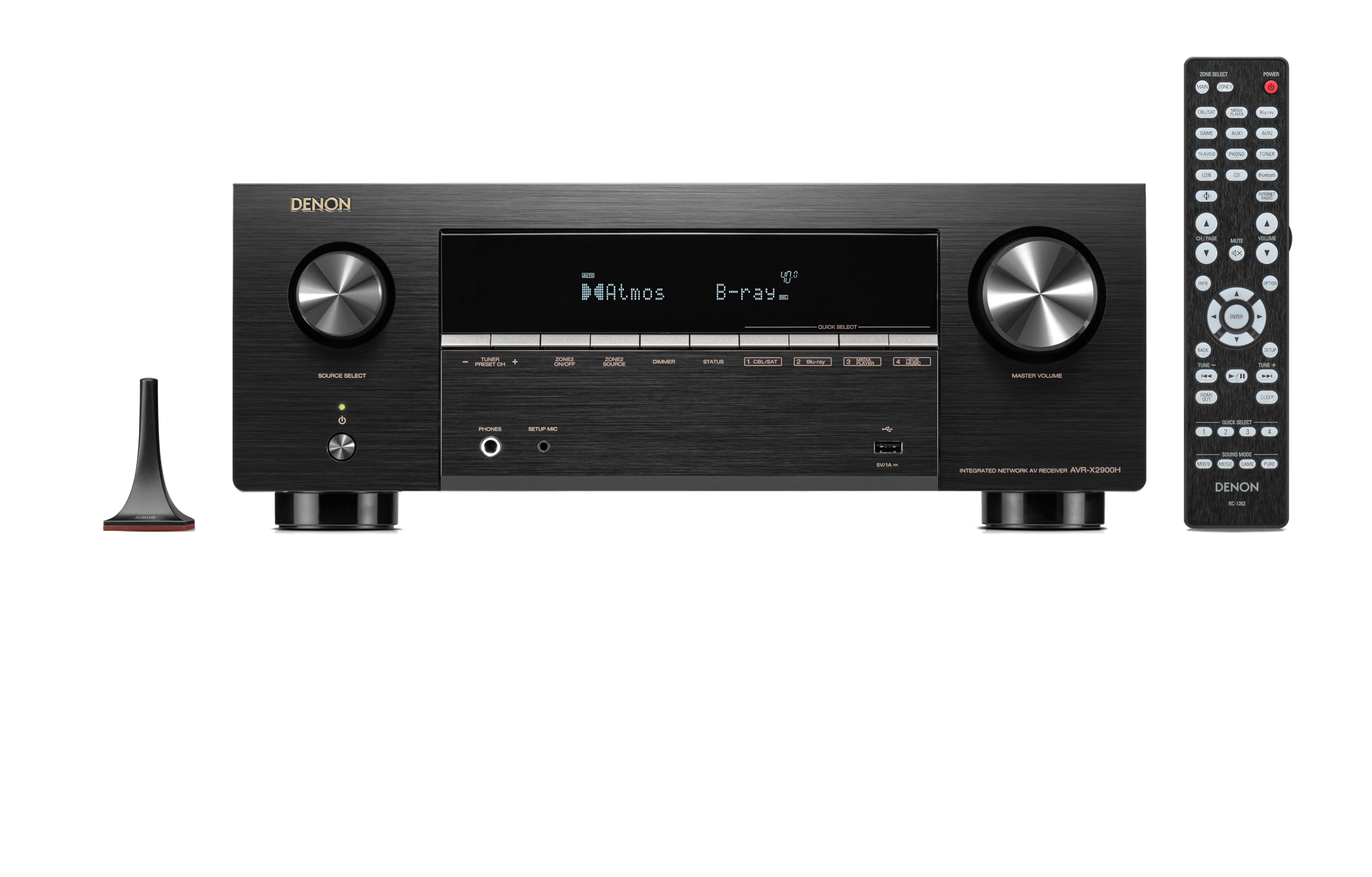
Front view of the Denon AVR-X2900H AV Receiver, showcasing its sleek black design and control knobs.
What's in the Box
Verify that all the following items are included in your package:
- Denon AVR-X2900H AV Receiver
- Remote Control + Batteries
- AM/FM Antennas
- Audyssey Microphone + cardboard mic stand
- Quick Start Guide and safety literature
- Wire Labels
Setup
Proper setup is crucial for optimal performance of your Denon AVR-X2900H. Follow these steps for initial installation and connection.
1. Placement
Place the receiver on a stable, flat surface with adequate ventilation. Ensure there is sufficient space around the unit for heat dissipation. Avoid placing it near heat sources or in direct sunlight.
2. Connecting Speakers
Connect your speakers to the appropriate terminals on the rear panel. The AVR-X2900H supports 7.2 surround sound or 5.2.2 Dolby Atmos configurations. Use high-quality speaker wire and ensure correct polarity (+ to + and - to -) for each speaker.
3. Connecting Audio/Video Sources
Connect your source devices (e.g., Blu-ray player, game console, streaming device) to the HDMI input ports. For optimal 4K/8K performance, use certified HDMI cables. The receiver also provides optical, coaxial, and analog audio inputs for other devices.
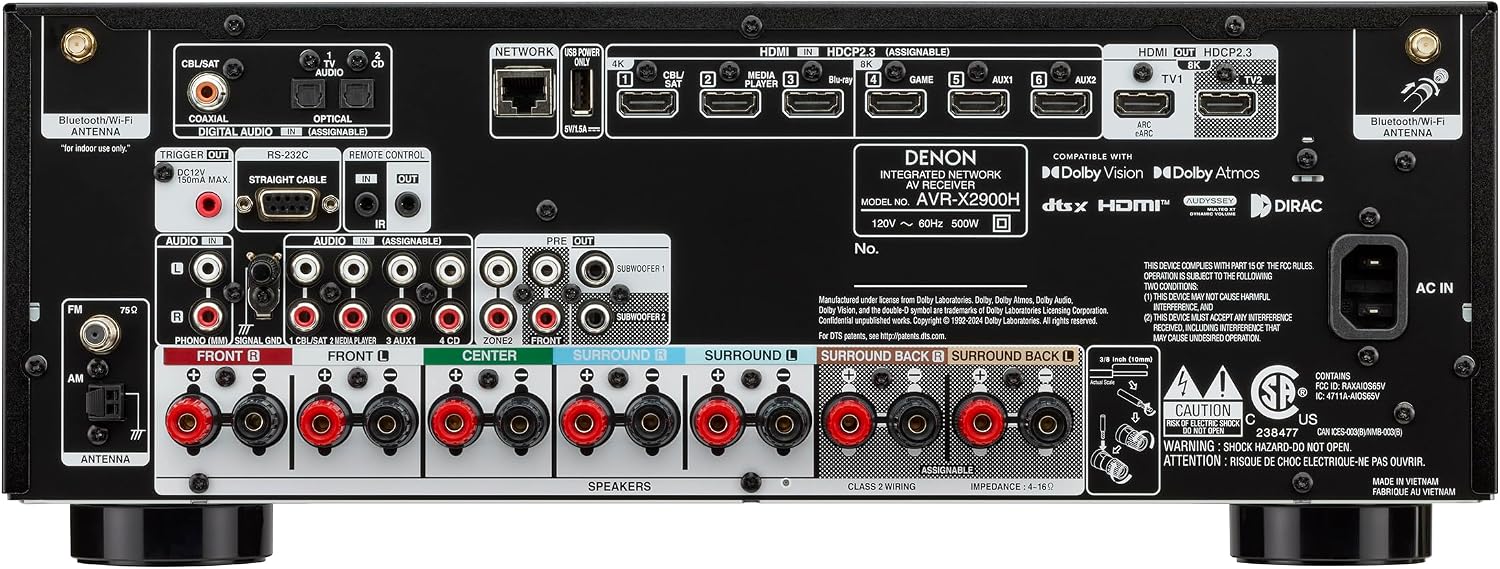
Rear panel of the Denon AVR-X2900H, showing various input and output ports for speakers, HDMI, network, and other audio/video connections.
4. Network and Antennas
Connect the included AM/FM antennas for radio reception. For network features, connect an Ethernet cable to the NETWORK port or attach the Wi-Fi antennas and configure wireless settings during initial setup.
5. Initial Setup Assistant and Room Correction
Upon first power-on, the Denon Setup Assistant will guide you through speaker connections, network setup, and source configuration. Utilize the included Audyssey MultEQ XT microphone to perform automatic room acoustic calibration. This process measures speaker levels, distances, and crossover points to optimize sound for your specific listening environment.
Official product overview video for the Denon AVR-X2900H, demonstrating its features and capabilities.
Operating Instructions
1. Power On/Off
Press the power button on the front panel or the remote control to turn the receiver on or off. The receiver will display the last used input source.
2. Input Selection
Use the SOURCE SELECT knob on the front panel or the input buttons on the remote control to switch between connected audio/video sources (e.g., TV Audio, Blu-ray, Game, Media Player).
3. Volume Control
Adjust the master volume using the VOLUME knob on the front panel or the VOL +/- buttons on the remote control.
4. Immersive Audio Experience
The AVR-X2900H supports Dolby Atmos and DTS:X, providing a three-dimensional audio experience. Ensure your content supports these formats and your speaker setup is configured accordingly for overhead effects.

A living room setup demonstrating immersive sound, with people enjoying content delivered by the Denon AVR-X2900H.
5. Gaming Features
For an enhanced gaming experience, connect your gaming console to an HDMI input that supports 4K/120Hz. The receiver's Variable Refresh Rate (VRR), Auto Low Latency Mode (ALLM), and AMD FreeSync technologies help reduce lag and screen tearing.

The Denon AVR-X2900H integrated into a home entertainment system, optimized for smooth and responsive gaming.
6. HEOS Multi-Room Audio
The built-in HEOS technology allows you to stream music wirelessly throughout your home to other HEOS-enabled devices. Download the HEOS app on your smartphone or tablet to control music playback, create groups, and access various streaming services.

A smartphone displaying the HEOS app, controlling multi-room audio streaming from the Denon AVR-X2900H to various rooms.
7. Bluetooth Connectivity
Pair your Bluetooth-enabled devices (e.g., smartphone, tablet) with the receiver to stream audio wirelessly. The receiver also supports Bluetooth headphone output for private listening.
Maintenance
Cleaning
Wipe the exterior of the receiver with a soft, dry cloth. Do not use abrasive cleaners, solvents, or chemical wipes, as these can damage the finish. Ensure the ventilation grilles are free from dust and obstructions to prevent overheating.
Firmware Updates
Periodically check for firmware updates via the receiver's network connection. Updates can provide new features, performance improvements, and bug fixes. Follow the on-screen instructions carefully during the update process and do not power off the unit.
Troubleshooting
If you encounter issues with your Denon AVR-X2900H, refer to the following common troubleshooting tips. For more detailed solutions, consult the full User Manual PDF available online.
- No Power: Ensure the power cord is securely connected to both the receiver and a working electrical outlet.
- No Sound: Check speaker connections, ensure the correct input source is selected, and verify that the volume is not muted or set too low. Confirm that the speakers are properly configured in the setup menu.
- No Picture: Verify HDMI cable connections between the source device, receiver, and TV. Ensure the correct HDMI input on the TV is selected.
- Network Connection Issues: Check your Ethernet cable or Wi-Fi settings. Restart your router and the receiver.
- Subwoofer Not Working: Ensure the subwoofer is powered on and connected to the SUBWOOFER PRE OUT. Check subwoofer settings in the receiver's menu and run Audyssey room correction again.
Specifications
| Feature | Specification |
|---|---|
| Brand | Denon |
| Model Number | 301131-01-00-101 |
| Connectivity Technology | Bluetooth, HDMI, USB, Wi-Fi |
| Output Power | 95 watts per channel |
| Number of Channels | 7.2 |
| Surround Sound Configuration | 7.2 or 5.2.2 Dolby Atmos |
| Video Support | 4K/120Hz, 8K/60Hz, Dolby Vision |
| Gaming Features | Variable Refresh Rate (VRR), Auto Low Latency Mode (ALLM), AMD FreeSync |
| Room Correction | Audyssey MultEQ XT (upgradeable to Dirac Live) |
| Wireless Technology | Bluetooth, Wi-Fi, HEOS |
| Product Dimensions (D x W x H) | 12.99"D x 17.09"W x 6.57"H |
| Item Weight | 21 pounds |
| UPC | 747192148119 |
Warranty and Support
The Denon AVR-X2900H comes with a 3-year warranty. For warranty claims or technical assistance, please contact Denon customer support or visit the official Denon website.
Additional resources, including a detailed User Manual and User Guide, are available in PDF format:
For further information and support, you can visit the Denon Store on Amazon.


