
1. Introduction
Thank you for choosing the Garosa Digital Level Box. This device is designed for precise angle measurements in various applications, including woodworking, construction, and machinery setup. Its compact size, backlit LCD screen, and magnetic base make it a versatile tool for professionals and DIY enthusiasts. This manual provides detailed instructions for the safe and effective use of your digital level box.
2. Product Overview
2.1 Key Features
- Precise Measurement: Offers a 4 x 90 degree measurement range with 0.05 degree resolution for accurate readings.
- Compact Design: Lightweight and portable, designed to fit easily in a toolbox.
- User-Friendly Display: Features a backlit LCD screen for enhanced visibility in low-light conditions.
- Automatic Power-Off: Conserves battery life by automatically shutting down after a period of inactivity.
- Magnetic Base: Allows secure attachment to metal surfaces for hands-free operation.
- Durable Material: Constructed from ABS material for longevity.
2.2 Components
The Garosa Digital Level Box package includes the following items:
- 1 x Garosa Digital Level Box
- 1 x Small Screwdriver (for battery compartment)
- 1 x User Manual

Image: The Garosa Digital Level Box shown alongside the small screwdriver included for battery installation.
3. Setup
3.1 Battery Installation
The Garosa Digital Level Box requires two (2) AAA batteries (not included) for operation.
- Locate the battery compartment cover on the back of the device.
- Use the included small screwdriver to loosen the screw on the battery compartment cover.
- Remove the cover.
- Insert two AAA batteries, ensuring correct polarity (+ and - terminals).
- Replace the battery compartment cover and tighten the screw.
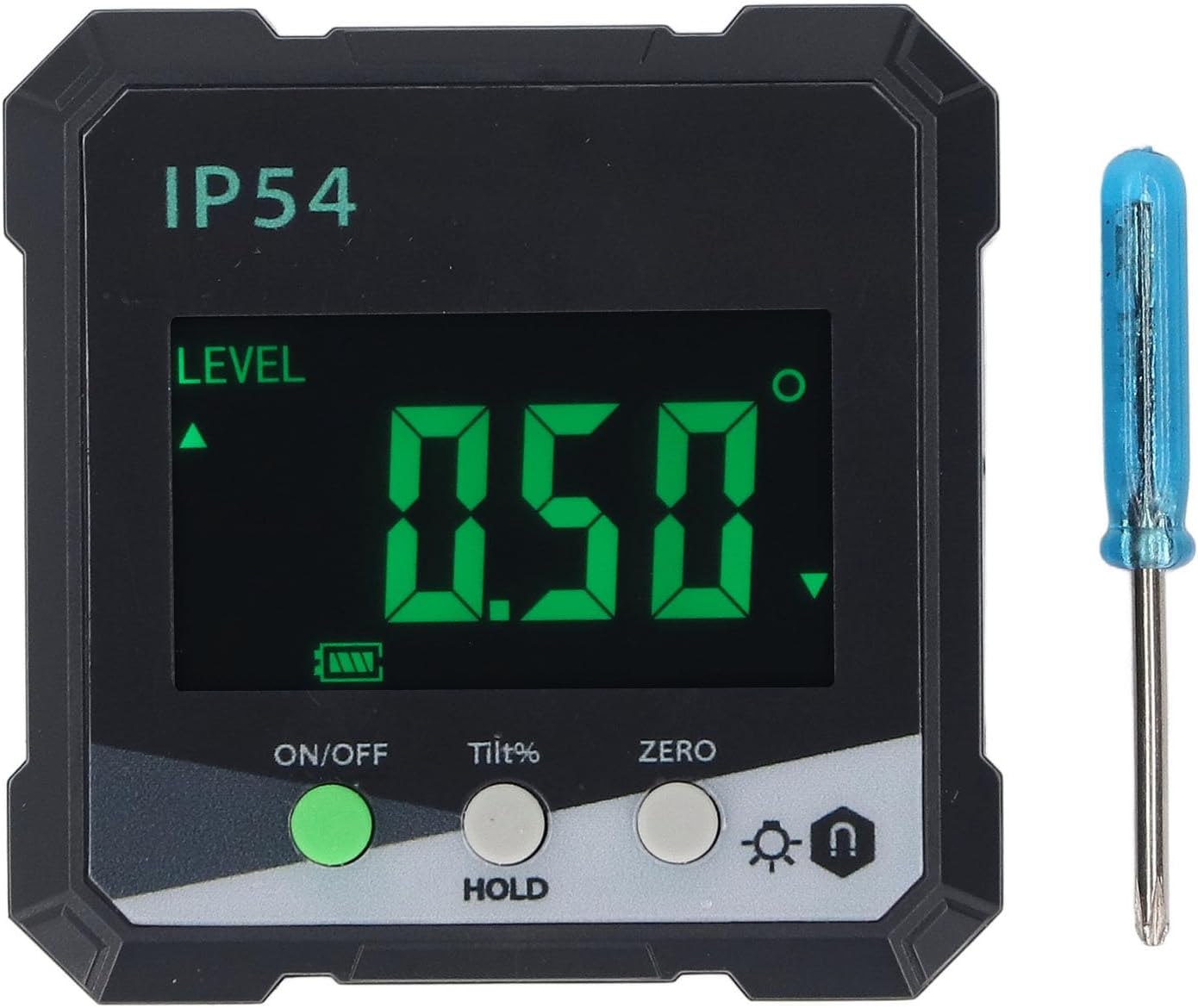
Image: Rear view of the digital level box, highlighting the battery compartment cover and screw.
The device is designed for low power consumption, providing over 50 hours of continuous use with fresh batteries.

Image: The digital level box screen with text indicating low power consumption and extended battery life.
4. Operating Instructions
4.1 Controls Overview
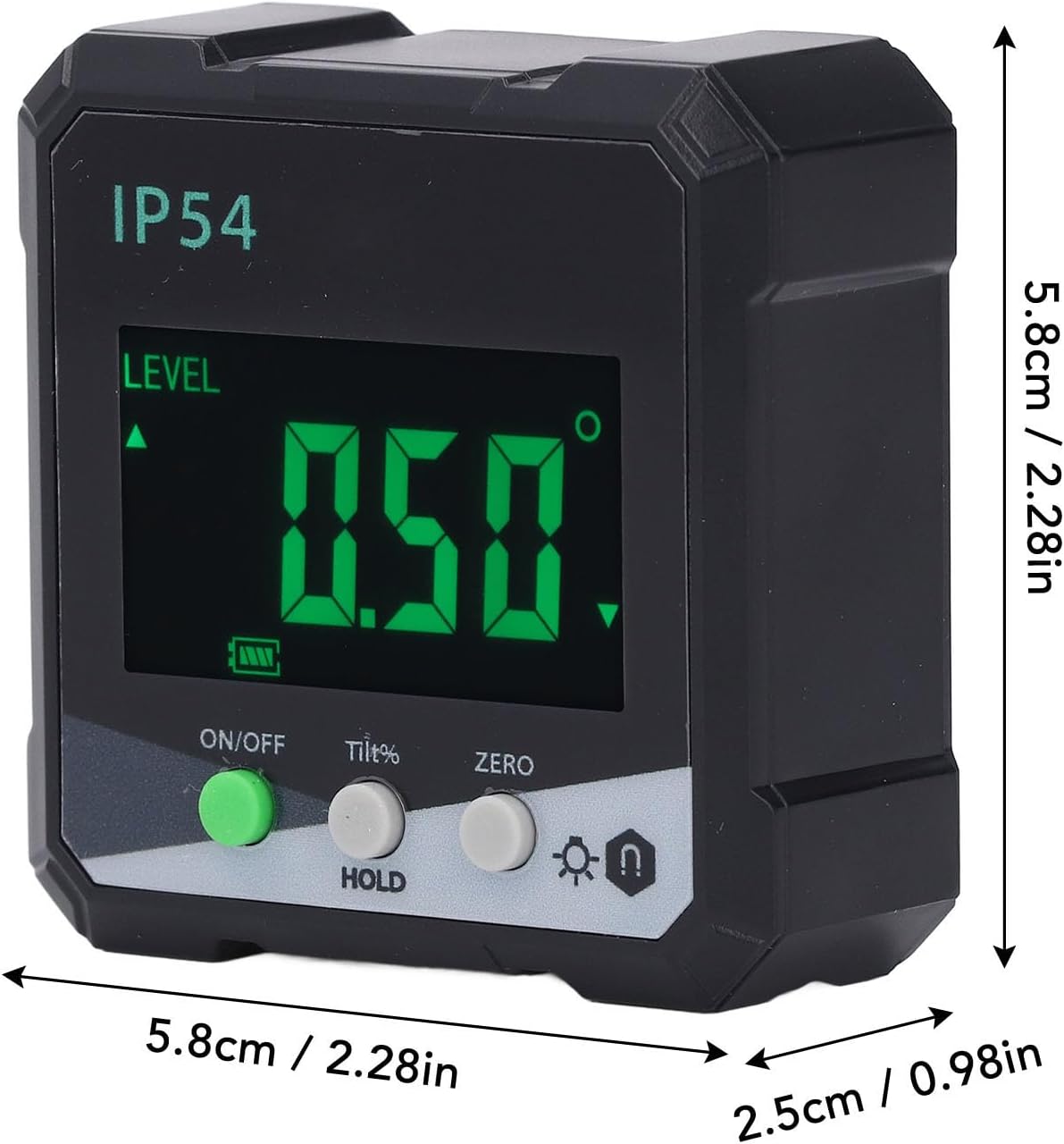
Image: A close-up view of the control panel, showing the ON/OFF, Tilt%, ZERO, Backlight, and Hold buttons.
- ON/OFF Button (Green): Press to power the device on or off.
- Tilt% / HOLD Button (Grey):
- Short press: Toggles between angle measurement (degrees) and slope percentage (%).
- Long press: Activates/deactivates the HOLD function, freezing the current reading on the display.
- ZERO Button (Grey): Press to set the current surface as the relative zero reference point for angle measurements.
- Backlight / Magnetic Base Indicator Button (Grey):
- Short press: Toggles the LCD backlight on/off.
- Long press: No specific function, but the icon indicates backlight and magnetic base presence.
4.2 Powering On and Off
Press the ON/OFF button to turn the device on. The LCD screen will illuminate. To turn off the device, press the ON/OFF button again. The device also features an automatic power-off function to conserve battery life after a period of inactivity.
4.3 Zeroing the Device
To ensure accurate relative measurements, you can set a reference surface as zero.
- Place the digital level box on the desired reference surface.
- Wait for the reading to stabilize.
- Press the ZERO button. The display will show "0.00°" or "0.0%" and an indicator that it is now the relative zero.
- All subsequent measurements will be relative to this new zero point.
- To return to absolute measurement, press the ZERO button again.
4.4 Taking Measurements
Place the base of the digital level box firmly against the surface you wish to measure. The angle will be displayed on the LCD screen.

Image: The digital level box in use, showing an angle measurement on its backlit display, with a construction worker in the background.
The device can measure angles relative to the horizontal plane.

Image: The digital level box demonstrating its ability to measure angles, including those relative to the horizontal plane.
4.5 Using the HOLD Function
To freeze the current measurement on the display, press and hold the Tilt% / HOLD button. The "HOLD" indicator will appear on the screen. Press and hold the button again to release the HOLD function and resume live measurement.
4.6 Backlight Control
In low-light conditions, press the Backlight button (with the lightbulb icon) to turn the LCD backlight on. Press it again to turn the backlight off.
4.7 Magnetic Base Usage
The strong magnetic base allows the device to be securely attached to ferrous metal surfaces, enabling hands-free operation. This is particularly useful when working on metal structures or machinery.
5. Maintenance
- Cleaning: Wipe the device with a soft, dry cloth. Do not use abrasive cleaners or solvents.
- Storage: Store the digital level box in a dry place, away from direct sunlight and extreme temperatures.
- Battery Replacement: If the device will not be used for an extended period, remove the batteries to prevent leakage. Replace batteries when the low battery indicator appears on the screen or if the device fails to power on.
- Avoid Impact: While durable, avoid dropping the device or subjecting it to strong impacts, as this may affect its accuracy.
6. Troubleshooting
| Problem | Possible Cause | Solution |
|---|---|---|
| Device does not power on. |
|
|
| Inaccurate readings. |
|
|
| Backlight not working. |
|
|
7. Specifications
| Model Number | Garosazsxnpk7jim |
| Material | ABS |
| Measurement Range | 4 x 90° |
| Resolution | 0.05° |
| Accuracy | ±0.2° |
| Repeatability | 0.1° |
| Power Source | 2 x AAA Batteries (not included) |
| Display | LCD with Backlight |
| Dimensions | Approximately 5.8cm x 5.8cm x 2.5cm (2.28in x 2.28in x 0.98in) |

Image: The digital level box with its approximate dimensions (length, width, height) clearly indicated.
8. Warranty and Support
For warranty information and customer support, please refer to the documentation provided at the point of purchase or contact your retailer. Garosa is committed to providing quality products and support.
For further assistance, you may visit the official Garosa store page on Amazon: Garosa Store.