
1. Introduction
Thank you for choosing the OasiSmile X610 Electric Toothbrush. This advanced sonic toothbrush is designed to provide a superior cleaning experience with its 42000 VPM (Vibrations Per Minute) motor and 5 distinct brushing modes, catering to various oral care needs, including sensitive teeth. Please read this manual thoroughly before first use to ensure safe and effective operation.
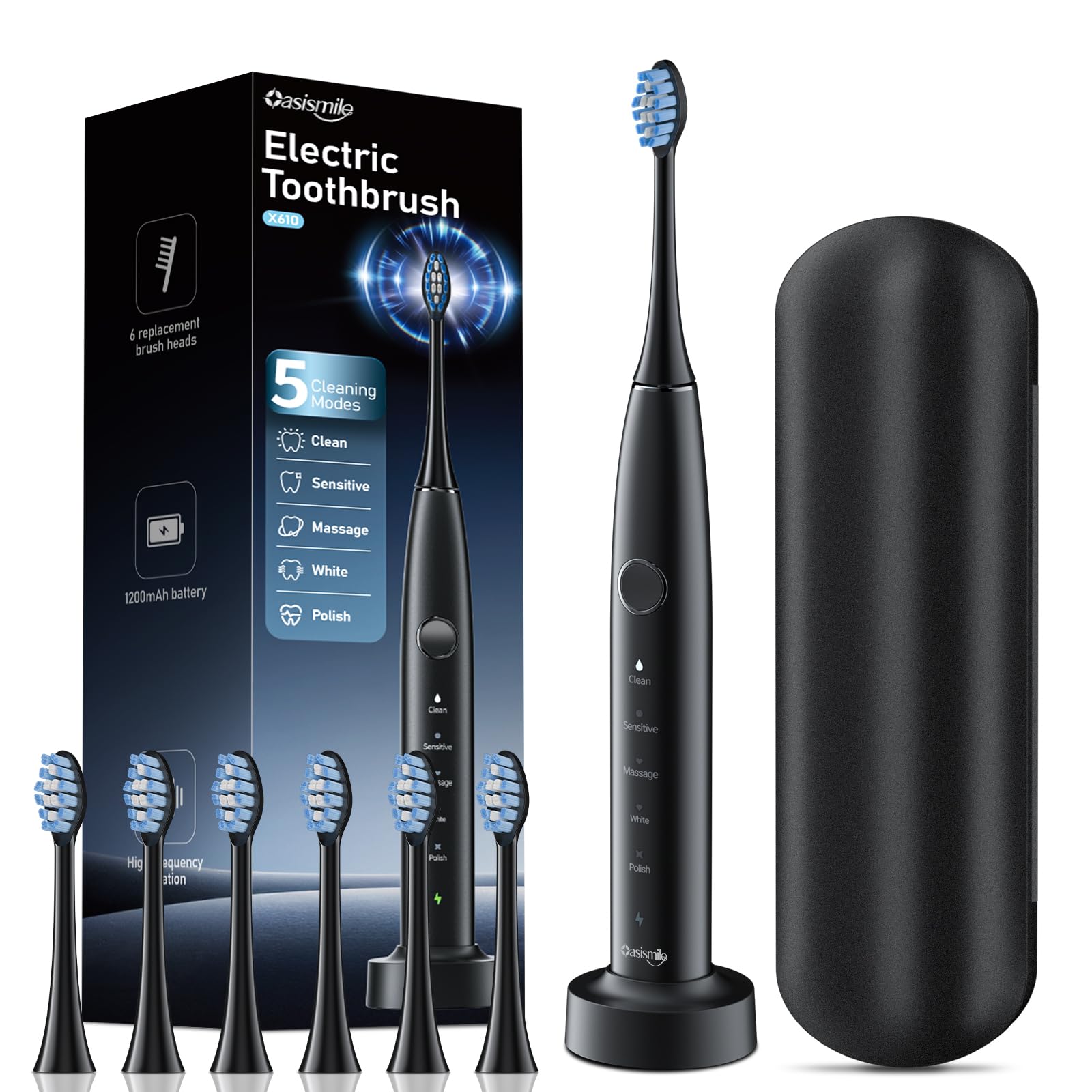
Image 1.1: The OasiSmile X610 Electric Toothbrush. This image displays the main body of the toothbrush with a brush head attached, highlighting its ergonomic design and compact size.
2. Important Safety Information
Please observe the following safety precautions to prevent injury or damage to the product:
- Do not immerse the charging base in water or any other liquid.
- Keep the toothbrush and charging base away from heat sources.
- This appliance is not intended for use by persons with reduced physical, sensory, or mental capabilities, or lack of experience and knowledge, unless they have been given supervision or instruction concerning use of the appliance by a person responsible for their safety.
- Children should be supervised to ensure that they do not play with the appliance.
- Do not use if the product or charging cable appears damaged.
- Consult your dentist before using this product if you have had oral surgery or gum disease.
3. Package Contents
The OasiSmile X610 package typically includes:
- 1 x OasiSmile X610 Electric Toothbrush Handle
- 2 x Standard Brush Heads
- 1 x USB Charging Cable
- 1 x User Manual
4. Setup
4.1. Charging the Toothbrush
Before first use, fully charge your OasiSmile X610 toothbrush. The toothbrush features a built-in rechargeable battery.
- Connect the USB charging cable to a compatible USB power adapter (not included) or a USB port.
- Insert the other end of the USB charging cable into the charging port at the bottom of the toothbrush handle.
- The indicator light on the handle will illuminate to show charging status. A full charge typically takes approximately 4 hours.
- Once fully charged, the indicator light will change or turn off, depending on the model. Disconnect the toothbrush from the charger.
Note: Do not charge the toothbrush in wet environments.
4.2. Attaching the Brush Head
To attach a brush head:
- Align the brush head with the metal shaft on the toothbrush handle.
- Push the brush head down firmly until it clicks into place. Ensure it is securely attached.
To remove, simply pull the brush head upwards from the handle.
5. Operating the Toothbrush
5.1. Powering On/Off and Changing Modes
The OasiSmile X610 features a single button for power and mode selection.
- To Power On: Press the power button once. The toothbrush will start in the last used mode.
- To Change Modes: While the toothbrush is on, press the power button repeatedly to cycle through the 5 available modes.
- To Power Off: After cycling through all modes, press the power button one more time, or press and hold the power button for 2-3 seconds in any mode.
5.2. Brushing Modes
The OasiSmile X610 offers 5 distinct brushing modes:
- Clean: Standard mode for daily cleaning, effectively removing plaque.
- White: Higher frequency vibrations to remove surface stains and whiten teeth.
- Polish: Rapid back-and-forth motion for polishing teeth and brightening the smile.
- Sensitive: Gentle vibrations for sensitive teeth and gums.
- Massage: Pulsating action for gentle gum stimulation and improved gum health.
5.3. Brushing Technique and Timer
For optimal results, follow these guidelines:
- Wet the brush head and apply a small amount of toothpaste.
- Place the brush head against your teeth at a slight angle towards the gum line.
- Press the power button to select your desired mode.
- Move the brush head slowly from tooth to tooth, allowing the bristles to clean each surface. Do not scrub.
- The OasiSmile X610 features a Smart Timer that automatically turns off after 2 minutes of brushing, which is the dentist-recommended brushing time.
- Additionally, a QuadPacer (30-second interval timer) will briefly pause the vibrations every 30 seconds to remind you to move to another quadrant of your mouth.
6. Maintenance
6.1. Cleaning the Toothbrush
Regular cleaning ensures optimal performance and hygiene:
- After each use, rinse the brush head thoroughly under running water while the toothbrush is briefly turned on to remove any remaining toothpaste and debris.
- Remove the brush head and rinse the metal shaft area on the handle.
- Wipe the handle with a damp cloth. Do not use abrasive cleaners or harsh chemicals.
- Ensure the charging port is dry before placing it on the charger.
6.2. Replacing Brush Heads
Dentists recommend replacing your brush head every 3 months, or sooner if the bristles become frayed or worn. Replacement brush heads can be purchased from authorized OasiSmile retailers or online.
7. Troubleshooting
| Problem | Possible Cause | Solution |
|---|---|---|
| Toothbrush does not turn on. | Battery is depleted. | Charge the toothbrush for at least 4 hours. |
| Weak vibrations. | Low battery. | Recharge the toothbrush. |
| Brush head feels loose. | Brush head not properly attached or worn out. | Ensure brush head is pushed down firmly until it clicks. Replace brush head if worn. |
| Charging indicator not working. | Charging cable or adapter issue; toothbrush fully charged. | Check cable and adapter connections. Try a different USB port/adapter. If fully charged, the light may turn off. |
8. Specifications
- Model: X610
- Vibrations Per Minute (VPM): Up to 42,000
- Brushing Modes: 5 (Clean, White, Polish, Sensitive, Massage)
- Power Source: Built-in Rechargeable Battery
- Special Features: 2-Minute Smart Timer, 30-Second QuadPacer
- Dimensions (Product): Approximately 8.46 x 2.56 x 2.36 inches
- Weight (Product): Approximately 8.47 ounces
- Manufacturer: OasiSmile
9. Warranty and Support
OasiSmile products are manufactured to high-quality standards. For warranty information, please refer to the warranty card included in your product packaging or visit the official OasiSmile website. If you encounter any issues or have questions regarding your OasiSmile X610 Electric Toothbrush, please contact our customer support team for assistance.
Customer Support: Please visit the OasiSmile Store on Amazon or refer to the contact information provided in your product documentation.