
Introduction
This manual provides detailed instructions for the safe and effective use of your UTRAI JS-50 Car Jump Starter with Air Compressor. Please read this manual thoroughly before operating the device and retain it for future reference.
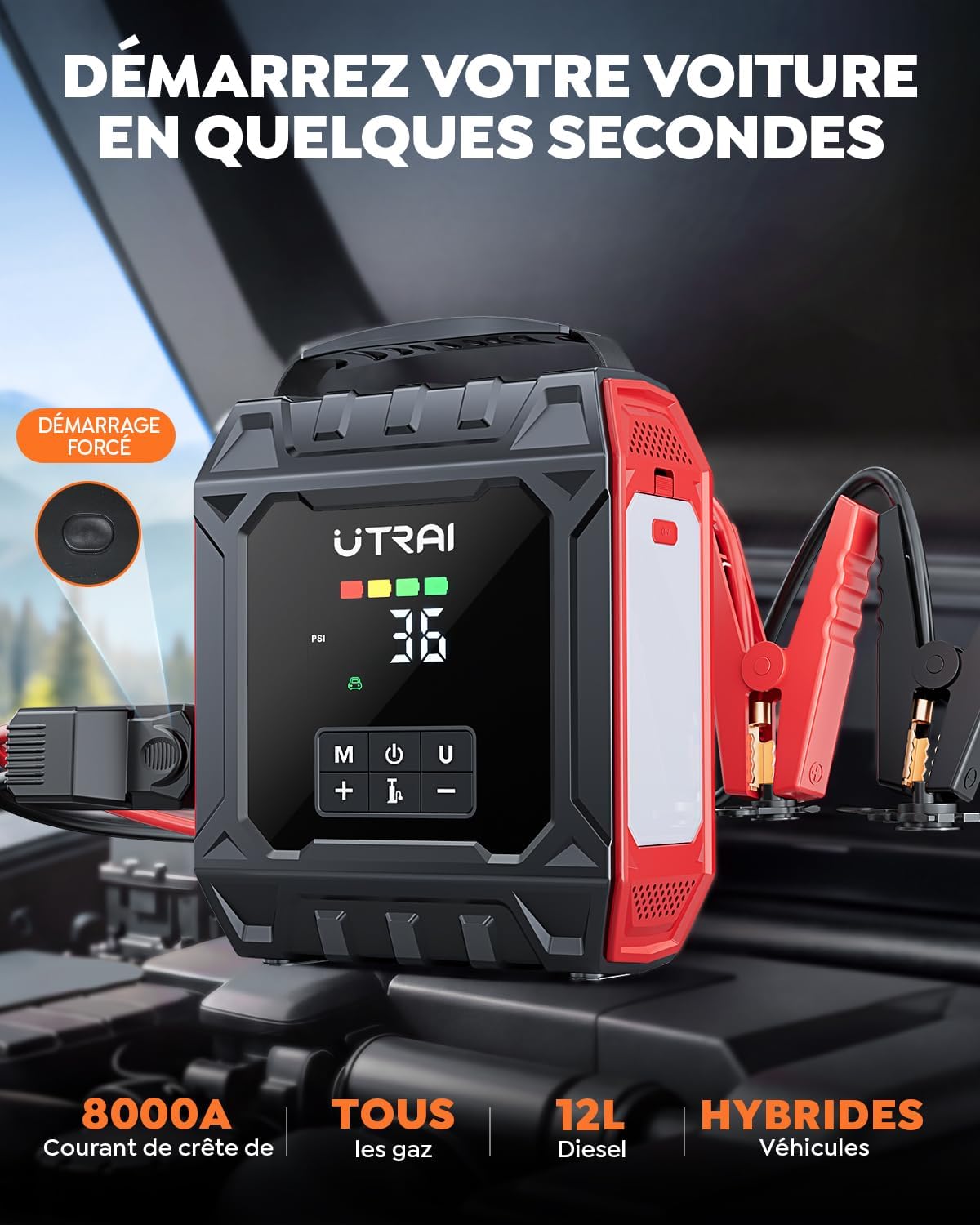
The UTRAI JS-50 is a versatile device combining a powerful 8000A jump starter, a 160 PSI portable air compressor, a portable power bank, and a detachable 1000-lumen magnetic LED light. It is designed to assist with common vehicle emergencies such as dead batteries and flat tires.
Package Contents
Verify that all items listed below are included in your package:
- UTRAI JS-50 Car Jump Starter with Air Compressor (1 unit)
- Storage Bag (1 unit)
- Smart Clamp with Force Start Function (1 unit)
- USB-C Data Cable (1 unit)
- Tire Repair Kit (1 unit)
- Metal Valve for Bicycle (1 unit)
- Inflation Needle (1 unit)
- Long Nozzle (1 unit)
- Short Nozzle (1 unit)
- User Manual (1 unit)

Safety Information
Read and understand all safety warnings and instructions before using this product. Failure to follow these instructions may result in electric shock, fire, and/or serious injury.
- Always connect the smart clamp to the jump starter before connecting to the vehicle battery.
- Ensure correct polarity: Red clamp to positive (+), Black clamp to negative (-).
- Do not touch the red and black clamps together to avoid short circuits.
- Do not jump start a frozen battery.
- Do not use the jump starter if the battery voltage is below 12V.
- Keep the device away from children.
- Store in a cool, dry place.
- The device features 10 advanced protections including reverse polarity, overcurrent, overload, short circuit, overheating, and overvoltage protection.

Product Features
The UTRAI JS-50 is designed with multiple functionalities for roadside assistance and convenience:
- 8000A Peak Current Jump Starter: Capable of starting all gasoline engines and diesel engines up to 12 liters. Features a FORCE START function for deeply discharged or low-voltage batteries.
- 160 PSI Portable Air Compressor: High-performance 40L/min air compressor for rapid tire inflation. Includes preset pressure, auto-stop, pressure detection, memory function, and ±1 PSI accuracy. Supports PSI/KPA/BAR units.
- Detachable 1000 Lumen Magnetic LED Light: Provides broad and consistent illumination. Attaches magnetically for hands-free operation. Offers 4 lighting modes: flashlight, strobe, red warning strobe, and SOS signal.
- Portable Power Bank: Equipped with two QC 3.0 USB ports for fast charging of phones, tablets, and other electronic devices.
- Tire Repair Kit: Included for temporary repair of punctured tires.
- Advanced Safety Protections: Robust metal terminals, V0 flame-retardant casing, and smart cables with 10 protections (reverse polarity, overcurrent, overload, short circuit, overheating, etc.).
- NTC Thermistor Battery Temperature Protection: Ensures safe operation in extreme temperatures (-40°C to 60°C).
Setup
Before first use, fully charge the UTRAI JS-50 unit using the provided USB-C cable and a suitable USB power adapter (not included). The LCD screen will indicate the charging status.
Charging the Device
- Connect the USB-C cable to the input port on the JS-50.
- Connect the other end of the USB-C cable to a USB power adapter (e.g., a phone charger).
- The battery indicator on the LCD screen will show charging progress. Charge until the indicator shows full.
Operating Instructions
1. Jump Starting a Vehicle
Ensure the JS-50 is at least 50% charged before attempting a jump start.
- Connect Smart Clamp: Insert the smart clamp's plug into the jump start output port of the JS-50.
- Connect to Battery: Attach the red (+) clamp to the positive terminal of the vehicle battery and the black (-) clamp to the negative terminal.
- Start Vehicle: Start your vehicle's engine. If it doesn't start immediately, wait 30 seconds and try again. If the battery is deeply discharged, use the FORCE START function by pressing the dedicated button on the smart clamp.
- Remove Clamps: Once the vehicle starts, remove the smart clamps from the vehicle battery first, then disconnect from the JS-50.


2. Using the Air Compressor
The JS-50 can inflate tires and other inflatables up to 160 PSI.
- Attach Nozzle: Align the inflation nozzle with the tire valve and press down the locking lever.
- Power On & Select Mode: Press and hold the power button for 3 seconds to turn on. Press "M" to select the inflation mode (car, motorcycle, bicycle, ball, custom). Use "+" and "-" to set the target pressure.
- Start Inflation: Press the inflation button (tire icon) for 3 seconds to start. The compressor will automatically stop when the preset pressure is reached.
- Detach Nozzle: Once inflation is complete, detach the nozzle from the tire valve.


3. Using the Portable Power Bank
The JS-50 can charge electronic devices via its two USB QC 3.0 output ports.
- Connect your device's USB charging cable to one of the USB output ports on the JS-50.
- The JS-50 will automatically begin charging your device.

4. Using the Detachable LED Light
The 1000-lumen magnetic LED light can be used for illumination or as a warning signal.
- Activation: Press the light button on the JS-50 to cycle through modes: Flashlight, Strobe, Red Warning Strobe, SOS.
- Detachable Use: The light can be detached from the main unit and magnetically attached to metallic surfaces (e.g., car hood) for hands-free lighting.
- Warning Triangle: The light can also function as a warning triangle for roadside emergencies.


Tire Repair Kit Usage
The included tire repair kit is for temporary repairs of small punctures. Seek professional repair as soon as possible.
- Locate Puncture: Identify the object causing the puncture and remove it.
- Ream Hole: Use the spiral probe tool to ream and clean the puncture hole.
- Insert Plug: Thread a repair plug into the insertion tool. Push the plug into the hole until about 2/3 of it is inside the tire.
- Remove Tool & Trim: Pull out the insertion tool. Trim any excess plug material flush with the tire tread (scissors not included).
- Inflate Tire: Use the JS-50's air compressor to inflate the tire to the recommended pressure.

Maintenance
- Cleaning: Wipe the device with a dry, soft cloth. Do not use harsh chemicals or abrasive cleaners.
- Storage: Store the JS-50 in its storage bag in a cool, dry place, away from direct sunlight and extreme temperatures.
- Charging: For optimal battery life, charge the device every 3-6 months, even if not in use.
- Battery Care: Do not disassemble the unit. Do not expose to fire or water.
Troubleshooting
| Problem | Possible Cause | Solution |
|---|---|---|
| Vehicle does not start. | Low charge on JS-50, incorrect clamp connection, deeply discharged battery. | Ensure JS-50 is sufficiently charged. Check clamp polarity. Use FORCE START function if battery is very low. |
| Air compressor not inflating. | Nozzle not properly attached, incorrect pressure setting, low battery. | Ensure nozzle is securely attached. Verify pressure setting. Charge JS-50 if battery is low. |
| Temperature protection light flashing. | Device is too hot or too cold. | Allow the device to return to operating temperature range (-40°C to 60°C). |
| USB charging not working. | Device not powered on, cable issue, low JS-50 battery. | Ensure JS-50 is powered on. Try a different USB cable. Charge JS-50. |
Specifications
- Model: JS-50
- Brand: UTRAI
- Peak Current: 8000 A
- Battery Composition: Lithium-polymer
- Voltage: 14.8 Volts
- Air Compressor Pressure: Up to 160 PSI
- Air Compressor Flow Rate: 40 L/min
- LED Light Brightness: 1000 Lumens
- USB Output: 2 x QC 3.0 ports
- Weight: 1.25 Kilograms
- Compatible Vehicle Types: Car, Motorcycle, Truck, RV, Yacht, ATV (All gasoline engines, diesel engines up to 12L)
Warranty and Support
UTRAI provides a 24-month warranty for this product from the date of purchase. Additionally, lifetime technical assistance is available.
For any issues, questions, or support needs, please contact UTRAI customer service:
- Customer Service: 7*24 hours
- Technical Assistance: Lifetime
- Warranty Period: 24 Months
- Returns: For defects
- Email: support.it@utrai.com


