
TOWER T769015TL
Tower T769015TL Flat Mop and Bucket Set User Manual
Model: T769015TL
Introduction
Thank you for choosing the Tower T769015TL Flat Mop and Bucket Set. This product is designed to provide an efficient and hygienic solution for floor cleaning. Its innovative dual-chamber system ensures that you always clean with fresh water, preventing the spread of dirt and grime. Please read this manual carefully before assembly and use to ensure proper operation and maintenance.

Image: The Tower T769015TL Flat Mop and Bucket Set, showcasing its compact design, dual-chamber system, removable water tank, two microfiber pads, and adjustable handle.
Important Safety Information
- Keep out of reach of children and pets.
- Do not use the product for purposes other than its intended use.
- Ensure the bucket is placed on a stable, level surface during use to prevent spills.
- Avoid using harsh chemicals or abrasive cleaners on the product, as this may damage the materials.
- Always empty the bucket after use and rinse thoroughly.
- Do not attempt to modify or repair the product yourself. Contact customer support if issues arise.
Package Contents
Please check the box for the following items:
- 1 x Mop Bucket with Dual Chambers
- 1 x 3-Part Adjustable Mop Handle
- 1 x Flat Mop Head
- 2 x Microfiber Mop Pads
Assembly and Setup
- Assemble the Mop Handle: Screw the three parts of the mop handle together clockwise until securely fastened.
- Attach the Mop Head: Connect the assembled handle to the flat mop head by aligning and screwing it into place.
- Attach Microfiber Pad: Align one microfiber mop pad with the flat mop head and press firmly to attach it using the hook-and-loop fasteners.
- Fill the Clean Water Tank: Remove the 1.8L clean water tank from the bucket. Fill it with clean water and your preferred floor cleaning solution (if applicable). Reinsert the tank into the designated clean water chamber of the bucket.

Image: A hand filling the removable 1.8L clean water tank under a faucet, demonstrating the easy-fill feature of the bucket.
Operating Instructions
Follow these steps for effective floor cleaning:
- Wet the Mop Pad: Insert the mop head into the "WASH" chamber (the side with the clean water tank). Push down several times to saturate the microfiber pad with clean water and cleaning solution.
- Wring the Mop Pad: Transfer the mop head to the "DRY" chamber. Push down several times to squeeze out excess water. Adjust the number of pushes based on your desired mop dampness for different floor types.
- Mop the Floor: Begin mopping your floor. The swivel head allows for easy maneuverability around furniture and into tight spaces.
- Clean the Mop Pad (during use): When the mop pad becomes dirty, insert it into the "WASH" chamber to rinse off loose dirt, then into the "DRY" chamber to wring it out before continuing to mop. For heavily soiled pads, you may need to repeat this process or replace the pad with a fresh one.
- Empty Dirty Water: Once cleaning is complete, locate the drain plug at the bottom of the dirty water chamber (5.5L capacity). Remove the plug to drain the dirty water into a sink or drain.

Image: A close-up view of the mop bucket's dual-chamber system, clearly showing the separation of clean and dirty water, which improves cleaning hygiene.
Care and Maintenance
- Microfiber Pads: The microfiber pads are machine washable. Remove them from the mop head and wash with similar colors at 40°C. Do not use bleach or fabric softener. Air dry or tumble dry on low heat.
- Bucket Cleaning: After each use, empty both water chambers and rinse the bucket thoroughly with clean water. Allow it to air dry completely before storing to prevent mildew.
- Storage: The slim design of the bucket allows for compact storage. The 3-part handle can be disassembled for even more space-saving storage in cupboards or under sinks.

Image: Two microfiber mop pads being placed into a washing machine, illustrating their machine-washable feature for easy cleaning and reuse.
Troubleshooting
| Problem | Possible Cause | Solution |
|---|---|---|
| Mop leaves streaks on the floor. | Mop pad is too wet or dirty. | Ensure the mop pad is thoroughly wrung out in the "DRY" chamber. Rinse the pad more frequently in the "WASH" chamber or use a fresh pad. |
| Mop not picking up dirt effectively. | Mop pad is saturated with dirt or worn out. | Rinse the mop pad thoroughly. If the pad is old or heavily soiled, replace it with a new microfiber pad. |
| Bucket leaks. | Drain plug not securely closed or damage to the bucket. | Ensure the drain plug is firmly inserted. Inspect the bucket for cracks or damage. If damaged, discontinue use and contact customer support. |
Specifications
- Model Number: T769015TL
- Brand: TOWER
- Color: Anthracite & Teal
- Material: Stainless Steel, PP Plastic
- Mop Head Material: Microfiber
- Clean Water Tank Volume: 1.8 Liters
- Dirty Water Chamber Volume: 5.5 Liters
- Item Weight: 1.3 Kilograms
- Handle Type: 3-Part Adjustable Handle
- Included Components: Mop Bucket, 2 Microfiber Mop Heads, 3-Part Handle
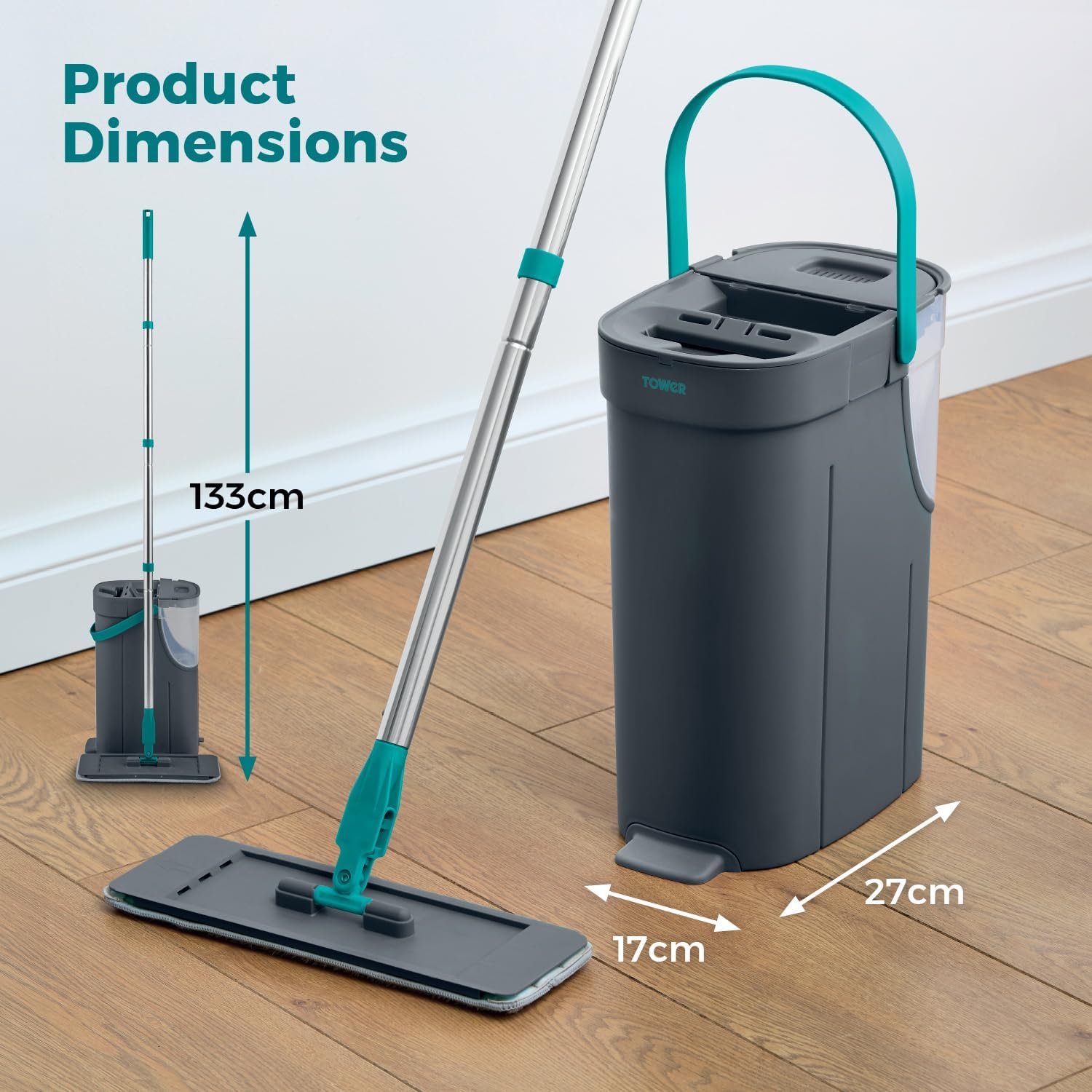
Image: A visual representation of the product dimensions, indicating the height of the mop (133cm) and the width/depth of the bucket (17cm x 27cm).
Warranty and Customer Support
The Tower T769015TL Flat Mop and Bucket Set comes with a standard 1-year manufacturer's guarantee. An optional 2-year extension is available upon product registration online, providing a total of 3 years warranty coverage.

Image: A graphic displaying "3 Year Guarantee" with a note about standard 1-year manufacturer's guarantee and optional 2-year extension upon online product registration.
For warranty claims, technical assistance, or any questions regarding your product, please visit the official TOWER website or contact their customer support directly. Please have your model number (T769015TL) and proof of purchase ready.
Online Registration: www.towerhousewares.co.uk/register-your-product (Example link, actual link might vary)
Related documentsT769015TL


Ask a question about this manual
Ask about setup, troubleshooting, compatibility, parts, safety, or missing instructions. Manuals+ will review the question and use this page’s manual context to help answer it.