
1. Important Safety Instructions
Read all instructions carefully before using this treadmill. Keep this manual for future reference.
- Always place the treadmill on a flat, stable surface.
- Keep children and pets away from the treadmill during operation.
- Wear appropriate athletic footwear and clothing.
- Do not operate the treadmill if it has a damaged cord or plug, or if it is not working properly.
- Consult a physician before starting any exercise program.
- Use the safety key clip at all times.
- Do not attempt to service the treadmill yourself. Contact customer support for assistance.
2. Setup and Assembly
The FUNMILY 4.5HP Heavy Duty Treadmill is designed for minimal assembly. It comes largely pre-assembled.
2.1 Unpacking and Placement
- Carefully remove all packaging materials.
- Place the treadmill in a clear area, ensuring at least 6 feet of clearance behind it and 2 feet on each side.
- Ensure the power cord is easily accessible and not obstructed.
2.2 Unfolding the Treadmill
This treadmill features a soft-drop hydraulic system for easy unfolding.
- Gently lift the running deck until it locks into the upright position.
- To lower, kick the base of the hydraulic cylinder, then the base frame will fall automatically and slowly.

Figure 2.2.1: Treadmill folding and unfolding mechanism with soft-drop system and transport wheels.
2.3 Moving the Treadmill
The treadmill is equipped with built-in wheels for easy relocation.
- Ensure the treadmill is folded and locked in the upright position.
- Tilt the treadmill slightly to engage the transport wheels.
- Carefully push or pull the treadmill to its desired location.
3. Operating Instructions
Familiarize yourself with the control panel and features before beginning your workout.
3.1 Control Panel Overview
The treadmill features a large LED console to display workout metrics and control settings.
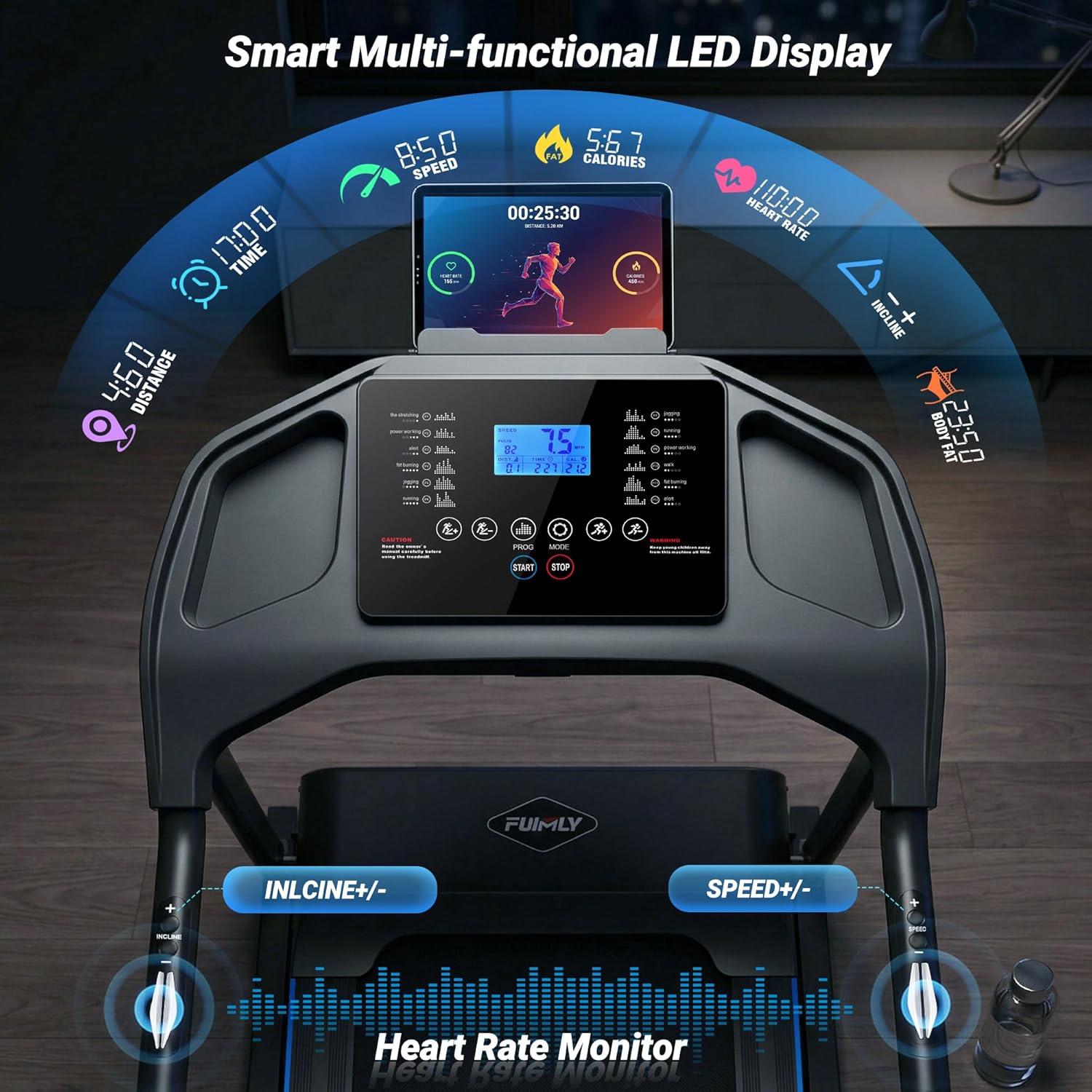
Figure 3.1.1: Multifunctional Smart LED Display and Control Panel.
- Display: Shows time, speed, distance, calories burned, incline level, and heart rate.
- Start/Stop Buttons: Initiate and end your workout.
- Speed +/- Buttons: Adjust the running belt speed (0.6 to 8.5 MPH).
- Incline +/- Buttons: Adjust the incline level (0% to 20% auto incline).
- Program (PROG) Button: Select from 12 preset workout programs.
- Mode Button: Switch between different display modes or settings.
- Heart Rate Sensors: Integrated into the handgrips for real-time heart rate monitoring.
- Body-Fat Measurement: Enter user data to calculate Body Mass Index (BMI).
- Tablet Holder: Conveniently located for your device.
3.2 Starting a Workout
- Ensure the safety key is properly inserted into the console.
- Step onto the treadmill, placing your feet on the side rails.
- Press the START button. The belt will begin moving at a low speed.
- Gradually increase speed using the SPEED + button.
- Adjust incline using the INCLINE +/- buttons as desired.
3.3 Using Auto Incline
The treadmill offers 0-20% auto incline with 15 levels to simulate various terrains and increase workout intensity.

Figure 3.3.1: Auto Incline levels and their corresponding workout modes.
- Use the INCLINE + or INCLINE - buttons to adjust the incline during your workout.
- The incline changes automatically when using preset programs.
3.4 Preset Programs
Choose from 12 scientific exercise programs to vary your routine and achieve specific fitness goals.
- Press the PROG button to cycle through the available programs (P1-P12).
- Each program has predefined speed and incline changes. Refer to the console display for program details.
3.5 Heart Rate and Body-Fat Measurement
- Heart Rate: Grip the handgrip sensors firmly with both hands to display your real-time heart rate on the console.
- Body-Fat: Follow the instructions on the console to input your personal data for BMI calculation.
3.6 Running Belt and Shock Absorption
The treadmill features a 7-layer running belt and a high-tech shock absorption system designed to protect your knees and joints.
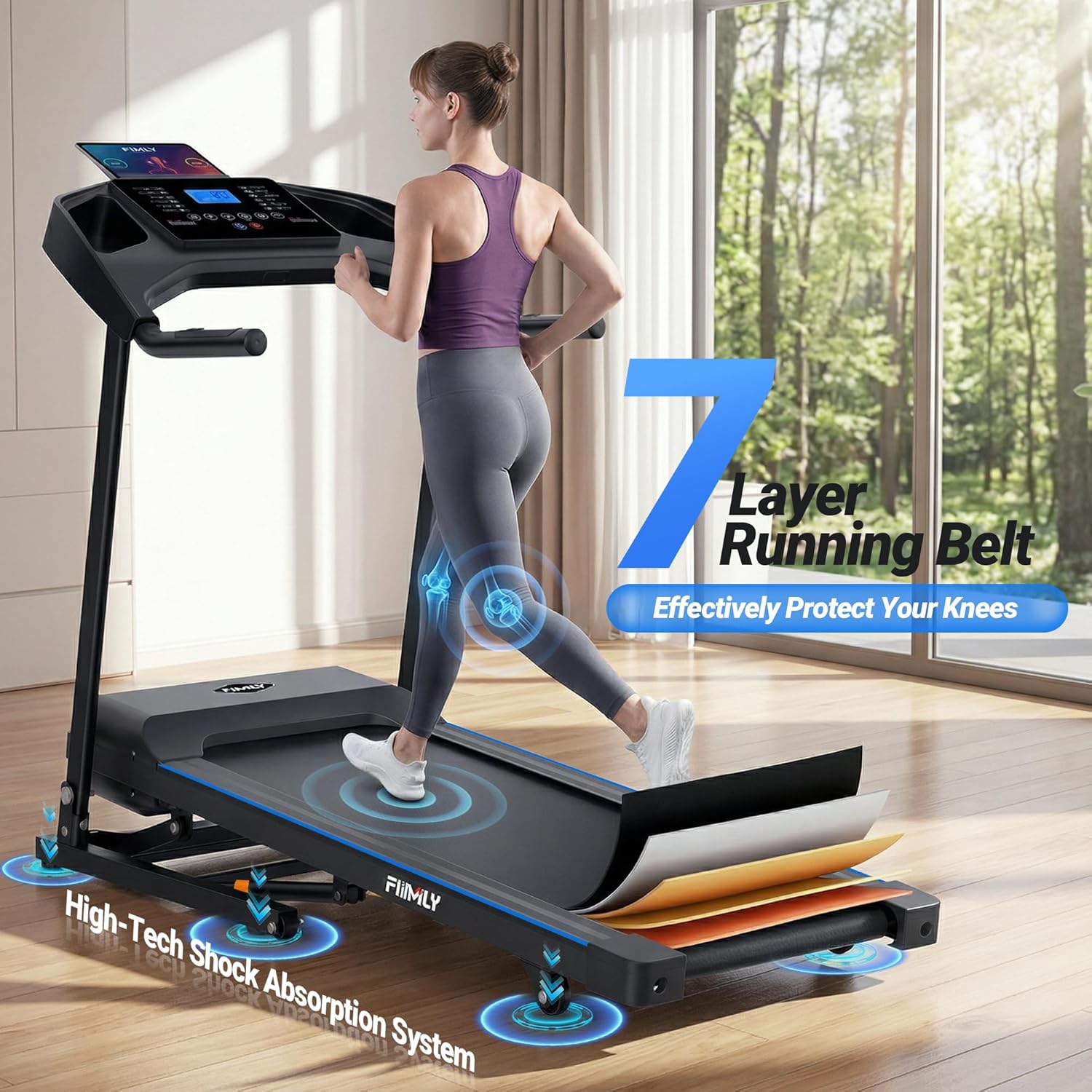
Figure 3.6.1: Illustration of the 7-layer running belt and shock absorption system.
4. Maintenance
Regular maintenance ensures optimal performance and extends the life of your treadmill.
4.1 Cleaning
- Disconnect the power cord before cleaning.
- Wipe down the console and exterior surfaces with a soft, damp cloth. Avoid abrasive cleaners.
- Vacuum under the treadmill regularly to prevent dust buildup.
4.2 Running Belt Lubrication
The running belt requires periodic lubrication to reduce friction and wear. Refer to the specific instructions provided with your treadmill's lubricant.
- Typically, lubrication is needed every 3-6 months, depending on usage.
- Lift the edge of the running belt and apply silicone lubricant to the center of the deck.
- Run the treadmill at a low speed for a few minutes to distribute the lubricant.
4.3 Belt Adjustment
If the running belt becomes off-center or slips, it may need adjustment. Use the provided Allen wrench to turn the tension bolts at the rear of the treadmill.
- To center the belt, turn the bolt on the side towards which the belt has shifted clockwise by a quarter turn.
- To tighten a slipping belt, turn both bolts clockwise by a quarter turn simultaneously.
5. Troubleshooting
This section addresses common issues you might encounter with your treadmill.
| Problem | Possible Cause | Solution |
|---|---|---|
| Treadmill does not start | Power cord not plugged in; Safety key not inserted; Circuit breaker tripped. | Ensure power cord is securely plugged in; Insert safety key fully; Reset circuit breaker. |
| Running belt slips | Belt too loose; Belt needs lubrication. | Adjust belt tension (see Section 4.3); Lubricate running belt (see Section 4.2). |
| Running belt is off-center | Belt needs alignment. | Adjust belt alignment (see Section 4.3). |
| Unusual noise during operation | Loose parts; Lack of lubrication; Motor issue. | Check for and tighten any loose bolts; Lubricate belt; If noise persists, contact customer support. |
| Incline not working | Incline motor issue; Connection problem. | Check all connections; If issue persists, contact customer support. |
For issues not listed here or if solutions do not resolve the problem, please contact FUNMILY customer support.
6. Specifications
Detailed technical specifications for the FUNMILY 4.5HP Heavy Duty Treadmill.
| Feature | Specification |
|---|---|
| Brand | FUNMILY |
| Model Name | FUNMILY 4.5HP Heavy Duty Treadmill with 0–20% Auto Incline |
| Product Dimensions (D x W x H) | 53.94" x 26.77" x 9.05" |
| Material | Alloy Steel |
| Maximum Horsepower | 4.5 HP |
| Maximum Speed | 8.5 Miles per Hour |
| Maximum Incline Percentage | 20% (15 Levels) |
| Maximum Weight Recommendation | 400 Pounds |
| Number of Programs | 12 |
| Power Source | Corded Electric |
| Assembly Required | No |
| Metrics Measured | Distance, Speed, Time, Calories, Heart Rate, Body Fat |
| Included Components | User Manual |
7. Warranty Information
The FUNMILY 4.5HP Heavy Duty Treadmill comes with a 1-year warranty from the date of purchase.
This warranty covers manufacturing defects in materials and workmanship. It does not cover damage caused by misuse, accident, unauthorized modification, or normal wear and tear.
Please retain your proof of purchase for warranty claims.
8. Customer Support
If you have any questions, concerns, or require assistance with your FUNMILY treadmill, please contact our customer support team.
- For the quickest service, please have your model name and purchase date available.
- Visit the official FUNMILY store on Amazon for more information: FUNMILY Store