
Product Overview
The RENPHO MorphoScan Base Smart Scale is an advanced body composition analyzer designed to provide detailed health data. Utilizing eight-electrode dual-frequency and segmental BIA technology, it offers highly accurate measurements of various body metrics. This scale is ideal for tracking fitness progress and maintaining overall wellness.
- Innovative & Precise: Eight-electrode dual-frequency and segmental BIA technology for accurate body composition data analysis, within 2% of physician scales.
- Comprehensive LED Display: Shows BMI, body fat percentage, skeletal muscle percentage, visceral fat index, and a seven-day weight trend for up to eight users.
- Detailed Health Report: Supports viewing additional body data analysis including segmental body fat percentage and generates printable reports in the app for customized plans.
- User-Friendly App: The RENPHO Health App allows unlimited user profiles and syncs with Apple Health, MyFitnessPal, and Samsung Health.
- Reliable & Efficient: Features a 60-inch elastic cable, durable handle, large weighing platform (up to 180 kg/400 lbs), and up to 130 days battery life.
Setup
- Install Batteries: Open the battery compartment on the underside of the scale and insert 4 AAA batteries (included). Ensure correct polarity.
- Download RENPHO Health App: Download and open the "RENPHO Health" app from your device's app store (Apple App Store or Google Play Store).
- Enable Bluetooth: Ensure Bluetooth is enabled on your smartphone.
- Add Device in App: In the RENPHO Health App, navigate to "My Device" or select the "+" symbol to add a new device. Choose "Body Composition Scale (8-Electrode Scale)".
- Activate Scale: Gently press on the scale with your foot to activate it. Wait for the display to show "0.0".
- Pairing: The app will search for and connect to your scale via Bluetooth. Once connected, you are ready to take measurements.
Video: How to Use RENPHO Smart Scale MorphoScan Base? This video demonstrates the initial setup and measurement process for the scale.
Operating Instructions
- Placement: Place the scale on a hard, flat surface. Avoid carpets or uneven flooring for accurate readings.
- Step On: With bare, dry feet, step onto the scale. Ensure your feet are positioned over the metal electrodes.
- Grasp Handle: Use both hands to grasp the retractable handle. Position your thumbs and fingers over the electrodes on the handle.
- Posture: Stand straight with your arms comfortably extended forward, angled slightly away from your body. Hold still during the measurement.
- Measurement Completion: The scale will complete its analysis, and data will be displayed on the LED screen and synced to the RENPHO Health App.
- Retract Handle: After measurement, gently pull the handle to retract it back into its original position. Step off the scale.
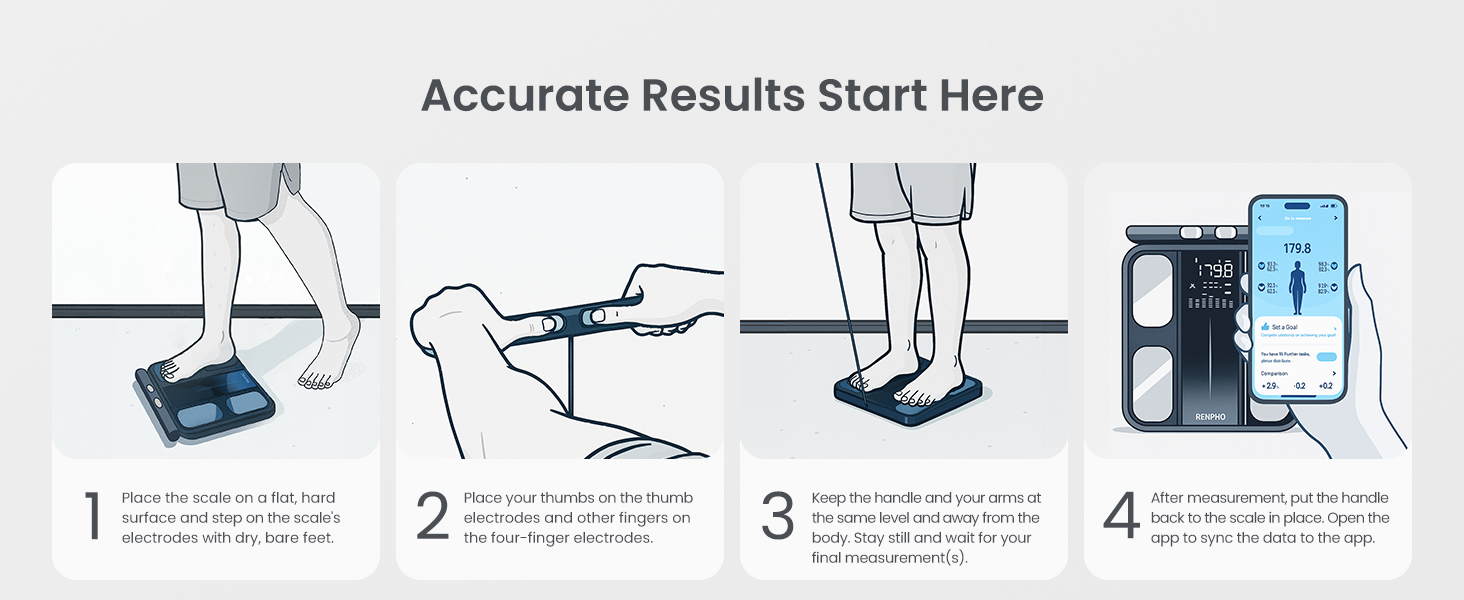
Image: Accurate Results Start Here. This diagram illustrates the four key steps for taking an accurate body composition measurement using the RENPHO MorphoScan Base scale, from initial placement to app synchronization.
Key Features and Metrics
The RENPHO MorphoScan Base provides over 50 body metrics for a comprehensive understanding of your health and fitness. The 8-electrode dual-frequency BIA technology ensures precise segmental analysis.
- Weight: Your current body weight.
- BMI (Body Mass Index): A measure of body fat based on height and weight.
- Body Fat Percentage: The proportion of fat to total body weight.
- Skeletal Muscle Percentage: The percentage of muscle attached to bones.
- Visceral Fat Index: Level of fat surrounding your organs.
- Body Water Percentage: The amount of water in your body.
- Bone Mass: The weight of bone mineral in your body.
- Protein Percentage: The proportion of protein in your body.
- BMR (Basal Metabolic Rate): The number of calories your body needs to function at rest.
- Metabolic Age: Compares your BMR to the average BMR for your age group.
- Segmental Analysis: Detailed breakdown of fat and muscle mass for individual body segments (left arm, right arm, trunk, left leg, right leg).

Image: 50+ Metrics on App. This image displays the comprehensive data available through the RENPHO Health App, including detailed body composition analysis and various health metrics.
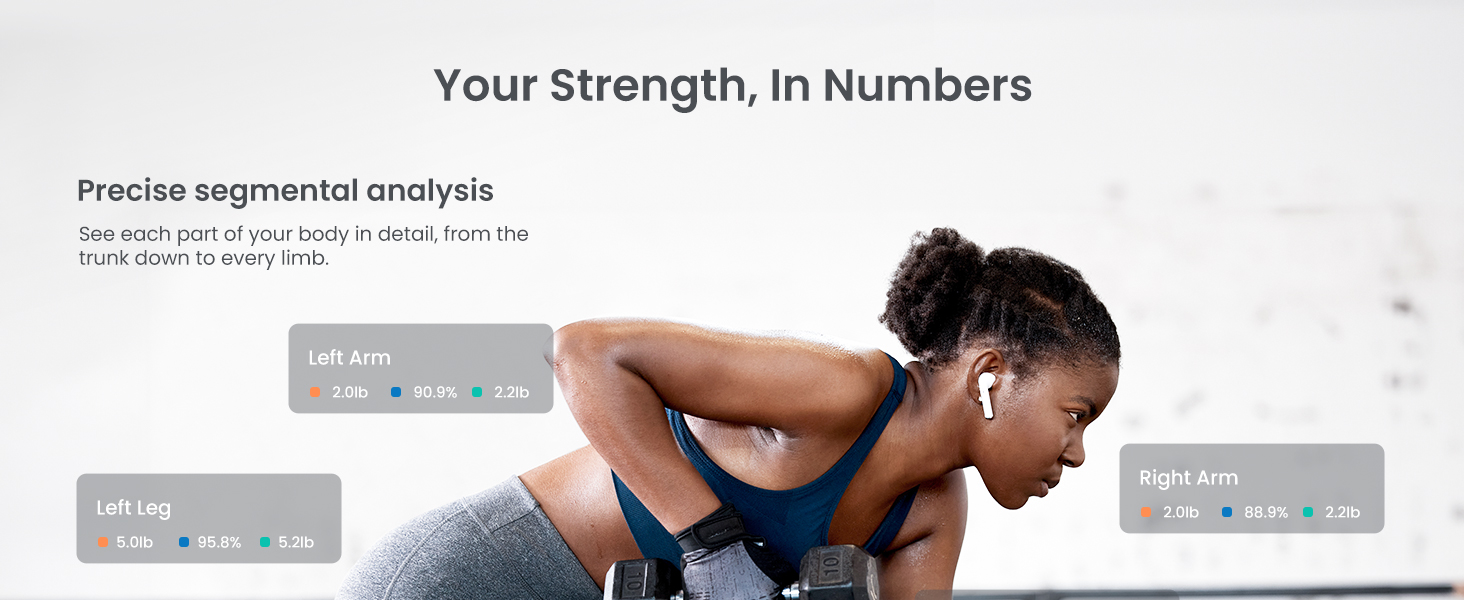
Image: Your Strength, In Numbers: Precise Segmental Analysis. This image highlights the scale's ability to provide detailed segmental analysis of muscle and fat distribution across the body.
App Integration
The RENPHO Health App is central to maximizing the utility of your MorphoScan Base scale. It offers seamless data synchronization and integration with popular health platforms.
- Unlimited User Profiles: Create and manage profiles for multiple family members, ensuring personalized tracking for everyone.
- Data Synchronization: Automatically syncs your body composition data to the app via Bluetooth after each measurement.
- Third-Party App Integration: Connects with Apple Health, MyFitnessPal, and Samsung Health for a unified view of your health data.
- Progress Tracking: View historical data, trends over time (daily, weekly, monthly, yearly), and generate comprehensive health reports.
- Goal Setting: Set and monitor personal health and fitness goals directly within the app.

Image: Syncs with Fitness Apps & Apple Watch. This image illustrates the RENPHO Health App's compatibility with various popular fitness and health tracking applications.
Video: RENPHO Smart Body Fat Scale MorphoScan Base. This short video provides a quick visual overview of the scale's features and app integration.
Specifications
| Feature | Detail |
|---|---|
| Brand | RENPHO |
| Model | R-MSC02 |
| Color | Black |
| Weight Capacity Maximum | 180 Kilograms / 400 lbs |
| Display Type | LED |
| Measurement Type | Digital, 8-Electrode Dual-Frequency BIA |
| Power Source | 4 x AAA Batteries (included) |
| Battery Life | Up to 130 days |
| Special Features | Auto Shut Off, Body Fat, Eight electrodes, Large Display, Smart, Segmental BIA |
| Included Components | Scale |
Maintenance
- Cleaning: Wipe the scale surface with a damp cloth and mild detergent. Avoid abrasive cleaners or submerging the scale in water.
- Storage: Store the scale in a cool, dry place. Avoid extreme temperatures or direct sunlight.
- Battery Replacement: Replace batteries when the low battery indicator appears on the display.
- Avoid Impact: Do not drop the scale or subject it to heavy impact, as this may damage the sensors.
Troubleshooting
- Inaccurate Readings: Ensure the scale is on a hard, flat surface. Make sure your feet are bare and dry, and properly positioned on the electrodes. Avoid moving during measurement.
- No Display/Power: Check if batteries are correctly installed and not depleted. Replace batteries if necessary.
- App Connection Issues: Ensure Bluetooth is enabled on your device and the scale is activated. Try restarting the app or your device.
- Data Not Syncing: Verify that the scale is connected to the app via Bluetooth. Check app permissions for data access.
Warranty and Support
For warranty information, technical support, or any questions regarding your RENPHO MorphoScan Base Smart Scale, please refer to the official RENPHO website or contact their customer service directly. Keep your purchase receipt for warranty claims.


