
1. Introduction
Thank you for choosing the EarFun Clip 2 Open Ear Earbuds. This manual provides essential information for setting up, operating, and maintaining your earbuds. Please read it thoroughly before use to ensure optimal performance and longevity of your device.
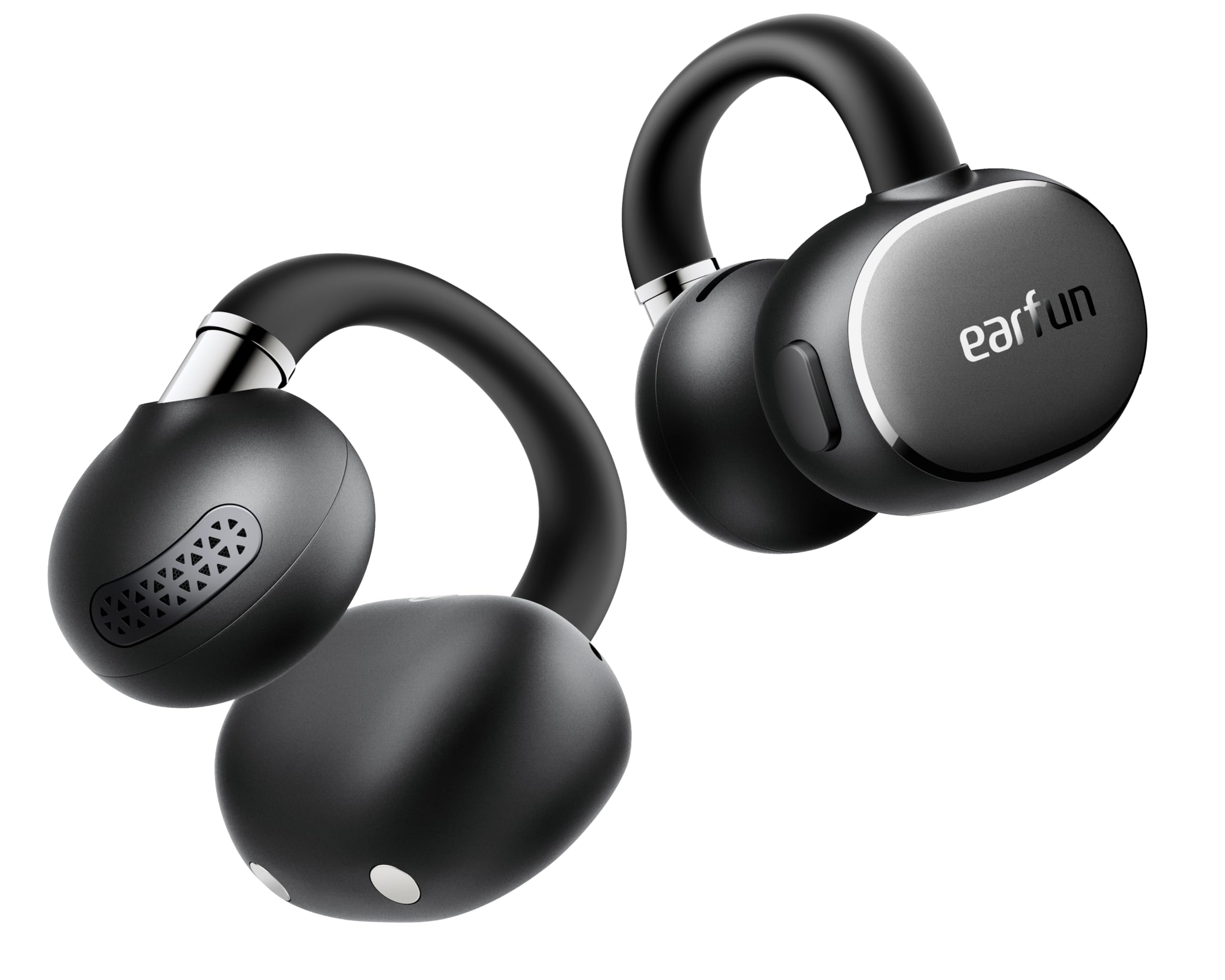
Image: EarFun Clip 2 Open Ear Earbuds and their charging case.
2. What's in the Box
- EarFun Clip 2 Earbuds
- Charging Case
- USB-C Charging Cable
- User Manual
Video: An unboxing demonstration of the EarFun Clip 2, showing the contents of the package including the earbuds, charging case, USB-C cable, and user manual.
3. Setup
3.1 Initial Charge
Before first use, fully charge the EarFun Clip 2 earbuds and their charging case. Connect the provided USB-C cable to the charging port on the case and a power source. The indicator light on the case will show charging status. A 10-minute charge provides approximately 2.5 hours of use.
3.2 Power On and Pairing
- Open the charging case. The earbuds will automatically power on and enter pairing mode.
- On your device (smartphone, tablet, laptop), enable Bluetooth and search for available devices.
- Select "EarFun Clip 2" from the list to connect. A voice prompt will confirm successful pairing.
For Android users, Google Fast Pair allows for instant setup by simply opening the case near your device.

Image: EarFun Clip 2 earbuds shown connecting to a smartphone via Google Fast Pair.
3.3 App Download
Download the EarFun Audio App from your device's app store (Google Play Store or Apple App Store) to access advanced features like AI Translation, custom equalizer settings, and button customization.
3.4 Proper Fit
For optimal sound and comfort, ensure the earbuds are properly positioned on your ears. The C-shaped bridge should clip securely without inserting into the ear canal. Adjust the earbud up or down until the sound is clear and the fit is comfortable.

Image: Visual guide demonstrating the correct way to wear the EarFun Clip 2 earbuds for a secure and comfortable fit, along with examples of incorrect positioning.
4. Operating Instructions
4.1 Basic Controls
The EarFun Clip 2 features physical buttons for reliable control. Functions can be customized via the EarFun Audio App.
| Action | Function |
|---|---|
| Single Press (Left/Right) | Play/Pause, Answer/End Call |
| Double Press (Left) | Previous Track |
| Double Press (Right) | Next Track |
| Triple Press (Left/Right) | Activate Voice Assistant |
| Press and Hold (Left) | Volume Down |
| Press and Hold (Right) | Volume Up |

Image: A finger demonstrating how to press the physical button on the earbud for control.
4.2 Audio Playback
The EarFun Clip 2 supports Hi-Res Audio with LDAC codec, delivering detailed sound. EarFun Spatial Stage Technology provides an immersive 3D audio experience. The open-ear design allows you to hear your surroundings while enjoying audio.

Image: A woman wearing EarFun Clip 2 earbuds, with visual effects indicating the spatial audio experience.
4.3 Call Functions
Equipped with 4 microphones and AI-powered Environmental Noise Cancellation (ENC), the earbuds ensure clear calls by isolating your voice from background noise, even in noisy environments.

Image: A man wearing EarFun Clip 2 earbuds, engaged in a phone call in an outdoor setting, highlighting clear call quality.
4.4 AI Translation
Utilize the real-time AI translation feature through the EarFun Audio App, supporting over 100 languages for seamless communication in various modes (Real-Time, Face-to-Face).

Image: Two individuals using EarFun Clip 2 earbuds and a smartphone app for real-time language translation, facilitating cross-cultural communication.
4.5 Multipoint Connection
The earbuds support multipoint connection, allowing you to connect to two devices simultaneously and switch between them effortlessly.

Image: EarFun Clip 2 earbuds simultaneously connected to a smartphone and a laptop, demonstrating multipoint connectivity.
4.6 App Customization
The EarFun Audio App provides options to adjust the equalizer, customize button controls, and manage other features to personalize your listening experience.

Image: A smartphone displaying the EarFun Audio App interface, showcasing various customization options for sound and controls.
4.7 Game Mode
Activate the Enhanced Game Mode via the app for reduced audio lag, providing a smoother and more responsive experience for gaming and video playback.

Image: EarFun Clip 2 earbuds being used while a person plays a game on a smartphone, demonstrating the enhanced game mode feature.
5. Maintenance
5.1 Cleaning
Regularly clean your earbuds and charging case with a soft, dry, lint-free cloth. Avoid using abrasive materials or harsh chemicals. Do not submerge the charging case in water.
5.2 Water Resistance
The EarFun Clip 2 earbuds are IP55 dust and water resistant, protecting them from sweat, light rain, and splashes. The charging case is not water resistant.

Image: A woman exercising outdoors while wearing EarFun Clip 2 earbuds, illustrating their IP55 water and sweat resistance.
5.3 Charging
Place the earbuds back into the charging case to recharge. The case itself can be charged via the USB-C cable or wirelessly. A full charge provides up to 11 hours of playtime for the earbuds, with the case extending total playtime to 40 hours.

Image: EarFun Clip 2 earbuds resting in their open charging case, with text highlighting the 40-hour total playtime.
6. Troubleshooting
6.1 Pairing Issues
- Ensure earbuds are charged and out of the case.
- Turn off and on your device's Bluetooth.
- Forget "EarFun Clip 2" from your device's Bluetooth list and re-pair.
- Perform a factory reset (refer to the EarFun Audio App or online support for specific instructions).
6.2 Sound Quality Issues
- Adjust the fit of the earbuds on your ears.
- Clean the earbuds to remove any debris.
- Ensure your audio source is of high quality.
- Check equalizer settings in the EarFun Audio App.
6.3 Charging Issues
- Verify the USB-C cable and power adapter are working correctly.
- Ensure the charging contacts on the earbuds and case are clean.
- For wireless charging, ensure the case is properly aligned on the charging pad.
7. Specifications
| Feature | Detail |
|---|---|
| Model Name | EarFun Clip 2 |
| Model Number | CW200B |
| Bluetooth Version | 6.0 |
| Audio Driver Type | 12mm Titanium-Composite Dynamic Driver |
| Hi-Res Audio Support | Yes (LDAC) |
| Microphones | 4 Mics with AI ENC |
| AI Translation | Yes (via EarFun Audio App) |
| Battery Life (Earbuds) | Up to 11 hours (6 hours with LDAC enabled) |
| Total Playtime (with Case) | Up to 40 hours |
| Fast Charging | 10 min charge for 2.5 hours playtime |
| Water Resistance | IP55 (earbuds only) |
| Control Method | Physical Button |
| Weight (each earbud) | 5.5g |
| Multipoint Connection | Yes |
8. Warranty and Support
8.1 Warranty Information
EarFun provides an 18-month warranty for every product. Please retain your proof of purchase for warranty claims.
8.2 Customer Support
For further assistance, technical support, or warranty inquiries, please visit the official EarFun website or contact their customer service team. Contact details can typically be found on the EarFun website or within the EarFun Audio App.


