
Introduction
The Helidirect MJX Hyper Go 14211 is a high-performance 1/14 scale brushless short course RC truck designed for enthusiasts seeking speed and durability. This instruction manual provides essential information for the safe and effective setup, operation, maintenance, and troubleshooting of your RC truck to ensure optimal performance and longevity.
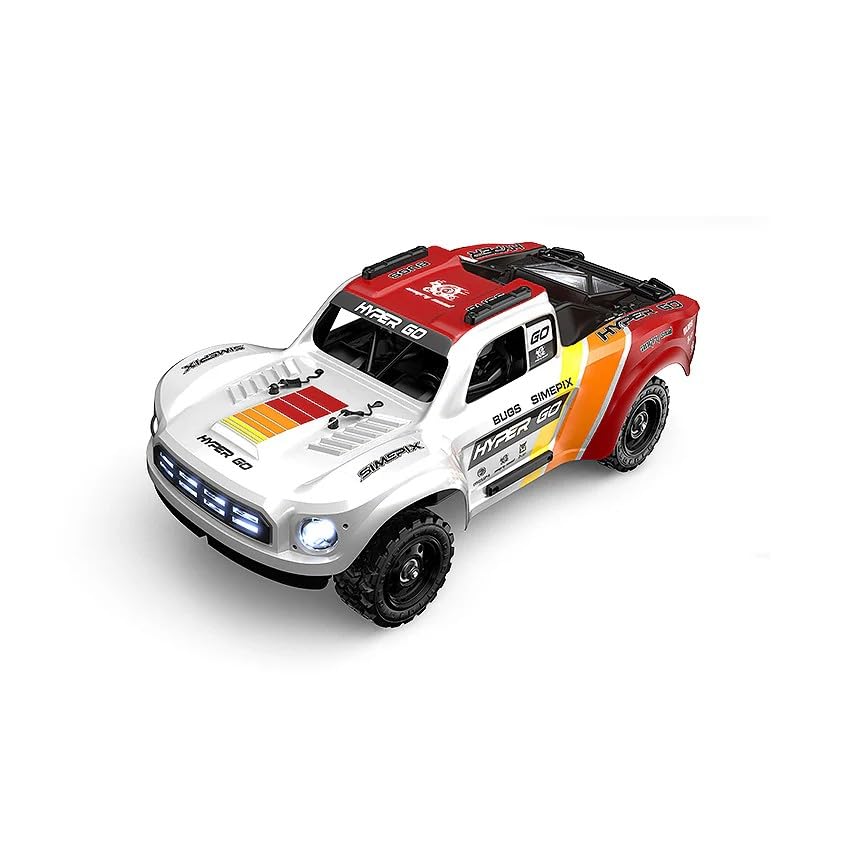
Image: The MJX Hyper Go 14211 RC truck in action, showcasing its design and key internal components.
Safety Information
WARNING: This product is intended for users aged 15 years or older. Adult supervision is recommended for younger users.
- Always operate the RC truck in open areas, away from people, pets, and obstacles.
- Never operate near public roads, power lines, or water bodies.
- Ensure all batteries are charged correctly and handled with care. Do not overcharge or short-circuit batteries.
- Keep fingers, hair, and loose clothing away from moving parts.
- Do not modify the vehicle or its components, as this may void the warranty and create safety hazards.
- Store the RC truck and its components in a cool, dry place when not in use.
Package Contents
Verify that all items listed below are included in your package:
- 1 × MJX Hyper Go 14211 RC Truck
- 1 × 2.4GHz T3D Radio Transmitter
- 1 × 2S 3000mAh LiPo Battery
- 1 × USB Charger
- 4 × Spare Tires (with White Rims)
- 1 × User Manual (this document)
Features
The MJX Hyper Go 14211 is engineered with advanced features for superior performance:
- Powerful Brushless System: Equipped with a 2852 brushless motor and a 45A ESC, supporting both 2S and 3S LiPo batteries for speeds up to 70km/h.
- Durable Construction: Features a CNC Aluminum Steering Assembly and a full metal chassis for enhanced strength and precision.
- Advanced Suspension: 69mm oil-filled adjustable shocks provide long-travel suspension for excellent off-road agility.
- Robust Drivetrain: Metal telescopic dogbones (front and rear) and metal differential gears ensure reliable power transfer under extreme loads.
- Smooth Performance: Fully equipped with ball bearings throughout the vehicle for reduced friction and increased efficiency.
- Responsive Control: Includes a 2.4GHz T3D transmitter with integrated gyro stabilization for improved handling and cornering, offering a control range of up to 120 meters.
- Realistic Design: Rugged polycarbonate body shell with interior driver detailing enhances realism and durability.
- Ready to Run: Comes with a factory-included 2S 3000mAh 25C LiPo battery and a USB charger.
- Customization Options: Includes a bonus set of 4 spare tires with white rims for easy customization and extended use.
Setup
1. Charging the Battery
- Connect the included 2S 3000mAh LiPo battery to the USB charger.
- Plug the USB charger into a suitable USB power source (e.g., computer USB port, USB wall adapter).
- The charger's indicator light will show charging status (refer to charger manual for specific light patterns).
- Once fully charged, disconnect the battery from the charger. Never leave batteries unattended while charging.
2. Transmitter Setup
- Install 4x AA batteries (not included) into the 2.4GHz T3D Radio Transmitter, observing correct polarity.
- Turn on the transmitter.
3. Vehicle Preparation
- Carefully remove the body clips and lift the polycarbonate body shell from the chassis.
- Connect the fully charged LiPo battery to the ESC (Electronic Speed Controller) in the vehicle. Ensure the connection is secure.
- Place the battery securely in its compartment.
- Replace the body shell and secure it with the body clips.
Operating Instructions
1. Starting the Vehicle
- Ensure the transmitter is turned ON first.
- Turn ON the power switch on the RC truck. The vehicle and transmitter should automatically bind.
- Test steering and throttle response before driving.
2. Basic Controls
- Throttle Trigger: Pull to accelerate forward, push to brake/reverse.
- Steering Wheel: Turn left to steer left, turn right to steer right.
- Trim Adjustments: Use the steering trim dial on the transmitter to ensure the wheels are straight when the steering wheel is centered.
3. Driving Tips
- Start with gentle throttle and steering inputs to familiarize yourself with the vehicle's response.
- Avoid driving in wet conditions or through deep puddles to prevent damage to electronics.
- Be mindful of battery life. When performance noticeably drops, it's time to recharge.
- Practice in an open, clear area before attempting more challenging maneuvers.
4. Shutting Down
- Turn OFF the power switch on the RC truck.
- Turn OFF the transmitter.
- Disconnect the battery from the ESC and remove it from the vehicle for storage.
Maintenance
Regular maintenance ensures the longevity and performance of your MJX Hyper Go 14211.
- Cleaning: After each use, clean the vehicle to remove dirt, dust, and debris. Use a soft brush or compressed air. Avoid using water directly on electronics.
- Inspection: Regularly check for loose screws, damaged parts, or worn tires. Pay attention to the suspension, drivetrain, and steering components.
- Lubrication: Apply appropriate RC-grade lubricant to moving metal parts, such as dogbones and differential gears, as needed.
- Battery Care: Store LiPo batteries in a cool, dry place at a storage voltage (typically 3.8V per cell) if not used for extended periods. Do not fully discharge or overcharge LiPo batteries.
- Shock Absorbers: Check oil levels in the adjustable oil-filled shocks periodically and refill or replace as necessary.
Troubleshooting
If you encounter issues with your RC truck, refer to the following common problems and solutions:
| Problem | Possible Cause | Solution |
|---|---|---|
| Vehicle does not respond | Low battery in vehicle or transmitter; Not bound; Power switch off. | Charge/replace batteries; Re-bind transmitter and vehicle; Ensure power switches are ON. |
| Reduced range or intermittent control | Interference; Low transmitter battery; Damaged antenna. | Move to an open area; Replace transmitter batteries; Inspect antenna for damage. |
| Steering not straight | Steering trim incorrect; Damaged steering components. | Adjust steering trim on the transmitter; Inspect servo and linkages. |
| Motor not running or running slowly | Low vehicle battery; Motor/ESC overheating; Debris in drivetrain. | Charge vehicle battery; Allow components to cool; Clear any obstructions. |
Specifications
| Feature | Detail |
|---|---|
| Scale | 1/14 |
| Top Speed | Up to 70km/h (on 3S LiPo) |
| Motor | 2852 Brushless Motor |
| ESC | 45A (2S/3S Compatible) |
| Included Battery | 2S 3000mAh 25C LiPo |
| Control Range | Up to 120m |
| Drive System | 4WD |
| Chassis | Full Metal with CNC Steering Parts |
| Suspension | 69mm Adjustable Oil-Filled Shocks |
| Dimensions (L×W×H) | 350 × 185 × 120 mm |
| Weight | Approx. 1208g |
| Transmitter | 2.4GHz T3D with Gyro Stabilization |
Warranty and Support
For warranty information, technical support, or to purchase replacement parts, please visit the official Helidirect website or contact your authorized retailer. Keep your proof of purchase for warranty claims.
You can find more information and support at the Helidirect Store.