
KEGIAN KE-DC76R
KEGIAN Pedestal Fan User Manual
Model: KE-DC76R
Introduction
Thank you for choosing the KEGIAN Pedestal Fan. This manual provides important information regarding the safe operation, assembly, maintenance, and troubleshooting of your new fan. Please read this manual thoroughly before use and retain it for future reference.
Important Safety Instructions
- Read all instructions before using this fan.
- Ensure the power supply voltage matches the rating label on the fan.
- Do not operate the fan with a damaged cord or plug. If damaged, contact qualified service personnel.
- Keep fingers and other objects away from the fan blades and openings during operation.
- Do not use the fan near water or in excessively humid environments.
- Unplug the fan from the power outlet before cleaning or performing any maintenance.
- Place the fan on a stable, level surface to prevent tipping.
- This appliance is not intended for use by persons (including children) with reduced physical, sensory or mental capabilities, or lack of experience and knowledge, unless they have been given supervision or instruction concerning use of the appliance by a person responsible for their safety.
- Children should be supervised to ensure that they do not play with the appliance.
Package Contents
Verify that all components are present in the package:
- 1 x KEGIAN Pedestal Fan Unit
- 1 x Remote Control
- 1 x User Manual (this document)
Product Diagram
Familiarize yourself with the parts of your KEGIAN Pedestal Fan:

Figure 1: Internal components of the fan head, highlighting the brushless DC motor and 5 bionic blades.
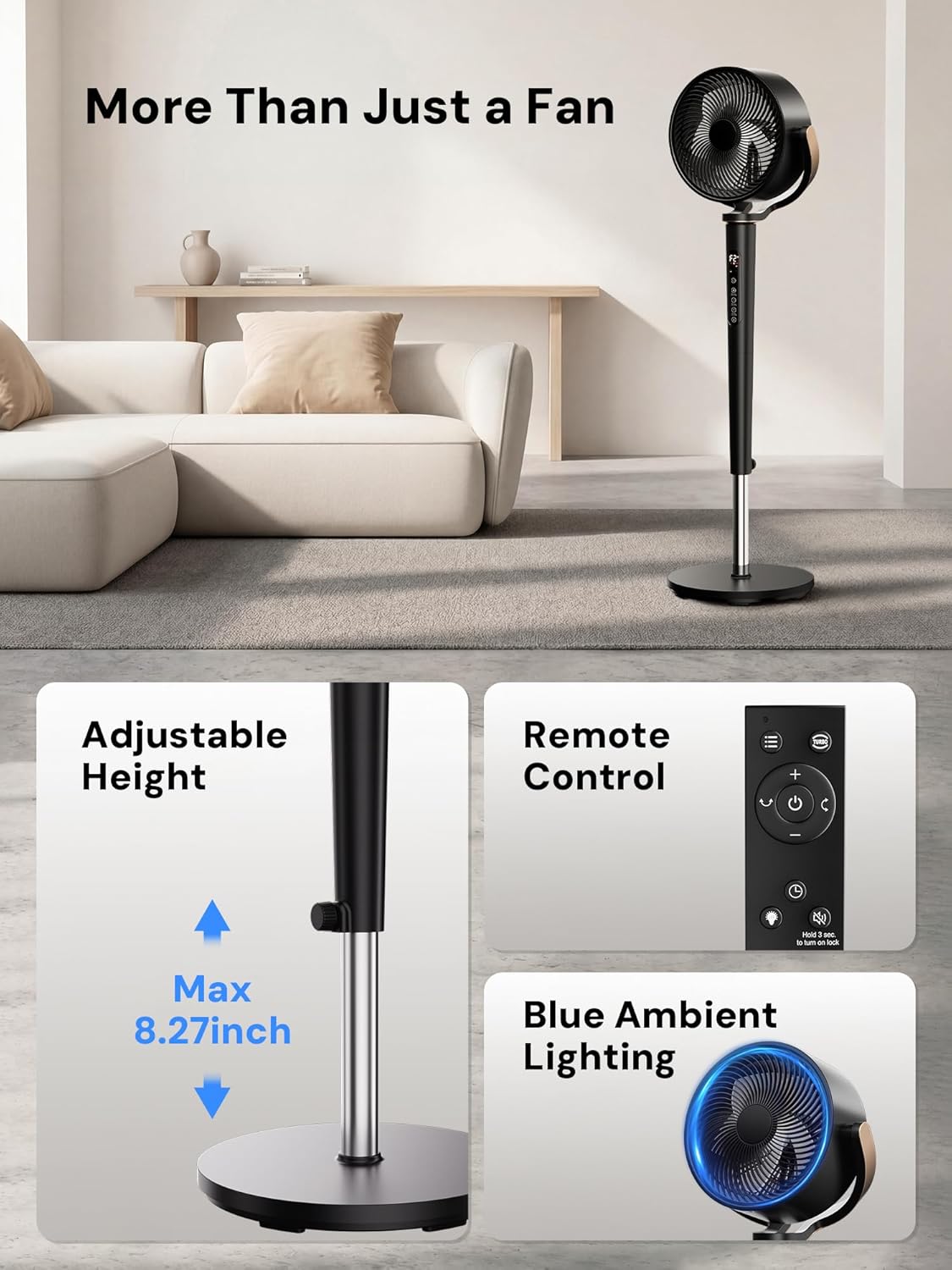
Figure 2: Key features including adjustable height, remote control, and ambient light.
Assembly Instructions
The KEGIAN Pedestal Fan is designed for easy assembly. Follow these steps:
- Base Attachment: Place the fan base on a flat surface. Insert the main pole into the base and secure it according to the markings.
- Fan Head Attachment: Carefully attach the fan head unit to the top of the main pole. Ensure it clicks securely into place.
- Power Connection: Plug the power cord into a standard 120V AC electrical outlet.
Your fan is now ready for operation.
Operating Instructions
Control Panel and Remote Control
The fan can be operated using the touch control panel on the unit or the included remote control. The remote control requires 2 AAA batteries (not included).

Figure 3: Fan control panel and remote control layout.
Power On/Off
- Press the Power button on the control panel or remote to turn the fan on or off.
Adjusting Fan Speed
The fan offers 16 speed settings.
- Press the Speed + or Speed - buttons on the control panel or remote to increase or decrease the fan speed.
Selecting Modes
The fan features 4 operating modes:
- ECO Mode: Automatically adjusts fan speed based on room temperature to optimize energy consumption.
- Turbo Mode: Provides instant maximum airflow for rapid cooling.
- Sleep Mode: Operates at progressively quieter speeds for undisturbed rest.
- Natural Mode: Simulates a natural breeze by varying fan speeds.
- Press the Mode button on the control panel or remote to cycle through the available modes.
Oscillation
The fan offers 120° horizontal and 120° vertical motorized oscillation for wide air distribution.

Figure 4: Fan oscillation range.
- Press the Oscillation button on the control panel or remote to activate or deactivate horizontal oscillation.
- Press the Vertical Oscillation button (if available on remote) or cycle through oscillation options on the control panel to activate or deactivate vertical oscillation.
Timer Function
Set the fan to automatically turn off after a specified period (1-12 hours).
- Press the Timer button on the control panel or remote to set the desired operating duration. Each press increases the timer by 1 hour.
Adjusting Height
The fan's height can be adjusted to suit your needs.
- Loosen the height adjustment knob/collar on the main pole.
- Adjust the pole to the desired height (up to 8.27 inches of adjustment).
- Tighten the knob/collar to secure the fan at the new height.
Ambient Night Lighting
The fan includes an ambient night light feature.
- Press the Light button on the control panel or remote to turn the ambient light on or off.
Child Lock
Activate the child lock to prevent unintended operation.
- Press and hold the Child Lock button (or indicated combination) on the control panel or remote for a few seconds to activate/deactivate.
Product Overview Video
Video: An overview of the KEGIAN Pedestal Fan, demonstrating its features and operation.
Maintenance
Regular cleaning helps maintain the fan's performance and extends its lifespan.
- Cleaning the Exterior: Wipe the exterior surfaces with a soft, damp cloth. Do not use abrasive cleaners or solvents.
- Cleaning the Grille and Blades: The front grille is removable for easy cleaning. Carefully remove the front grille and wipe the fan blades with a soft cloth. Ensure all parts are dry before reassembling.
- Storage: When not in use for extended periods, store the fan in a cool, dry place, preferably in its original packaging.
Caution: Always unplug the fan before cleaning.
Troubleshooting
If you encounter issues with your fan, refer to the following common problems and solutions:
| Problem | Possible Cause | Solution |
|---|---|---|
| Fan does not turn on. | No power supply. Power cord not properly plugged in. | Check if the power outlet is working. Ensure the power cord is securely plugged into the outlet and the fan. |
| Weak airflow. | Fan speed is too low. Grille or blades are dirty. | Increase the fan speed setting. Clean the fan grille and blades as per maintenance instructions. |
| Fan makes unusual noise. | Loose parts. Obstruction in fan blades. | Check for any loose components and tighten them. Ensure nothing is obstructing the fan blades. If rattling persists at high speeds, refer to the manufacturer for support. |
| Remote control not working. | Batteries are dead or incorrectly inserted. Obstruction between remote and fan. | Replace batteries with new ones, ensuring correct polarity. Remove any obstacles between the remote and the fan's receiver. |
| Oscillation not working. | Oscillation function is off. | Press the oscillation button to activate. |
Specifications
| Feature | Detail |
|---|---|
| Model Number | KE-DC76R |
| Brand | KEGIAN |
| Type | Pedestal Fan / Floor Fan |
| Power Source | Electric |
| Voltage | 120 Volts (AC) |
| Wattage | 50 watts |
| Number of Speeds | 16 |
| Operating Modes | ECO, Turbo, Sleep, Natural |
| Oscillation | 120° Horizontal, 120° Vertical |
| Timer | 1-12 Hours |
| Noise Level | 20 Decibels |
| Air Flow Capacity | 1200 Cubic Feet Per Minute (CFM) |
| Max Air Speed | 30 Feet Per Second |
| Product Dimensions (D x W x H) | 16"D x 16"W x 42"H |
| Adjustable Height | Up to 8.27 inches |
| Control Method | Remote, Touch Panel |
| Material | Acrylonitrile Butadiene Styrene (ABS) |
| Indoor/Outdoor Usage | Indoor |
| Certifications | ETL |
Warranty and Customer Support
For warranty information or customer support inquiries, please refer to the warranty card included with your purchase or contact KEGIAN directly through their official website or customer service channels. This manual does not contain specific warranty terms or contact details.
Ask a question about this manual
Ask about setup, troubleshooting, compatibility, parts, safety, or missing instructions. Manuals+ will review the question and use this page’s manual context to help answer it.