
1. Safety Instructions
Please read all instructions carefully before using this appliance and retain for future reference.
- Ensure the power supply voltage matches the rating label on the appliance.
- Do not immerse the appliance, cord, or plug in water or other liquids.
- Unplug from the outlet when not in use, before assembling or disassembling parts, and before cleaning.
- Keep the appliance out of reach of children and pets.
- Do not operate any appliance with a damaged cord or plug, or after the appliance malfunctions or has been damaged in any manner.
- Do not block air inlets or outlets.
- Use only on a flat, stable surface to prevent tipping.
- Do not use outdoors or in wet conditions.
- Always ensure the water tank is securely latched before moving the unit.
2. Product Overview
Features
- 3-in-1 Functionality: Operates as an evaporative air cooler, fan, and humidifier.
- Powerful Airflow: Delivers 1800 CFM with a 34 ft/s wind speed, covering up to 600 sq.ft and reaching up to 60 ft.
- Dual Control: Features an intuitive LED touch panel and a remote control for convenient operation.
- Multiple Settings: Offers 3 fan speeds (High/Medium/Low) and 4 modes (Normal/Natural/Sleep/Cooling).
- 12-Hour Timer: Allows for programmed shutoff.
- Quiet Operation: Operates at a low noise level of 35dB, ideal for bedrooms.
- Ambient Light: Integrated LED light strip in the water tank for soft illumination, with an option to turn off the display.
- Large Water Tank: 4-gallon detachable water tank with a top-fill design and visible water level indicator.
- Ice Pack Compatibility: Includes 4 ice packs for enhanced cooling.
- Wide-Angle Oscillation: Automatic 120° horizontal oscillation and manual 100° vertical louvers for even air distribution.
- Easy Mobility: Equipped with four smooth-rolling wheels and two side handles.
- Simple Maintenance: Detachable back frame for easy access to the cooling pad and a rear drain port.
- Bladeless Design: Safe for homes with children and pets.
- Auto Water Protection: Automatically stops the water pump in cooling mode when the tank is low.
Components
- Main Unit (Air Cooler)
- Detachable Water Tank
- Remote Control
- Ice Packs (4 included)
- Swivel Casters (4 included)
- User Manual (This document)
3. Setup
Unboxing and Initial Assembly
- Carefully remove the air cooler from its packaging.
- Attach the four swivel casters to the bottom of the water tank for easy mobility.
- Ensure the main unit is securely placed and latched onto the water tank.
Filling the Water Tank
The KEGIAN JH-130Y features a 4-gallon detachable water tank for easy filling and maintenance.
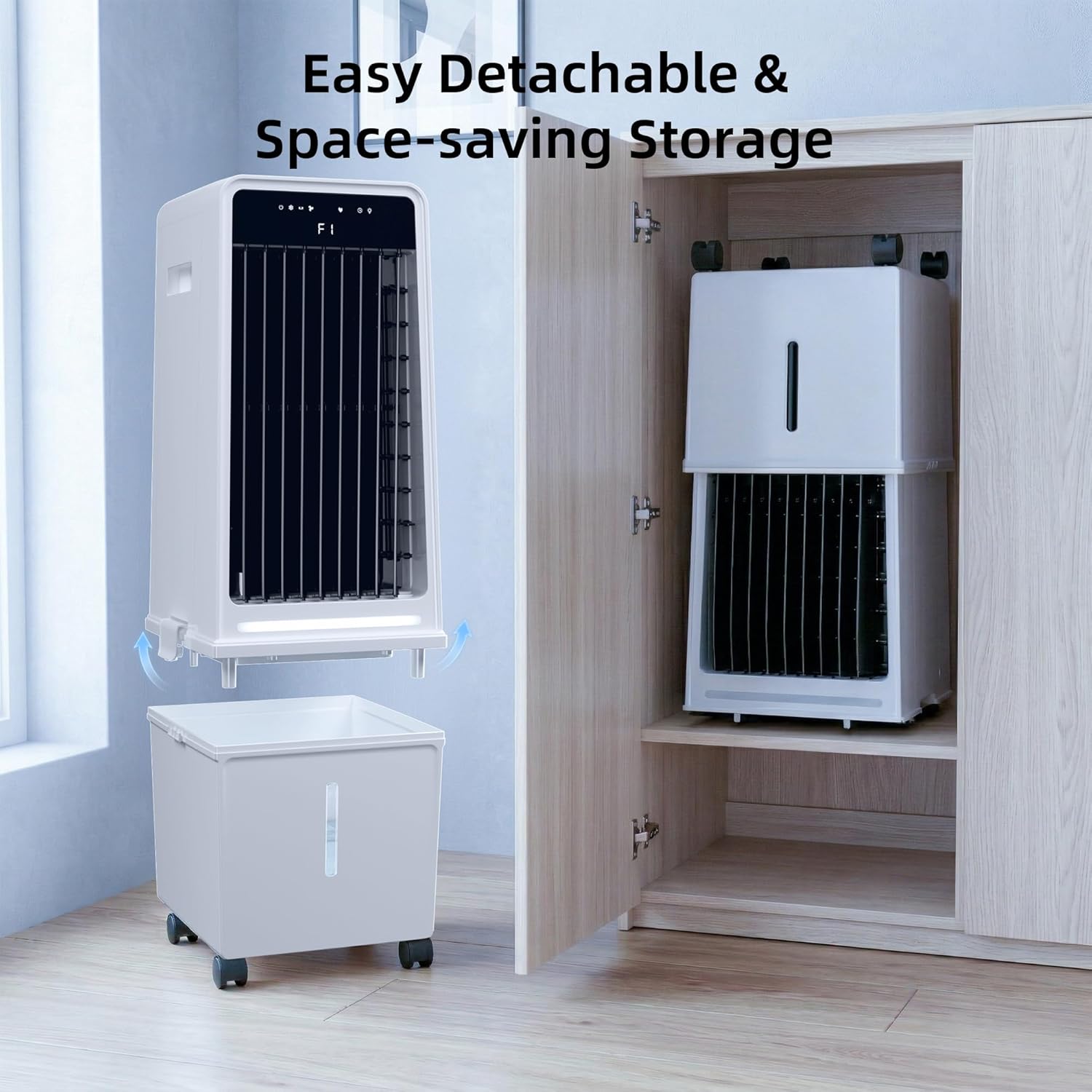
- Unlatch the main unit from the water tank and lift it off.
- Fill the water tank with clean water. The visible water level indicator helps prevent overfilling.
- For enhanced cooling, place the included ice packs into the upper water tank area before adding water.
- Carefully place the main unit back onto the water tank and secure the side latches.

Remote Control Setup
The remote control requires 2 AAA batteries (not included). Insert them according to the polarity markings inside the battery compartment.
4. Operating Instructions
The KEGIAN JH-130Y can be operated using the LED touch panel on the unit or the included remote control.
Power On/Off
- Plug the power cord into a suitable electrical outlet.
- Press the Power button on the control panel or remote to turn the unit on or off.
Fan Speed and Modes
Choose from 3 fan speeds (Low, Medium, High) and 4 operating modes (Normal, Natural, Sleep, Cooling).
- Fan Speed: Press the Speed button to cycle through Low, Medium, and High settings.
- Modes: Press the Mode button to select Normal (constant airflow), Natural (simulates natural breeze), Sleep (quieter operation with dimmable display), or Cooling (evaporative cooling with water pump active).

Oscillation
Activate oscillation for wider air distribution.
- Press the Swing button on the control panel or remote to activate automatic 120° horizontal oscillation.
- Manually adjust the vertical louvers up to 100° to direct airflow vertically.

Timer Function
Set the timer for automatic shutoff.
- Press the Timer button to set the desired operating duration, up to 12 hours. The unit will automatically turn off after the set time.
Ambient Light and Display
Control the ambient light and display brightness.
- Press the Light button to turn the ambient light on or off.
- In Sleep mode, the display can be turned off for undisturbed rest.

Product Demonstration Video
Video: KEGIAN 1800CFM Windowless Air Conditioner - A comprehensive overview of the product's functions and ease of use.
5. Maintenance
Regular maintenance ensures optimal performance and longevity of your air cooler.
Cleaning the Cooling Pad
- Unplug the unit from the power outlet.
- Remove the detachable back frame to access the cooling pad.
- Gently rinse the cooling pad under running water to remove dust and mineral buildup.
- Allow the cooling pad to air dry completely before reinserting it.
Draining the Water Tank
- Unplug the unit.
- Locate the rear drain port at the bottom of the water tank.
- Open the drain plug and allow all water to empty into a suitable container.
- Close the drain plug securely after emptying.
Storage
When not in use for extended periods, drain the water tank and clean the unit. The detachable design allows for space-saving storage.
6. Troubleshooting
If you encounter issues with your KEGIAN JH-130Y, please refer to the following common problems and solutions:
| Problem | Possible Cause | Solution |
|---|---|---|
| Unit does not power on. | No power supply; power cord not properly connected. | Check if the unit is plugged into a working outlet. Ensure the power cord is securely connected. |
| No cool air/Weak airflow. | Water tank empty; cooling pad dirty; fan speed too low; ice packs not used. | Fill the water tank. Clean the cooling pad. Increase fan speed. Add ice packs to the water tank. |
| Water leakage. | Water tank not properly secured; drain plug open or loose; overfilled water tank. | Ensure the water tank is correctly latched. Check and secure the drain plug. Do not overfill the water tank. |
| Remote control not working. | Batteries depleted or incorrectly inserted; obstruction between remote and unit. | Replace batteries. Check battery polarity. Ensure no obstructions are blocking the signal. |
| Unusual noise. | Unit not on a flat surface; foreign object inside; water pump issue. | Place the unit on a stable, flat surface. Check for and remove any foreign objects. If noise persists, contact support. |
7. Specifications
| Feature | Specification |
|---|---|
| Brand | KEGIAN |
| Model Name | Portable Air Cooler (JH-130Y) |
| Material | Polypropylene (PP) |
| Mounting Type | Freestanding |
| Color | White |
| Air Flow Capacity | 1800 Cubic Feet Per Minute (CFM) |
| Reservoir Capacity | 4 Gallons |
| Item Weight | 13.2 Pounds |
| Wattage | 90 watts |
| Noise Level | 35 Decibels |
| Number of Speeds | 3 |
| Voltage | 120 Volts |
| Item Dimensions (D x W x H) | 11.34"D x 11.18"W x 30"H |
8. Warranty and Support
For warranty information or technical support, please contact KEGIAN customer service. Refer to the product packaging or the official KEGIAN website for contact details.
Keep your purchase receipt as proof of purchase for any warranty claims.