
1. Safety Information
Please read all safety instructions carefully before operating the Garvee Portable Air Conditioner. Failure to follow these instructions may result in electric shock, fire, or personal injury.
- Ensure the power supply matches the voltage requirements specified on the unit's label.
- Do not operate the unit with a damaged power cord or plug. If damaged, contact qualified service personnel.
- Do not insert fingers or objects into the air inlet or outlet grilles.
- Keep the unit at least 20 inches (50 cm) away from walls or other objects to ensure proper airflow.
- Do not use the unit in wet environments such as bathrooms or laundry rooms.
- Always unplug the unit before cleaning or performing any maintenance.
- This appliance is not intended for use by persons (including children) with reduced physical, sensory or mental capabilities, or lack of experience and knowledge, unless they have been given supervision or instruction concerning use of the appliance by a person responsible for their safety.
- Children should be supervised to ensure that they do not play with the appliance.
- Do not use chemical solvents (e.g., benzene, alcohol, gasoline) to clean the unit. This may damage the surface and internal components.
- The unit contains R-32 refrigerant. Do not attempt to service the refrigerant system yourself. Contact qualified personnel for service.
2. Product Overview
The Garvee 12,000 BTU Portable Air Conditioner is a versatile 3-in-1 unit designed to provide cooling, dehumidification, and fan functions for rooms up to 550 sq. ft.
2.1 Components and Features
- 3-in-1 Functionality: Offers Cooling, Dehumidifier, and Fan modes for year-round comfort.
- Sleep-Friendly Design: Features a Sleep mode and a 1-24 hour programmable timer. Operates quietly at less than 51dB.
- Adjustable Fan Speeds: Three fan speeds (Low, Medium, High) for personalized airflow.
- Easy Installation: Includes an exhaust hose and an adjustable window kit (fits windows from 9 to 47 inches).
- Low Maintenance: Self-evaporating operation minimizes the need for manual water draining.
- Washable Filter: Easily removable and washable filter for improved air quality and unit efficiency.
- Portability: Equipped with smooth-rolling casters for easy movement between rooms.
- Remote Control: Allows convenient operation from a distance.
2.2 What's in the Box
- Garvee Portable Air Conditioner Unit
- Exhaust Hose
- Window Installation Kit (Adjustable from 9 to 47 inches)
- Remote Control
- User Manual
2.3 Unit Dimensions and Weight
- Dimensions (D x W x H): 14.2" x 16.6" x 28.35"
- Weight: 73 Pounds
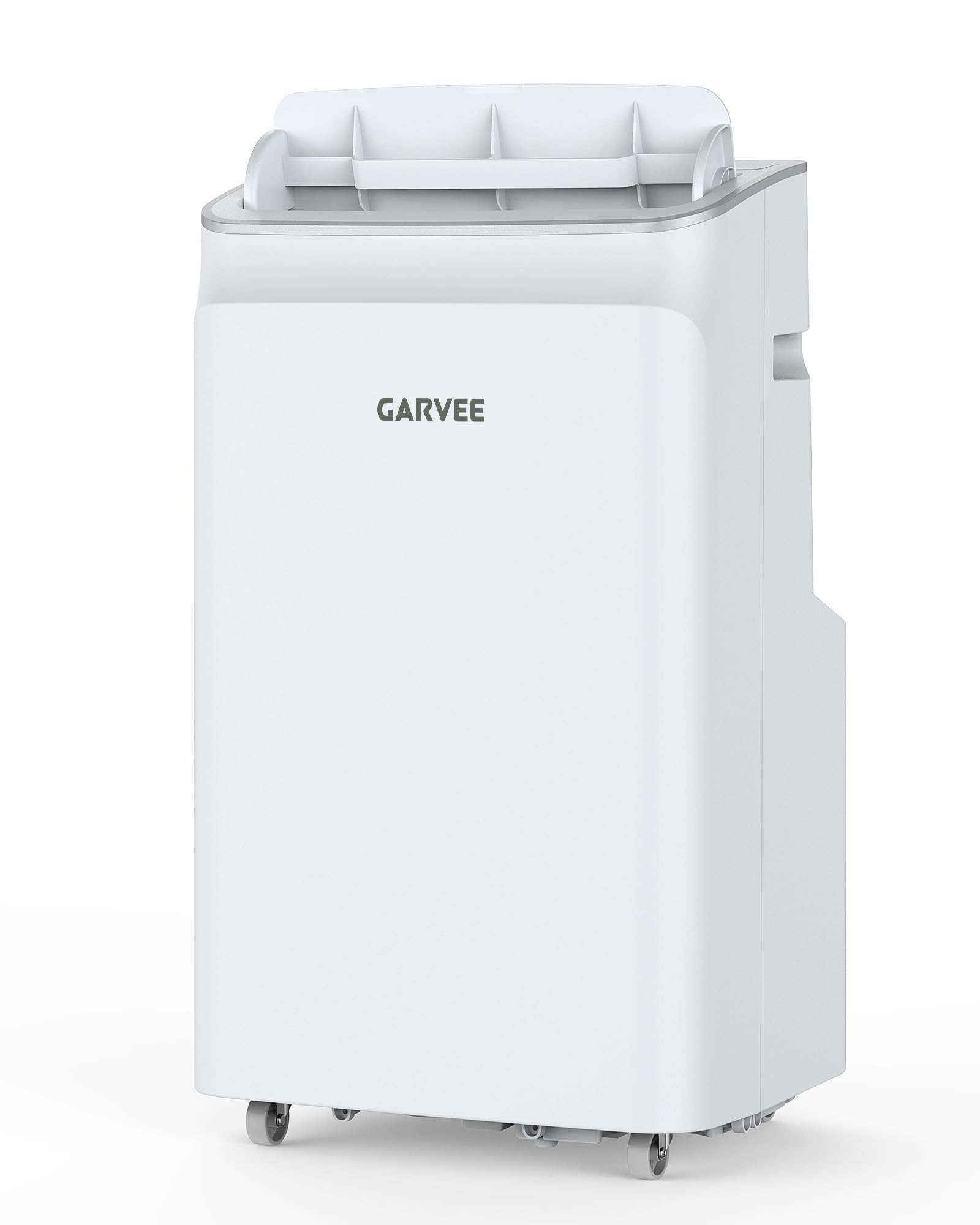
Figure 1: Front view of the Garvee 12,000 BTU Portable Air Conditioner. The unit is white with a control panel on top and an air outlet grille at the front.
3. Setup and Installation
Follow these steps to set up your portable air conditioner. No special tools are required.
3.1 Positioning the Unit
- Place the unit on a flat, stable surface.
- Ensure there is at least 20 inches (50 cm) of clear space around the unit for proper air circulation.
- Position the unit near a window for exhaust hose installation and a grounded electrical outlet.
3.2 Installing the Window Kit
- Open the window where you intend to install the exhaust kit.
- Assemble the window sealing plate kit. The kit is adjustable to fit windows from 9 to 47 inches. Extend the adjustable panel to fit the window opening.
- Place the assembled window sealing plate into the window opening and close the window securely against it.
- Connect one end of the exhaust hose to the unit's exhaust outlet.
- Connect the other end of the exhaust hose to the adapter on the window sealing plate. Ensure both connections are secure to prevent air leakage.
- Extend the exhaust hose as straight as possible to minimize bends, which can reduce efficiency.
Note: For optimal performance, ensure the exhaust hose is not excessively long or bent sharply, as this can impede airflow and reduce cooling efficiency.
4. Operation
Your Garvee Portable Air Conditioner offers three operating modes: Cool, Dehumidify, and Fan. It can be controlled via the control panel on the unit or the included remote control.
4.1 Control Panel and Remote Control
The control panel on top of the unit features buttons for Power, Mode, Fan Speed, Timer, and Temperature adjustment. The remote control duplicates these functions for convenience.
- Power Button: Turns the unit ON or OFF.
- Mode Button: Cycles through Cool, Dehumidify, and Fan modes.
- Fan Speed Button: Adjusts fan speed (Low, Medium, High) in Cool and Fan modes.
- Timer Button: Sets the auto-on or auto-off timer (1-24 hours).
- Temperature Up/Down Buttons: Adjusts the desired temperature in Cool mode (61°F - 88°F).
- Sleep Mode Button (Remote Only): Activates Sleep mode for quiet operation and gradual temperature adjustment during sleep.
4.2 Operating Modes
- Cool Mode:
Select Cool mode to lower the room temperature. Use the Up/Down buttons to set your desired temperature between 61°F and 88°F. The unit will cool until the set temperature is reached, then cycle on and off to maintain it. Adjust fan speed as desired.
- Dehumidify Mode:
In Dehumidify mode, the unit removes excess moisture from the air. The fan speed is typically set to low and cannot be adjusted in this mode. The unit will operate to reduce humidity levels.
- Fan Mode:
Fan mode circulates air without cooling. Use this mode for air circulation or when a gentle breeze is desired. Adjust fan speed (Low, Medium, High) to your preference.
4.3 Sleep Mode
Activate Sleep mode for quiet operation and energy saving during sleep. In Cool mode, the set temperature will increase by 1°F after 30 minutes, and by another 1°F after another 30 minutes. This new temperature will be maintained for 7 hours before the unit returns to its original settings. The fan speed will automatically adjust to low.
4.4 Timer Function
The 24-hour timer allows you to program the unit to turn ON or OFF automatically. Press the Timer button and use the Up/Down buttons to set the desired number of hours (1-24) for the unit to turn on or off.
5. Maintenance and Cleaning
Regular maintenance ensures optimal performance and extends the lifespan of your Garvee Portable Air Conditioner.
5.1 Cleaning the Air Filter
The air filter should be cleaned every two weeks or more frequently depending on usage and air quality.
- Unplug the unit from the power outlet.
- Locate the air filter panel (usually at the back or side of the unit).
- Gently slide out the air filter.
- Wash the filter under running water (warm, not hot) or use a vacuum cleaner to remove dust.
- Allow the filter to air dry completely before reinserting it into the unit. Do not expose to direct sunlight.
- Reinsert the dry filter and close the panel.
Note: Never operate the unit without the air filter installed.
5.2 Cleaning the Unit Exterior
- Unplug the unit before cleaning.
- Wipe the exterior with a soft, damp cloth.
- Do not use harsh chemicals, abrasives, or solvents, as these can damage the surface.
- Ensure no water enters the internal components.
5.3 Self-Evaporating System
This unit features a self-evaporating system, which means most of the condensed water is recycled to cool the condenser coils, improving efficiency and eliminating the need for manual draining under normal operating conditions. In very high humidity environments, the internal water tank may fill. If this occurs, the unit will stop operating and display an error code (e.g., "FL" for Full Water). Refer to the troubleshooting section for draining instructions.
6. Troubleshooting
Before contacting customer support, please refer to the following troubleshooting guide for common issues.
| Problem | Possible Cause | Solution |
|---|---|---|
| Unit does not turn on. | No power supply. Power cord not plugged in. Circuit breaker tripped. | Ensure unit is plugged into a working outlet. Check circuit breaker and reset if necessary. Press the Power button on the control panel or remote. |
| Unit is running but not cooling. | Window kit not properly installed. Room temperature is too low. Air filter is dirty. Exhaust hose is blocked or bent. Doors/windows are open. | Ensure window kit and exhaust hose are sealed. Set desired temperature lower than current room temperature. Clean the air filter. Check and clear any obstructions in the exhaust hose. Close all doors and windows in the room. |
| Unit is noisy. | Unit is not on a level surface. Air filter is dirty. Internal components vibrating. | Place the unit on a flat, level surface. Clean the air filter. If noise persists, contact customer support. |
| "FL" or "P1" error code displayed. | Water tank is full. | Turn off the unit and unplug it. Move the unit to a drain location. Remove the drain plug from the bottom of the unit and allow water to drain completely. Replace the drain plug securely. Restart the unit. |
| Remote control not working. | Batteries are dead or incorrectly inserted. Obstruction between remote and unit. | Replace batteries with new ones, ensuring correct polarity. Remove any obstructions. Ensure remote is pointed at the unit's receiver. |
7. Specifications
| Feature | Specification |
|---|---|
| Model Name | KKO-36678C-1 |
| Brand | Garvee |
| Cooling Power | 12,000 BTU |
| Coverage Area | Up to 550 sq. ft. |
| Functions | Cool, Dehumidifier, Fan |
| Temperature Range | 61°F - 88°F |
| Dehumidifier Capacity | 70 Pints |
| Noise Level | 50 Decibels |
| Voltage | 115 Volts |
| Wattage | 1099 watts |
| Refrigerant | R-32 |
| Product Dimensions (D x W x H) | 14.2" x 16.6" x 28.35" |
| Item Weight | 73 Pounds |
| Controller Type | Remote Control |
| Window Kit Adjustment | 9 - 47 inches |
| Annual Energy Consumption | 831 Kilowatt Hours Per Year |
8. Warranty and Support
The Garvee Portable Air Conditioner (Model KKO-36678C-1) comes with a 5 Years Manufacturer Warranty.
For warranty claims, technical support, or any questions regarding your product, please contact Garvee customer service. Refer to the product packaging or the official Garvee website for the most current contact information.
When contacting support, please have your model number (KKO-36678C-1) and purchase date available.