
1. Safety Information
Important: The maximum weight recommendation for this chair is 300 pounds. Ensure the chair is used within this safe limit to prevent damage or injury. Always follow assembly instructions carefully and inspect the chair regularly for any loose parts or damage.
2. Product Overview
The COLAMY Office Chair (Model ocm03-bk01) is designed for extended periods of use, offering ergonomic support and multiple adjustment features. This chair includes a breathable mesh backrest, a cushioned seat, and a robust construction for durability.

Image: COLAMY Office Chair in a modern office setting, showcasing its design and presence.
Key Features:
- Easy Wire-Control Mechanism for height and tilt adjustment.
- Sliding Seat Depth for customized leg support.
- Thick Padded Lumbar Support, vertically adjustable.
- 4D Adjustable Armrests (height, width, depth, pivot).
- Weight-Activated Auto-Tension Tilt for seamless recline.
- Breathable Mesh Backrest and Cushioned Seat.
- Heavy-Duty construction with a 300 lbs weight capacity.
3. Assembly Instructions
Assembly of the COLAMY Office Chair is designed to be straightforward. Please ensure all components are present before beginning.
Components Checklist:
- Backrest
- Seat Cushion
- Armrests (2)
- Gas Lift Cylinder
- Star Base
- Casters (5)
- Mounting Hardware (screws, washers, Allen wrench)
Step-by-Step Assembly:
- Attach Casters: Insert the five casters into the holes at the end of each leg of the star base until they click securely into place.
- Insert Gas Lift: Place the gas lift cylinder into the center hole of the star base.
- Attach Armrests to Seat: Secure the armrests to the underside of the seat cushion using the provided screws. Ensure they are firmly attached.
- Attach Backrest to Seat: Align the backrest with the seat cushion and secure it using the designated screws.
- Connect Seat Assembly to Gas Lift: Carefully place the assembled seat and backrest onto the gas lift cylinder, ensuring it is centered and stable.
- Final Check: Verify all screws are tightened and the chair is stable before use.
Video: Official COLAMY video demonstrating the assembly and adjustable features of the ergonomic office chair.
4. Operating Instructions
The COLAMY Office Chair offers various adjustments to customize your seating experience for optimal comfort and ergonomic support.
4.1. Seat Height Adjustment
To adjust the seat height, locate the wire-control lever on the side of the chair.
- To raise the seat: While standing, pull the lever upwards. The seat will rise. Release the lever at the desired height.
- To lower the seat: While seated, pull the lever upwards. The seat will lower. Release the lever at the desired height.
4.2. Seat Depth Adjustment
The sliding seat depth feature allows you to adjust the seat pan forward or backward to accommodate different leg lengths and ensure proper thigh support.
- Locate the seat depth adjustment lever, typically found on the side or front-underside of the seat.
- Pull the lever to unlock the seat pan.
- Slide the seat forward or backward to achieve a comfortable distance, ensuring a gap of about two to three fingers between the edge of the seat and the back of your knees.
- Release the lever to lock the seat in position.

Image: A user demonstrating the seat depth adjustment feature, highlighting how it relieves leg pressure.
4.3. Lumbar Support Adjustment
The thick-padded lumbar support can be adjusted vertically to align with the natural curve of your spine.
- Grasp the lumbar support pad on the backrest.
- Gently push it up or down to find the position that best supports your lower back.
- The support will hold its position once released.

Image: Two individuals seated in COLAMY office chairs, illustrating the effective lumbar support for natural spine alignment.
4.4. 4D Armrest Adjustment
The armrests offer four-dimensional adjustments for personalized comfort and support.
- Height Adjustment: Press the button on the side of the armrest and move it up or down. Release the button to lock.
- Width Adjustment: Slide the armrest pads inward or outward.
- Depth Adjustment: Slide the armrest pads forward or backward.
- Pivot Adjustment: Rotate the armrest pads left or right.

Image: A detailed diagram illustrating the various adjustments available for the 4D armrests, including height, width, depth, and pivot.
4.5. Recline and Tilt Lock
The chair features a weight-activated auto-tension tilt mechanism and a tilt lock function.
- Reclining: Lean back in the chair. The auto-tension mechanism will adjust resistance based on your body weight.
- Tilt Lock: Use the wire-control lever (often the same one for height) to lock the backrest in an upright or reclined position. Push the lever inwards to lock, pull outwards to unlock and allow recline.
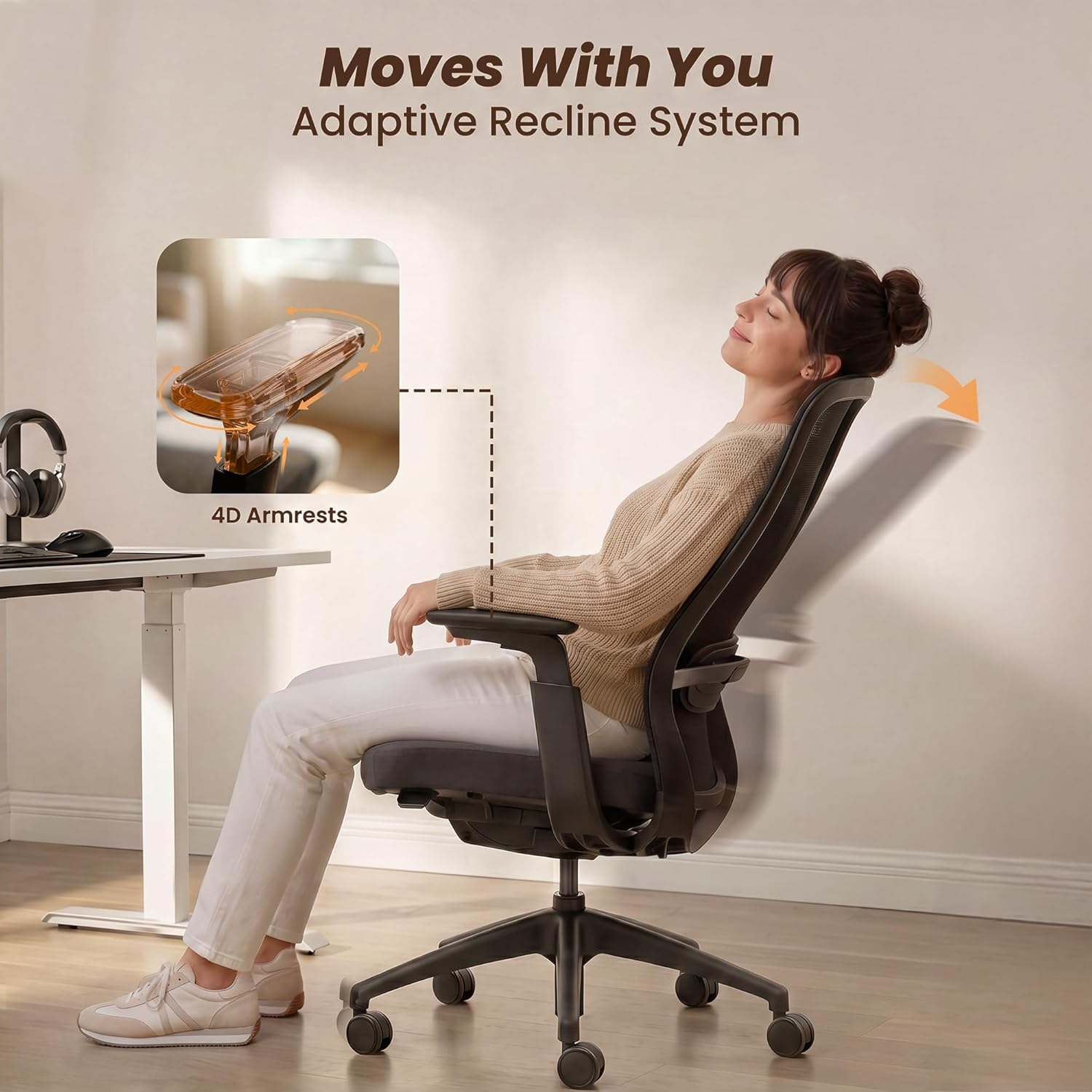
Image: A person comfortably reclining in the COLAMY office chair, demonstrating the adaptive recline system.
4.6. Swivel Function
The chair is equipped with a 360-degree swivel base, allowing for easy rotation and movement within your workspace. Simply rotate the chair as needed.
4.7. Retractable Footrest (if applicable)
Some models may include a retractable footrest. If present, locate the handle or mechanism beneath the seat. Pull it outwards to extend the footrest and push it back in to retract.
5. Maintenance and Care
Regular maintenance helps prolong the life and appearance of your COLAMY Office Chair.
- Cleaning Mesh and Fabric: Use a soft cloth dampened with mild soap and water to clean the mesh backrest and fabric seat. Avoid abrasive cleaners or harsh chemicals.
- Cleaning Plastic and Metal Parts: Wipe plastic and metal components with a damp cloth.
- Caster Maintenance: Periodically check casters for accumulated hair or debris and clean them to ensure smooth rolling.
- Tighten Fasteners: Every few months, check all screws and bolts and tighten them if necessary to maintain stability.
- Avoid Direct Sunlight: Prolonged exposure to direct sunlight can fade fabric and mesh.
6. Troubleshooting
If you encounter any issues with your COLAMY Office Chair, refer to the following common problems and solutions.
| Problem | Possible Cause | Solution |
|---|---|---|
| Chair does not adjust height. | Gas lift cylinder malfunction or lever not engaged. | Ensure the height adjustment lever is fully pulled. If the issue persists, the gas lift may need replacement. |
| Chair makes noise (squeaking/creaking). | Loose fasteners or friction between components. | Tighten all screws and bolts. Apply a small amount of silicone lubricant to moving parts if necessary. |
| Chair feels unstable or wobbly. | Loose connections or damaged base/casters. | Check and tighten all assembly screws. Inspect the star base and casters for any damage. |
| Difficulty reclining or locking tilt. | Tilt mechanism not engaged or tension knob too tight/loose. | Ensure the tilt lock lever is in the correct position. For auto-tension, verify the mechanism is functioning freely. |
| Casters do not roll smoothly. | Debris caught in casters. | Remove any hair, dust, or debris from the caster wheels. |
7. Specifications
| Feature | Detail |
|---|---|
| Model Name | ocm03-bk01 |
| Brand | COLAMY |
| Color | Black |
| Material | Foam, Mesh, Plastic, Polyurethane |
| Product Dimensions (D x W x H) | 22.24"D x 28.74"W x 43.9"H |
| Item Weight | 35.6 pounds |
| Maximum Weight Recommendation | 300 pounds |
| Seat Height | Adjustable, up to 22.24 inches (max) |
| Seat Depth | Adjustable, up to 19.09 inches (max) |
| Back Style | Mid-Back |
| Arm Style | 4D Adjustable Arms |
| Recommended Uses | Office, Study |

Image: Front and side views with detailed product dimensions and weight capacity.
8. Warranty and Support
For information regarding warranty coverage, product support, or to purchase replacement parts, please contact COLAMY customer service directly. Refer to the product packaging or the official COLAMY website for contact details.


