
1. Introduction
Thank you for choosing the LEADZM GPP-106/BD-887 88-Key Foldable Digital Piano. This instrument is designed to provide a realistic playing experience with its semi-weighted keys and versatile features, including dual Bluetooth connectivity, a wide range of tones and rhythms, and learning modes. This manual will guide you through the setup, operation, and maintenance of your new digital piano.
Package Contents:
- LEADZM GPP-106/BD-887 Digital Piano
- Carrying Case
- Sustain Pedal
- Music Stand
- Microphone
- Headphones
- Power Adapter
- User Manual (this document)
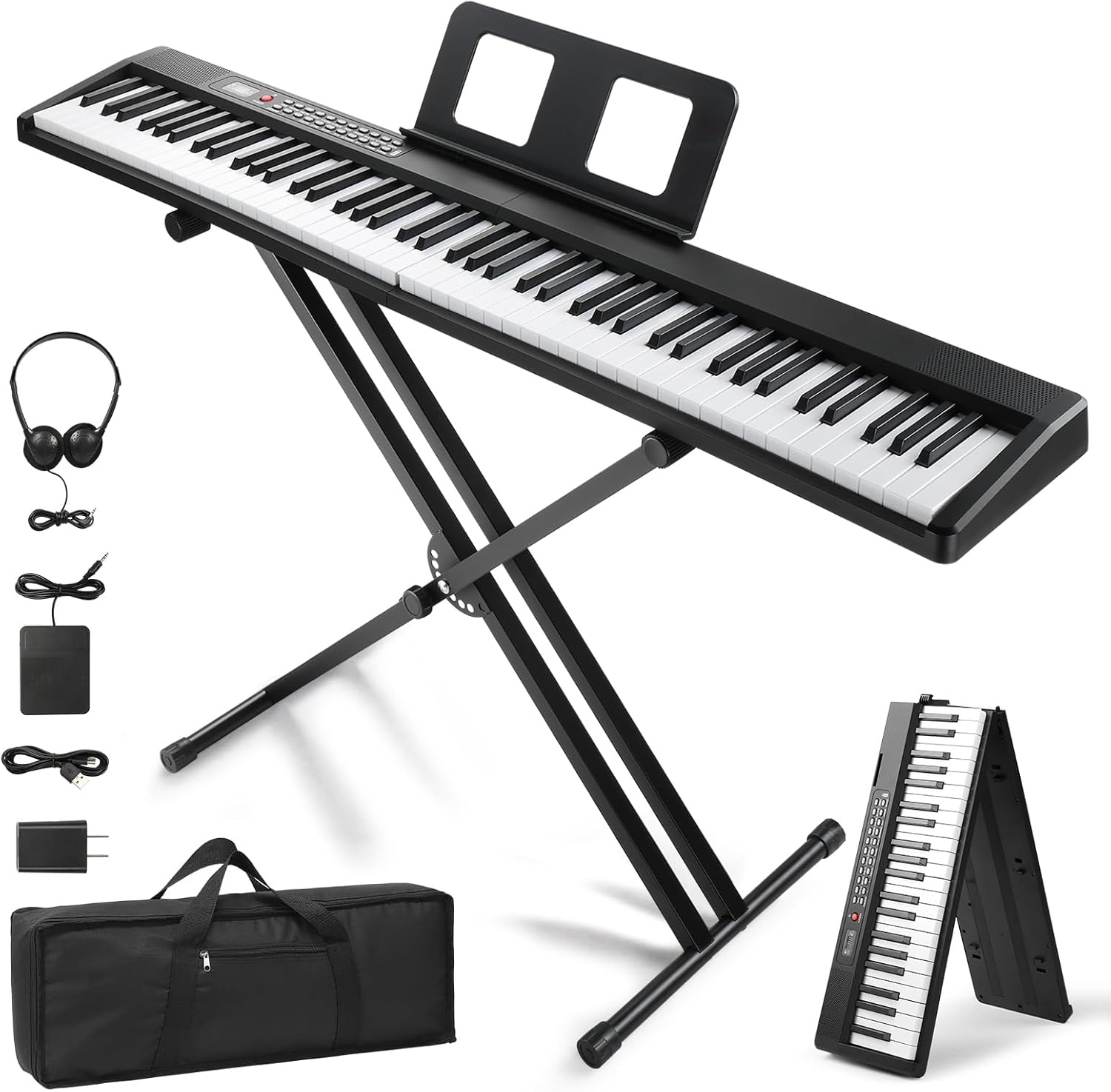
Image 1.1: The LEADZM GPP-106/BD-887 Digital Piano with its included accessories, including the foldable stand, sustain pedal, music stand, microphone, and headphones.
2. Safety Instructions
Please read and follow these safety instructions carefully to ensure safe operation and prolong the life of your instrument:
- Do not expose the piano to direct sunlight, high temperatures, or excessive humidity.
- Avoid placing the piano near heat sources such as radiators or stoves.
- Do not use or store the piano in dusty or dirty environments.
- Keep the piano away from water or other liquids. Do not operate with wet hands.
- Use only the provided power adapter. Ensure the voltage matches your local power supply.
- Do not attempt to disassemble or modify the piano. Refer all servicing to qualified personnel.
- Keep out of reach of small children to prevent accidents.
- Unplug the power adapter during lightning storms or when not in use for extended periods.
3. Product Overview
Familiarize yourself with the main components and controls of your digital piano.
Key Features:
- 88 Semi-Weighted Keys: Provides a realistic piano feel with responsive touch.
- 1000 Tones & 1000 Rhythms: A vast library of sounds and accompaniment styles.
- 50 Demo Songs: Pre-recorded songs for listening and learning.
- Dual Bluetooth Mode: Connects to smart devices for MIDI and audio functions.
- Recording & Playback: Capture your performances.
- Dual-Keyboard Mode: Splits the keyboard for two players or different instrument sounds.
- Transposition: Adjust the pitch of the keyboard.
- Built-in Stereo Speakers: For clear and rich sound output.
- Headphone Jack: For private practice.
- Microphone Input: For vocal accompaniment.
- USB MIDI Connectivity: Connect to computers and other MIDI devices.
- Foldable Design: For easy portability and storage.

Image 3.1: Overview of the digital piano's powerful functions, including 32 polyphony, 150 demo songs, 1000 rhythms, 1000 tones, 2 stereo speakers, Bluetooth, dual-keyboard mode, recording, transposition, and MIDI.

Image 3.2: Detail of the semi-weighted keyboard, designed to simulate the feel of an acoustic piano, with a graphic explaining key velocity and touch response.
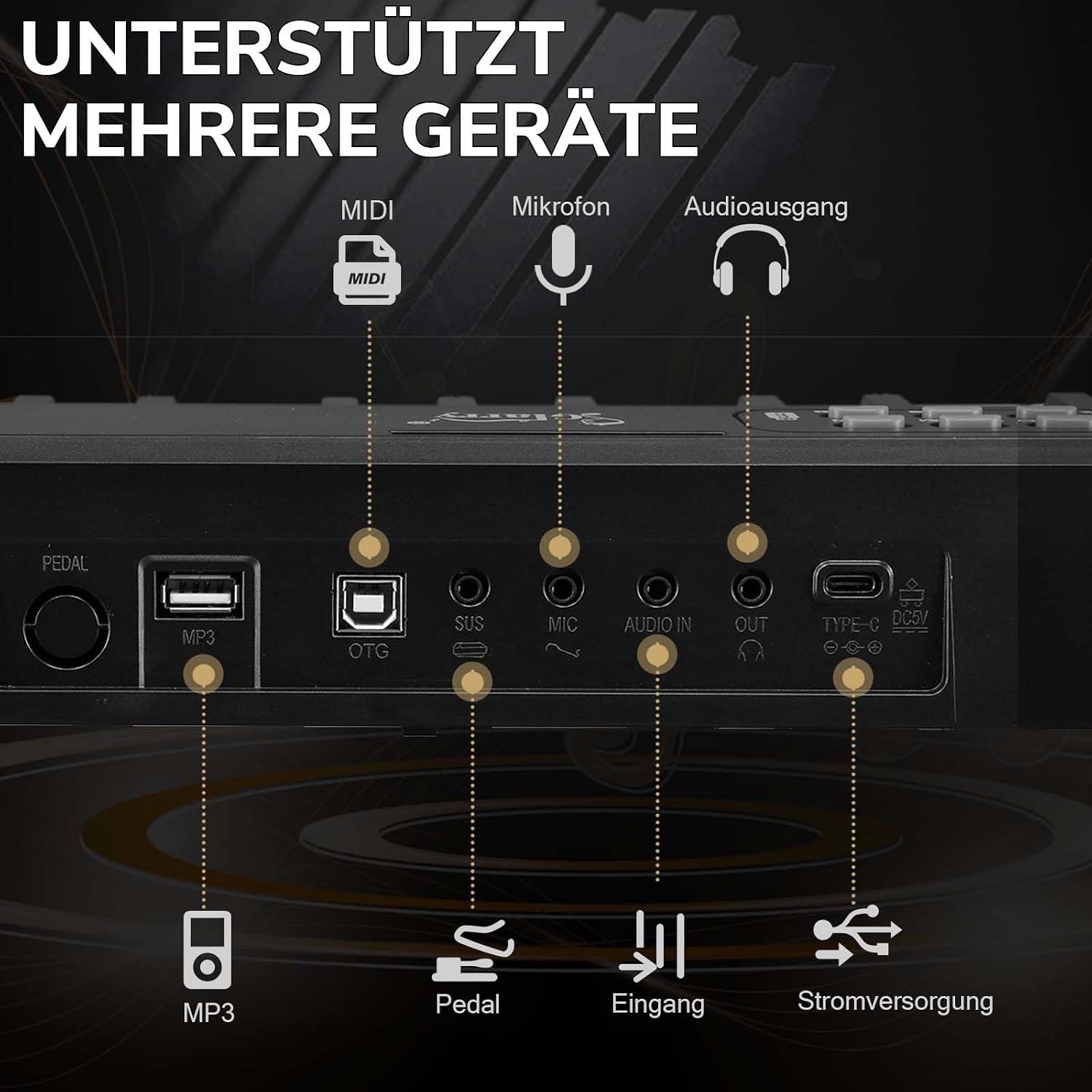
Image 3.3: The rear panel of the piano, highlighting connectivity options such as MIDI, microphone input, audio output, USB for MP3, pedal input, and power supply (Type-C DC5V).
4. Setup
4.1 Unpacking and Placement
- Carefully remove all components from the packaging.
- Place the piano on a stable, flat surface. If using the included stand, ensure it is properly assembled and adjusted.
4.2 Assembling the X-Stand (if included)
The included double X-stand is height-adjustable. Follow these steps to set it up:
- Unfold the X-stand to its desired width.
- Adjust the height using the locking mechanism. There are 7 adjustable height settings to find your comfortable playing position (ranging from approximately 27cm to 94cm for the top bar).
- Ensure all locking pins are securely engaged before placing the piano on top.

Image 4.1: The 8-fold height-adjustable double X-stand, illustrating its robust design and adjustable height range for optimal playing comfort.
4.3 Connecting Peripherals
- Power: Connect the power adapter to the DC5V Type-C port on the rear panel of the piano, then plug it into a wall outlet.
- Sustain Pedal: Plug the sustain pedal into the 'PEDAL' input on the rear panel.
- Music Stand: Insert the music stand into the designated slots on the top panel of the piano.
- Headphones: For private practice, plug your headphones into the 'OUT' (Audio Out) jack.
- Microphone: Connect the included microphone to the 'MIC' input.
5. Operating Instructions
5.1 Power On/Off
- To power on, press the POWER button. The display will light up.
- To power off, press and hold the POWER button until the display turns off.
5.2 Volume Control
Use the VOLUME knob or buttons (if present) to adjust the overall output volume of the piano.
5.3 Selecting Tones (Voices)
Your piano features 1000 standard international tones. To select a tone:
- Press the TONE button.
- Use the number pad or +/- buttons to enter the desired tone number.
- Press ENTER (if applicable) or wait a few seconds for the selection to apply.
5.4 Selecting Rhythms (Accompaniments)
The piano includes 1000 rhythms. To select a rhythm:
- Press the RHYTHM button.
- Use the number pad or +/- buttons to enter the desired rhythm number.
- Press START/STOP to begin or end the rhythm.
- Adjust the tempo using the TEMPO buttons.
5.5 Playing Demo Songs
There are 50 demonstration songs available. To play a demo song:
- Press the DEMO button.
- Use the number pad or +/- buttons to select a demo song.
- The song will start playing automatically. Press DEMO again to stop.
5.6 Recording and Playback
To record your performance:
- Press the RECORD button. The record indicator will light up.
- Begin playing. Your performance will be recorded.
- Press RECORD again to stop recording.
To play back your recorded performance:
- Press the PLAY button.
5.7 Learning Modes
The piano offers three learning modes to assist beginners. Refer to the specific instructions on the control panel or display for activating and utilizing these modes.
5.8 Dual-Keyboard Mode
This mode splits the keyboard into two identical sections, allowing two players to play simultaneously or for a single player to use two different instrument sounds across the keyboard. Activate this mode using the dedicated DUAL-KEYBOARD button or menu option.
5.9 Transposition
The transposition function allows you to shift the pitch of the entire keyboard up or down in semitone steps without changing your finger positions. Use the TRANSPOSE buttons or menu to adjust.
6. Bluetooth & MIDI Connectivity
6.1 Bluetooth Audio Connection
To connect your smartphone or tablet via Bluetooth for audio playback through the piano's speakers:
- Ensure Bluetooth is enabled on your smart device.
- On the piano, activate Bluetooth mode (refer to the control panel or display for the specific button/menu option).
- On your smart device, search for available Bluetooth devices and select "LEADZM Piano" (or similar name).
- Once paired, audio from your device will play through the piano.
6.2 Bluetooth MIDI Connection
The dual Bluetooth MIDI function allows you to connect the piano to music applications on your smartphone, tablet, or computer for recording, learning, or controlling software instruments.
- Ensure Bluetooth is enabled on your smart device or computer.
- On the piano, activate Bluetooth MIDI mode.
- Open your preferred music application (e.g., GarageBand, Flowkey, Synthesia) and navigate to its MIDI or Bluetooth settings.
- Select "LEADZM Piano MIDI" (or similar name) to establish the connection.
- You can now use the piano as a MIDI controller for the application.

Image 6.1: The MIDI function allows connection to a phone or tablet PC via MIDI-USB to access learning system applications.
6.3 USB MIDI Connection
For a wired MIDI connection, use a USB cable to connect the piano's 'OTG' (USB MIDI) port to your computer. Your computer should recognize the piano as a MIDI device, allowing you to use it with Digital Audio Workstations (DAWs) or other music software.
7. Portability and Folding
The LEADZM GPP-106/BD-887 is designed for portability, featuring a 180° foldable mechanism.
7.1 Folding the Piano
- Ensure the piano is powered off and disconnected from all cables.
- Locate the folding mechanism (usually a latch or button) on the side of the piano.
- Engage the mechanism and carefully fold the two halves of the piano together until they lock securely.

Image 7.1: The one-button folding mechanism, allowing the piano to be easily folded for transport and storage.
7.2 Transporting the Piano
Once folded, place the piano in its padded carrying case for protection during transport. The compact dimensions (128cm x 22.5cm x 6cm when unfolded) and lightweight design (4.2 kg) make it easy to carry.

Image 7.2: Dimensions of the piano, illustrating its lightweight and portable design, with a length of 128cm when unfolded.
8. Maintenance
8.1 Cleaning
- Always unplug the piano before cleaning.
- Use a soft, dry cloth to wipe the surface of the piano.
- For stubborn dirt, slightly dampen the cloth with water and a mild detergent, then wipe dry immediately.
- Do not use abrasive cleaners, solvents, or waxes, as these can damage the finish.
8.2 Storage
- When not in use, especially for extended periods, store the piano in its carrying case to protect it from dust and physical damage.
- Store in a cool, dry place, away from direct sunlight and extreme temperatures.
9. Troubleshooting
If you encounter any issues with your digital piano, please refer to the following common problems and solutions:
| Problem | Possible Cause | Solution |
|---|---|---|
| No sound | Power off; Volume too low; Headphones connected; Speaker malfunction. | Ensure piano is powered on. Increase volume. Disconnect headphones. If problem persists, contact support. |
| Keys not responding | Piano off; Specific mode activated (e.g., learning mode waiting for input); Malfunction. | Check power. Exit any active learning modes. Restart piano. If problem persists, contact support. |
| Bluetooth not connecting | Bluetooth not enabled on device/piano; Device too far; Interference. | Ensure Bluetooth is on for both devices. Move device closer. Try pairing again. Restart both devices. |
| Distorted sound | Volume too high; Loose cable connection; External interference. | Lower volume. Check all cable connections (power, audio out). Move away from other electronic devices. |
| Sustain pedal not working | Pedal not fully plugged in; Faulty pedal. | Ensure the sustain pedal is fully inserted into the correct port. Test with another compatible pedal if available. |
If you experience an issue not listed here, or if the suggested solutions do not resolve the problem, please contact customer support.
10. Specifications
- Model: GPP-106/BD-887
- Number of Keys: 88
- Key Type: Semi-weighted
- Dimensions (unfolded): 128 cm (L) x 22.5 cm (W) x 6 cm (H)
- Weight: 4.2 Kilograms
- Tones: 1000 standard international tones
- Rhythms: 1000 standard international rhythms
- Demo Songs: 50
- Connectivity: Dual Bluetooth (Audio & MIDI), USB MIDI (OTG), Microphone Input, Audio Out (Headphone Jack), Sustain Pedal Input
- Power Source: AC Adapter (Cable eléctrico)
- Special Features: Hammer action simulation, Built-in stereo speakers, Headphone connector, Foldable design, Recording, Playback, Learning modes, Dual-keyboard mode, Transposition.
- Manufacturer: VICTOPV
- Country of Origin: China
11. Warranty and Support
11.1 Product Warranty
This LEADZM digital piano is covered by a 2-year warranty from the date of purchase, covering manufacturing defects. Please retain your proof of purchase for warranty claims. The warranty does not cover damage caused by misuse, accidents, unauthorized modifications, or normal wear and tear.
11.2 Customer Support
For technical assistance, warranty claims, or any questions regarding your LEADZM GPP-106/BD-887 digital piano, please contact the retailer where you purchased the product or refer to the contact information provided by LEADZM or VICTOPV (the manufacturer) on their official website or product packaging.