
Product Overview
The FOSSIBOT S7 is an Android 16 smartphone featuring a dual-screen design, a 6.9-inch 120Hz main display, and a 1.85-inch rear display. It is equipped with a Unisoc T615 Octa-Core processor, 16GB RAM, 128GB internal storage (expandable up to 2TB), and a 5000mAh battery. This device supports 4G connectivity and includes a 16MP AI rear camera and an 8MP front camera.

Figure 1: FOSSIBOT S7 Android 16 Cell Phone. This image provides a general view of the phone's design.
1. Setup
1.1 Package Contents
Verify that your package contains the following items:
- FOSSIBOT S7 Cell Phone
- USB Cable
- SIM Ejector Tool (typically included)
- Quick Start Guide (if applicable)
1.2 SIM Card and Storage Installation
The FOSSIBOT S7 supports dual SIM cards and expandable storage via a TF card (up to 2TB).
- Locate the SIM card tray on the side of the device.
- Insert the SIM ejector tool into the small hole next to the tray and press gently until the tray pops out.
- Place your Nano-SIM card(s) and/or TF card into the designated slots on the tray. Ensure the gold contacts are facing down.
- Carefully reinsert the tray into the phone until it clicks into place.

Figure 2: Dual SIM Card Slots. This image illustrates the proper placement of two SIM cards and an expandable storage card (TF card) into the phone's tray.
1.3 Initial Power On and Basic Setup
- Press and hold the Power button (usually on the right side) until the FOSSIBOT logo appears.
- Follow the on-screen prompts to select your language, connect to a Wi-Fi network, and set up your Google account.
1.4 Security Setup (Face ID & Fingerprint ID)
Enhance your phone's security with biometric authentication.
- Navigate to Settings > Security & privacy > Device unlock.
- Select Face Unlock and follow the instructions to register your face.
- Select Fingerprint Unlock and follow the instructions to register your fingerprint(s). The fingerprint sensor is typically integrated into the power button.

Figure 3: Face ID and Fingerprint Unlock. This image demonstrates the use of facial recognition and fingerprint scanning for unlocking the device.
2. Operating Instructions
2.1 Main Display (6.9" 120Hz)
The FOSSIBOT S7 features a large 6.9-inch HD+ IPS display with a 120Hz refresh rate for smooth visuals and responsive touch interactions.
- Navigation: Use gestures or the traditional navigation bar (configurable in settings) to move between apps and screens.
- Brightness: Adjust screen brightness from the Quick Settings panel (swipe down from the top) or in Settings > Display.
- Refresh Rate: The 120Hz refresh rate is designed to provide a fluid experience. Actual performance may vary based on application and system load.
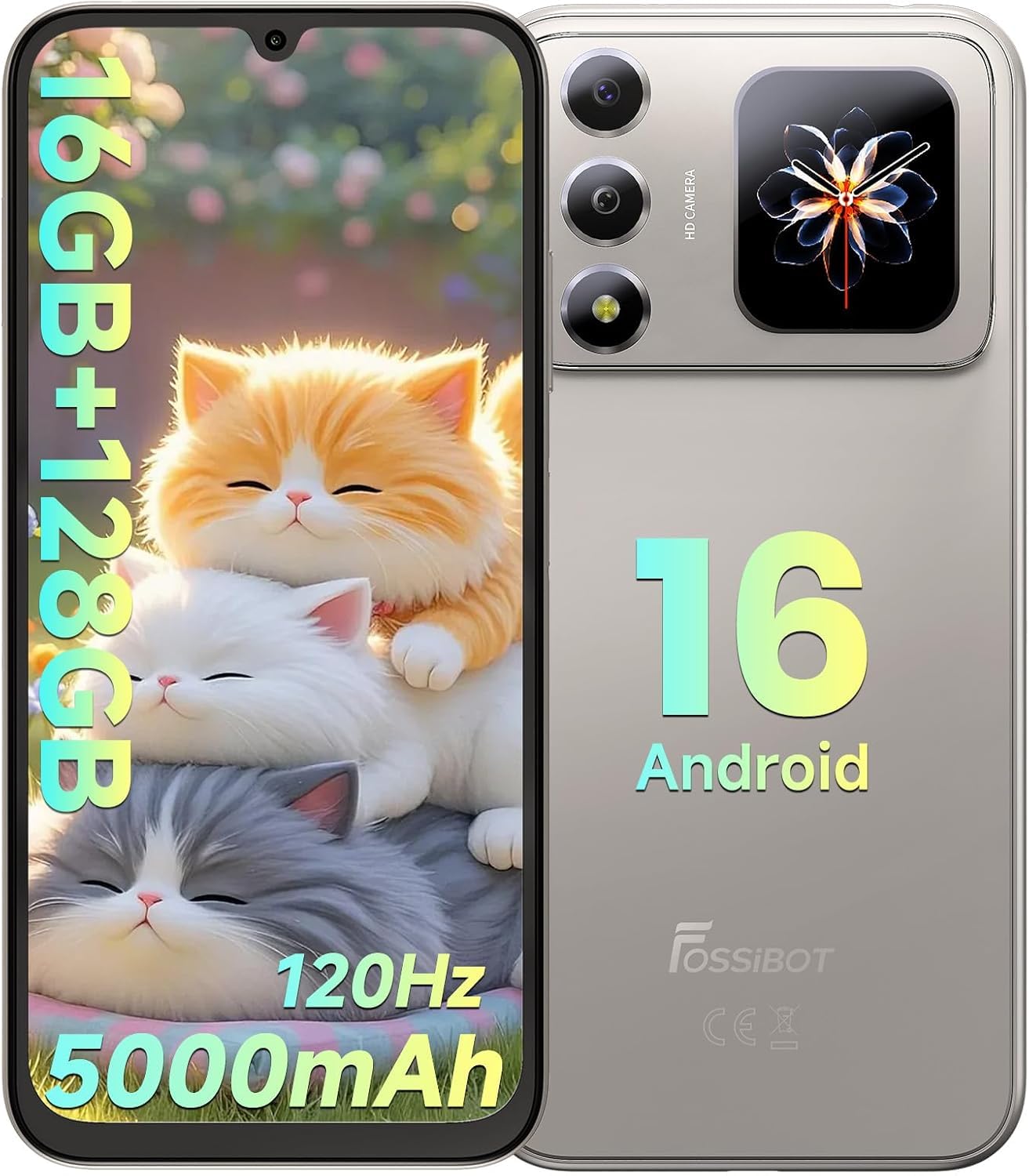
Figure 4: Main Display Features. This image highlights the 6.9-inch HD+ 120Hz display and its technical specifications.
2.2 Rear Screen (1.85" Multifunction Display)
The 1.85-inch rear display provides quick access to essential information without needing to activate the main screen.
- Notifications: View incoming call alerts, messages, and other app notifications.
- Time & Date: Always-on display for current time and date.
- Battery Level: Monitor your phone's battery status.
- Music Controls: Control media playback (play, pause, skip tracks).
- Customization: Explore display settings to personalize the rear screen's appearance and displayed information.

Figure 5: Personalized Secondary Display. This image demonstrates the customizable interface of the rear screen, showing different widgets and information layouts.
2.3 Android 16 Operating System
The FOSSIBOT S7 runs on Android 16, offering an optimized user experience with enhanced privacy controls and customizable themes.
- App Management: Install, uninstall, and manage applications through the Google Play Store.
- Notifications: Manage notification preferences for individual apps in Settings > Notifications.
- Privacy Controls: Utilize Android 16's advanced privacy features to control app permissions and data access.

Figure 6: Android 16 OS Interface. This image represents the Android 16 operating system with various application icons.
2.4 Performance (Processor, RAM, Storage)
The FOSSIBOT S7 is powered by a Unisoc T615 Octa-Core processor, ensuring efficient multitasking and smooth operation.
- Processor: Unisoc T615 12nm 4G octa-core CPU for balanced performance.
- RAM: 16GB RAM (4GB physical + up to 12GB extended RAM) for seamless app switching and demanding tasks.
- Internal Storage: 128GB internal storage, expandable up to 2TB with a TF card for ample space for apps, photos, and media.

Figure 7: Performance Specifications. This image details the phone's processor, RAM, and storage capabilities.
2.5 Camera Functions
Capture photos and videos using the 16MP AI rear camera and 8MP front camera.
- Rear Camera (16MP): Features AI enhancements for scene recognition, auto-adjustment, and portrait optimization. Supports Panorama, Night, and Video modes.
- Front Camera (8MP): Ideal for selfies and video calls.
- Camera App: Open the camera application to switch between photo, video, and other modes. Tap to focus, pinch to zoom.

Figure 8: Camera System. This image details the 16MP rear and 8MP front cameras, showcasing their capabilities with example photographs.
2.6 Gemini AI Integration
The integrated Gemini AI assists in optimizing performance and provides intelligent suggestions.
- Performance Optimization: Gemini AI learns usage patterns to manage battery and system resources efficiently.
- Smart Suggestions: Receive intelligent recommendations for various tasks, including photo editing and app usage.
- AI Assistant: Utilize Gemini for conversational queries and creative tasks, such as AI coding assistance and image generation.

Figure 9: Gemini AI Assistant. This image illustrates the various functions of the Gemini AI, from conversational interaction to creative assistance.
2.7 Connectivity
The FOSSIBOT S7 supports various connectivity options:
- 4G LTE: For mobile data connectivity.
- Wi-Fi: Supports 2.4GHz and 5GHz networks. Connect via Settings > Network & internet > Wi-Fi.
- Bluetooth 5.0: For connecting wireless accessories. Pair devices via Settings > Connected devices > Bluetooth.
- GPS/GLONASS/Galileo/Beidou: For accurate location services.
- USB Type-C: For charging and data transfer.
- 3.5mm Headphone Jack: For wired audio accessories.

Figure 10: Connectivity and Features. This image displays the phone's various connectivity options and integrated software tools.
2.8 Software Toolkit
The device includes a built-in software toolkit for various utilities:
- Compass: For navigation and direction.
- SoundMeter: Measures ambient sound levels.
- Gradienter: Measures angles and slopes.
- Pedometer: Tracks steps taken.
- Torch: Activates the LED flash as a flashlight.
- Alarm bell: A utility for alarms.
- Protractor: Measures angles.
- HeightMeasure: Estimates height.
2.9 Product Video Overview
Video 1: FOSSIBOT S7 Android 16 Cell Phone Overview. This video provides a visual demonstration of the FOSSIBOT S7 smartphone's key features and design.
3. Maintenance
3.1 Battery Care
The FOSSIBOT S7 is equipped with a 5000mAh battery. To maximize battery lifespan:
- Avoid extreme temperatures.
- Use the provided USB cable for charging. The device supports 10W fast charging.
- Avoid completely draining the battery frequently.
- For prolonged storage, charge the battery to approximately 50%.

Figure 11: Battery Life. This image illustrates the 5000mAh battery and its estimated usage times for standby, talk, video, and gaming.
3.2 Software Updates
Regular software updates provide security enhancements and new features. Ensure your device is connected to Wi-Fi and has sufficient battery before initiating an update.
- Go to Settings > System > System update.
- Check for available updates and follow the on-screen instructions.
3.3 Cleaning the Device
To clean your FOSSIBOT S7:
- Power off the device before cleaning.
- Use a soft, lint-free cloth.
- For stubborn marks, slightly dampen the cloth with water or a screen cleaner. Avoid harsh chemicals.
4. Troubleshooting
This section addresses common issues you might encounter with your FOSSIBOT S7.
4.1 Device Not Powering On
- Ensure the battery is charged. Connect the phone to a charger for at least 15 minutes before attempting to power it on again.
- Perform a forced restart by holding the Power button for 10-15 seconds.
4.2 Slow Performance or Lag
- Close unnecessary background applications.
- Clear cache for frequently used apps (Settings > Apps > [App Name] > Storage & cache > Clear cache).
- Ensure sufficient storage space is available.
- While the display supports 120Hz, actual refresh rates can be influenced by processor load and battery status. For optimal performance, ensure the device is adequately charged and not running too many demanding applications simultaneously.
4.3 Battery Draining Quickly
- Check battery usage in Settings > Battery to identify power-consuming apps.
- Reduce screen brightness and disable features like Wi-Fi, Bluetooth, or GPS when not in use.
- Limit background app refresh.
4.4 Connectivity Issues (Wi-Fi/4G)
- Wi-Fi: Restart your router and phone. Forget the network and reconnect.
- 4G: Ensure your SIM card is properly inserted and your mobile data plan is active. Check network coverage in your area.
- Toggle Airplane Mode on and off.
4.5 Rear Screen Not Responding
- Ensure the main screen is locked or off to allow the rear screen to function.
- Check rear screen settings in Settings > Display (or a similar dedicated section for the secondary display).
- Restart the phone.
5. Specifications
| Feature | Detail |
|---|---|
| Brand | FOSSIBOT |
| Model Name | S7 |
| Operating System | Android 16 |
| Processor | Unisoc T615 Octa-Core (1.8 GHz CPU Speed) |
| RAM | 16 GB (4GB physical + up to 12GB extended) |
| Internal Storage | 128 GB |
| Expandable Storage | Up to 2TB (TF Card) |
| Main Display Size | 6.9 inches |
| Main Display Type | HD+ IPS LCD |
| Main Display Resolution | 1280x720 |
| Refresh Rate | 120 Hz |
| Rear Display Size | 1.85 inches (Multifunction) |
| Rear Camera | 16 MP AI Camera |
| Front Camera | 8 MP |
| Battery Capacity | 5000 mAh |
| Charging | 10W Fast Charging (USB Type C) |
| Cellular Technology | 4G LTE (Dual SIM) |
| Wireless Connectivity | Wi-Fi (2.4GHz/5GHz), Bluetooth 5.0 |
| Navigation | GPS, GLONASS, Galileo, Beidou |
| Biometric Security | Face Recognition, Fingerprint ID |
| Dimensions (Thickness) | 8.6 mm |
| Weight | 216 g |
| Included in Box | USB Cable |

Figure 12: Key Features Overview. This image provides a summary of the FOSSIBOT S7's main specifications and functionalities.
6. Warranty Information
The FOSSIBOT S7 comes with a 2-year warranty from the date of purchase. This warranty covers manufacturing defects and malfunctions under normal use. It does not cover damage caused by misuse, accidents, unauthorized repairs, or normal wear and tear.
Please retain your proof of purchase for all warranty claims.
7. Customer Support
For further assistance, technical support, or warranty claims, please contact FOSSIBOT customer service through their official website or the retailer where the product was purchased.
You can visit the FOSSIBOT store on Amazon for more information: FOSSIBOT Store