
1. Introduction
Thank you for choosing the SKMEI 2401 Men's Tactical Sports Watch. This watch is designed for durability and functionality, featuring a dual analog and digital display, multiple timekeeping functions, and 50-meter water resistance. This manual provides detailed instructions to help you get the most out of your watch.
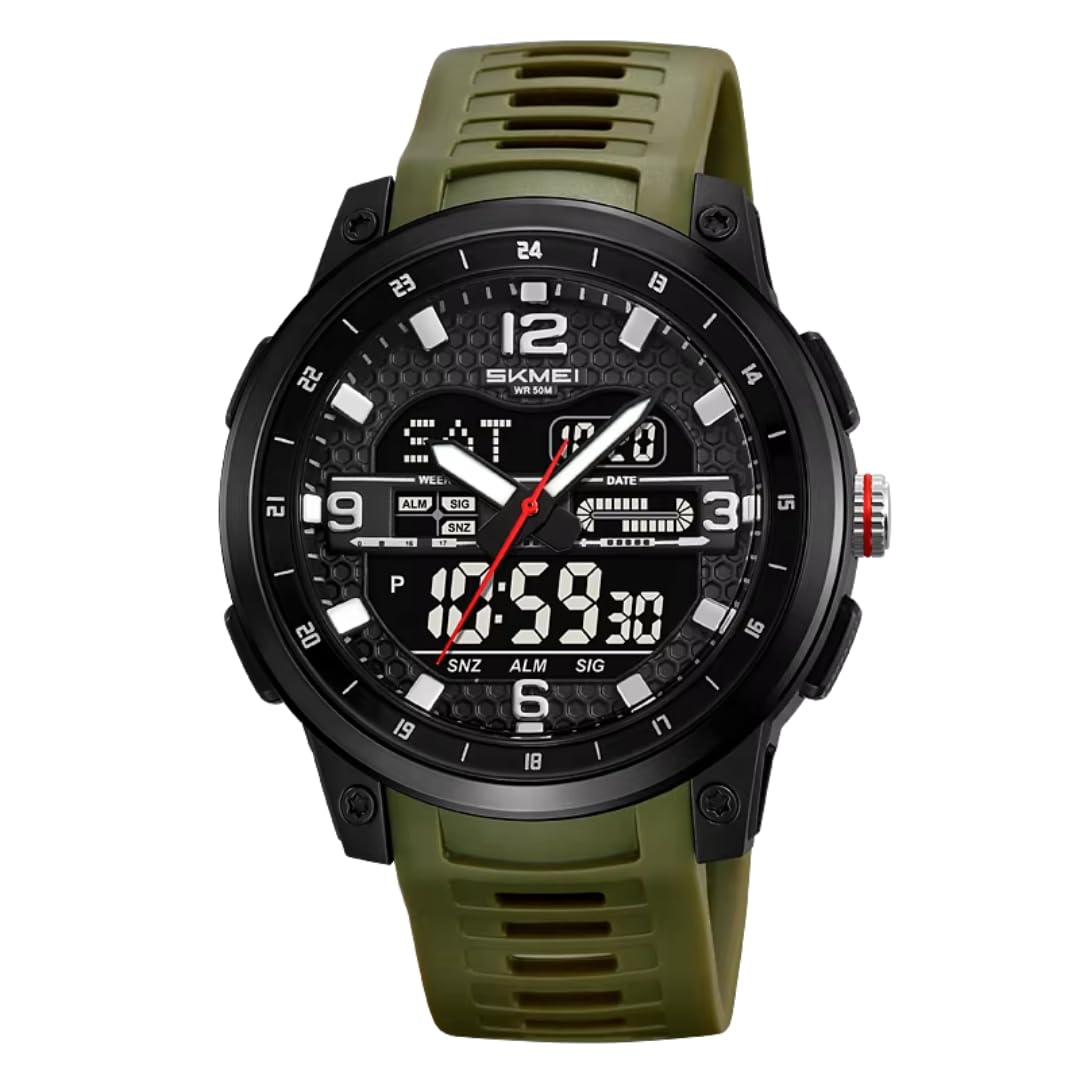
Image 1: SKMEI 2401 Men's Tactical Sports Watch (Green variant). This image shows the watch face with both analog hands and the digital display, highlighting its robust design and button layout.
2. Button Functions
The SKMEI 2401 watch typically features four buttons for operation. While exact labels may vary, their general functions are:
- Light (Top Left): Activates the EL backlight for the digital display.
- Mode (Bottom Left): Cycles through different modes (Time, Alarm, Stopwatch, Countdown Timer, Dual Time).
- Start/Stop (Top Right): Used to start/stop functions in Stopwatch and Countdown modes, and to adjust values in setting modes.
- Reset/Adjust (Bottom Right): Used to reset functions in Stopwatch mode, and to select items or confirm settings in setting modes.
3. Setup
3.1 Setting Analog Time
- Pull out the crown (the small knob on the side of the watch case) to the first position.
- Rotate the crown to move the analog hour and minute hands to the correct time.
- Push the crown back in to its normal position to start the analog timekeeping.
3.2 Setting Digital Time and Date
- From the normal time display mode, press the Mode button repeatedly until the seconds start flashing. This indicates you are in time setting mode.
- Press the Reset/Adjust button to cycle through the settings: Seconds → Hour → Minute → Month → Date → Day of the Week.
- While a value is flashing, press the Start/Stop button to increase the value. Hold it down to advance rapidly.
- Once all settings are correct, press the Mode button to exit the setting mode and return to the normal time display.
3.3 12/24 Hour Format
In the normal time display mode, press the Start/Stop button to toggle between 12-hour (AM/PM) and 24-hour formats.
4. Operating Instructions
4.1 Using the Backlight
Press the Light button (top left) to illuminate the digital display for a few seconds. This is useful in low-light conditions.
4.2 Stopwatch Function
- Press the Mode button until 'ST' or 'STOP' appears on the digital display.
- Press the Start/Stop button to start timing.
- Press the Start/Stop button again to pause timing.
- Press the Start/Stop button again to resume timing.
- To reset the stopwatch to zero, ensure it is paused, then press the Reset/Adjust button.
4.3 Alarm Function
- Press the Mode button until 'AL' or 'ALARM' appears on the digital display.
- Press the Reset/Adjust button until the hour digits start flashing.
- Press the Start/Stop button to set the desired hour.
- Press the Reset/Adjust button to select the minute digits, then use the Start/Stop button to set the desired minute.
- Press the Mode button to exit alarm setting mode.
- To turn the alarm ON/OFF, in alarm mode, press the Start/Stop button. An alarm icon will appear when it's active.
4.4 Countdown Timer Function
- Press the Mode button until 'TR' or 'TIMER' appears on the digital display.
- Press the Reset/Adjust button until the hour digits start flashing.
- Press the Start/Stop button to set the desired countdown hour.
- Press the Reset/Adjust button to select the minute digits, then use the Start/Stop button to set the desired minute. Repeat for seconds if available.
- Press the Mode button to exit timer setting mode.
- Press the Start/Stop button to start the countdown.
- Press the Start/Stop button again to pause/resume.
- When the countdown reaches zero, an alarm will sound. Press any button to stop the alarm.
4.5 Dual Time Function
The dual time function allows you to keep track of time in another time zone.
- Press the Mode button until 'DT' or 'DUAL TIME' appears on the digital display.
- Press the Reset/Adjust button until the hour digits start flashing.
- Press the Start/Stop button to set the desired hour for the second time zone.
- Press the Reset/Adjust button to select the minute digits, then use the Start/Stop button to set the desired minute.
- Press the Mode button to exit dual time setting mode.
5. Maintenance
5.1 Water Resistance
Your SKMEI 2401 watch is rated 5ATM (50 meters) water resistant. This means it is suitable for:
- Daily use
- Hand washing
- Rain exposure
- Showering (avoid hot water and steam)
- Swimming in shallow water
Important: Do not press any buttons while the watch is wet or submerged. Do not use the watch for diving, snorkeling, or high-pressure water activities. Exposure to hot water or steam can damage the seals and compromise water resistance.
5.2 Cleaning
Wipe the watch case and strap regularly with a soft, dry cloth. For stubborn dirt, use a slightly damp cloth and then dry thoroughly. Avoid using chemical cleaners, solvents, or abrasive materials, as these can damage the watch's finish.
5.3 Battery Replacement
When the display becomes dim or functions become erratic, it may be time to replace the battery. Battery replacement should ideally be performed by a qualified watch technician to ensure proper sealing and water resistance integrity.
6. Troubleshooting
- Digital Display is Blank or Dim: Check if the battery needs replacement. Ensure the watch has not been exposed to extreme temperatures.
- Buttons Not Responding: Ensure the watch is not in a locked mode (if applicable, though this model typically does not have one). Try resetting the watch by removing and reinserting the battery (professional service recommended).
- Time Inaccuracy: If the time is consistently fast or slow, the watch movement may require adjustment or service. Ensure the crown is fully pushed in for analog timekeeping.
- Water Inside the Watch: If you notice condensation or water droplets inside the watch, stop using it immediately and have it inspected by a professional. This indicates a breach in the water resistance.
7. Specifications
| Feature | Detail |
|---|---|
| Model Number | SKMEI 2401 |
| Display Type | Dual Analog and Digital |
| Movement | Digital-Analog Quartz |
| Case Material | Resin |
| Band Material | Resin / Silicone Rubber |
| Dial Window Material | Reinforced Mineral Glass |
| Water Resistance | 5 ATM (50 Meters) |
| Special Features | Dual Time, Stopwatch, Countdown Timer, Alarm, Backlight |
| Power Source | Battery Powered |
| Case Diameter | 45.2 mm |
| Case Thickness | 14 mm |
| Band Width | 24 mm |
| Band Length | 24 cm |
| Item Weight | 30 grams (shipping weight) |
8. Warranty
This SKMEI sports watch is water-resistant and features an alarm and stopwatch. It is suitable for swimming for both men and women, designed to be highly durable. It includes a clear backlight LED display. Please refer to the manufacturer's warranty terms for specific coverage details and duration.
9. Support
For further assistance, troubleshooting not covered in this manual, or warranty claims, please contact your retailer or visit the official SKMEI website for customer support information. Keep your purchase receipt as proof of purchase.