
1. Product Overview
The KU XIU X55 Turbo is a versatile 3-in-1 wireless charging station designed for Apple devices. It features Qi2.2 certified 25W fast charging for compatible iPhones, 5W charging for Apple Watch, and 5W charging for AirPods. Its foldable design makes it highly portable, and it includes a 45W power adapter for optimal performance.

Image: The KU XIU X55 Turbo charging station, showcasing its compact, foldable design and ability to charge multiple devices simultaneously.
2. What's in the Box
Please check the package contents upon unboxing:
- 1 x KU XIU X55 Turbo QI2.2 25W 3-in-1 Charging Station
- 1 x 45W USB-C GaN Adapter
- 1 x USB-C to USB-C Cable
- 1 x Storage Travel Bag
- 1 x User Manual (this document)

Image: All items included in the product package: the foldable charging station, 45W USB-C GaN adapter, USB-C cable, and a storage travel bag.
3. Setup Guide
- Unpack the Charger: Carefully remove all components from the packaging.
- Connect the Power Adapter: Insert one end of the provided USB-C cable into the USB-C port on the 45W GaN adapter.
- Connect to Charging Station: Insert the other end of the USB-C cable into the USB-C input port on the KU XIU X55 Turbo charging station.
- Plug into Power Outlet: Plug the 45W GaN adapter into a wall power outlet.
- Prepare for Charging: Unfold the charging station to your desired configuration (flat or stand mode). The magnetic charging pad for the iPhone should be upright, and the Apple Watch charging disc should be extended.
Video: A demonstration of setting up the KU XIU X55 Turbo charging station, showing how to unfold it and place devices for charging.
4. Operating Instructions
The KU XIU X55 Turbo allows simultaneous wireless charging for up to three Apple devices:
4.1 Charging an iPhone (Qi2.2 Compatible)
- Ensure the charging station is powered on and unfolded into stand mode.
- Align your iPhone (iPhone 17/16 series or iPhone 12-15 series with MagSafe compatibility) with the magnetic charging pad. The magnets will securely hold your device in place.
- The iPhone can be charged in both portrait and landscape orientations. In landscape mode, it supports Nightstand mode.
- A charging indicator will appear on your iPhone screen to confirm charging has begun.
4.2 Charging an Apple Watch
- Extend the Apple Watch charging disc from the main unit.
- Place your Apple Watch onto the charging disc. The magnetic connection will secure it.
- A charging icon will appear on your Apple Watch screen.
4.3 Charging AirPods
- Place your AirPods (with a wireless charging case) onto the flat charging pad at the base of the station.
- Ensure the AirPods case is centered on the charging zone.
- The indicator light on your AirPods case will illuminate to confirm charging. Note: The AirPods area does not use magnets; proper placement is key.
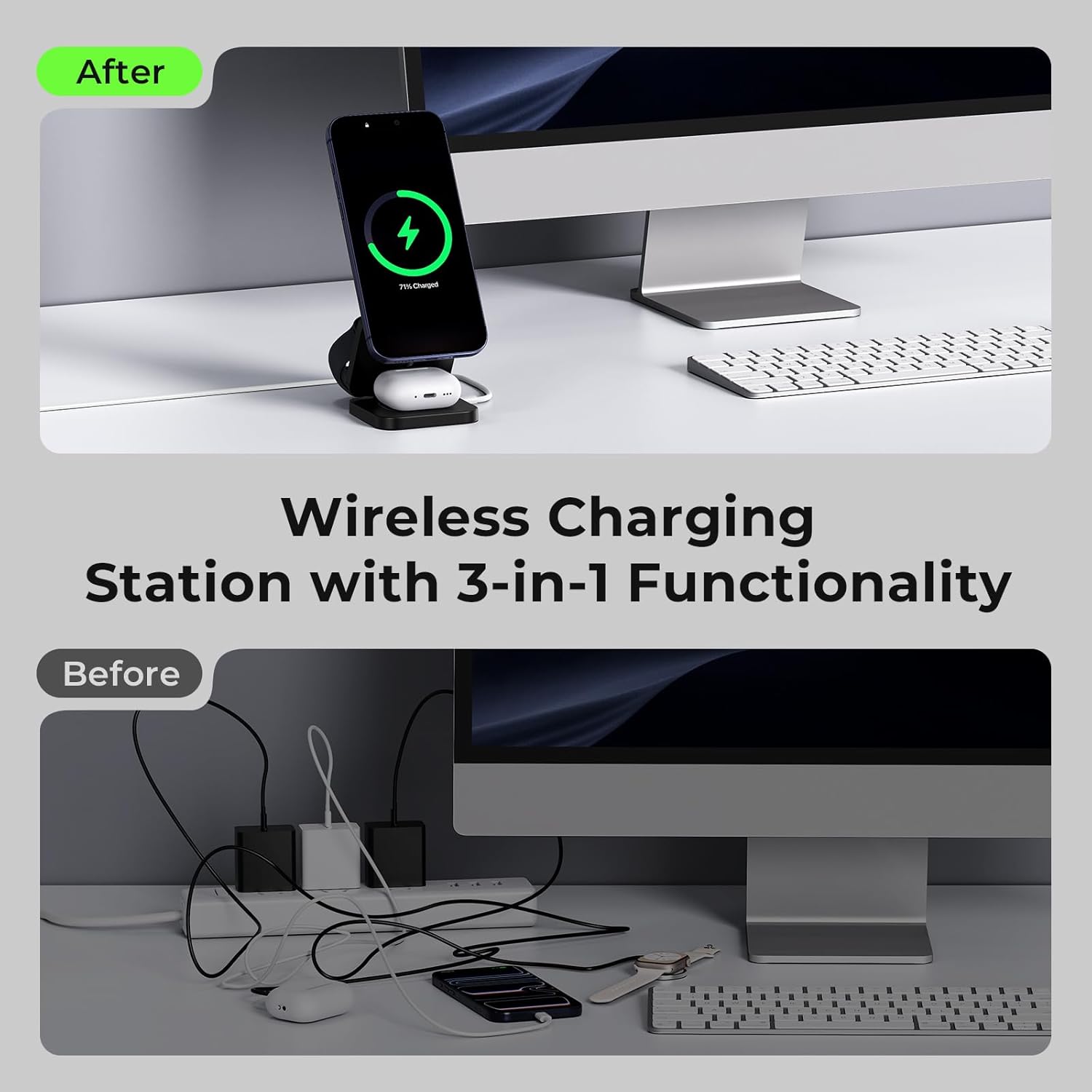
Image: The KU XIU X55 Turbo charging station in use, simultaneously charging an iPhone, Apple Watch, and AirPods, demonstrating its 3-in-1 functionality.
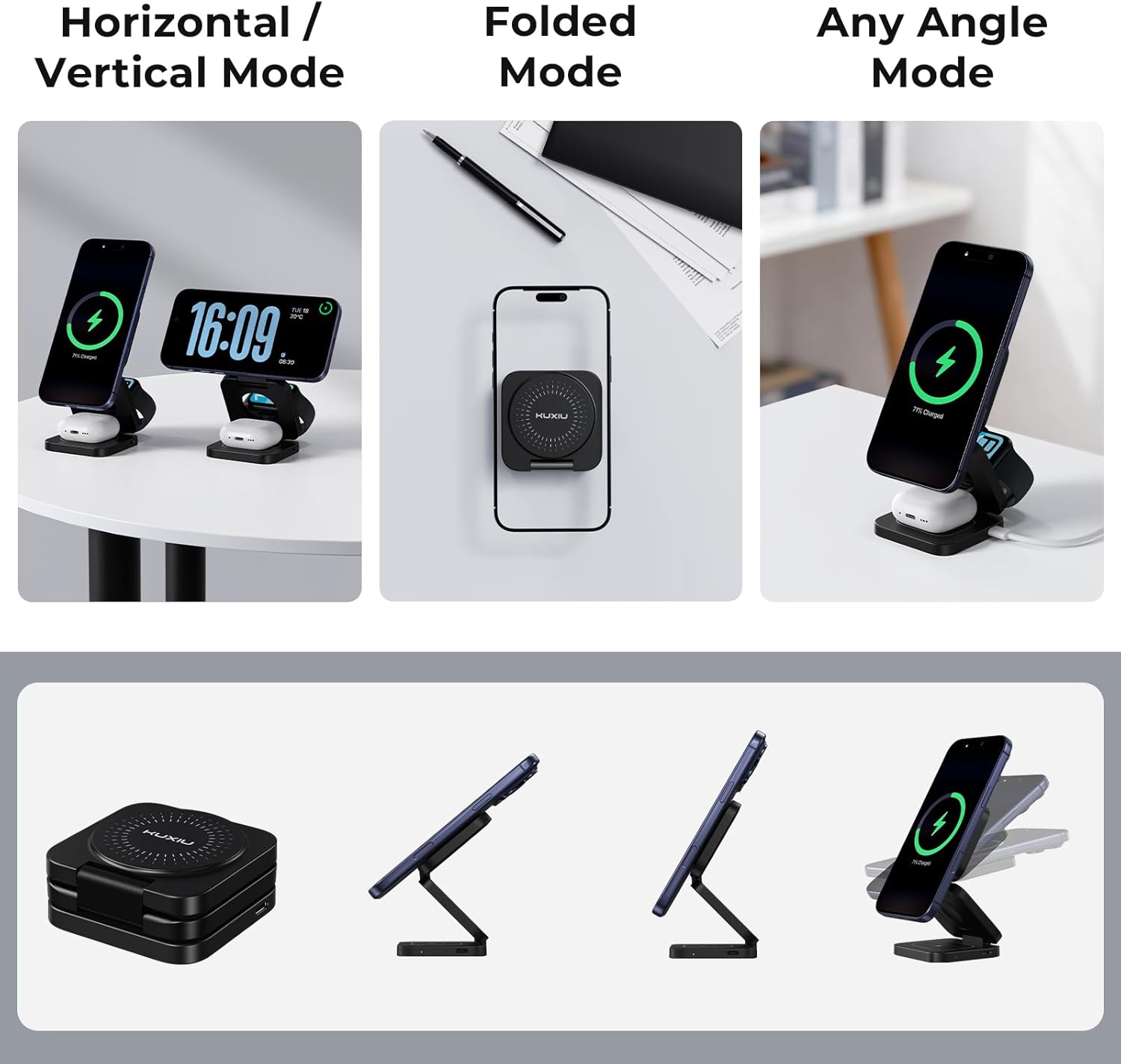
Image: The KU XIU X55 Turbo charger shown in different configurations: horizontal, vertical, folded for portability, and at various adjustable angles.
5. Compatibility
The KU XIU X55 Turbo is designed for a wide range of Apple devices and other Qi-compatible devices:
- Qi2.2 25W Fast Wireless Charging:
- iPhone 17, iPhone 17 Pro, iPhone 17 Pro Max
- iPhone 16 Plus, iPhone 16 Pro Max (with iOS 26 or later)
- 20W Wireless Charging:
- iPhone 17 Air, iPhone 16, iPhone 16 Pro
- Qi2 15W Wireless Charging:
- iPhone 15/14/13/12 Series
- Google Pixel 10, Google Pixel 10 Pro, Google Pixel 10 Pro XL (with a magnetic case)
- Samsung Galaxy S25 Ultra/S25+/S25 (with a magnetic case)
- Max 5W for Apple Watch:
- Apple Watch Ultra 3/2/Ultra, Series 11-1, SE 3/2/SE
- Max 5W for AirPods:
- AirPods Pro 3/Pro 2/Pro/4 with ANC/3rd/2nd with Wireless Charging Case
Note: The AirPods charging area does not use magnets. Ensure the AirPods case is placed within the marked charging zone for proper charging.

Image: A visual guide detailing the compatibility of the KU XIU X55 Turbo with various iPhone models (Qi2.2 25W, Qi2.2 15W), Apple Watch, and AirPods.
6. Maintenance and Care
- Cleaning: Disconnect the charger from the power source before cleaning. Use a soft, dry, lint-free cloth to wipe the surface. Avoid using harsh chemicals, cleaning solvents, or strong detergents.
- Storage: When not in use or for travel, fold the charging station into its compact form and store it in the provided travel bag to protect it from dust and scratches.
- Environmental Conditions: Avoid exposing the charger to extreme temperatures, direct sunlight, or humid environments. Operate and store the device within recommended temperature ranges.
- Handling: Handle the device with care. Avoid dropping it or subjecting it to strong impacts, which could damage internal components or the magnetic charging surfaces.
7. Troubleshooting
If you encounter issues with your KU XIU X55 Turbo charging station, please refer to the following common solutions:
| Problem | Possible Cause | Solution |
|---|---|---|
| Device not charging |
|
|
| Slow charging |
|
|
| Device or charger getting warm |
|
|
8. Product Specifications
| Feature | Detail |
|---|---|
| Brand | KU XIU |
| Model Number | X55 Turbo |
| Connector Type | USB Type C |
| Input Voltage | 12 volts |
| Wattage | 45 watts (with included adapter) |
| Output Current | 3 A |
| Output Voltage | 5 volts |
| Special Features | Fast Charging, Foldable for Travel, Magnetic, MagSafe Compatible, Wireless Charging |
| Safety Protection | Over-temperature, over-current, over-voltage, foreign object detection |
| Color | Black-B |
9. Warranty and Customer Support
9.1 Product Warranty
The KU XIU X55 Turbo Qi 2.2 25W 3-in-1 Charging Station is covered by a 24-month warranty from the date of purchase. This warranty covers manufacturing defects and ensures dependable everyday use. Please retain your proof of purchase for warranty claims.
9.2 Customer Support
For any questions, technical assistance, or warranty claims, please contact KU XIU customer support. You can typically find contact information on the official KU XIU website or through the retailer where you purchased the product. Please have your model number (X55 Turbo) and proof of purchase ready when contacting support.
Manufacturer: Shenzhen Kuxiu Communication Co., Ltd.

