
1. Safety Information
Read all instructions carefully before using this treadmill. Keep this manual for future reference.
- Electrical Safety: Ensure the treadmill is connected to a properly grounded outlet. Do not use extension cords. Unplug the treadmill when not in use or before cleaning/maintenance.
- Usage Precautions: Place the treadmill on a flat, stable surface. Maintain a clear area of at least 2 meters (6.5 feet) behind the treadmill and 0.6 meters (2 feet) on each side. Do not allow children or pets near the treadmill during operation. The maximum user weight capacity is 350 lbs (158 kg).
- Personal Safety: Wear appropriate athletic footwear. If you experience pain, dizziness, or shortness of breath, stop exercising immediately. Use the safety key during operation.
2. Package Contents
Verify that all components are present in the package:
- KALWOL X382PT Treadmill Unit
- Power Cord
- Remote Control
- Tool Kit
- Lubricant
- User Manual (this document)
3. Product Overview
The KALWOL X382PT is a versatile 6-in-1 foldable treadmill designed for home use, offering multiple exercise modes and smart features.

Image: The KALWOL X382PT Foldable Treadmill, showcasing its compact design and modern aesthetic in a home environment.
Key Features:
- 6-in-1 Versatile Design: Supports city walk, working, walking, jogging, running, and climbing modes with speeds from 0.6 to 7.5 MPH.
- Foldable Handle: Allows use as a walking pad under a desk or as a traditional treadmill with handrails.
- Integrated Speaker & App Compatibility: Built-in speaker for audio playback and seamless connection to fitness apps like FITSHOW, KINOMAP, and ZWIFT.
- 10% Manual Incline: Easily adjustable incline to increase workout intensity.
- 3.0HP Brushless Motor: Provides quiet operation (≤40dB) and supports up to 350 lbs.
- 12 HIIT Programs & 3 Countdown Modes: Pre-set programs and customizable countdown options for varied workouts.
- LED Display & Remote Control: Clear display for tracking metrics and convenient control via remote or console buttons.
- Space-saving & No Assembly: Ready to use out of the box with transport wheels for easy storage.
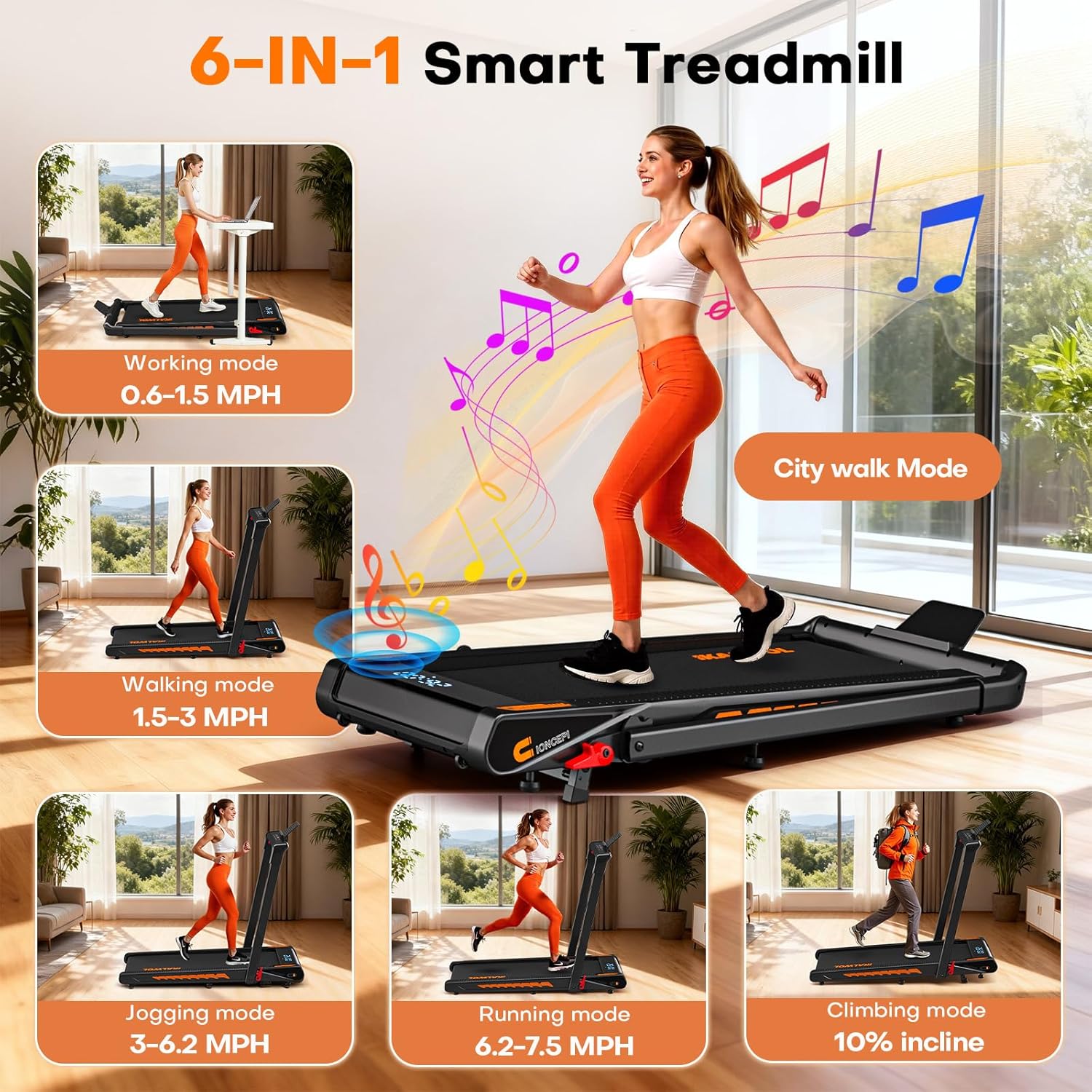
Image: Illustration of the treadmill's six versatile modes: City Walk, Working, Walking, Jogging, Running, and Climbing (with 10% incline).

Image: A visual representation of the treadmill's innovative multi-layer shock absorption system, designed to protect joints and ankles during exercise.
4. Setup
The KALWOL X382PT treadmill requires no assembly and is ready for use directly from the box.
4.1 Unfolding the Treadmill
- Carefully remove the treadmill from its packaging.
- Place the treadmill on a flat, stable surface.
- To raise the handle, locate the red locking pins on each side of the base. Pull the pins outwards to release the handle.
- Lift the handle to its upright position until it locks securely into place. Ensure both pins are fully engaged.
- If using as a walking pad without the handle, ensure the handle is folded down and secured.

Image: A woman demonstrating how to fold the treadmill handle down for compact storage or use as a walking pad.
4.2 Power Connection
- Connect the power cord to the treadmill's power input.
- Plug the other end of the power cord into a grounded electrical outlet.
- Turn on the main power switch, usually located near the power cord input.
5. Operating Instructions
The treadmill can be operated via the console buttons or the remote control.

Image: The treadmill's LED display console and the included remote control, highlighting the dual control options.
5.1 Basic Operation
- Safety Key: Attach the safety key clip to your clothing and insert the safety key into its designated slot on the console. The treadmill will not operate without the safety key.
- Start/Stop: Press the 'Start/Stop' button on the console or remote to begin or end your workout. The treadmill will typically start at a low speed.
- Speed Adjustment: Use the '+' and '-' buttons on the console or remote to increase or decrease the speed. Quick speed buttons (e.g., 2 MPH, 4 MPH) may also be available.
- Mode Selection: Press the 'M' button on the remote or 'P/M' button on the console to cycle through different workout modes (e.g., manual, pre-set programs, countdown modes).
5.2 Manual Incline Adjustment
The treadmill features a 10% manual incline adjustment to enhance calorie burning and workout intensity.
- Ensure the treadmill is powered off and unplugged before adjusting the incline.
- Locate the incline adjustment mechanism at the rear of the treadmill base.
- Lift the rear of the treadmill and adjust the support legs to the desired incline level (0% or 10%). Ensure the legs are securely locked into position before use.

Image: The treadmill demonstrating its 10% manual incline feature, showing how it can be adjusted for a more challenging workout.
5.3 App Connectivity & Speaker Usage
Connect your smart device to the treadmill for enhanced workout tracking and entertainment.
- App Connection: Download compatible fitness apps (FITSHOW, KINOMAP, ZWIFT) from your device's app store. Enable Bluetooth on your device and pair with the treadmill (look for 'X382PT' or similar in your Bluetooth settings).
- Speaker Usage: Once paired via Bluetooth, your device's audio will play through the treadmill's built-in speaker. Adjust volume from your device.

Image: A tablet displaying a fitness app, wirelessly connected to the treadmill, illustrating the app compatibility feature.
5.4 Official Product Video

Video: This official product video demonstrates the setup, various exercise modes, and key features of the KALWOL 6-in-1 Walking Pad Treadmill with Speaker, including its foldable design and app connectivity.
6. Maintenance
Regular maintenance ensures the longevity and optimal performance of your treadmill.
6.1 Cleaning
- Always unplug the treadmill before cleaning.
- Wipe down the console and exterior surfaces with a soft, damp cloth. Avoid abrasive cleaners or solvents.
- Periodically vacuum underneath the treadmill to prevent dust and debris buildup.
6.2 Lubrication
The running belt requires periodic lubrication to reduce friction and extend its lifespan. Use the provided lubricant.
- Unplug the treadmill.
- Loosen the running belt by turning the rear roller bolts counter-clockwise (usually 2-3 full turns).
- Lift the edge of the running belt and apply a thin line of lubricant to the center of the deck, underneath the belt.
- Tighten the running belt by turning the rear roller bolts clockwise until the belt is snug but not overly tight.
- Plug in the treadmill and run it at a low speed (e.g., 1 MPH) for 2-3 minutes to distribute the lubricant.
6.3 Belt Adjustment
If the running belt shifts to one side or slips, it may need adjustment.
- Centering the Belt: If the belt drifts to the left, turn the left rear roller bolt clockwise in small increments (1/4 turn) until the belt centers. If it drifts right, turn the right bolt clockwise. Run the treadmill at a moderate speed and observe the belt's position.
- Tightening the Belt: If the belt slips during use, it may be too loose. Turn both rear roller bolts clockwise in small, equal increments (1/4 turn) until the slipping stops. Do not overtighten.
7. Troubleshooting
If you encounter issues with your treadmill, refer to the following common problems and solutions:
- Treadmill does not start: Ensure the power cord is securely plugged in, the main power switch is on, and the safety key is correctly inserted. Check for tripped circuit breakers.
- Running belt stops or slips: The belt may be too loose or require lubrication. Refer to Section 6.2 and 6.3 for adjustment and lubrication instructions.
- Unusual noise: Check for loose parts or foreign objects under the belt. Ensure the treadmill is on a level surface. If the noise persists, contact customer support.
- Display not working: Check power connections and ensure the safety key is in place. If the issue continues, contact customer support.
- Bluetooth connection issues: Ensure Bluetooth is enabled on your device and the treadmill. Try restarting both devices. Make sure no other devices are connected to the treadmill.
8. Specifications
| Feature | Specification |
|---|---|
| Brand | KALWOL |
| Model Name | X382PT |
| Product Dimensions (D x W x H) | 50.59"D x 22.6"W x 5.04"H |
| Item Weight | 22.3 Kilograms |
| Material | Acrylonitrile Butadiene Styrene (ABS), Alloy Steel |
| Maximum Speed | 7.5 Miles per Hour |
| Minimum Speed | 0.6 Miles per Hour |
| Maximum Horsepower | 3 Horsepower |
| Maximum Incline Percentage | 10% (Manual) |
| Maximum Weight Recommendation | 350 Pounds |
| Noise Level | ≤40dB |
| UPC | 716151427893 |
9. Warranty and Support
The KALWOL X382PT Treadmill comes with a 1-Year Warranty from the date of purchase.
For any questions, technical assistance, or warranty claims, please contact our professional support team. We aim to provide clear and helpful responses within 16 hours.
Refer to your purchase documentation for specific contact details or visit the official KALWOL website.