
1. Product Overview
The Klanata ZL-81A Sound Level Meter is a portable decibel meter designed for accurate noise measurement in various environments. It features A-weighted frequency response, fast and slow sampling rates, and functions for data hold, maximum/minimum value tracking, and auto power off. This device is suitable for monitoring sound levels in industrial settings, construction sites, and residential areas.
Key Features
- Measurement Accuracy: Provides real-time monitoring with a detection accuracy of ±2 dB. The A-weighted frequency response simulates human ear characteristics for precise environmental noise detection.
- Adjustable Response Speed: Features selectable fast (125ms) and slow (1 second) response modes to accommodate various testing environments.
- Real-Time Data Tracking: Includes a maximum and minimum mode to display peak or low sound values within a specific area.
- Noise Interference Reduction: Equipped with an integrated windproof ball designed to minimize sound distortion from wind interference.
- Broad Application Range: Suitable for monitoring sound levels in factories, construction sites, automotive settings, traffic zones, and residential environments.
Package Contents
- 1 x Klanata ZL-81A Sound Level Meter (Noise Decibel Detector)
- 1 x Screwdriver
- 1 x User Manual
2. Product Components

Figure 2.1: Labeled diagram of the Klanata ZL-81A Sound Level Meter.
This diagram illustrates the key components of the Klanata ZL-81A Sound Level Meter, including the noise meter sensor (microphone), digital display screen, power switch, data retention button (HOLD), speed change button (F/S), and maximum/minimum value button (MAX/MIN).
3. Technical Specifications
| Feature | Specification |
|---|---|
| Item Type | Sound Level Meter |
| Model | ZL-81A |
| Material | ABS |
| Power Supply | 2 x AAA batteries (not included) |
| Measurement Range | 30-130dB |
| Sampling Rate (FAST) | 125ms |
| Sampling Rate (SLOW) | 1sec |
| Noise Accuracy | ±2dB |
| Frequency Response Range | 30Hz-8KHz |
| Resolution | 0.1dB |
| Frequency Weighting | A Weighting |
| Analog Bar | Yes |
| Data Hold | Yes |
| Maximum or Min Value | Yes |
| Auto Power Off | Yes |
| Operating Temperature | 0-40℃ (32-104°F) |
| Operating Humidity | ≤80%RH |
| Item Weight | 2.4 ounces (approx. 68g) |
| Package Dimensions | 7.09 x 1.97 x 1.18 inches (approx. 18 x 5 x 3 cm) |
4. Setup and Battery Installation
Battery Installation
The Klanata ZL-81A Sound Level Meter requires 2 AAA batteries for operation. Ensure the device is powered off before installing or replacing batteries.
- Locate the battery compartment cover on the back of the device.
- Use the provided screwdriver to open the battery compartment.
- Insert two AAA batteries, observing the correct polarity (+/-) as indicated inside the compartment.
- Replace the battery compartment cover and secure it with the screwdriver.
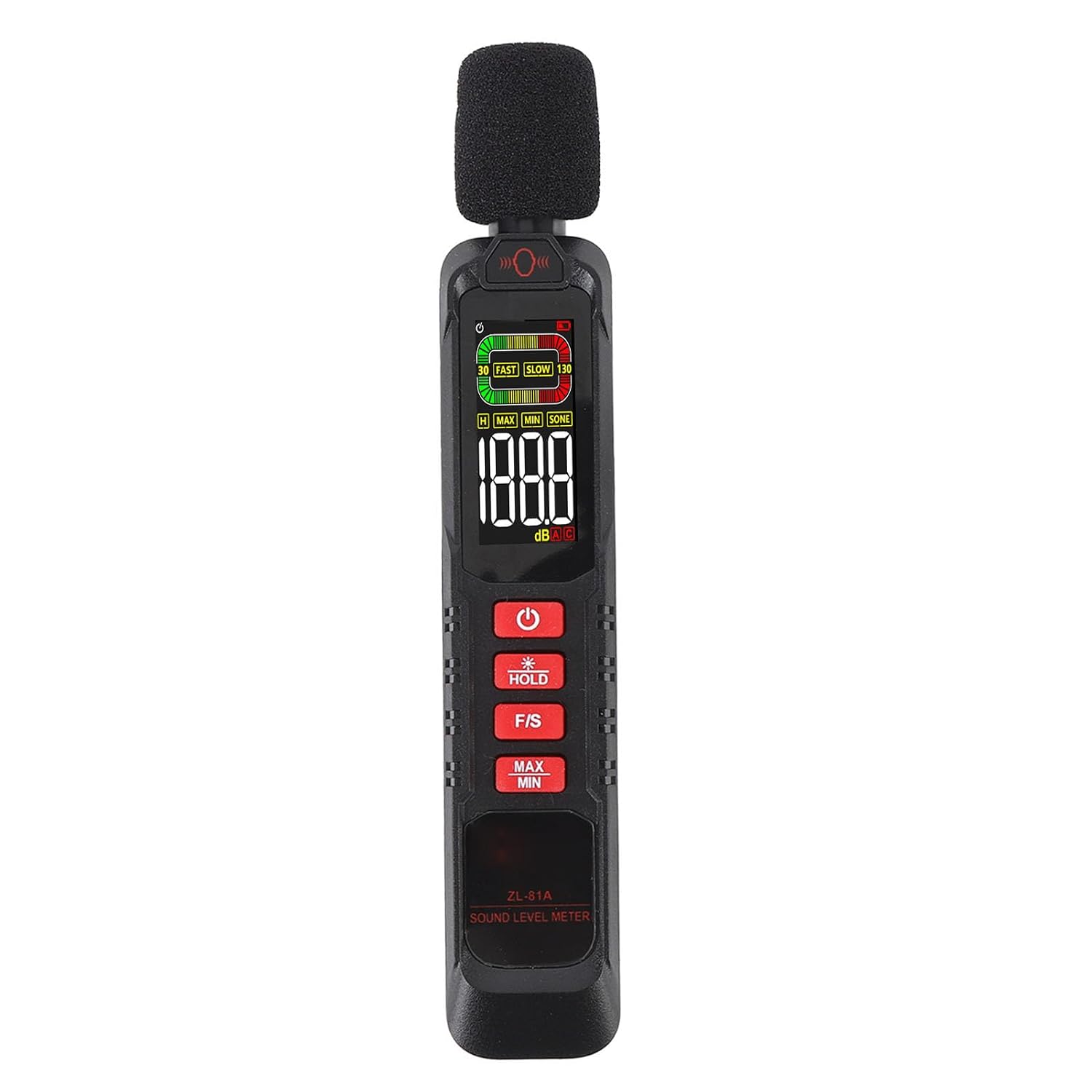
Figure 4.1: Rear view of the ZL-81A Sound Level Meter, indicating the battery compartment.
Use the included screwdriver to access and install 2 AAA batteries into the compartment shown.
5. Operating Instructions

Figure 5.1: Front view of the Klanata ZL-81A Sound Level Meter, showing the digital display and control buttons.
This image highlights the main interface for operating the device, including the power button, data hold, response speed, and max/min value buttons.
5.1 Powering On/Off
Press and hold the Power Button (red circle with line symbol) to turn the device on or off.
5.2 Basic Measurement
Once powered on, the device will immediately begin displaying the current sound level in decibels (dB) on the screen. Ensure the noise meter sensor (microphone) is pointed towards the sound source for accurate readings.
5.3 Data Hold Function
Press the HOLD Button to freeze the current reading on the display. The 'HOLD' indicator will appear on the screen. Press it again to resume real-time measurement.
5.4 Fast/Slow Response Mode
Press the F/S Button to switch between FAST (125ms sampling rate) and SLOW (1 second sampling rate) response modes. Use FAST for quick changes in sound levels and SLOW for more stable, average readings. The selected mode will be indicated on the display.
5.5 Maximum/Minimum Value Tracking
Press the MAX/MIN Button to cycle through the maximum (MAX) and minimum (MIN) sound levels recorded since the device was powered on or the function was reset. The display will show 'MAX' or 'MIN' along with the corresponding value. Press again to return to current measurement.
5.6 Auto Power Off
The device is equipped with an auto power-off function to conserve battery life. It will automatically shut down after a period of inactivity.
6. Maintenance and Care
- Keep the device clean and dry. Use a soft, dry cloth to wipe the exterior. Do not use abrasive cleaners or solvents.
- Avoid exposing the device to extreme temperatures, high humidity, or direct sunlight.
- Store the device in a safe place when not in use, away from dust and moisture.
- Remove batteries if the device will not be used for an extended period to prevent leakage and potential damage.
- Protect the noise meter sensor (microphone) from physical impact and contamination.
7. Troubleshooting
Device does not power on:
- Check if the batteries are installed correctly with the correct polarity.
- Ensure the batteries are not depleted. Replace with new AAA batteries if necessary.
- Verify the battery compartment cover is securely closed.
Inaccurate readings:
- Ensure the noise meter sensor is clean and unobstructed.
- Check for strong electromagnetic interference in the measurement area.
- Confirm the device is operating within its specified temperature and humidity ranges.
- Make sure the windproof ball is properly attached if measuring in windy conditions.
Display is blank or flickering:
- This may indicate low battery power. Replace the batteries.
- If the issue persists, contact customer support.
8. Warranty and Support
Warranty Information
Klanata products are manufactured to high-quality standards. For specific warranty details, please refer to the warranty card included with your product or contact Klanata customer support.
Customer Support
For technical assistance, troubleshooting, or product inquiries, please contact Klanata customer support through the retailer where the product was purchased or visit the official Klanata website.