
1. Introduction
Thank you for choosing the Amicura P2 HEPA Air Purifier. This device is designed to improve indoor air quality by effectively removing airborne particles, pet hair, dander, odors, and other pollutants. Featuring a multi-layer filtration system, smart air quality monitoring, and app control, the P2 provides a cleaner and healthier living environment. Please read this manual thoroughly before operation to ensure proper use and maintenance.
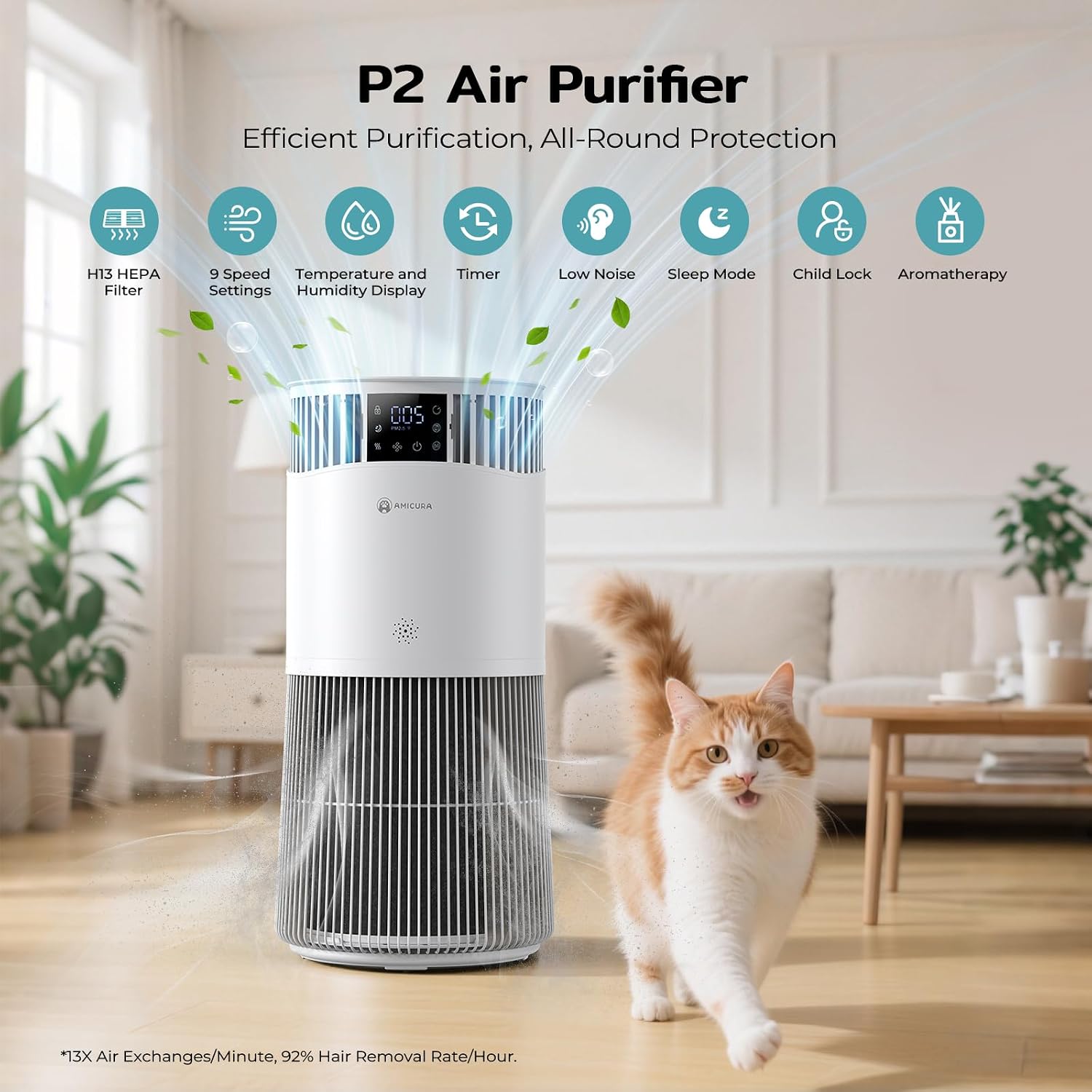
Image 1.1: Amicura P2 HEPA Air Purifier in a home environment.
2. Safety Information
To reduce the risk of electric shock, fire, or injury, please observe the following safety precautions:
- Always unplug the air purifier before moving, cleaning, or performing any maintenance.
- Do not operate the unit with a damaged cord or plug. If the cord or plug is damaged, contact customer support.
- Keep the air purifier away from water or wet areas. Do not immerse the unit in water or other liquids.
- Ensure the air inlet and outlet are not blocked. Maintain at least 20 cm (8 inches) clearance from walls and furniture.
- This appliance is not intended for use by persons (including children) with reduced physical, sensory, or mental capabilities, or lack of experience and knowledge, unless they have been given supervision or instruction concerning use of the appliance by a person responsible for their safety.
- The unit features a nibble-resistant cord to reduce chewing risk and an automatic shut-off when tilted, enhancing pet safety.
- Only use Amicura genuine replacement filters.

Image 2.1: Pet-safe design features of the Amicura P2.
3. Product Components
The Amicura P2 Air Purifier consists of the main unit, a multi-layer filter, and a power adapter. Key features include:
- Control Panel: Touch controls and LED display for settings and air quality feedback.
- Air Inlet Grille: 360-degree omnidirectional intake for efficient air circulation.
- Air Outlet: Top grille for purified air release.
- Filter Compartment: Houses the multi-layer filtration system.
- Aroma Diffuser Slot: For adding essential oils (oils not included).
- Power Port: For connecting the power adapter.

Image 3.1: The 4-layer filtration system.
The 4-layer filtration system includes:
- No-Wash Filter Cotton: Filters pet hair, dander, and stray fluff.
- Outer Pre-Filter: Captures dust, hair, dander, lint, pet fur, and fibers.
- H13 HEPA Filter: Targets allergens and particulate matter, capturing 96.4% of cat allergens and 98.6% of dust mite particles.
- HD Activated Carbon Layer: Removes pet smells, smoke, and cooking odors.
4. Setup
Follow these steps to set up your Amicura P2 Air Purifier:
- Unpack: Carefully remove the air purifier from its packaging.
- Install Filter: The filter may come pre-installed or require installation. If not installed, remove the base cover, insert the filter, and secure the cover. Ensure all packaging is removed from the filter before installation.
- Placement: Place the air purifier on a flat, stable surface. Ensure there is at least 20 cm (8 inches) of clear space around all sides for optimal airflow.
- Power Connection: Connect the power adapter to the power port on the unit, then plug it into a standard electrical outlet.
- App Pairing (Optional): Download the Amicura app from your device's app store. Follow the in-app instructions to pair your air purifier for remote control and monitoring.

Image 4.1: Filter replacement steps.
5. Operating Instructions
The Amicura P2 Air Purifier can be operated via its touch control panel or the dedicated mobile app.
Control Panel Overview

Image 5.1: Smart Touch Controls & LED Display.
- Power Button: Tap to turn On/Standby. Hold for 3 seconds to connect to network.
- Gear (Fan Speed): Tap to cycle through 1-9 fan speeds or Auto mode. Hold for 5 seconds to show PM2.5.
- Auto Mode: In auto mode, the built-in sensor monitors dust and odors, automatically adjusting fan speed.
- PM2.5 Display: The LED display shows real-time PM2.5 levels.
- Air Quality Indicator: Color-coded LED ring provides instant visual feedback: Green (Excellent: 0-35µg/m³), Yellow (Fair: 36-75µg/m³), Red (Poor: 76-115µg/m³), Dark Red (Very Poor: 116+µg/m³).

Image 5.2: PM2.5 Real-Time Monitoring and Air Quality Indicators.
- Sleep Mode: Tap to turn the screen off in 10 seconds. Tap again to exit. In Sleep Mode, the unit operates quietly with dimmed lights for undisturbed rest.

Image 5.3: Quiet Sleep Mode.
- Timer: Tap to set a timer from 0-12 hours. Hold for 5 seconds to show PM2.5.
- Child Lock: Hold for 3 seconds to lock the controls (red light indicates locked). Hold again to cancel.
- Aroma Diffuser: Tap to switch between 1-3 aroma diffusion levels. Auto-off in 30 minutes. Add essential oils to the designated slot (20ml empty bottle included).

Image 5.4: Essential Oil Diffusion Function.
App Control
The Amicura app allows you to:
- Adjust settings (fan speed, mode).
- Set timers.
- Check filter life remotely.
- Monitor air quality.
6. Maintenance
Regular maintenance ensures optimal performance and extends the life of your air purifier.
Filter Replacement
The main filter (HEPA + carbon) lasts up to 12 months with daily use. The pre-filter can be replaced every 3-4 weeks.
- Unplug the air purifier from the power outlet.
- Remove the base cover by twisting it counter-clockwise.
- Carefully remove the old filter.
- Insert the new filter, ensuring it is correctly oriented.
- Replace the base cover and twist clockwise to secure.
- Plug in the air purifier.
- Reset Filter Life: After replacing the filter, hold the 'Filter Reset' button on the control panel for 3 seconds until the red light flashes to reset the filter life indicator.
Image 6.1: Filter replacement procedure.
Cleaning the Unit
- Wipe the exterior of the air purifier with a soft, dry cloth.
- Do not use abrasive cleaners or solvents.
- Periodically clean the air inlet and outlet grilles with a soft brush or vacuum cleaner attachment to remove dust buildup.
7. Troubleshooting
If you encounter issues with your Amicura P2 Air Purifier, refer to the following common problems and solutions:
| Problem | Possible Cause | Solution |
|---|---|---|
| Unit does not turn on | No power supply; Power cord not properly connected | Ensure the power cord is securely plugged into the unit and a working electrical outlet. Check the power source. |
| Weak airflow | Filter is dirty or clogged; Air inlets/outlets blocked | Check and replace the filter if necessary. Ensure no obstructions are blocking the air inlets or outlets. |
| Unusual noise | Foreign object inside; Unit not on a stable surface | Unplug the unit and check for any foreign objects. Place the unit on a flat, stable surface. |
| Air quality reading seems inaccurate or stuck | Sensor is dirty; Environmental factors | Gently clean the sensor area (refer to manual for sensor location if specified, otherwise general cleaning). Ensure the unit is not placed near strong odor sources or vents. |
| App control not working | Wi-Fi connection issue; App not paired | Ensure your Wi-Fi is active and the unit is within range. Re-pair the device with the app if necessary. |
8. Specifications
| Feature | Specification |
|---|---|
| Brand | Amicura |
| Model Number | P2 |
| Colour | White |
| Product Dimensions (D x W x H) | 25D x 22W x 20H centimetres |
| Item Weight | 0.9 kg |
| Power Source | Battery Powered (Note: Typically AC powered, please verify with product labeling) |
| Wattage | 15 watts |
| Control Method | App, Touch Control |
| Filter Type | HEPA (True H13) |
| Floor Area Coverage | 20 square meters |
| Noise Level | 32 dB |
| Particle Retention Size | 0.3 microns |
| Contaminant Filtration Capability | Pet Hair, Dander, Odors, Dust, Pollen, Smoke |
| Special Features | Wireless, Air Quality Monitor, PM2.5 Sensor, Aroma Diffuser, Child Lock, Sleep Mode |
9. Warranty and Support
Warranty: The Amicura P2 Air Purifier comes with a 2-year warranty from the date of purchase. This warranty covers defects in materials and workmanship under normal use.
Customer Support: For any questions, concerns, or warranty claims, please contact our friendly support team. They are available 24 hours a day, 7 days a week via email.
Please refer to your product packaging or the Amicura website for specific contact information.