
Introduction
Thank you for choosing the HOMCOM 9000 BTU Portable Air Conditioner. This manual provides essential information for the safe and efficient operation, installation, and maintenance of your appliance. Please read it thoroughly before use and retain it for future reference.
This portable air conditioner is designed to provide cooling, dehumidification, and fan functions for rooms up to 30 square meters. It features a 4-in-1 design, including cooling, dehumidifying, fan, and sleep modes, controlled via an intuitive touch panel or remote control.

Image: The HOMCOM portable air conditioner, illustrating its 9000 BTU cooling power, suitability for areas up to 30m², an airflow of 350 m³/h, and a minimum cooling temperature of 16°C.
Safety Instructions
Always follow basic safety precautions when using electrical appliances to reduce the risk of fire, electric shock, or injury.
- Read all instructions before using the appliance.
- Ensure the power supply matches the voltage specified on the rating label.
- Do not operate the unit with a damaged cord or plug.
- Do not insert fingers or objects into the air inlet or outlet.
- Keep the appliance away from flammable materials and open flames.
- Always place the unit on a flat, stable surface.
- Unplug the appliance before cleaning or servicing.
- This appliance is not intended for use by persons (including children) with reduced physical, sensory or mental capabilities, or lack of experience and knowledge, unless they have been given supervision or instruction concerning use of the appliance by a person responsible for their safety.
Setup
1. Unpacking and Component Identification
Carefully remove the air conditioner and all accessories from the packaging. Verify that all components are present:
- Portable Air Conditioner Unit
- Exhaust Hose
- Window Sealing Kit (Adjustable window slider, adapter)
- Remote Control
- Drain Hose
- Power Cord

Image: A visual representation of the air conditioner's dimensions (33.6D x 31W x 71.3H cm) and its accompanying parts, including the exhaust hose (max 150 cm), window kit (65-120 cm), remote, and drain hose (100 cm).
2. Positioning the Unit
Place the air conditioner on a flat, stable surface near a window. Ensure there is at least 30 cm of space around the unit for proper airflow.
3. Installing the Window Sealing Kit
The window sealing kit is essential for exhausting hot air outside. It can be installed in various window types, including single/double hung windows and sliding windows.
- Assemble the adjustable window slider to fit your window opening.
- Secure the window slider in the window frame.
- Attach the exhaust hose adapter to the window slider.
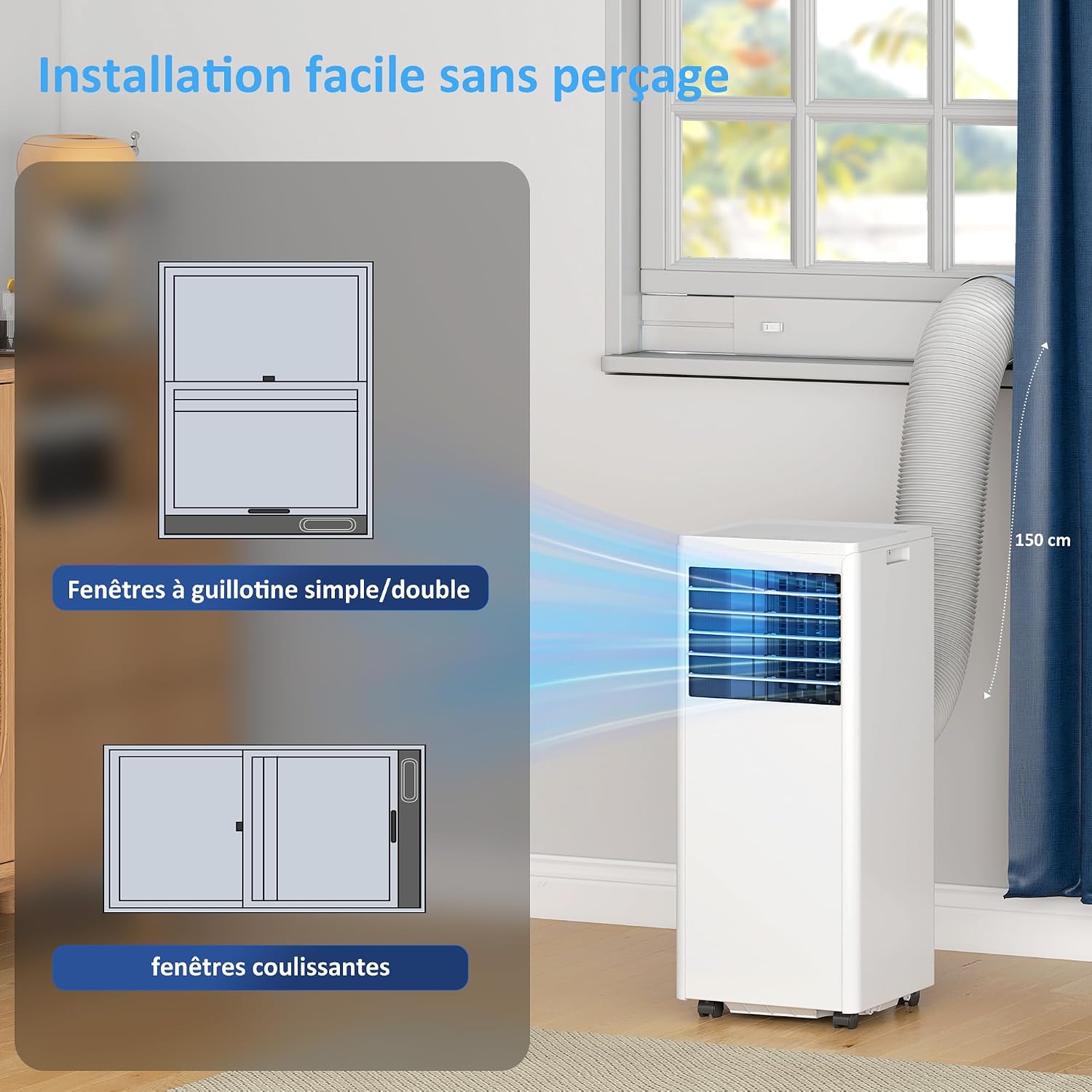
Image: Instructions for easy, no-drilling installation of the window kit, showing compatibility with both guillotine (single/double hung) and sliding windows.
4. Connecting the Exhaust Hose
- Screw one end of the exhaust hose onto the air outlet on the back of the unit.
- Connect the other end of the exhaust hose to the adapter in the window sealing kit.
- Ensure the hose is extended and not kinked to allow for efficient hot air exhaust. The hose can extend up to 150 cm.

Image: The portable air conditioner in a room, demonstrating the proper connection and extension of the exhaust hose to a window for effective cooling.
Operating Instructions
1. Control Panel and Remote Control
The unit can be operated using the touch control panel on top of the unit or the included remote control. The remote control offers an extended range of up to 5 meters.
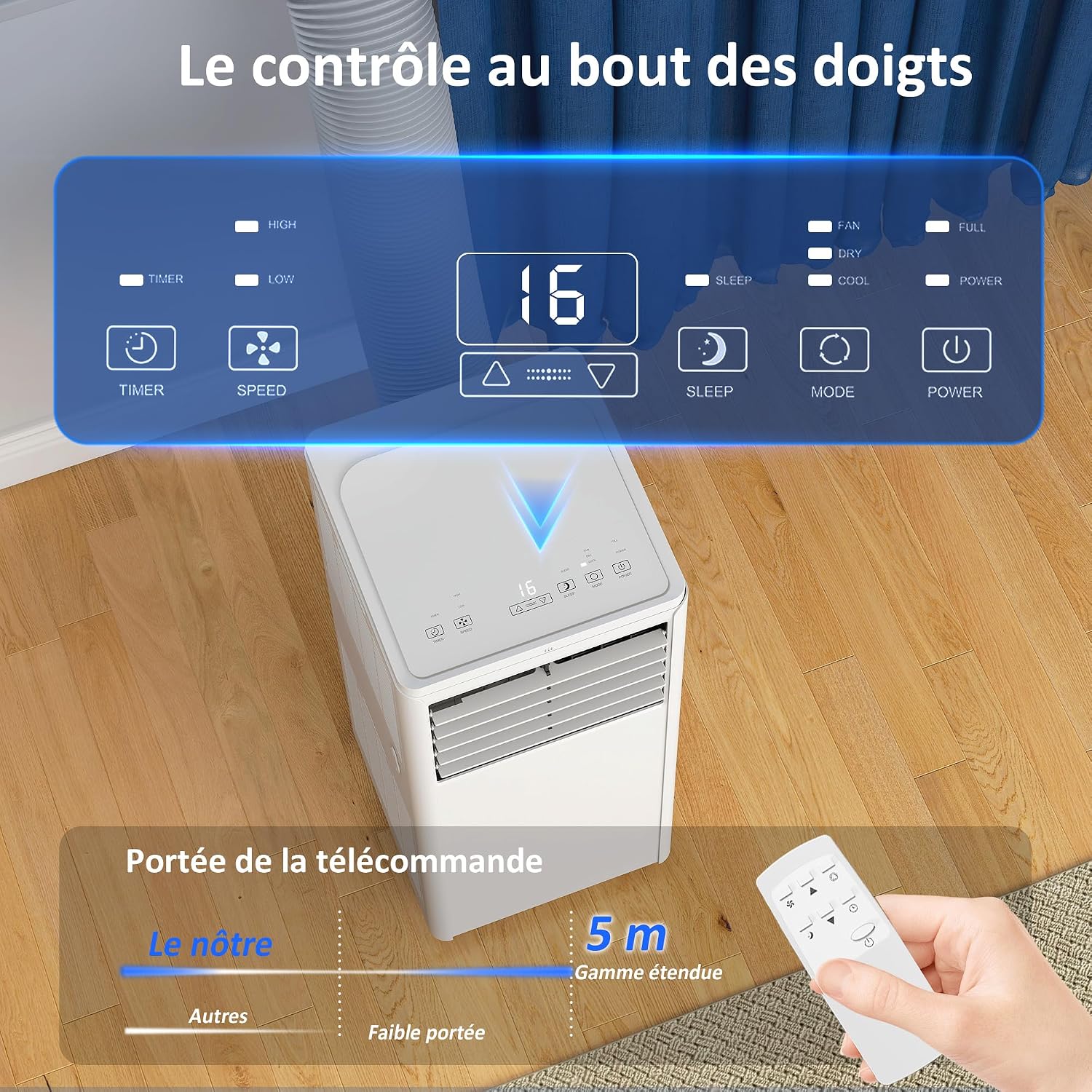
Image: Detailed view of the control panel and remote, highlighting buttons for Timer, Speed (High/Low), Temperature adjustment, Sleep mode, Mode selection (Fan/Dry/Cool), and Power. The remote control has a range of 5 meters.
2. Power On/Off
Press the POWER button on the control panel or remote control to turn the unit on or off.
3. Mode Selection
Press the MODE button to cycle through the available operating modes:
- Cooling Mode: Provides powerful cooling, adjustable down to 16°C.
- Dehumidifier Mode: Removes up to 42 liters of moisture per day.
- Fan Mode: Circulates air without cooling, with two speed settings.
- Sleep Mode: Operates quietly at 55 dB, with the screen dimming automatically for undisturbed rest.

Image: The four primary functions of the portable air conditioner: Cooling (16°C-31°C), Fan (2 speeds), Dehumidifier (42L/day), and Sleep mode (automatic shut-off for peaceful sleep).

Image: Demonstrates the comfort and control of the unit's silent sleep mode (55 dB), with the screen automatically dimming to ensure optimal rest.
4. Temperature Adjustment
In Cooling mode, use the UP and DOWN arrow buttons to set your desired temperature. The temperature range is typically 16°C to 31°C.
5. Fan Speed
In Cooling or Fan mode, press the SPEED button to select between High and Low fan speeds.
6. Timer Function
Press the TIMER button to set a 24-hour programmable timer for automatic on/off operation. Use the UP and DOWN arrow buttons to adjust the desired time.
Maintenance
1. Filter Cleaning
Regular cleaning of the air filter is crucial for maintaining efficiency and air quality. The filter is removable and washable.
- Turn off and unplug the unit.
- Locate and remove the air filter from the back or side of the unit.
- Wash the filter under running water with a mild detergent.
- Allow the filter to air dry completely before reinserting it.
- Clean the filter every two weeks or more frequently depending on usage.

Image: Highlights the washable filter, demonstrating its easy removal and cleaning. Also shows the unit's side handle, swivel wheels for portability, and manually adjustable louvers for directing airflow.
2. Water Drainage
The unit features an auto-evaporation system that minimizes the need for manual drainage. However, in high humidity conditions, the water tank may fill up. An indicator will signal when the reservoir is full.
- Turn off and unplug the unit.
- Place a shallow pan or container under the drain outlet at the bottom rear of the unit.
- Remove the drain plug to allow water to flow out.
- Once drained, replace the drain plug securely.
3. Storage
Before storing the unit for an extended period:
- Drain all accumulated water.
- Clean the air filter.
- Run the unit in fan-only mode for a few hours to dry the internal components.
- Store the unit in a dry, upright position, covered to protect it from dust.
Troubleshooting
If you encounter issues with your air conditioner, refer to the following common problems and solutions:
| Problem | Possible Cause | Solution |
|---|---|---|
| Unit does not turn on | No power, power cord unplugged, full water tank | Check power connection, empty water tank if full. |
| Insufficient cooling | Window kit not properly installed, exhaust hose blocked/kinked, dirty air filter, room too large, doors/windows open | Ensure proper window kit seal, clear exhaust hose, clean filter, close doors/windows. |
| Unit is noisy | Unit not on a flat surface, fan speed too high | Place on a level surface, reduce fan speed. Note: Portable AC units generate some operational noise. |
| Water leakage | Drain plug loose, unit tilted | Ensure drain plug is secure, place unit on a level surface. |
Specifications
| Feature | Detail |
|---|---|
| Brand | HOMCOM |
| Model Number | 823-075V90WT |
| Cooling Capacity | 9000 BTU |
| Dehumidification Capacity | 42 Liters/day |
| Product Dimensions (D x W x H) | 33.6 x 31 x 71.3 cm |
| Color | White |
| Voltage | 240 Volts |
| Noise Level | 65 Decibels |
| Refrigerant | R-290 |
| Filter Type | Grid filter |
| Wattage | 1010 Watts |
| Item Weight | 22 Kilograms |
| Control Method | Touch, Remote Control |
| Energy Efficiency | Class A |
| Annual Energy Consumption | 370 kWh/year |
| Floor Area Coverage | Up to 30 m² |
| Included Components | Power cord, remote control |
Warranty
This HOMCOM Portable Air Conditioner comes with a 2-year limited warranty. Please retain your proof of purchase for any warranty claims. The warranty covers manufacturing defects under normal use conditions. It does not cover damage resulting from misuse, accident, alteration, or unauthorized repair.
Support
For further assistance, technical support, or to inquire about replacement parts, please contact HOMCOM customer service. Refer to your purchase documentation or the HOMCOM website for contact details.


