
1. Introduction
This manual provides essential information for the safe and effective installation, operation, and maintenance of the Generic Automatic Voltage Regulator (AVR) designed for Yokohuma YK10000E and YK8500E generators. This AVR is a replacement part intended to maintain a stable output voltage from your generator.
Please read this manual thoroughly before attempting any installation or operation. Retain this manual for future reference.
2. Safety Information
WARNING: Electrical shock hazard. Always disconnect power before servicing the generator or installing this component.
- Ensure the generator is completely shut down and cooled before beginning any work.
- Disconnect the spark plug wire or battery to prevent accidental starting.
- Wear appropriate personal protective equipment (PPE), including safety glasses and insulated gloves.
- If you are unsure about any procedure, consult a qualified technician.
- Do not operate the generator with damaged or improperly installed components.
3. Product Overview
The Automatic Voltage Regulator (AVR) is a crucial component in your generator's electrical system. It senses the output voltage of the generator and adjusts the excitation current to the alternator to maintain a constant output voltage, regardless of load changes.
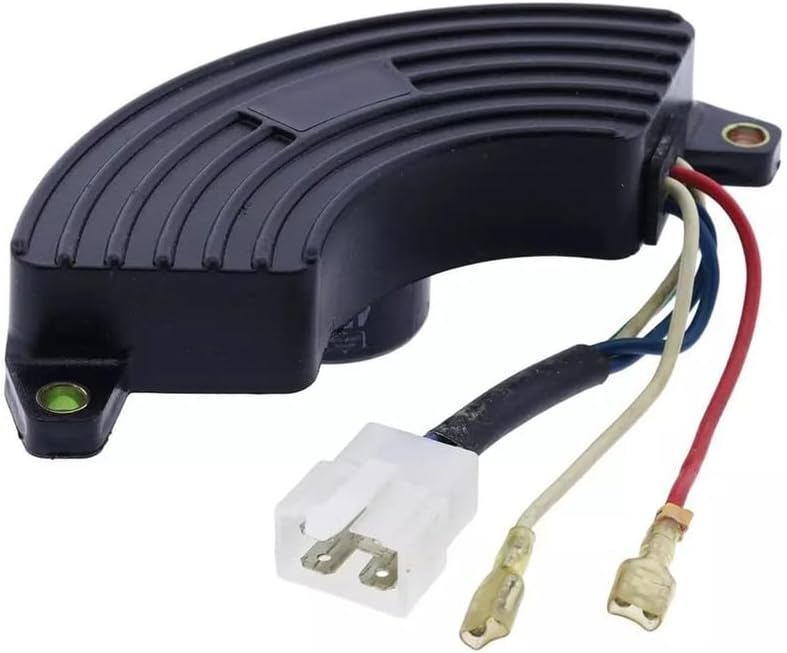
Figure 1: The Generic AVR unit. This image displays the black, curved housing of the AVR with cooling fins on top. Wires (red, blue, and off-white) extend from one end, terminating in a white plastic connector and two spade terminals. Mounting holes are visible on each end of the unit.
This replacement AVR is compatible with Yokohuma YK10000E and YK8500E generator models, typically rated for 8.5KW to 10KW output.
4. Installation Instructions
Before you begin: Ensure the generator is completely off, cooled, and the spark plug wire is disconnected to prevent accidental starting.
- Locate the Existing AVR: Identify the current AVR unit on your Yokohuma YK10000E or YK8500E generator. It is typically mounted near the alternator section.
- Document Connections: Before disconnecting anything, take clear photos of all wire connections to the existing AVR. Note the color and position of each wire.
- Disconnect Wires: Carefully disconnect all wires from the old AVR. This usually involves unplugging connectors and detaching spade terminals.
- Remove Old AVR: Unscrew and remove the old AVR from its mounting location.
- Install New AVR: Position the new Generic AVR in the same location. Secure it using the original mounting hardware. Do not overtighten.
- Connect Wires: Refer to your documented connections (photos/notes) and carefully connect the wires from the generator to the new AVR. Ensure all connections are secure and correctly matched. The main connector typically plugs into a corresponding receptacle, and individual wires (often red and blue for excitation, and others for sensing) connect to their respective terminals.
- Verify Installation: Double-check all connections for tightness and correctness. Ensure no wires are pinched or exposed.
5. Operating Principles (Post-Installation)
After installing the new AVR, the generator's operation should return to normal, providing stable voltage output. The AVR works automatically; no user intervention is typically required during operation.
- Initial Start-up: Reconnect the spark plug wire. Start the generator according to its manufacturer's instructions.
- Voltage Check: Use a multimeter to verify the output voltage of the generator. It should be stable and within the specified range (e.g., 120V AC or 240V AC, depending on the generator model and output).
- Load Test: Gradually apply a load to the generator. Observe if the voltage remains stable under varying loads. Significant voltage fluctuations or instability may indicate an issue with the AVR or other generator components.
If the generator does not produce power or the voltage is unstable after AVR replacement, refer to the Troubleshooting section.
6. Maintenance
The AVR itself is a sealed unit and generally requires no specific maintenance. However, regular inspection of its connections and surrounding area is recommended as part of your generator's overall maintenance schedule.
- Visual Inspection: Periodically check the AVR and its wiring for any signs of damage, corrosion, loose connections, or overheating (discoloration).
- Cleanliness: Ensure the AVR and its cooling fins (if present) are free from dirt, dust, and debris to allow for proper heat dissipation. Use compressed air or a soft brush for cleaning.
- Connection Integrity: Ensure all electrical connections remain tight and secure.
Always perform maintenance with the generator shut down and power disconnected.
7. Troubleshooting
If you experience issues after installing the new AVR, consider the following common problems and solutions:
| Problem | Possible Cause | Solution |
|---|---|---|
| No power output from generator |
|
|
| Unstable or fluctuating voltage |
|
|
| Over-voltage or Under-voltage |
|
|
If troubleshooting steps do not resolve the issue, it is recommended to seek assistance from a certified generator technician.
8. Specifications
- Product Type: Automatic Voltage Regulator (AVR)
- Compatibility: Yokohuma YK10000E, Yokohuma YK8500E Generators
- Generator Power Range: 8.5KW - 10KW
- Model Number (AVR): foxwpart#1225.14479
- Manufacturer: Foxwparts (Generic Brand)
- Function: Regulates generator output voltage
9. Warranty and Support
As this is a replacement part from a generic brand, specific warranty details may vary. Please refer to the retailer or seller from whom you purchased this AVR for information regarding their return policy or any applicable warranty.
For technical support related to your Yokohuma generator, please consult the original generator manufacturer's manual or contact their authorized service centers.