
Introduction
This manual provides detailed instructions for the installation, operation, and maintenance of your Roadanvi X14 12.3-inch Head Unit. Designed specifically for Toyota RAV4 models from 2019 to 2022, this unit features an Android 14 operating system, a QLED touchscreen, wireless Apple CarPlay and Android Auto, Bluetooth 5.2, GPS navigation, and integrated physical knobs for enhanced control.
The Roadanvi X14 is compatible with LE, XLE, XLE Premium, Adventure, TRD Off-Road, and Limited trims. It retains essential factory functions including steering wheel controls, reverse camera, 360° camera, JBL amplifier, parking sensors, OEM USB/AUX ports, A/C information, and door alerts.
Setup and Installation
1. Package Contents
Verify that all components are present in the package:
- Main Head Unit
- Microphone
- Tool Kit
- AUX Out & CAM In Cable
- AUX In & F-Cam Cable
- USB Cables (x2)
- GPS Antenna
- 4G Antenna
- SIM Card Slot
- Canbus Decoder
- Power Cable
- USB Adapter
- User Manual

Image: All items included in the Roadanvi X14 Head Unit package.
2. Compatibility Check
Before installation, ensure your vehicle's OEM radio matches the configurations shown below. This unit is designed for Toyota RAV4 2019-2022 models.

Image: Example of a compatible OEM radio in a Toyota RAV4.
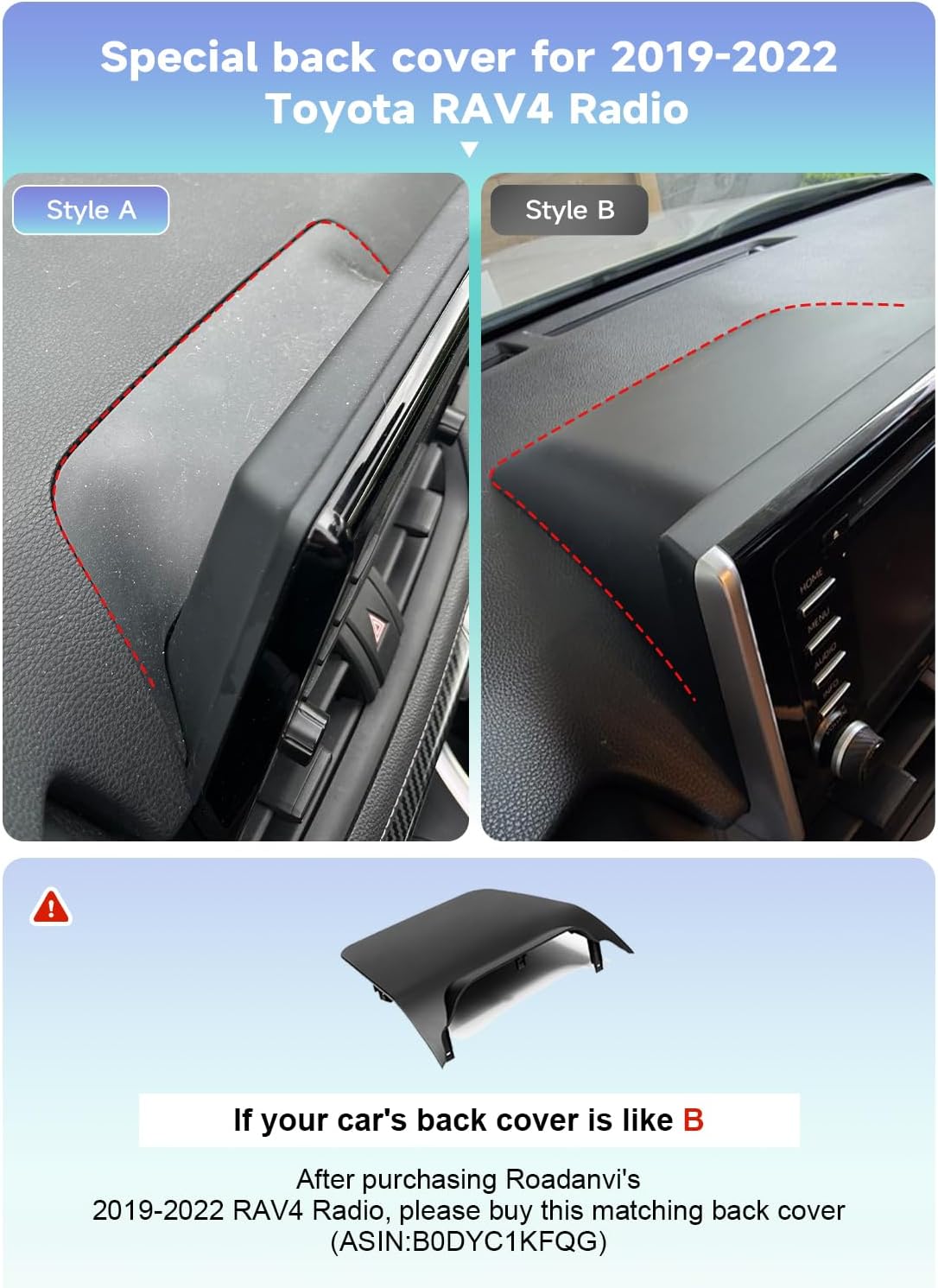
Image: Another compatible OEM radio configuration.
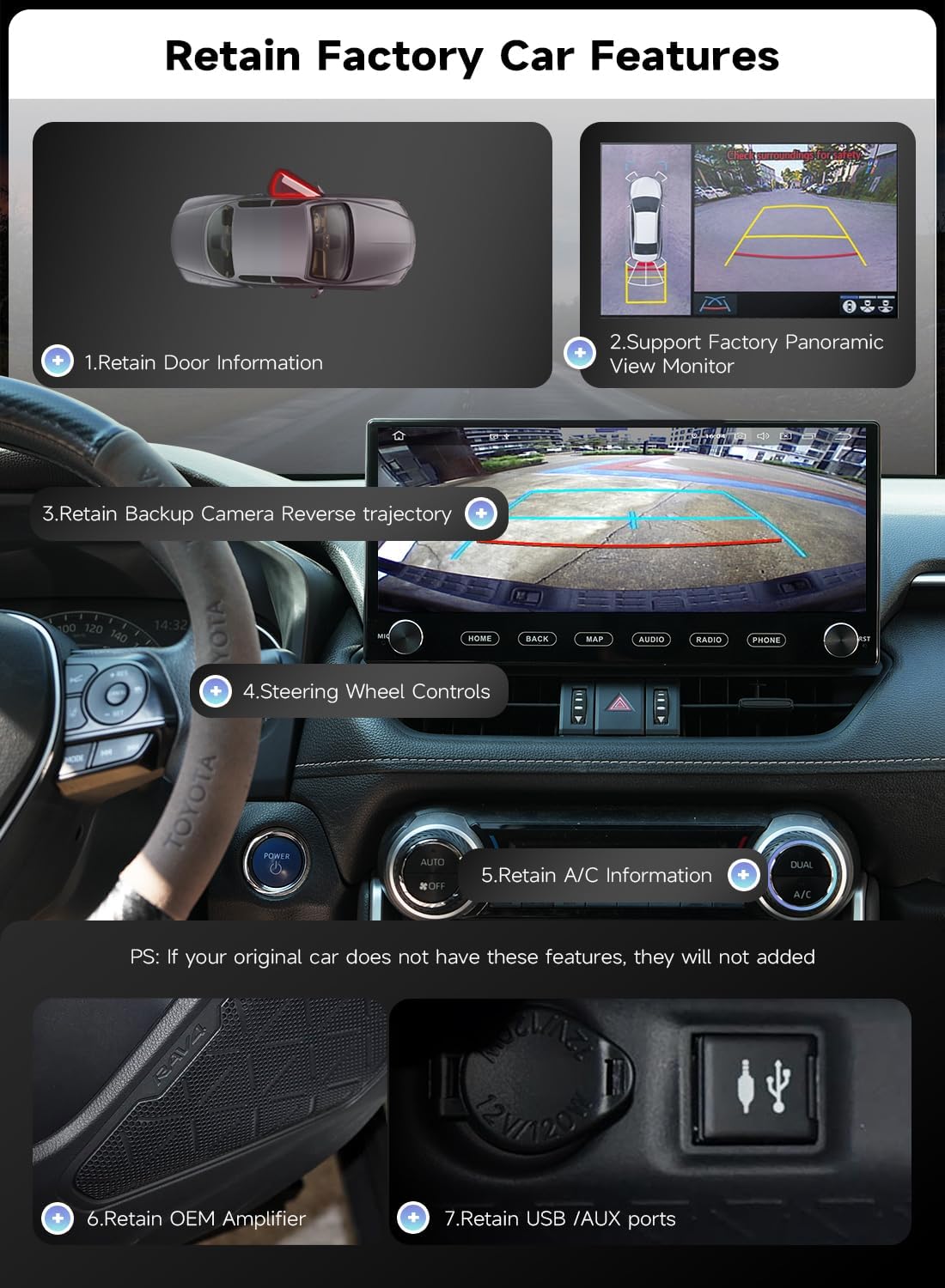
Image: A third compatible OEM radio setup.
Also, check the back cover of your original car's radio. If your car's back cover matches 'Style B' as shown in the image below, you may need to purchase a specific matching back cover (ASIN: B0DYC1KFQG) for proper fitment.

Image: Comparison of original radio back cover styles and a required accessory for Style B.
3. Wiring Diagram
Refer to the wiring diagram below for correct connections. Ensure all cables are securely connected to their corresponding ports.

Image: Stereo Wiring Diagram with labeled ports for GPS, 4G, SIM, USB, AUX, Camera, Canbus, and Power.
4. Installation Steps
Follow the step-by-step guide provided in the included installation manual. It is recommended to consult a professional for installation if you are unsure about any steps.

Image: Reference to the installation guide and technical support options.
5. Retained Factory Features
The Roadanvi X14 Head Unit is designed to seamlessly integrate with and retain several original vehicle functions:
- Steering Wheel Controls
- Reverse Camera and Trajectory
- 360° Panoramic View Monitor
- JBL Amplifier
- Parking Sensors
- OEM USB/AUX Ports
- A/C Information Display
- Door Open Alerts
Note: If your original vehicle does not possess these features, they will not be added by the head unit.

Image: Visual representation of factory features retained after head unit installation.
Operating Instructions
1. Display and Controls
The 12.3-inch 1920×720 QLED touchscreen offers a clear and responsive interface. The unit features dual physical knobs for quick volume and function control, alongside touch buttons for convenient access to common features. The OEM-style design ensures a natural integration with your dashboard.

Image: The X14 Head Unit's OEM-style integration with physical knobs and touch buttons.
2. System Performance
Powered by the MTK8781 6nm 8-core processor and Android 14, the unit provides fast and responsive performance. With 6GB RAM and 128GB storage, it supports smooth multitasking for navigation, music, streaming, and various applications.

Image: Overview of the head unit's core specifications and performance metrics.
3. Wireless Connectivity (CarPlay & Android Auto)
Connect your smartphone wirelessly for Apple CarPlay or Android Auto. This allows access to maps, calls, messages, music, and voice assistance directly from the head unit's screen. The system also supports phone screen mirroring.

Image: Wireless CarPlay, Android Auto, and Mirror Link functionality.
4. Multimedia Features
The unit offers a comprehensive multimedia experience with 5G WiFi, Bluetooth 5.2, 4G SIM support, GPS navigation, and DTS audio tuning. An optical fiber output is available for connecting external audio equipment.
Audio Enhancements
Experience immersive sound with DTS audio tuning, featuring crisp vocals and rich bass. The unit includes a professional DSP chip (AKM7738) and a 4x50W high-power amplifier chip (TDA7851) for precise sound restoration and powerful impact. A 30-band EQ equalizer allows for personalized audio adjustments.

Image: Professional-grade car audio effects with DSP and amplifier chips.
The optical fiber output ensures lossless music and high-quality audio/video transmission to external amplifiers.

Image: Fiber optical output for high-fidelity audio.
5. User Interface (UI) Customization
Choose from three customizable UI themes to match your preference. The system also supports a day-night mode that adjusts seamlessly with your headlights or sunset.

Image: Customizable UI themes and day-night mode.
Split Screen Functionality
Utilize the split-screen feature to run two applications simultaneously, such as navigation and music, enhancing convenience for both driver and passenger.

Image: Split screen feature for multitasking.
Wallpaper Customization
Personalize your head unit by changing the wallpaper. Long-press on a blank area of the interface to access wallpaper selection options, including pre-installed images or your own photos.

Image: Steps to change the head unit's wallpaper.
6. SIM Card and Internet Access
The unit supports 4G LTE connectivity via a SIM card and 5G WiFi for internet access. Ensure the engine is turned off before inserting the SIM card. Use a standard SIM card; Micro SIM and Nano SIM are not compatible.

Image: Guide for inserting the SIM card for 4G connectivity.
7. Off-Road Inclinometer
For off-road enthusiasts, the built-in gyro-compass system tracks your vehicle's roll and pitch angles, providing critical stability data to enhance driving safety on challenging terrain.

Image: Off-Road Inclinometer display showing vehicle angles.
Maintenance
1. General Care
- Cleaning: Use a soft, dry cloth to clean the screen and exterior. Avoid abrasive cleaners or solvents.
- Temperature: Operate the unit within recommended temperature ranges to prevent damage.
- Moisture: Keep the unit dry and away from excessive moisture.
2. Software Updates
Periodically check for software updates to ensure optimal performance and access to new features. Updates can typically be performed via the unit's settings menu when connected to Wi-Fi.
Troubleshooting
If you encounter issues with your Roadanvi X14 Head Unit, refer to the following common solutions:
- No Power: Check all power connections and fuses. Ensure the vehicle's ignition is on.
- No Sound: Verify speaker connections, volume levels, and audio source selection. Check if the mute function is active.
- Touchscreen Unresponsive: Try restarting the unit. If the issue persists, a factory reset may be necessary (note: this will erase user data).
- GPS Not Working: Ensure the GPS antenna is properly installed and has a clear view of the sky. Check GPS settings within the unit.
- Bluetooth/CarPlay/Android Auto Connection Issues: Ensure Bluetooth is enabled on both the head unit and your smartphone. Forget and re-pair devices. For wired connections, try a different USB cable.
- Steering Wheel Controls Not Working: Verify the Canbus decoder connection and ensure it is correctly configured in the unit's settings.
For persistent issues or problems not listed here, please contact Roadanvi customer support.
Specifications
| Feature | Detail |
|---|---|
| Brand | Roadanvi |
| Model Name | Roadanvi X14 RAV4 Radio |
| Compatible Vehicle | Toyota RAV4 (2019-2022) |
| Screen Size | 12.3 inches |
| Display Type | QLED Capacitive Touchscreen |
| Resolution | 1920 x 720 |
| Operating System | Android 14 |
| Processor | MTK8781 (8-core, 6nm) |
| RAM | 6GB |
| Storage Capacity | 128GB |
| Connectivity | Bluetooth 5.2, USB, Wi-Fi (5G), 4G SIM Support |
| Navigation | GPS, BeiDou, GLONASS (North America Map Type) |
| Audio Output Mode | Digital (DTS Audio Tuning, Optical Fiber Output) |
| Human-Interface Input | Touchscreen, Physical Knobs |
Warranty and Support
1. Warranty Information
The Roadanvi X14 Head Unit comes with a 1-year warranty from the date of purchase. This warranty covers manufacturing defects and malfunctions under normal use. Please retain your proof of purchase for warranty claims.
Additionally, protection plans are available for purchase:
- 3-Year Protection Plan: One-time payment of $64.99.
- Complete Protect: Monthly billing at $16.99, covering all past and future eligible purchases.
A 30-day exchange or return policy is also available.

Image: Warranty and return policy overview.
2. Customer Support
For technical assistance, installation guidance, or any product-related inquiries, please contact Roadanvi customer support:
- US Support Phone: 714-936-5339 (Mon-Fri, 8:00-17:00 Pacific Time)
- Email Support: office@roadanvi.com (Mon-Sat, 9:00-18:00 Beijing Time)
You can also visit the official Roadanvi store on Amazon for more information and to contact the seller directly.

Image: How to access customer support through the seller page.
Instructional Videos
1. Roadanvi X14 Unboxing, Installation & Features Overview
Video: A comprehensive guide covering the unboxing, installation process, and key features of the Roadanvi X14 Head Unit for Toyota RAV4 2019-2022.
2. Roadanvi X14 Features Demonstration
Video: A detailed demonstration of the Roadanvi X14 Head Unit's features, including its Android 14 interface and knob controls, in a Toyota RAV4.