
Important Safety Information
Warning:
- Do not exceed the maximum weight capacity of 300 pounds.
- Always follow the assembly instructions carefully to avoid injury.
- Keep the chair on a stable surface to prevent tipping.
1. Setup: Assembly Instructions
Your HeroSet Ergonomic Office Chair Model 611H is designed for easy assembly. All necessary tools are included in the package. Please follow these steps carefully.
Included Components:
- Arm Pad
- Base Plate
- Cushion
- Hardware Bag
- Screw Kit

This image highlights the robust components of the chair, including the SGS certified gas lift for smooth height adjustment, a heavy-duty five-star base for stability, 360-degree silent wheels for easy mobility, and an explosion-proof chassis for safety and durability.
Assembly Steps:
- Attach the five caster wheels to the chair base.
- Insert the gas lift cylinder into the center hole of the chair base.
- Secure the mechanism plate to the underside of the seat cushion using the provided screws. Ensure the front of the mechanism faces the front of the seat.
- Attach the armrests to the seat cushion using the designated screws.
- Connect the backrest to the seat cushion assembly.
- Carefully place the assembled seat and backrest onto the gas lift cylinder.
For detailed visual instructions, please refer to the assembly guide provided in your product package.
2. Operating the Chair: Adjustments
2.1. Seat Height Adjustment
To adjust the seat height, locate the lever on the right side beneath the seat. Pull the lever upwards while seated to lower the seat, or stand up and pull the lever upwards to raise the seat. Release the lever at your desired height. The chair offers approximately 3.9 inches of height adjustment.

This image details the chair's 90-120 degree tilt function, allowing for relaxation. It also shows the lever for adjusting seat height (up to 3.9 inches) and the knob for adjusting tilt tension.
2.2. Recline and Tilt Function
The chair features a 90-120 degree tilt rocking function. To activate the tilt, pull the lever on the left side of the seat outwards. To lock the chair in an upright position, push the lever inwards. The tilt tension can be adjusted by rotating the round knob located under the seat at the front. Turn clockwise to increase tension (making it harder to recline) and counter-clockwise to decrease tension (making it easier to recline).
2.3. Lumbar Support Adjustment
The adjustable lumbar support can be moved vertically and horizontally to provide optimal support for your lower back. Gently push or pull the lumbar support pad to adjust its depth, and slide it up or down along the backrest to find your most comfortable position.
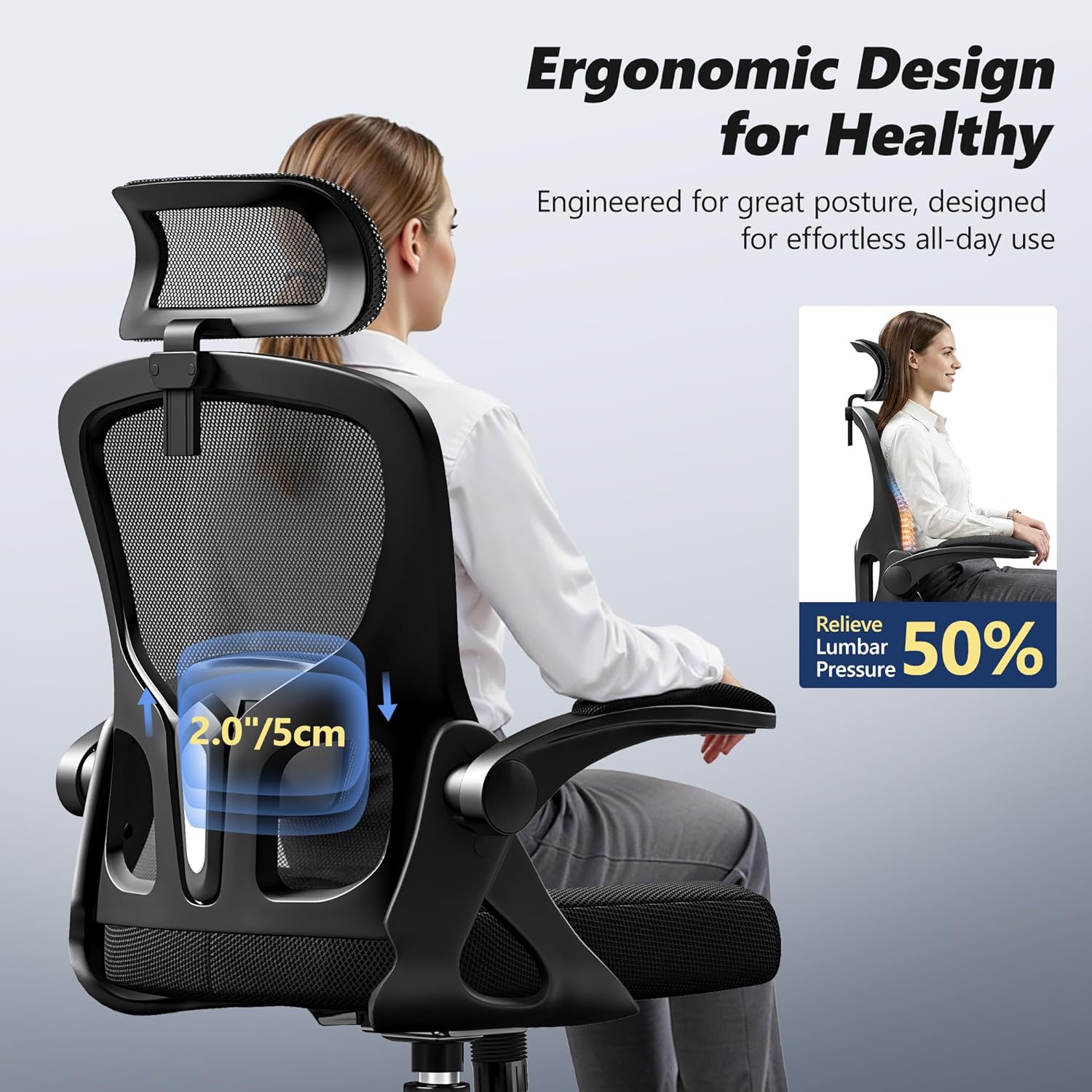
The chair features adjustable lumbar support designed to relieve pressure and promote healthy posture. The lumbar support can be moved up/down and forward/backward to fit individual needs.
2.4. Headrest Adjustment
The headrest can be adjusted for height and angle. To adjust the height, grasp the headrest and slide it up or down. It offers approximately 3.15 inches of vertical adjustment. The headrest also rotates up to 45 degrees to support your neck and head comfortably.

The headrest offers 3.15 inches of vertical adjustment and 45 degrees of rotation, allowing users to customize its position for optimal neck and head support.
2.5. Flip-up Armrests
The armrests can be flipped up by 90 degrees. To raise them, simply lift the armrests upwards until they lock into a vertical position. To lower them, gently pull them down. This feature allows the chair to be stored compactly under a desk.

The chair is equipped with 90-degree flip-up armrests, allowing the chair to be easily pushed under a desk to save space when not in use. The armrests are soft-padded for comfort.
2.6. Swivel and Mobility
The chair features a 360-degree swivel function and smooth-rolling wheels for easy movement across various floor surfaces. Ensure the wheels are clean and free of debris for optimal mobility.
3. Maintenance
3.1. Cleaning
For the mesh backrest and seat cushion, use a soft cloth dampened with mild soap and water. Avoid harsh chemicals or abrasive cleaners, as these can damage the material. Wipe dry immediately.
For the plastic and metal components, wipe with a damp cloth and dry thoroughly.
3.2. Fastener Checks
Periodically check all screws and bolts to ensure they are tight. Retighten if necessary to maintain stability and safety.
4. Troubleshooting
4.1. Chair Squeaks
If the chair squeaks, check all bolts and screws for tightness. Applying a small amount of silicone lubricant to moving parts or connection points may also help.
4.2. Difficulty Adjusting Height
Ensure the gas lift lever is fully engaged. If the issue persists, the gas lift may need replacement. Contact customer support for assistance.
4.3. Chair Does Not Roll Smoothly
Check the wheels for any trapped debris (hair, lint, etc.). Clean the wheels thoroughly. If a wheel is damaged, it may need replacement.
5. Specifications
| Feature | Detail |
|---|---|
| Model Name | 611H |
| Brand | HeroSet |
| Material | Mesh (Back), Foam (Seat), Alloy Steel (Frame) |
| Color | Black |
| Product Dimensions (D x W x H) | 24.4" x 24.4" x 40" (62cm x 62cm x 101.6cm) |
| Maximum Weight Capacity | 300 lbs (136 kg) |
| Seat Height Adjustment Range | 3.9 inches (10 cm) |
| Reclining Angle | 90-120 degrees |
| Headrest Adjustment | 3.15 inches (8 cm) vertical, 45 degrees rotation |
| Armrest Type | 90° Flip-up, Soft-Padded |
| Mobility | 360-degree swivel, smooth wheels |
| Assembly Required | Yes |
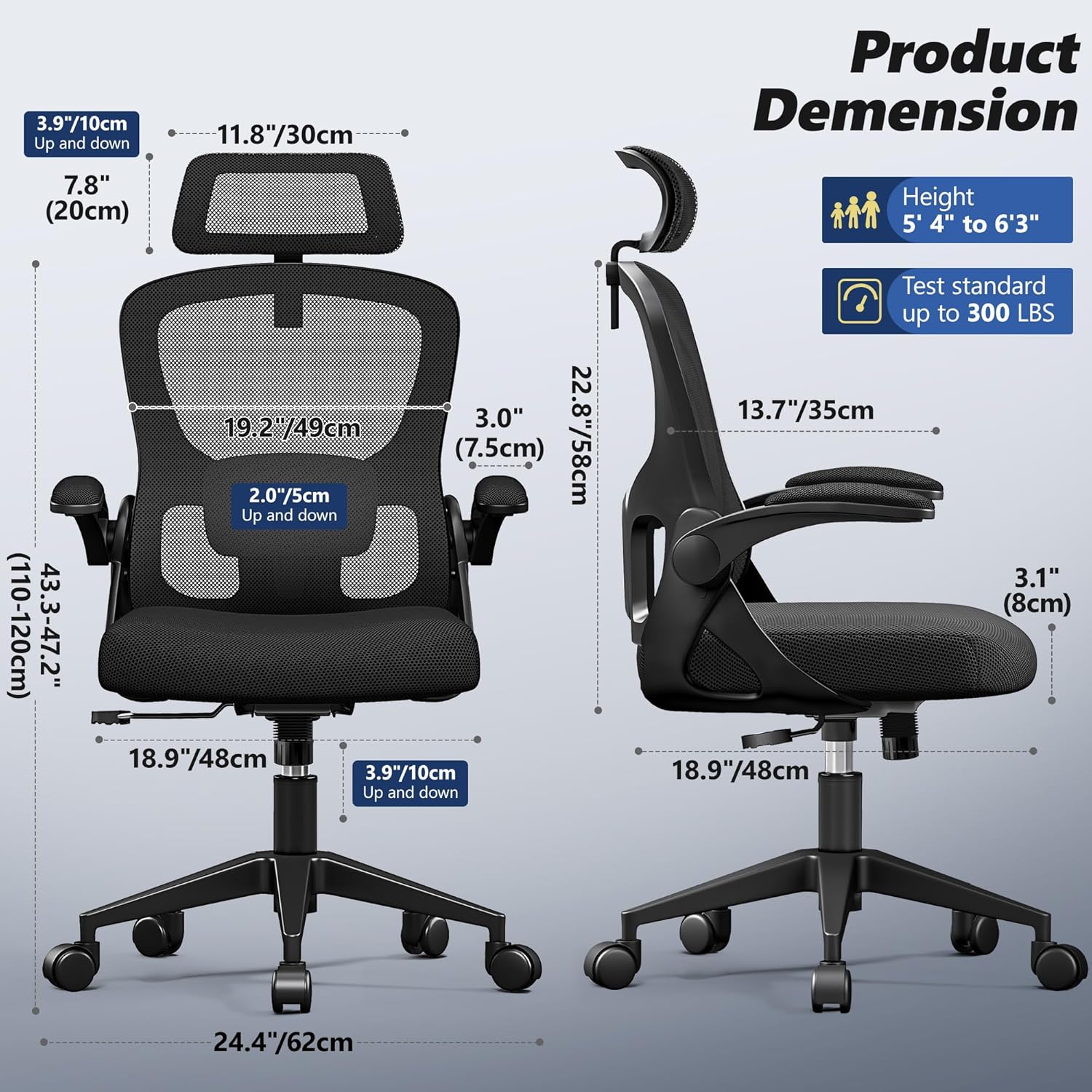
This diagram illustrates the key dimensions of the chair, including height, width, depth, and adjustable ranges for the headrest, lumbar support, and seat height. It also indicates the maximum weight capacity of 300 lbs.
6. Warranty Information
Please refer to the warranty card included with your product for specific warranty terms and conditions. Generally, HeroSet products come with a limited warranty covering manufacturing defects. Keep your proof of purchase for warranty claims.
7. Customer Support
For any questions, assistance with assembly, or troubleshooting not covered in this manual, please contact HeroSet customer support. Refer to the contact information provided in your product packaging or visit the official HeroSet website.
Online Support: HeroSet Store on Amazon


