
1. Introduction
This manual provides essential information for the safe operation, assembly, maintenance, and troubleshooting of your Ruitoo M5PRO Electric Scooter. Please read this manual thoroughly before using the scooter to ensure proper function and safety.
The Ruitoo M5PRO is a high-performance electric scooter designed for adults, featuring dual 1000W motors (2000W peak), 11-inch fat tires, and a maximum speed of 34 mph. It offers a range of up to 50 miles and is equipped with dual suspension and a comprehensive lighting system for enhanced safety and comfort across various terrains.
2. What's in the Box
Upon unpacking, verify that all components are present:
- 1 x Ruitoo M5PRO Electric Scooter
- 1 x Charger
- 1 x Installation Tools (wrench, hex keys)
- 1 x User Manual
- 1 x Seat (optional attachment)
- 1 x Rear Storage Box (optional attachment)
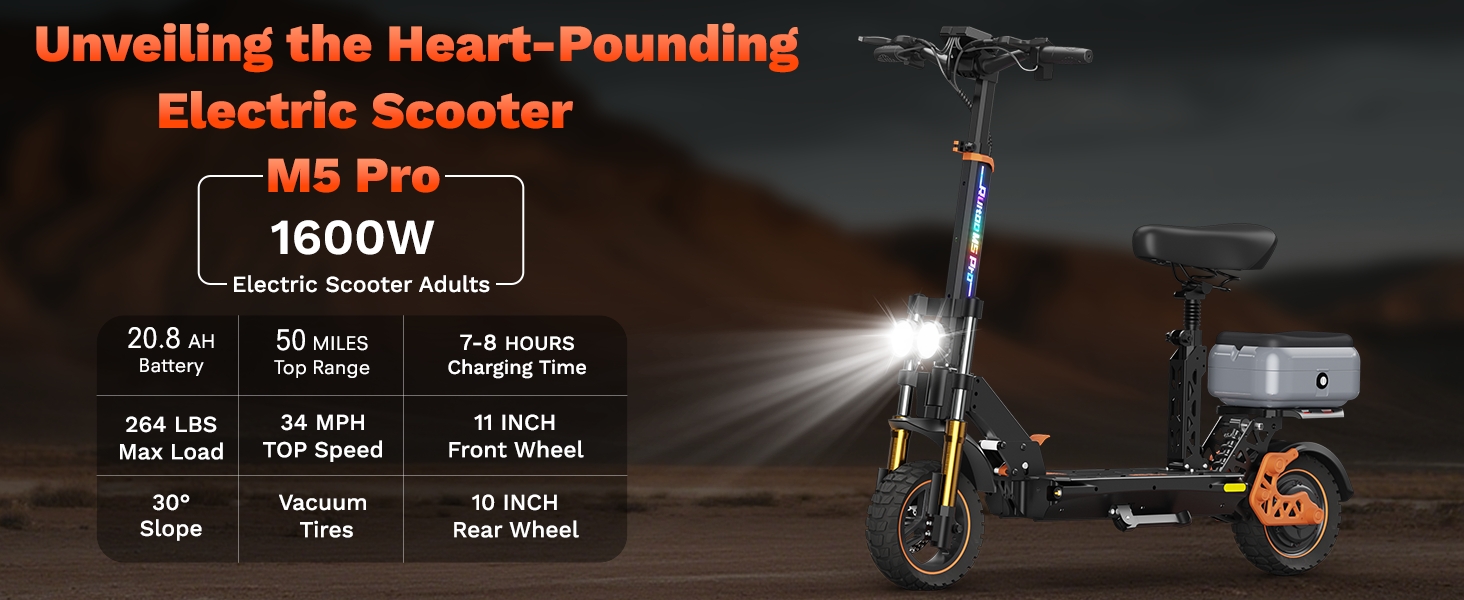
Figure 2.1: Unpacked components of the Ruitoo M5PRO Electric Scooter.
3. Assembly and Setup
3.1 Unfolding the Scooter
- Carefully remove the scooter and all accessories from the packaging.
- Place the scooter on a flat, stable surface.
- Lift the handlebar stem until it locks into the upright position. Secure any locking mechanisms.
- Ensure all connections are secure and cables are not pinched.
Video 3.1: Demonstrates the unpacking and initial assembly of the M5PRO Electric Scooter, including unfolding the main frame.
3.2 Seat and Storage Box Installation
If your model includes a seat and rear storage box, follow these steps for installation:
- Attach the seat post to the seat cushion using the provided tools and hardware.
- Insert the assembled seat post into the designated slot on the scooter's deck. Secure it firmly.
- Mount the rear storage box onto the rear rack, ensuring it is securely fastened with the appropriate screws and brackets.
Video 3.2: Detailed instructions for installing the seat onto the M5PRO Electric Scooter.
Video 3.3: Shows the process of folding and unfolding the scooter, and attaching the rear storage box.

Figure 3.1: Ruitoo M5PRO Electric Scooter with seat and storage box.
4. Operating Instructions
4.1 Powering On/Off
- To power on: Long press the power button on the display.
- To power off: Long press the power button until the display turns off.
4.2 Speed Modes
The M5PRO features multiple speed levels. Short press the power button to cycle through the available speed modes:
- Eco Mode: Approximately 10 mph (15 km/h)
- Drive Mode: Approximately 20 mph (30 km/h)
- Sport Mode: Up to 34 mph (55 km/h)
Video 4.1: Instructions on how to change speed modes on the M5PRO Electric Scooter's display.
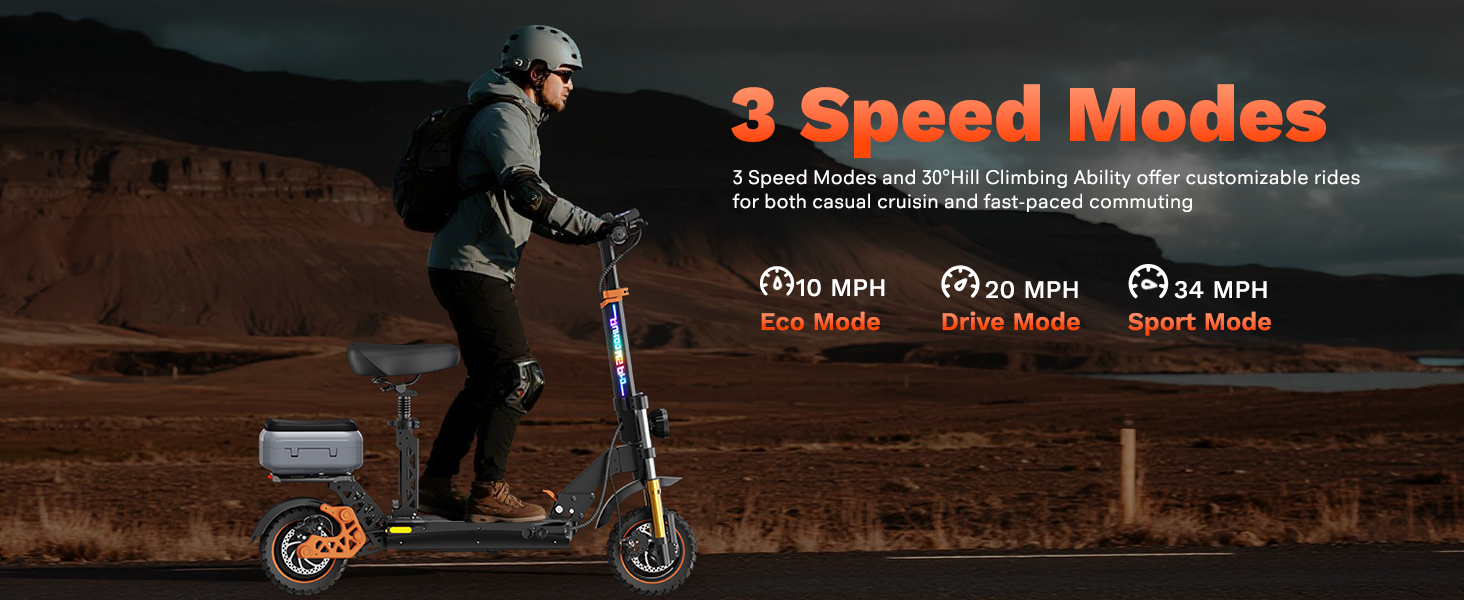
Figure 4.1: Overview of the three available speed modes.
4.3 Unlocking Speed Limit
To unlock the full speed potential (if restricted), press the left brake lever and simultaneously press the acceleration button four times. The 'single' indicator on the display will disappear, indicating the speed limit has been lifted.
4.4 Lighting System
- The scooter features a 360° lighting system including a front light, brake light, and turn signals.
- Press the light button once to turn on/off the main headlights.
- Press the light button twice to activate the pole light (LED strip on the stem).

Figure 4.2: M5PRO Electric Scooter with its comprehensive lighting system.
4.5 LCD Display
The intuitive LCD display provides real-time information:
- Speed (current, average, max)
- Battery level indicator
- Riding mode (Eco, Drive, Sport)
- Distance traveled (trip, odometer)
- Light status
- Cruise control status

Figure 4.3: M5PRO LCD Display showing key riding information.
5. Maintenance
5.1 Charging the Battery
- Ensure the scooter is powered off before charging.
- Connect the charger to the charging port on the scooter.
- Plug the charger into a standard electrical outlet.
- The charging indicator on the charger will typically show red during charging and turn green when fully charged.
- Charging time is approximately 8 hours for a full charge.
- Important: Do not use the scooter while charging. Use only the original 48V charger provided.

Figure 5.1: M5PRO Battery with safety features.
5.2 General Care
- Regularly check tire pressure and inflate as needed.
- Inspect brake components for wear and proper function.
- Keep the scooter clean and dry. Avoid prolonged exposure to water.
- Periodically check all screws and fasteners for tightness.
6. Troubleshooting
| Problem | Possible Cause | Solution |
|---|---|---|
| Scooter does not power on | Low battery; loose connections; power button malfunction | Charge battery; check all cable connections; contact support if issue persists |
| Reduced speed/power | Low battery; speed limit active; motor issue | Charge battery; unlock speed limit (refer to section 4.3); contact support |
| Brakes not responsive | Worn brake pads; loose brake cable; hydraulic fluid low | Inspect and replace brake pads; adjust brake cable tension; seek professional service |
| Unusual noises | Loose components; motor issue; suspension issue | Check all fasteners; inspect motor and suspension for damage; contact support |
For issues not listed here or if solutions do not resolve the problem, please contact customer support.
7. Specifications
| Feature | Detail |
|---|---|
| Brand | Ruitoo |
| Model Name | M5 Pro Electric Scooter |
| Motor Power | Dual 1000W (2000W Peak) |
| Max Speed | 34 Mph |
| Max Range | 50 Miles |
| Battery | 48V/20.8Ah Lithium Battery |
| Charging Time | 8 Hours |
| Tire Size | 11 Inches (Fat Tires) |
| Braking System | Front and Rear Dual Disc Brake System with ABS |
| Suspension | Dual Suspension Hydraulic Shock Absorber |
| Weight Limit | 264 Pounds |
| Product Dimensions | 50.4"L x 23.6"W x 41.7"H |
| Item Weight | 90 Pounds |
| Special Features | Adjustable Handlebar Height, Digital Display, Foldable, Replaceable Battery |
8. Warranty and Support
8.1 Warranty Information
The Ruitoo M5PRO Electric Scooter comes with a 1-year limited warranty covering different components. Please refer to the warranty card included in your package for specific terms and conditions.
8.2 Customer Support
For any questions, technical assistance, or warranty claims, please contact Ruitoo customer support. You can find contact information on the official Ruitoo website or through your purchase platform.
Dreams Trading Inc. provides customer support for this product. They offer 30-day easy returns and dedicated customer service.
