
1. Product Overview
The Coleman-Mach 2111-0043 Digital Wall Thermostat is designed for use with Coleman-Mach VS-18 RV air conditioner systems. This 12V digital thermostat provides precise temperature control for single-zone RV climate systems, offering both heating and cooling functionalities. Its backlit LCD ensures easy readability in various lighting conditions.

Image 1.1: The Coleman-Mach 2111-0043 thermostat shown with its retail packaging and a miniature RV, illustrating its intended application.
2. Safety Information
Please read all instructions carefully before installation and operation. Failure to follow these instructions may result in property damage, personal injury, or death. Always disconnect power before servicing or installing the thermostat.
- This thermostat operates on 12V DC power. Ensure correct voltage and polarity during installation.
- Installation should be performed by a qualified technician to prevent electrical hazards.
- Do not expose the thermostat to water or excessive moisture.
- Keep out of reach of children.
3. Package Contents
Verify that all components are present before beginning installation.
- Coleman-Mach 2111-0043 Digital Wall Thermostat
- Mounting Hardware (screws)
- User Manual (this document)
4. Setup and Installation
This thermostat is specifically designed for Coleman-Mach VS-18 air conditioner systems. Refer to your RV's wiring diagrams and the VS-18 system manual for specific wiring connections. Professional installation is recommended.
4.1 Mounting the Thermostat
- Choose a central location on an interior wall, away from direct sunlight, heat sources, or drafts, which could affect temperature readings.
- Ensure there is sufficient space behind the wall for wiring.
- Carefully remove the old thermostat, if applicable, noting existing wiring connections.
- Mount the new thermostat base plate to the wall using the provided screws.
4.2 Wiring Connections
WARNING: Disconnect all power to the RV's climate control system before wiring.
- Connect the 12V DC power wires to the appropriate terminals on the thermostat. Ensure correct polarity.
- Connect the communication wires from the VS-18 AC system to the designated terminals on the thermostat.
- Secure all wire connections firmly.
- Attach the thermostat faceplate to the mounted base plate.
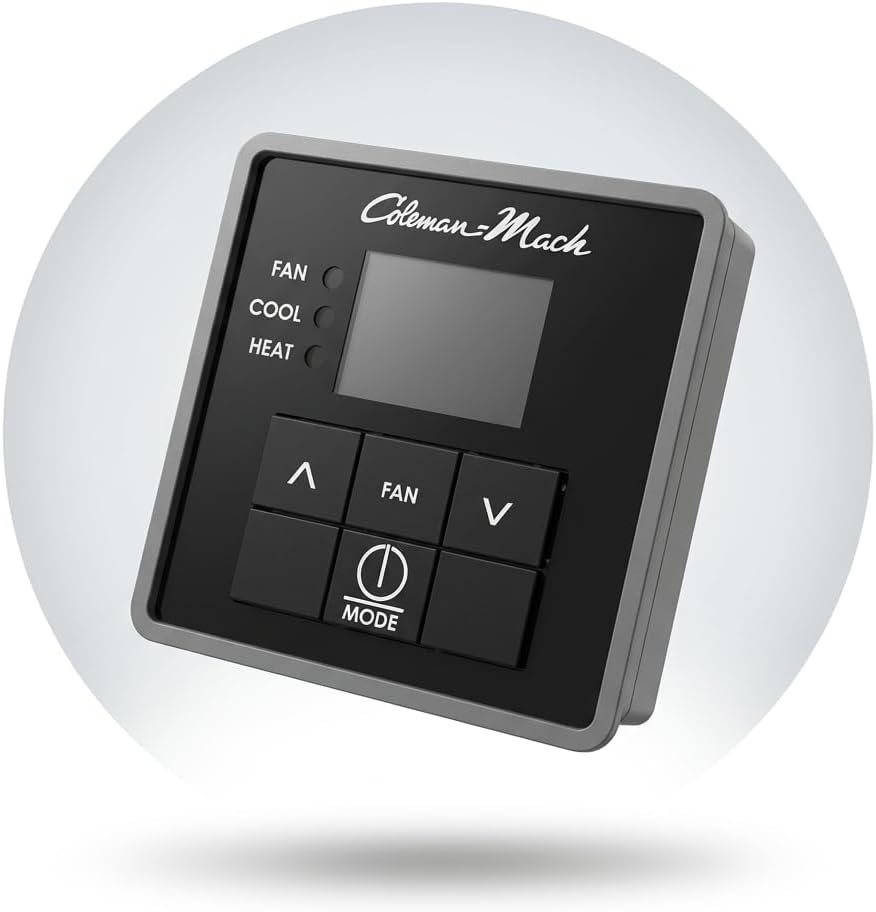
Image 4.1: A detailed view of the Coleman-Mach 2111-0043 thermostat, highlighting its digital display and control buttons.
5. Operating Instructions
The Coleman-Mach 2111-0043 thermostat offers intuitive control over your RV's climate.
5.1 Powering On/Off
Press the MODE button to cycle through the available modes (Cool, Fan, Furnace, Off).
5.2 Setting Temperature
- Ensure the thermostat is in COOL or FURNACE mode.
- Use the UP (^) and DOWN (v) arrow buttons to adjust the desired temperature. The set temperature will be displayed on the LCD.
5.3 Selecting Operation Mode
Press the MODE button repeatedly to cycle through the following options:
- COOL: Activates the air conditioning system to cool the RV interior.
- FAN: Operates the fan only, circulating air without heating or cooling.
- FURNACE: Activates the RV's heating system.
- OFF: Turns off the climate control system.
5.4 Adjusting Fan Speed
When in COOL or FAN mode, press the FAN button to cycle through fan speed settings:
- HIGH: Maximum fan speed.
- LOW: Minimum fan speed.
- AUTO: Fan speed adjusts automatically based on temperature demand.

Image 5.1: The thermostat held in a hand, demonstrating the clear, backlit digital display and accessible control buttons during operation.
6. Maintenance
The Coleman-Mach 2111-0043 thermostat requires minimal maintenance.
- Cleaning: Wipe the thermostat's surface with a soft, damp cloth. Do not use abrasive cleaners or solvents.
- Inspection: Periodically check for loose wiring connections or physical damage.
7. Troubleshooting
If you encounter issues with your thermostat, refer to the following common problems and solutions.
7.1 No Power to Thermostat
- Check RV's 12V DC power supply: Ensure the RV's battery is charged and main power switch is on.
- Inspect wiring: Verify all 12V DC connections to the thermostat are secure and correctly polarized.
- Check fuses: Locate and inspect the fuse for the RV's climate control system. Replace if blown.
7.2 Incorrect Temperature Reading
- Relocation: Ensure the thermostat is not exposed to direct sunlight, heat sources, or drafts.
- Obstructions: Clear any objects that might be blocking airflow around the thermostat's temperature sensor.
7.3 AC/Furnace Not Responding
- Mode Selection: Confirm the thermostat is set to the correct operating mode (COOL or FURNACE).
- Temperature Setting: Ensure the set temperature is appropriately lower (for cooling) or higher (for heating) than the ambient temperature.
- System Check: Verify that the VS-18 AC system itself is powered on and functioning correctly. Consult the VS-18 system manual for specific troubleshooting.
8. Specifications
| Brand | MACH (Coleman-Mach) |
| Model Number | 2111-0043 |
| Model Name | VS-18 Heat and Cool |
| Power Input | 12V DC |
| Product Dimensions (D x W x H) | 6.13" x 4.63" x 4.5" |
| Item Weight | 0.5 Pounds |
| Control Type | Digital, Single-Zone |
| Display | Backlit LCD |
| Compatibility | Coleman-Mach VS-18 RV Air Conditioner System |
| UPC | 755790012671 |
9. Warranty Information
This product is covered by a manufacturer's warranty. For specific details regarding warranty coverage, duration, and claims process, please refer to the documentation provided with your purchase or contact Coleman-Mach customer support directly. Keep your proof of purchase for warranty purposes.
10. Support
For technical assistance, troubleshooting beyond this manual, or warranty inquiries, please contact Coleman-Mach customer support. You can typically find contact information on the manufacturer's website or in the product packaging.
Online Resources: Visit the official Coleman-Mach website for additional product information, FAQs, and support resources.


