
Important Safety Information
Please read all instructions carefully before using this appliance. Keep this manual for future reference.
- Ensure the unit is placed on a flat, stable surface.
- Maintain a minimum distance of 17.75 inches (45 cm) from walls and other objects for proper airflow.
- Do not block air inlets or outlets.
- Always unplug the unit before cleaning or performing any maintenance.
- Do not operate the unit with a damaged cord or plug.
- This appliance uses R-32 refrigerant. Handle with care and ensure proper ventilation during installation and maintenance.
Product Overview
The ZAFRO Smart Inverter Portable Air Conditioner is designed to provide efficient cooling, dehumidification, and fan functions for residential spaces. It features smart inverter technology for energy saving and quiet operation, along with smart control options via an app and remote.
Key Features:
- Cooling Capacity: 12000 BTU (8000 BTU SACC)
- Dual Hose System: Enhances cooling efficiency by separating intake and exhaust air.
- Inverter Technology: Provides stable temperature control and energy efficiency (CEER 12.8).
- Ultra Quiet Operation: Operates as low as 42 dB in Sleep Mode.
- Drainage-Free Cooling: Self-evaporating system for up to 72 hours in humidity below 90%.
- Multiple Modes: Cool, Dry, Fan, Sleep, Extra, Eco.
- Smart Control: ZAFRO app and remote control.
- 24-Hour Timer: Programmable on/off times.
- 4-Way Oscillation: Automatic vertical and horizontal airflow.

Figure 1: ZAFRO Smart Inverter Portable Air Conditioner.

Figure 2: R32 Refrigerant and Dual Duct System.
Setup and Installation
This section details the steps for setting up your ZAFRO portable air conditioner. Ensure all components are present before beginning installation.
Included Components:
- Air exhaust hose (x2)
- Drainage hose (x1)
- Window panel (x5)
- Bracket (x1)
- Remote control (x1)
- Remote control bracket (x1)
- Batteries (AAA) (x2)
- Sealing foam (x4)
- Butterfly bolts (x5)
- User Manual (x1)
Window Kit Installation:
- Measure Window: Measure the length of your window opening. Refer to the provided table to select the appropriate window panels (A, B, C, D, E) for your window size. The window opening minimum width is 17.72 inches, and the maximum width is 70.87 inches.
- Assemble Window Panels: Pre-install the metal clip, then assemble the window panels by inserting the metal clip into the path on the other panel.
- Apply Sealing Foam: Cut the adhesive sealing foam according to the dimensions of your window and apply it to the window frame to ensure a tight seal.
- Place Window Panels: Place the assembled window panels into the window opening. Adjust them to fit securely and fasten with butterfly bolts.
- Seal Gaps: Close the window. Fill any remaining gaps with non-adhesive sealing foam as needed to improve the room's sealing.
- Install Air Exhaust Hoses: Align and install the air exhaust hose assembly into the window panel. Press the latch to lock the air exhaust hose into the hole in the window panel.
- Connect Hoses to Unit: Attach the other end of the air exhaust hoses onto the portable air conditioner. Ensure a minimum distance of 17.75 inches (45 cm) from the wall.

Figure 3: Window Measurement and Panel Selection.

Figure 4: Assembling Window Panels.

Figure 5: Placing and Adjusting Window Panels.

Figure 6: Sealing Gaps and Installing Hoses.

Figure 7: Connecting Hoses to the AC Unit.
Video 1: This video provides a guide to the parts and assembly process for setting up the ZAFRO AC unit.
Operating Instructions
Your ZAFRO portable air conditioner can be operated using the control panel on the unit, the included remote control, or the ZAFRO smartphone application.
Control Panel:
The unit features an ergonomic tilt-top digital display for intuitive operation.

Figure 8: Digital Control Panel.
Operating Modes:
The unit offers six versatile operating modes:
- Cool Mode: Provides powerful cooling with 12,000 BTU capacity.
- Dry Mode: Reduces room humidity.
- Fan Mode: Circulates air with adjustable speeds (Auto/Low/Middle/High).
- Sleep Mode: Operates at ultra-quiet levels (as low as 42dB) and adjusts temperature for comfortable sleep.
- Extra Mode: Locks temperature at 61°F (16°C) and runs at full power for rapid cooling.
- Eco Mode: Optimizes operation for energy saving.
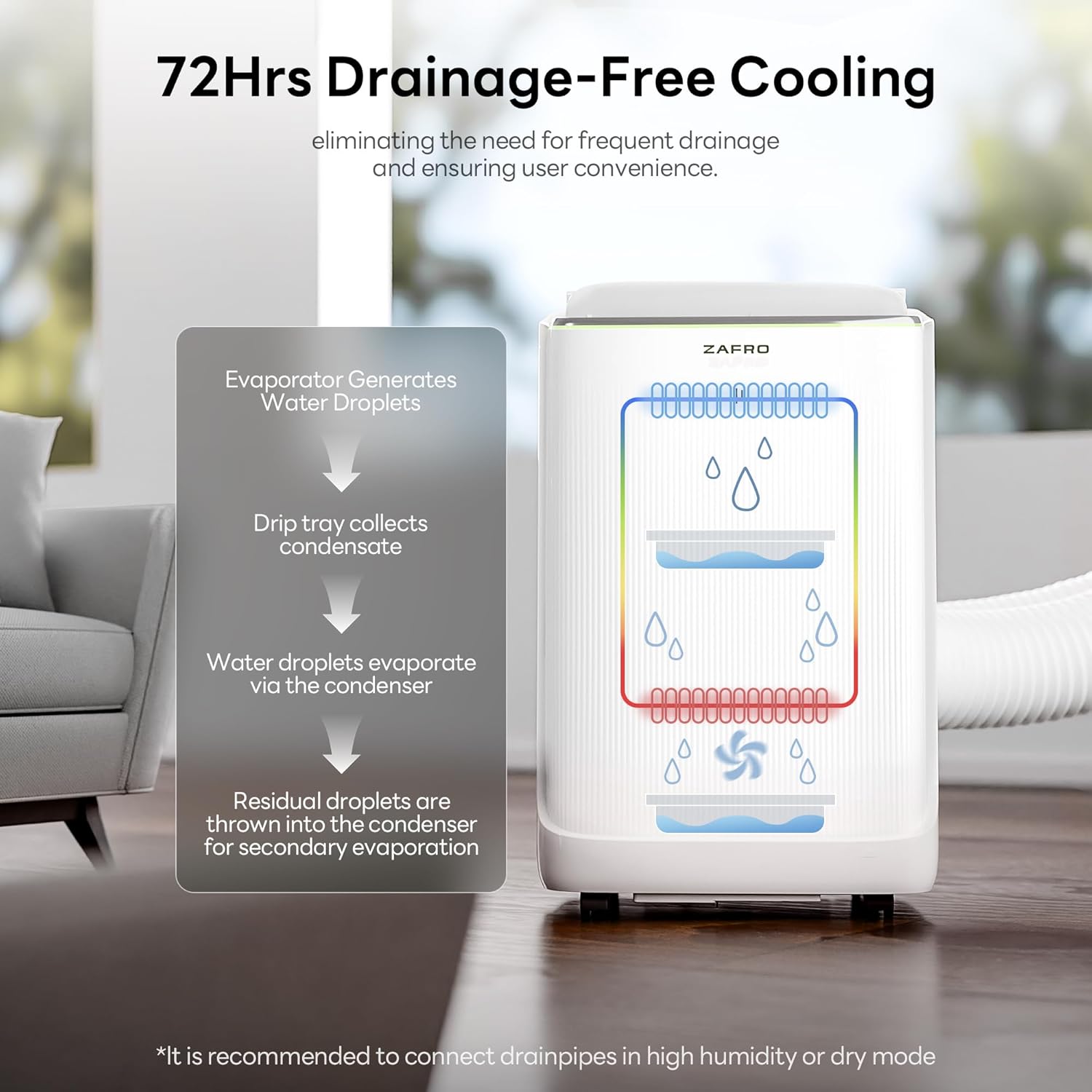
Figure 9: 72-Hour Drainage-Free Cooling System.

Figure 10: Ultra Quiet Operation in Sleep Mode.
Smart Control (App & Remote):
The ZAFRO app allows you to adjust temperature, switch modes, and set schedules from anywhere. The remote control provides convenient access to all functions.
- 24-Hour Timer: Set specific on and off times to match your daily routine.
- Power-Off Memory: The unit remembers your last settings after a power interruption.
- Ambient Lighting: Customizable lighting feature.

Figure 11: Smart Control via ZAFRO App.
Video 2: This video demonstrates how to use the ZAFRO Portable AC Unit in a home setting.
Video 3: This video highlights important information to know before purchasing and operating this Smart AC.
Maintenance
Regular maintenance ensures optimal performance and longevity of your air conditioner.
Drainage:
The unit features a self-evaporating condensate system. In environments with humidity below 90%, the unit is typically drainage-free for up to 72 hours. For extreme humidity (above 90%) or when using Dry Mode, a drain hose is provided for continuous drainage. Connect the drainage hose to the drain port at the back of the unit and direct it to a suitable drain.
Filter Cleaning:
The unit includes filter-clean reminders to prompt you when maintenance is needed. Regularly clean the air filter to maintain airflow and efficiency. Refer to the user manual for specific instructions on how to remove and clean the filter.

Figure 12: Removable Filter Location.
Troubleshooting
If you encounter issues with your ZAFRO portable air conditioner, refer to the following common solutions. For more complex problems, contact customer support.
- Unit does not turn on: Ensure the power cord is securely plugged into a working outlet. Check if the circuit breaker has tripped.
- Insufficient cooling: Verify that the window kit is properly installed and sealed. Ensure no obstructions are blocking the air intake or exhaust. Check if the air filter is clean. Confirm the unit is set to Cool Mode and the temperature setting is appropriate.
- Unit is noisy: While designed for quiet operation, ensure the unit is on a level surface. Check for any loose parts or obstructions in the fan area.
- Water leakage: If continuous drainage is not set up, the internal water tank may be full. If in high humidity or Dry Mode, ensure the drainage hose is properly connected and directed to a drain.
- App connectivity issues: Ensure your unit's Wi-Fi is enabled and your smartphone is connected to the same Wi-Fi network. Follow the app's instructions for pairing.
Specifications
| Feature | Detail |
|---|---|
| Brand | ZAFRO |
| Model Number | 90045EAC0-8K-ZAZ |
| Cooling Power | 12000 BTU (8000 BTU SACC) |
| Capacity (Dehumidifier) | 81 pints |
| Seasonal Energy Efficiency Ratio (CEER) | 12.8 |
| Noise Level | 42 dB (Sleep Mode) |
| Product Dimensions (D x W x H) | 14.25" x 16.5" x 27.2" |
| Item Weight | 50 pounds |
| Voltage | 115 volts |
| Wattage | 1040 watts |
| Annual Energy Consumption | 1158 kilowatt hours per year |
| Refrigerant | R-32 |
| Control Method | App, Remote, Touch |
| Room Type | Bedroom, Living Room |
| Floor Area Coverage | Up to 600 square feet |
| Window Opening Minimum Width | 17.72 inches |
| Window Opening Maximum Width | 70.87 inches |
| Window Opening Minimum Height | 17.72 inches |
Warranty Information
This ZAFRO portable air conditioner comes with a 1 Year Manufacturer Warranty. Please retain your proof of purchase for warranty claims. For detailed terms and conditions, refer to the warranty card included in the packaging or contact ZAFRO customer support.
Customer Support
For any questions, technical assistance, or warranty inquiries regarding your ZAFRO Smart Inverter Portable Air Conditioner, please contact ZAFRO customer support. We aim to reply within 24 hours.
Refer to the official ZAFRO website or the contact information provided in your product packaging for the most up-to-date support channels.


