
1. Introduction
This manual provides essential information for the safe and efficient operation of your BORSSO Atom 2.0 4K Projector. Please read it thoroughly before using the device and retain it for future reference.
The BORSSO Atom 2.0 is a Native 4K Ultra HD projector featuring LTPS+ Display technology, 4000 ANSI lumens brightness, Certified Google TV (Android 14), HDR10/HLG support, MEMC, 24W stereo DSP speakers, WiFi 6, and Bluetooth 5.2. It incorporates a Closed Optomechanics Engine with GeoThermal Cooling for enhanced durability and reduced dust accumulation.
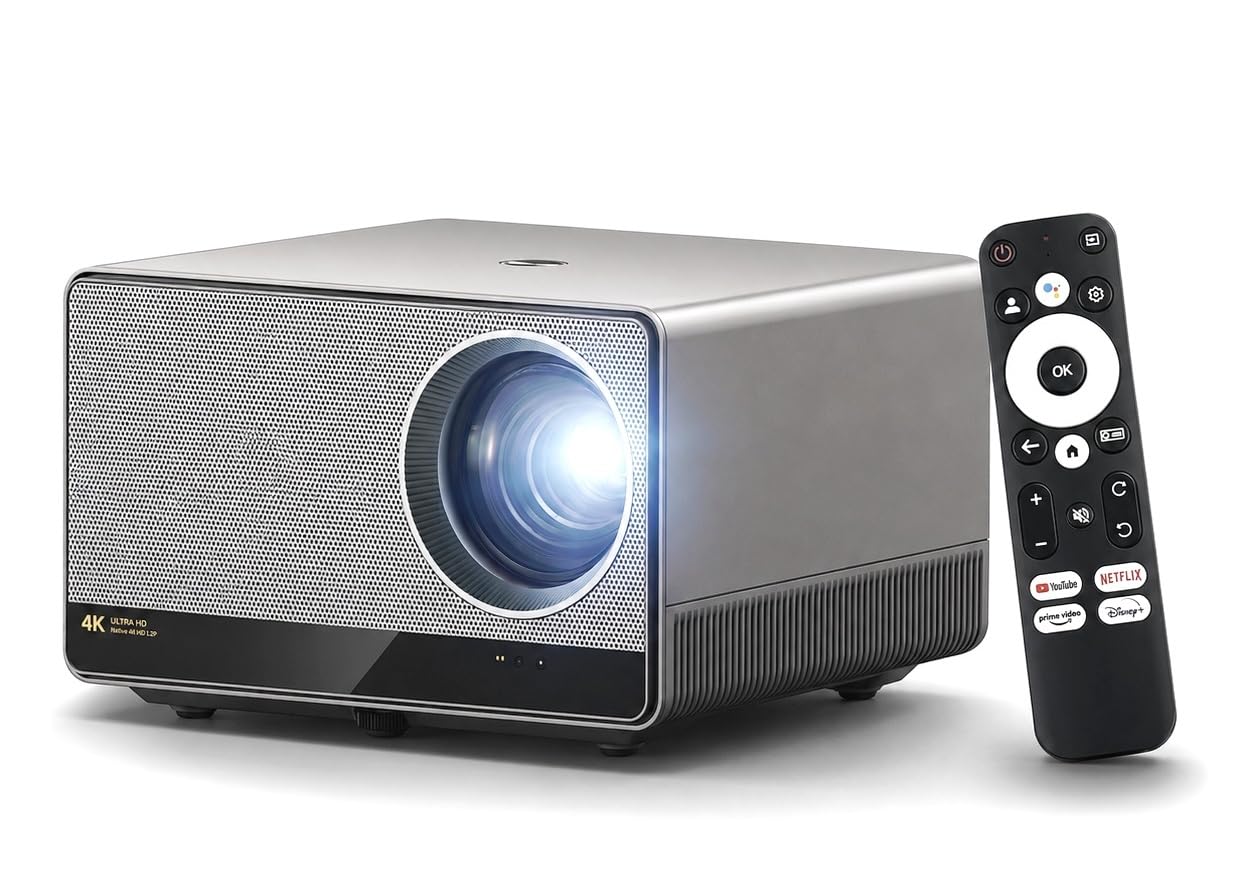
Image: The BORSSO Atom 2.0 projector, its remote control, and a projected image showing the Google TV interface with various streaming apps.
2. Package Contents
Verify that all items listed below are included in your package:
- ATOM 2.0 Projector
- Remote Control
- Power Cord
- Warranty Registration Card
3. Setup Guide
3.1 Projector Placement
The BORSSO Atom 2.0 offers versatile installation options. Choose a stable surface for placement, ensuring proper ventilation around the unit.
- Tabletop Mount: Place the projector on a flat surface in front of the screen.
- Ceiling Mount: The projector can be inverted and mounted to the ceiling.
- Floor Stand: Utilize a compatible floor stand for flexible positioning.
For a 100-inch display, position the projector approximately 11 to 12 feet from the screen. The maximum display size of 150 inches can be achieved at a distance of up to 13.5 feet.

Image: Illustrations demonstrating different projector installation methods: tabletop, ceiling mount, and floor stand.
3.2 Power Connection
- Connect the power cord to the projector's power input port.
- Plug the other end of the power cord into a suitable electrical outlet.
- Press the power button on the projector or remote control to turn on the device.
3.3 Initial Setup and Automatic Adjustments
The Atom 2.0 features an AI-based Smart Algorithm 3.0 for fully automatic projection adjustments:
- Auto Focus: The projector automatically adjusts the image clarity.
- Auto Keystone Correction: Corrects trapezoidal distortion to ensure a rectangular image.
- Obstacle Avoidance: Detects and adjusts the projection area to avoid objects on the wall.
- Auto Screen Fit: Automatically scales the image to fit the screen boundaries.

Image: Visual representation of the projector's automatic focus, keystone correction, obstacle avoidance, and screen fitting capabilities.
4. Operating Instructions
4.1 Remote Control
Use the provided remote control to navigate the projector's interface, adjust settings, and control media playback. The remote supports voice assistance for convenient operation.
4.2 Connectivity
The projector offers various connectivity options:

Image: An illustration detailing the various input and output ports on the projector for connecting external devices.
- HDMI: Connect external devices such as laptops, gaming consoles, Blu-ray players, or TV sticks.
- USB: For connecting USB drives for media playback or peripherals like a mouse.
- 3.5mm Audio: Connect headphones or external speakers.
- WiFi 6: Connect to your wireless network for internet access and streaming.
- Bluetooth 5.2: Pair with Bluetooth speakers or other compatible audio devices.
4.3 Google TV (Android 14)
The projector comes with a built-in Certified Google TV (Android 14) system, providing access to over 1000 applications in 4K HDR, including Netflix, YouTube, Prime Video, and Hotstar. Navigate the interface using the remote control.
4.4 Wireless Screen Mirroring
The built-in Chromecast supports wireless screen mirroring from both Android and iOS devices.
4.5 Picture Quality Settings
- HDR10 / HLG: The projector supports HDR10 decoding technology. Enable HDR effects in the settings for enhanced dynamic range and vivid colors.
- MEMC (Motion Estimation, Motion Compensation): This technology improves motion smoothness in fast-action scenes by inserting intermediate frames, reducing blur and judder.
- AI Cinema Engine 5.0: Enhances contrast, deep color, and clarity.

Image: A visual comparison illustrating the difference between SDR and HDR10 image quality, with HDR10 showing greater detail and dynamic range.
4.6 Audio Settings
The projector is equipped with 12W×2 stereo DSP speakers with 3D surround sound (Bass Diaphragm) and Dolby Digital Plus support.
- HDMI ARC: Connect to external sound systems for an immersive audio experience.
- Bluetooth 5.2: Wirelessly connect to external Bluetooth speakers.

Image: A lifestyle image depicting the projector's 24W speakers providing audio in a living room setting.
5. Maintenance
Proper maintenance ensures the longevity and optimal performance of your projector.
- Dust Management: The Closed Optomechanics Engine with GeoThermal Cooling technology significantly reduces dust accumulation. However, regularly wipe the exterior of the projector with a soft, dry cloth.
- Lens Cleaning: Use a lens cleaning cloth or brush specifically designed for optical lenses to gently clean the projector lens. Avoid abrasive materials or harsh chemicals.
- Ventilation: Ensure that the projector's ventilation openings are not blocked to prevent overheating.
- Lamp Life: The projector lamp has an estimated operating life of 50,000 hours.
6. Troubleshooting
If you encounter issues with your BORSSO Atom 2.0 projector, refer to the following common solutions:
- No Power:
- Ensure the power cord is securely connected to both the projector and the power outlet.
- Verify the power outlet is functional.
- No Image:
- Check if the projector is powered on.
- Verify the input source is correctly selected (e.g., HDMI 1, USB).
- Ensure the connected device (laptop, media player) is powered on and outputting a signal.
- Blurry Image:
- Allow the automatic focus feature to complete its adjustment.
- Ensure the projector lens is clean.
- Check the projection distance relative to the screen size.
- Image Distortion (Trapezoid Shape):
- Allow the automatic keystone correction to adjust.
- Ensure the projector is placed as perpendicular to the screen as possible.
- No Sound:
- Check the volume level on the projector and the connected source device.
- If using external speakers, ensure they are properly connected and powered on.
- Verify the audio output settings on the projector (e.g., internal speakers, HDMI ARC, Bluetooth).
- Remote Control Not Responding:
- Replace the batteries in the remote control.
- Ensure there are no obstructions between the remote and the projector.
If the issue persists, contact customer support.
7. Specifications
Key technical specifications for the BORSSO Atom 2.0 Projector:
| Feature | Specification |
|---|---|
| Brand | BORSSO |
| Model Name | ATOM 2.0 |
| Display Resolution | Native 3840 x 2160 (4K Ultra HD) |
| Display Type | LTPS+ Display, LED |
| Brightness | 4000 ANSI Lumens (Peak Lamp Brightness) |
| Contrast Ratio | 50000:1 Dynamic Contrast |
| Operating System | Certified Google TV (Android 14) |
| HDR Support | HDR10, HLG |
| Motion Compensation | MEMC |
| Audio | 12W×2 Stereo DSP Speakers with 3D Surround Sound (Bass Diaphragm), Dolby Digital Plus Support |
| Connectivity | HDMI, USB, 3.5mm Audio, WiFi 6 (2.4G/5G), Bluetooth 5.2 |
| Screen Mirroring | Built-in Chromecast (Android & iOS) |
| Automatic Features | Auto Focus, Auto Keystone, Obstacle Avoidance, Auto Screen Fit (AI Smart Algorithm 3.0) |
| Light Source Life | 50,000 Hours |
| Maximum Image Size | 150 Inches |
| Throw Ratio | 1.27:1 |
| Dimensions (L x W x H) | 26L x 15W x 26H Centimeters |
| Weight | 3 Kilograms |
8. Warranty and Support
BORSSO provides comprehensive warranty and support for the Atom 2.0 projector.
- Overall Warranty: 1 Year from the date of purchase.
- Lamp Warranty: 2 Years.
- Warranty Registration: It is mandatory to register your product's warranty within 10 days from the date of delivery to avail full benefits. Please refer to the brand website for registration details.
For warranty claims or technical support, please contact BORSSO at:
- Phone: 8955589977
- Email: myrakhmshop@gmail.com
