
1. Product Overview
The UGREEN 130W USB C Car Charger and Gravity Phone Holder is a versatile accessory designed for in-vehicle use. It combines a powerful multi-port car charger with an automatic gravity-sensing phone holder, providing convenient charging and secure phone mounting while driving.
The car charger features three output ports: two USB-C ports and one USB-A port, capable of delivering a combined total output of 130W. This allows for rapid charging of multiple devices simultaneously. The gravity phone holder is engineered for easy, one-handed operation, automatically securing your smartphone as it is placed into the mount.
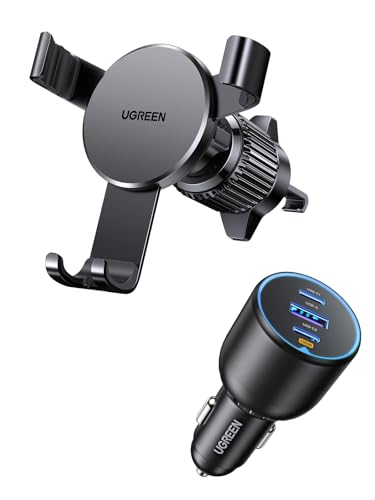
Figure 1: UGREEN 130W USB C Car Charger and Gravity Phone Holder. This image displays the combined car charger and phone holder unit, highlighting its compact design and multiple charging ports.
2. Setup Instructions
2.1 Installing the Car Charger
- Locate the Vehicle's Cigarette Lighter Socket: Ensure the vehicle's engine is off before installation.
- Insert the Charger: Firmly push the UGREEN car charger into the 12V-24V cigarette lighter socket until it is securely seated.
- Verify Power: Once the vehicle's engine is started, the charger should receive power. Some chargers may have an indicator light.
2.2 Installing the Gravity Phone Holder
The gravity phone holder is designed for horizontal air vents only. Ensure your vehicle has suitable horizontal air vents for proper installation.
- Identify a Horizontal Air Vent: Choose a stable horizontal air vent in your vehicle that does not obstruct your view or vehicle controls.
- Attach the Holder: The holder features a "hook shape" design. Carefully slide the hook onto one of the horizontal slats of the air vent.
- Secure the Grip: Ensure the "three grip points" of the holder firmly engage with the air vent slats. Adjust for a snug fit to prevent movement while driving.

Figure 2: Installation of the gravity phone holder. This image illustrates how to securely attach the phone holder to a horizontal air vent using its hook and grip points.
3. Operating Instructions
3.1 Using the Car Charger
- Connect Devices: Use appropriate charging cables to connect your devices to the USB-C1, USB-C2, or USB-A ports on the charger.
- Power Distribution:
- USB-C2: Up to 100W maximum output when used alone.
- USB-C1: Up to 30W maximum output when used alone.
- USB-A: Up to 22.5W maximum output when used alone.
- Compatibility: The charger is compatible with a wide range of devices including iPhone 17/16/15/14 series, Samsung Galaxy S25/S24, Xiaomi, MacBook Pro, iPad Pro, Pixel 10/9, GPS, and Dash Cameras.

Figure 3: Close-up of the car charger ports. This image highlights the USB-C1, USB-C2, and USB-A ports, indicating their respective power outputs.
3.2 Using the Gravity Phone Holder
- Insert Phone: Gently place your mobile phone into the holder. The bottom support will extend, and the side arms will automatically close and secure your phone using gravity.
- Remove Phone: To remove your phone, simply lift it upwards. The gravity mechanism will release the side arms.
- Stable Support: The extensible back support and three-point grip ensure a strong and stable hold, preventing the phone from falling during driving.

Figure 4: Phone placement in the gravity holder. This image demonstrates how the gravity mechanism automatically secures a phone when placed into the holder.
4. Maintenance
- Cleaning: Use a soft, dry cloth to clean the surface of the charger and holder. Do not use liquid cleaners or abrasive materials.
- Storage: When not in use, store the product in a cool, dry place away from direct sunlight and extreme temperatures.
- Avoid Disassembly: Do not attempt to disassemble or modify the product. This can void the warranty and cause damage.
5. Troubleshooting
5.1 Car Charger Issues
- Charger not powering on/devices not charging:
- Ensure the car charger is fully inserted into the vehicle's cigarette lighter socket.
- Verify that the vehicle's engine is running, as some sockets only receive power when the ignition is on.
- Check the vehicle's fuse for the cigarette lighter socket.
- Try a different charging cable or device to rule out cable/device issues.
- Slow charging:
- Ensure you are using a high-quality charging cable that supports fast charging.
- Check the power requirements of your device and compare them to the charger's output specifications (e.g., a device requiring 100W will charge slower on a 30W port).
- When multiple devices are connected, the total power is shared, which may reduce individual charging speeds.
5.2 Phone Holder Issues
- Holder not securing phone:
- Ensure the phone is placed centrally into the holder, allowing the gravity mechanism to engage properly.
- Check if your phone's size (width/height) is within the compatible range for the holder.
- Remove any bulky phone cases that might prevent the arms from closing fully.
- Holder loose on air vent:
- Re-check the installation to ensure the hook and grip points are firmly attached to a horizontal air vent slat.
- Ensure the air vent slats are not too thin or too thick for the holder's grip.
- The holder is designed for horizontal air vents only. It may not be stable on vertical or circular vents.
6. Technical Specifications
| Model Name | 130W USB C Car Charger with Gravity Phone Holder |
| Input Voltage | DC 12V-24V |
| Total Output Power | 130W Max |
| USB-C2 Output (Single Use) | 100W Max |
| USB-C1 Output (Single Use) | 30W Max |
| USB-A Output (Single Use) | 22.5W Max |
| Material | Flame-retardant material |
| Safety Features | Overheating, Short-circuit, Over-voltage, Over-current Protection |
| Phone Holder Compatibility | Smartphones (gravity-activated), Horizontal Air Vents Only |
7. Safety Information
- Material Safety: The car charger casing is constructed from flame-retardant material, offering enhanced thermal insulation and fire protection.
- Integrated Protection: This charger incorporates a smart chip designed to safeguard your connected devices against common electrical hazards such as overheating, short-circuits, over-voltage, and over-current, ensuring a secure charging environment.
- Operating Environment: Do not expose the product to water, moisture, or extreme temperatures.
- Children and Pets: Keep the product out of reach of children and pets.
- Driving Safety: Always ensure the phone holder and charger do not obstruct your view or interfere with the safe operation of your vehicle. Adjust settings or place your phone only when the vehicle is stationary.

Figure 5: Illustration of internal safety mechanisms. This image represents the smart chip and flame-retardant casing that provide protection against electrical hazards.
8. Warranty and Support
For detailed warranty information and customer support, please refer to the official UGREEN website or contact their customer service directly. Keep your purchase receipt as proof of purchase for any warranty claims.
You can typically find support and contact information on the UGREEN Official Website.


