
Introduction
This manual provides detailed instructions for the installation, operation, and maintenance of your AQUALTRA USF-AR-800 Tankless Alkaline Under-Sink Reverse Osmosis (RO) System. Please read this manual thoroughly before installation and keep it for future reference. Proper installation and maintenance are crucial for optimal performance and longevity of the system.
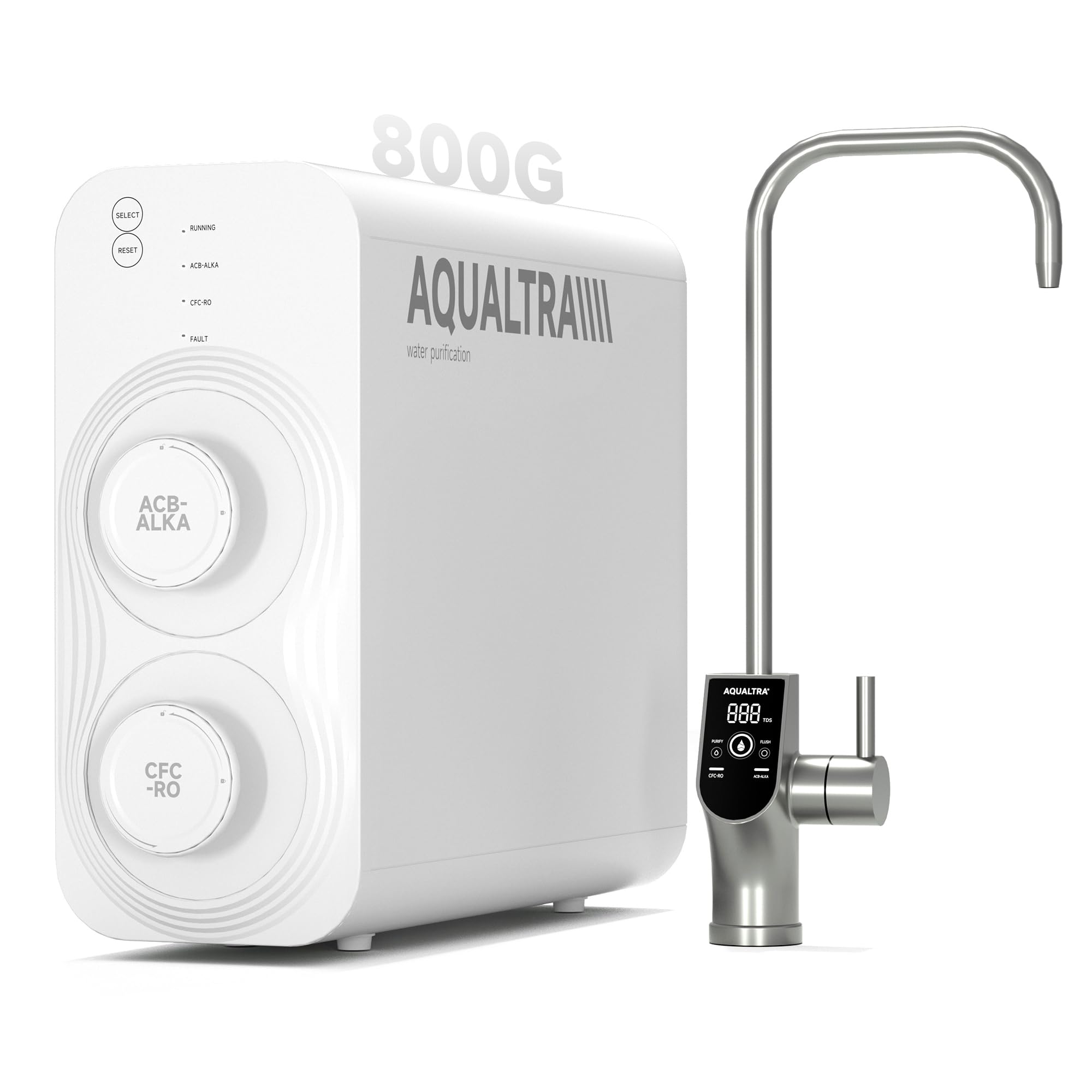
Image: The AQUALTRA USF-AR-800 system unit and its accompanying smart faucet.
Product Features
- 10-Stage Filtration: Advanced filtration process to remove various contaminants.
- Tankless Design: Saves up to 70% under-sink space compared to traditional RO systems.
- 800 GPD High Flow Rate: Provides purified water quickly and on demand (2 L/min or 0.53 GPM).
- 3:1 Pure/Drain Ratio: Efficient water usage, reducing wastewater.
- Alkaline Mineralization: Enriches water with beneficial minerals like Ca²⁺, Mg²⁺, Na⁺, K⁺ for improved taste and health benefits.
- Smart LED Faucet: Displays TDS levels, water quality, and filter lifespan indicators.
- Certified Quality: CSA certified to NSF/ANSI 372 for lead-free compliance.
- Easy Installation & Filter Replacement: Push-to-connect design for quick setup and 3-second filter changes.

Image: Detailed diagram showing the layers of the 10-stage deep filtration system, including non-woven fabric, carbon fiber, PP cotton, RO membrane, and alkaline carbon.

Image: Illustration of the pH scale and how the system enriches water with minerals like Ca²⁺, Mg²⁺, Na⁺, K⁺ to produce slightly alkaline water, improving taste and hydration.
Safety Information
- This system is designed for municipal tap water sources only. Do not use with well water unless pre-filtered.
- Only use with COLD water sources. Do not connect to hot water lines.
- Ensure adequate space under the sink for installation and maintenance. Refer to product dimensions: 42.4L x 15W x 34.3H cm.
- The system requires an electrical outlet under the sink.
- Ensure all connections are secure to prevent leaks.
- Do not expose the system to direct sunlight or freezing temperatures.
Package Contents
Verify that all components are present before beginning installation:
- AQUALTRA USF-AR-800 Main Unit
- Smart LED Faucet
- CFC-RO Filter Cartridge
- ACB-ALKA Filter Cartridge
- Water Inlet Adapter
- Drain Saddle
- Water Tubing (various colors for identification)
- Faucet Accessories
- Power Adapter
- User Manual
Installation
Pre-Installation Checklist
- Confirm you have all package contents.
- Ensure sufficient space under your sink (42.4L x 15W x 34.3H cm).
- Locate a cold water supply line and a drain pipe.
- Identify an accessible electrical outlet.
- Gather necessary tools (drill, wrench, screwdriver, etc.).
Step-by-Step Installation
The installation process typically takes 30-60 minutes. Follow the detailed instructions provided in the included manual for specific steps. Below is a general overview:
- Install the Faucet: Drill a hole (if necessary) in your sink or countertop and mount the smart LED faucet.
- Connect to Cold Water Supply: Shut off the main water supply. Install the water inlet adapter to your cold water line and connect the appropriate tubing to the main unit.
- Install Drain Saddle: Attach the drain saddle to the drain pipe and connect the wastewater tubing from the main unit.
- Insert Filters: Twist and lock the CFC-RO and ACB-ALKA filter cartridges into their designated slots on the main unit.
- Connect Faucet Tubing: Connect the purified water tubing from the main unit to the smart faucet.
- Power Connection: Plug the power adapter into the main unit and then into an electrical outlet.
- Initial Flushing: Turn on the main water supply. Open the smart faucet and allow water to run for at least 30 minutes to flush the system and new filters. This is crucial for optimal performance and taste. The faucet's LED indicator will show when flushing is complete.

Image: An illustrative diagram detailing the various connections required for the system's installation, including water inlet, drain, and faucet lines.

Image: Visual comparison demonstrating how the tankless design of the AQUALTRA system saves significant under-sink space compared to conventional RO systems with storage tanks.
Operating Instructions
Dispensing Water
To dispense purified water, simply open the smart LED faucet. The system will activate automatically and provide a continuous flow of water. For optimal flow, open the faucet completely.
Smart LED Faucet Indicators
The smart faucet provides real-time information:
- TDS Level Display: Shows the Total Dissolved Solids in the purified water.
- Water Quality Indicator: Provides a visual cue of water quality.
- Filter Lifespan Indicator: Alerts you when it's time to replace filters.

Image: A detailed view of the smart LED faucet, highlighting its digital display for TDS levels and filter status indicators.

Image: Demonstrates the rapid and consistent water flow from the smart faucet, capable of filling a glass quickly.
Maintenance
Filter Replacement
The system uses two main filter cartridges: CFC-RO and ACB-ALKA. The smart faucet will indicate when a filter needs replacement.
- CFC-RO Filter: Recommended replacement every 24-36 months (up to 3,000 gallons / 11,356 L), depending on local water quality and usage.
- ACB-ALKA Filter: Recommended replacement every 24 months (up to 2,600 gallons / 9,842 L), depending on local water quality and usage.
To replace a filter, simply twist the old cartridge counter-clockwise to unlock and remove it. Insert the new cartridge and twist clockwise to lock it into place. The push-to-connect design allows for filter changes in approximately 3 seconds.
Resetting Filter Indicators
After replacing a filter, you must reset its indicator on the main unit:
- Press and hold the "RESET" button for 5 seconds until you hear a beep.
- Press the "SELECT" button to choose the corresponding filter whose indicator is flashing.
- Press and hold the "RESET" button until the indicator turns solid white.
- Repeat for any other filters that need resetting.
Note: Always flush the system after filter replacement by running water for a few minutes.

Image: A visual guide demonstrating the simple twist-and-lock mechanism for quick filter replacement on the AQUALTRA system.

Image: Details on the expected lifespan of the CFC-RO and ACB-ALKA filters, along with instructions for resetting the filter life indicator after replacement.
Troubleshooting
| Problem | Possible Cause | Solution |
|---|---|---|
| No water flow | Water supply off; Filters clogged; Power issue; Tubing kinked. | Check main water supply; Replace filters; Ensure power is connected; Inspect tubing for kinks. |
| Slow water flow | Clogged filters; Low water pressure; Faucet not fully open. | Replace filters; Check household water pressure; Open faucet completely. |
| Water leakage | Loose connections; Damaged O-rings; Incorrectly installed filters. | Tighten all connections; Inspect and replace O-rings if damaged; Reinstall filters correctly. |
| Unpleasant taste/odor | New filters not flushed; Expired filters. | Perform initial flushing for 30 minutes; Replace filters. |
| Filter indicator flashing after replacement | Indicator not reset. | Follow the filter indicator reset procedure. |
Specifications
| Model Name | USF-AR-800 |
| Brand | AQUALTRA |
| Purification Method | Reverse Osmosis (RO) |
| Filtration Stages | 10 Stages |
| Daily Production Rate (GPD) | 800 Gallons Per Day |
| Pure/Drain Ratio | 3:1 |
| Installation Type | Under-Sink |
| Product Dimensions (L x W x H) | 42.4 cm x 15 cm x 34.3 cm |
| Operating Temperature Range | 4°C - 40°C (39°F - 104°F) |
| CFC-RO Filter Lifespan | 24-36 Months |
| ACB-ALKA Filter Lifespan | 24 Months |
| Certifications | NSF/ANSI/CAN 372 (CSA certified) |

Image: The CSA certification mark, indicating compliance with NSF/ANSI/CAN 372 standards for lead-free materials.
For detailed SGS test reports, visit: SGS Report
Warranty and Support
AQUALTRA is committed to customer satisfaction. If you encounter any issues with your USF-AR-800 system, please contact our customer service team. We aim to resolve all inquiries within 24 hours. Please refer to your purchase documentation for specific warranty terms and conditions.
For support, visit the AQUALTRA store on Amazon or contact the seller directly.