
Introduction
Thank you for choosing the STARYLINE Portable Power Station 1800W (1024Wh). This device is designed to provide reliable and portable power for various applications, including camping, RV travel, and as an emergency home backup. Featuring a high-capacity LiFePO4 battery and multiple output ports, it offers a versatile power solution for your needs. This manual provides essential information for safe and efficient use of your power station.
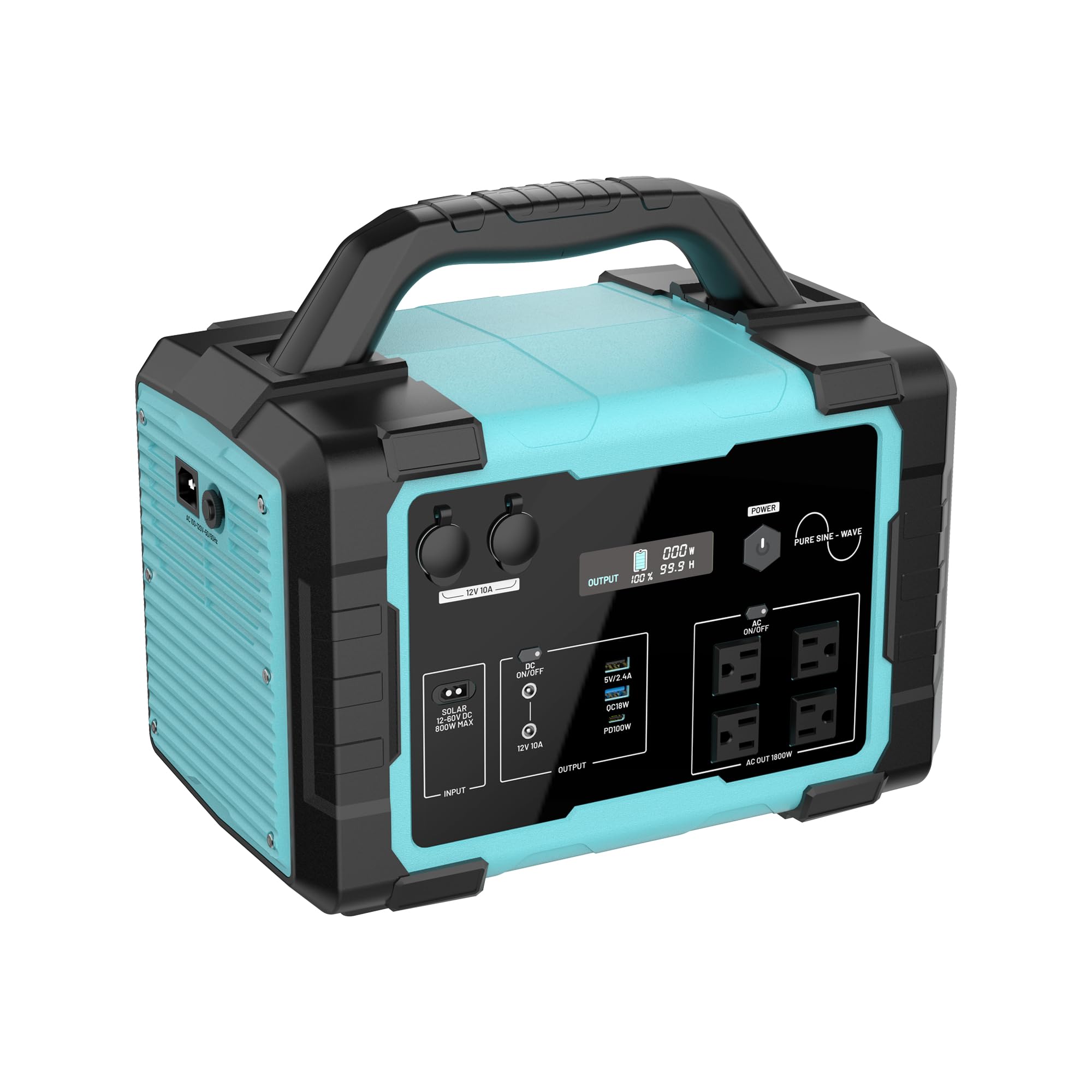
Image: The STARYLINE Portable Power Station, showcasing its compact design and output capabilities.
Important Safety Information
Please read and understand all safety instructions before operating this product. Failure to follow these instructions may result in electric shock, fire, or serious injury.
- Do not disassemble, repair, or modify the unit.
- Do not expose the unit to fire or extreme temperatures.
- Keep the unit away from water, moisture, and direct sunlight.
- Ensure proper ventilation during use and charging to prevent overheating.
- Use only approved accessories and charging cables.
- Keep out of reach of children and pets.
- If the unit emits smoke, strange odors, or unusual noise, discontinue use immediately and contact customer support.
What's in the Box
Carefully unpack your STARYLINE Portable Power Station and ensure all components are present and undamaged. If any items are missing or damaged, please contact customer support.

Image: The package contents, including the power station, power cable, and car charging cable.
- STARYLINE 1800W Portable Power Station (1024Wh)
- AC Charging Cable (Wall Charger)
- Car Charging Cable
- User Manual (this document)
Product Overview
Familiarize yourself with the various ports and features of your power station.

Image: Front panel view of the power station, highlighting various input and output ports.
- AC Output (1800W max): 4x Pure Sine Wave 110V AC outlets for household appliances.
- USB-C Output: 2x PD 60W/100W fast charge ports for compatible devices.
- USB-A Output: 2x USB-A ports for standard USB charging.
- 12V Car Port: For powering 12V devices or charging from a vehicle.
- DC5521 Output: 2x DC 12V 10A ports for specific DC devices.
- Input Port: For AC wall charging, solar panel input, or car charging.
- Display Screen: Shows battery level, input/output wattage, and other status indicators.
Setup and Charging
Before first use, fully charge your power station.
1. AC Wall Charging
Connect the provided AC charging cable to the input port on the power station and then to a standard wall outlet. The unit supports high-speed AC charging, reaching 80% in approximately 1 hour and a full charge in 1.5 hours.

Image: The power station connected to a wall outlet for AC charging.
2. Solar Charging
Connect compatible solar panels (up to 400W input) to the input port. Ensure the solar panels are placed in direct sunlight for optimal charging efficiency. The input voltage range for solar charging is DC 12-60V.

Image: The power station being charged by solar panels in an outdoor setting.
3. Car Charging
Use the provided car charging cable to connect the power station to your vehicle's 12V/24V car outlet. This method is suitable for charging while on the go.
Operating Instructions
1. Powering On/Off
Press and hold the main power button for a few seconds to turn the unit on or off. The display screen will illuminate when the unit is active.
2. Using AC Outlets
Press the AC power button to activate the AC outlets. Plug your devices into the 110V AC ports. Ensure the total wattage of connected devices does not exceed 1800W (3600W surge).
3. Using DC Outlets (USB, Car Port, DC5521)
Press the DC power button to activate the DC output ports. Connect your USB devices, 12V car accessories, or DC5521 compatible devices. The display will show the output wattage.
Video: A brief overview of the STARYLINE 1800W Portable Power Station, demonstrating its features and ports.
Video: Detailed demonstration of the 1800W solar generator, including setup with solar panels.
Maintenance
Battery Care
The STARYLINE Power Station uses a durable LiFePO4 battery designed for over 3,500+ life cycles to 80% capacity. To maximize battery lifespan:
- Avoid fully discharging the battery frequently.
- Store the unit in a cool, dry place, ideally between 0°C and 40°C (32°F and 104°F).
- Recharge the unit every 3-6 months if not in regular use to maintain battery health.
Cleaning
Use a dry, soft cloth to clean the exterior of the power station. Do not use abrasive cleaners or immerse the unit in water.
Troubleshooting
| Problem | Possible Cause | Solution |
|---|---|---|
| Unit does not power on | Battery is depleted; Power button not pressed correctly | Charge the unit; Press and hold the power button firmly. |
| No output from AC/DC ports | AC/DC output not activated; Overload protection triggered; Device not compatible | Press the respective AC/DC power button; Reduce load; Check device compatibility. |
| Slow charging | Insufficient solar input; Faulty cable; High ambient temperature | Ensure solar panels are in direct sunlight; Use original cables; Charge in a cooler environment. |
| Display not working | Unit is off; Display malfunction | Power on the unit; Contact customer support if issue persists. |
For further assistance, please refer to the Warranty & Support section.
Specifications
| Feature | Detail |
|---|---|
| Brand | STARYLINE |
| Model Name | PPS-1k8US-IB |
| Battery Type | LiFePO4 |
| Capacity | 1024Wh |
| AC Output | 1800W (Rated), 3600W (Surge) |
| AC Voltage | 120 Volts (AC) |
| USB-C Output | 2x (PD 60W/100W) |
| USB-A Output | 2x (Standard, 1x QC 3.0 18W max) |
| DC Output | 1x 12V Car Port, 2x DC5521 (12V 10A) |
| AC Charging Time | 1.5 hours (full charge) |
| Solar Input | Up to 400W (DC 12-60V) |
| Life Cycles | 3500+ to 80% capacity |
| Dimensions (L x W x H) | 9.25"L x 12.83"W x 14.84"H |
| Special Features | Automatic Voltage Regulation, Digital Display, Fully Enclosed Design |
Warranty and Support
Your STARYLINE Portable Power Station is covered by a 60-Month Worry-Free Warranty and lifetime technical support. This also includes a 5-Year Manufacturer Warranty.
If you encounter any issues or have questions regarding your product, please contact STARYLINE customer support. Please note that due to Hazmat regulations, the product may be non-returnable, but it is fully covered by our replacement guarantee.
For support, please visit the official STARYLINE website or contact the seller directly through your purchase platform.