
Introduction
This manual provides comprehensive instructions for the safe and efficient use of your Nothing Phone 4a. Please read this guide thoroughly before operating your device to ensure optimal performance and longevity. Keep this manual for future reference.
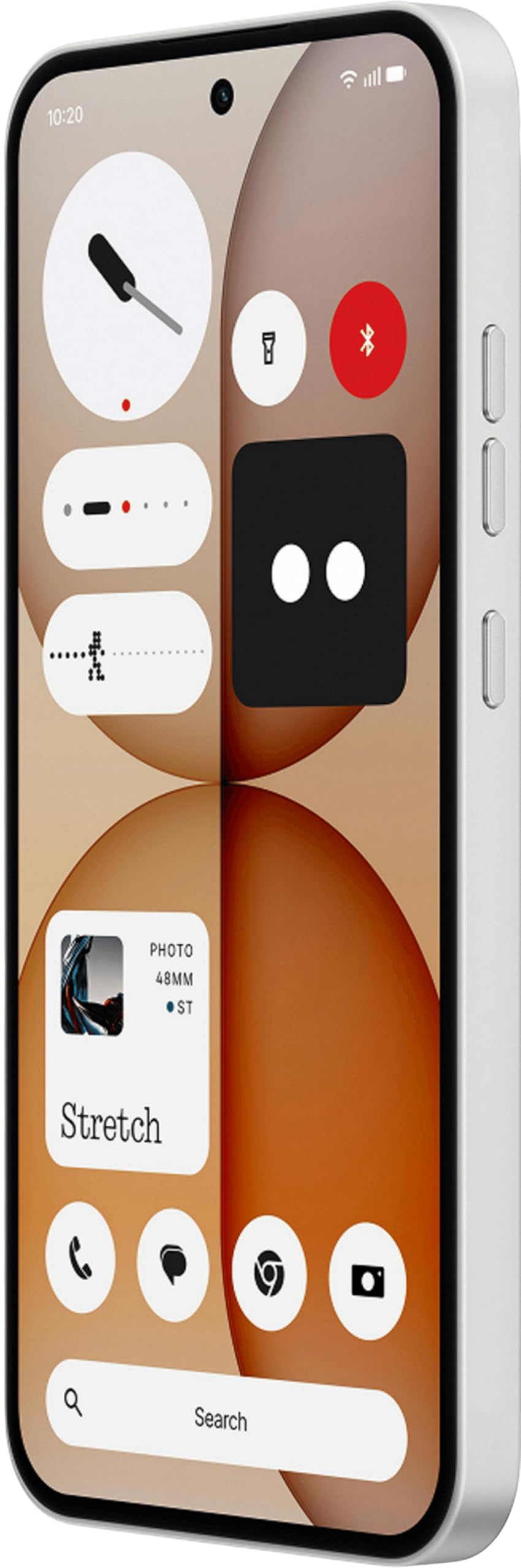
Image: The Nothing Phone 4a, a white smartphone featuring a sleek design with a visible transparent back panel, highlighting its unique aesthetic.
1. Setup
1.1 Unboxing
Carefully remove all items from the packaging. The box contents typically include the Nothing Phone 4a device and a headset. Inspect all components for any signs of damage.
1.2 SIM Card Installation
- Locate the SIM card tray on the side of your Nothing Phone 4a.
- Insert the SIM ejector tool (not included) into the small hole on the tray to open it.
- Place your Nano-SIM card into the tray with the gold contacts facing down. Ensure it fits securely. The Nothing Phone 4a supports a single SIM card.
- Gently push the tray back into the phone until it clicks into place.
1.3 Initial Power On and Setup
- Press and hold the Power button until the Nothing logo appears.
- Follow the on-screen prompts to complete the initial setup. This includes selecting your language, connecting to a Wi-Fi network, and signing in with your Google account.
- Your Nothing Phone 4a runs on Android 14, providing a user-friendly interface and access to a wide range of applications.
1.4 Charging the Device
Before first use, it is recommended to fully charge your Nothing Phone 4a. Connect the USB Type-C cable to the phone's charging port and the other end to a compatible power adapter (not included). The device features a 5080 Milliamp Hours battery capacity.
2. Operating Your Phone 4a
2.1 Basic Navigation
- Touch Gestures: Use taps, swipes, and pinches to interact with the screen.
- Home Screen: Access your apps and widgets. Swipe left or right to navigate between screens.
- Notifications: Swipe down from the top of the screen to view notifications and quick settings.
2.2 Making Calls and Sending Messages
- Calls: Tap the Phone icon, enter the number, and tap the call button.
- Messages: Tap the Messages icon, start a new conversation, enter the recipient's number or select from contacts, and type your message.
2.3 Connecting to Networks
- Wi-Fi: Go to Settings > Network & internet > Wi-Fi. Turn Wi-Fi on and select your desired network.
- Mobile Data: Ensure your SIM card is installed correctly. Go to Settings > Network & internet > Mobile network and enable Mobile data. The Nothing Phone 4a supports 4G cellular technology.
2.4 Camera Usage
Open the Camera app from your home screen or app drawer. Tap the shutter button to take photos. Swipe to switch between different modes like video, portrait, and more. Adjust settings such as flash, timer, and aspect ratio as needed.
2.5 App Management
Download new applications from the Google Play Store. To uninstall an app, long-press its icon on the home screen or in the app drawer, then drag it to the "Uninstall" option.
2.6 Security Features
Protect your device with various security options. Navigate to Settings > Security & privacy to set up screen locks (PIN, pattern, password), fingerprint unlock, or face recognition (if available on your model).
3. Maintenance
3.1 Cleaning the Device
Use a soft, lint-free cloth to gently wipe the screen and body of your phone. Avoid using harsh chemicals or abrasive materials. The device is Water Resistant, but avoid submerging it in water.
3.2 Software Updates
Regularly check for and install software updates to ensure your device has the latest features, security patches, and performance improvements. Go to Settings > System > System update.
3.3 Battery Care
To prolong battery life, avoid extreme temperatures. It is generally recommended to keep the battery charge between 20% and 80% for optimal long-term health. Avoid leaving the phone fully charged or fully discharged for extended periods.
3.4 Storage Management
Your Nothing Phone 4a comes with 128 GB of internal storage. Regularly review your installed apps, photos, and videos. Delete unnecessary files or transfer them to cloud storage or a computer to free up space and maintain optimal performance.
4. Troubleshooting
4.1 Common Issues and Solutions
- Device Not Responding: Press and hold the Power button for about 10-15 seconds to force a restart.
- Apps Crashing: Clear the app's cache (Settings > Apps > [App Name] > Storage & cache > Clear cache) or reinstall the app.
- Network Connectivity Issues: Toggle Airplane Mode on and off. Restart your phone. Check your SIM card installation.
- Battery Draining Quickly: Reduce screen brightness, close unused apps, and check battery usage in Settings to identify power-hungry apps.
4.2 Factory Reset
If you encounter persistent issues, a factory reset may resolve them. Warning: This will erase all data on your phone. Back up important data before proceeding. Go to Settings > System > Reset options > Erase all data (factory reset).
5. Specifications
| Feature | Detail |
|---|---|
| Brand | Nothing |
| Model | Phone 4a |
| Operating System | Android 14 |
| RAM Memory | 8 GB |
| Storage Capacity | 128 GB |
| CPU Model | Mobile CPU |
| CPU Speed | 2 GHz |
| Battery Capacity | 5080 Milliamp Hours (Lithium-Ion) |
| Display Type | AMOLED |
| Cellular Technology | 4G |
| Connector Type | USB Type C |
| SIM Card Type | Nano-SIM (Single SIM) |
| Water Resistance | Water Resistant |
| Color | White |
| Dimensions | 16.2 x 7.6 x 0.9 Centimeters |
| Weight | 230 Grams |
| Model Year | 2025 |
6. Warranty and Support
6.1 Warranty Information
Your Nothing Phone 4a comes with a 1-year manufacturer's warranty from the date of purchase. This warranty covers manufacturing defects. Please retain your proof of purchase for warranty claims. For detailed terms and conditions, refer to the warranty card included with your product or visit the official Nothing website.
6.2 Customer Support
For technical assistance, troubleshooting, or service inquiries, please contact Nothing customer support. You can usually find contact information (phone numbers, email, or support portals) on the official Nothing website or within the device's settings under "About phone" or "Support".


