
Introduction
This manual provides detailed instructions for the installation, operation, and maintenance of your SakerPlus 360° 4 Channel Dash Cam System. This system is designed to provide comprehensive video surveillance for your vehicle, recording front, rear, left, and right views in 1080P Full HD. Please read this manual thoroughly before using the device to ensure proper functionality and safety.
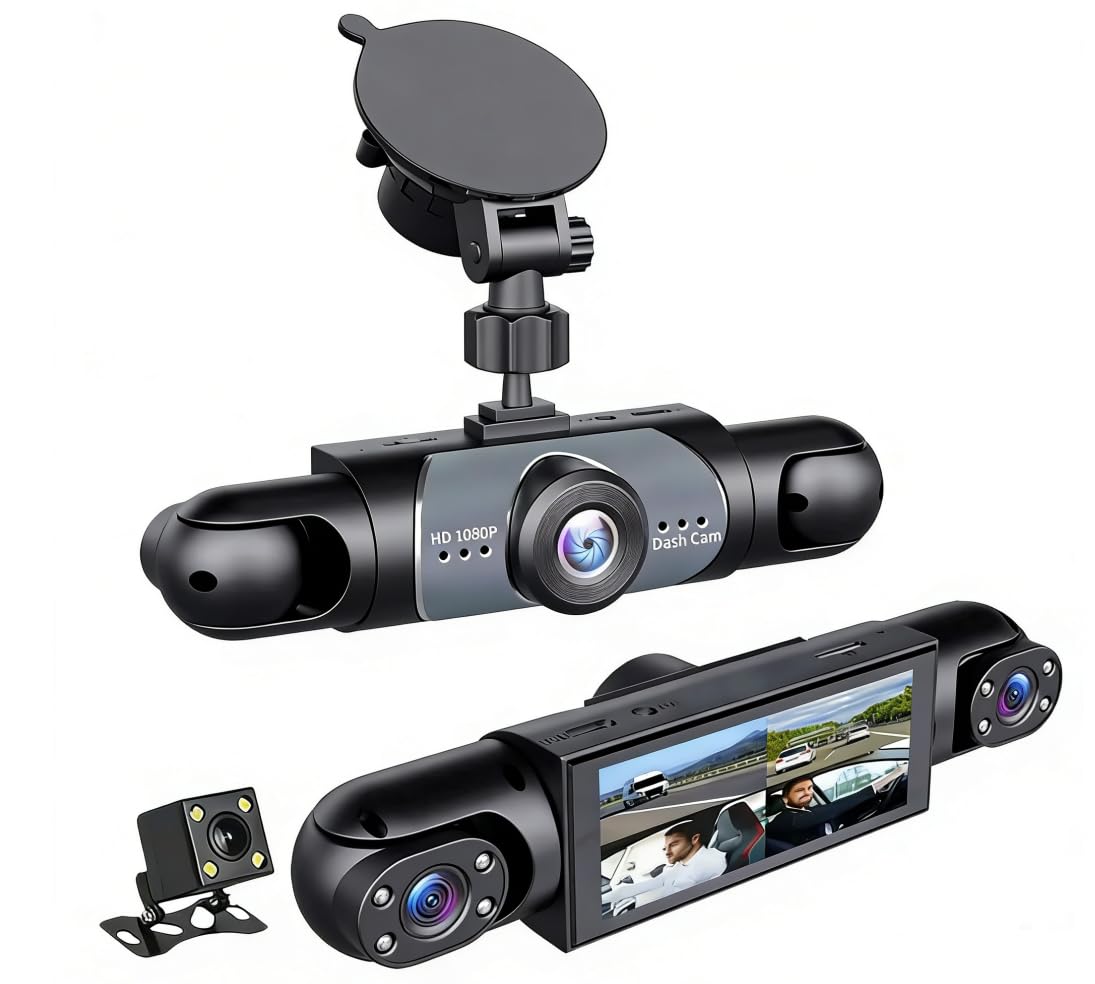
Image: The SakerPlus 360° 4 Channel Dash Cam System, illustrating its multi-camera setup for full vehicle coverage.
Product Features
- 1080P Panoramic Recording: Records front, rear, left, and right sides of your vehicle in Full HD, providing a complete view.
- Reduced Blind Spots: Adjustable side cameras capture details from all angles.
- Stable Vehicle Power Supply: Designed for long-term, reliable use with direct vehicle power connection.
- Pre-installed 128GB SD Card: Provides generous storage capacity for recordings.
- Enhanced Night Vision: Captures clear road details in low-light conditions.
- Interior Infrared Recording: Built-in infrared lights enable sharp recording of cabin activity in dark conditions.
- G-Sensor Emergency Lock: Automatically locks critical video footage upon collision or sudden impact, preventing overwriting.
- Seamless Loop Recording: Automatically overwrites older unprotected files to ensure continuous recording without storage issues.
- Wide Application: Suitable for personal cars, taxis, fleet vehicles, trucks, and other commercial vehicles.
Package Contents
Verify that all items are present in the package:
- SakerPlus Dash Cam Unit (with integrated cameras)
- Vehicle Power Cable
- Mounting Accessories (for dashboard mount)
- 128GB SD Card (pre-installed)
- User Manual (this document)
Setup
1. Installation and Mounting
The SakerPlus Dash Cam is designed for dashboard mounting. Choose a location on your dashboard that provides an unobstructed view for all cameras and does not interfere with your driving visibility or airbag deployment.
- Clean the chosen dashboard area thoroughly to ensure a strong adhesive bond for the mount.
- Attach the mounting bracket to the dash cam unit.
- Securely attach the dash cam with its mount to the prepared dashboard area.
- Adjust the angle of the main camera and the side cameras to ensure optimal coverage of the front, rear, and side views.
2. Power Connection
Connect the provided vehicle power cable to the dash cam and route the cable neatly along the vehicle's interior to a suitable power source (e.g., cigarette lighter socket or fuse box for hardwiring, if applicable). Ensure the connection is secure for stable and uninterrupted recording.
3. SD Card Insertion (if not pre-installed)
Your SakerPlus Dash Cam comes with a 128GB SD card pre-installed. If you need to replace it or verify its presence:
- Locate the SD card slot on the dash cam unit.
- Insert the SD card with the metal contacts facing the correct direction until it clicks into place.
- To remove, gently push the SD card until it springs out.
It is recommended to format the SD card periodically to maintain optimal performance.
Operating Instructions
1. Powering On/Off
The dash cam will automatically power on and begin recording when your vehicle's ignition is turned on, provided it is connected to a stable power source. It will power off automatically when the ignition is turned off.
2. Recording Modes
- Continuous Loop Recording: The camera records video in segments (e.g., 1, 3, or 5 minutes) and automatically overwrites the oldest unprotected files when the SD card is full. This ensures continuous recording without manual intervention.
- G-Sensor Emergency Recording: In the event of a sudden impact or collision, the built-in G-sensor detects the event and automatically locks the current video segment, preventing it from being overwritten by loop recording. These files are stored in a separate, protected folder.
- Parking Monitoring (if supported): If your dash cam is hardwired with a parking monitor feature, it can record events when the vehicle is parked and the ignition is off. Refer to specific settings for activation.
3. Night Vision and Infrared
The dash cam automatically utilizes its enhanced night vision capabilities in low-light conditions to capture clear external footage. The interior camera uses built-in infrared lights to record cabin activity effectively in complete darkness.
4. Wi-Fi Connectivity (if applicable)
If your model supports Wi-Fi, you can connect your smartphone to the dash cam via a dedicated app to view live footage, playback recordings, and adjust settings. Refer to the app's instructions for pairing and usage.
Maintenance
1. SD Card Formatting
Regularly format the SD card (e.g., once a month) to prevent data corruption and ensure optimal recording performance. This can usually be done through the dash cam's menu settings. Warning: Formatting will erase all data on the SD card. Back up any important files before formatting.
2. Cleaning the Device
Use a soft, dry cloth to clean the dash cam's lenses and body. Avoid using abrasive cleaners or solvents, which can damage the device. Keep the lenses free of dust and smudges for clear video quality.
Troubleshooting
| Problem | Possible Solution |
|---|---|
| Dash cam does not power on. |
|
| Recording stops or freezes. |
|
| Video quality is poor. |
|
| G-Sensor is too sensitive/not sensitive enough. | Adjust the G-Sensor sensitivity setting in the dash cam's menu. |
Specifications
| Brand | SakerPlus |
| Model | 360° 4 Channel Dash Cam System |
| Video Capture Resolution | 1080p Full HD |
| Special Feature | 360 Degree Full View, Night Vision, G-Sensor, Loop Recording |
| Connectivity Technology | Wi-Fi |
| Mounting Type | Dashboard Mount |
| Included Components | SakerPlus Dash Cam, 128GB SD Card |
| Product Dimensions (D x W x H) | 7"D x 14"W x 11"H |
| UPC | 703079393072 |
| ASIN | B0GR52GQ46 |
Warranty and Support
This product does not come with a specified warranty description in the provided information. For any product inquiries, technical support, or warranty claims, please contact SakerPlus customer service or visit the official SakerPlus store.
Official SakerPlus Store: Visit SakerPlus Store