
1. Introduction
Thank you for choosing the Korfile 66-inch L-Shaped Gaming Desk. This manual provides detailed instructions for assembly, operation, maintenance, and troubleshooting to ensure you get the most out of your new desk. This versatile desk is designed for both gaming and home office use, featuring ample storage, integrated power outlets, and customizable LED lighting.
2. Safety Information
- Read all instructions carefully before assembly and use.
- Keep all packaging materials away from children.
- Ensure all screws and fasteners are securely tightened before use. Periodically check and re-tighten as needed.
- Do not overload the desk or shelves. Refer to specifications for weight limits.
- Use only in a dry indoor environment. Avoid exposure to moisture or extreme temperatures.
- When moving the desk, lift it carefully to prevent damage or injury. Do not drag.
- Keep liquids away from power outlets and electronic components.
3. Package Contents
Please verify that all components are present before beginning assembly. If any parts are missing or damaged, please contact customer support.
- Desk panels (L-shaped desktop, monitor stand, storage shelves)
- Metal frame components (Thicker Steel Tubes, Triangular Support)
- 2 Fabric Drawers
- Built-in Power Outlet strip (3 AC outlets, 2 USB ports, 6.5-foot power cord)
- LED Light Strip with Remote Control
- 2 Headphone Hooks
- Adjustable Table Legs (Foot Pads)
- Assembly Hardware (screws, bolts, etc.)
- Basic Assembly Tools (Allen wrenches, screwdriver) - Note: Additional tools may be required for complete assembly.
- Instruction Manual
4. Setup and Assembly
Assembly is required for this product. It is recommended to have two people for easier and safer assembly. Follow the step-by-step instructions provided in the separate assembly guide included in your package. Ensure you have adequate space for assembly.
4.1 Reversible Design
The L-shaped desk features a reversible design, allowing you to configure the longer and shorter sections to your preference (left or right orientation). Plan your desired layout before starting assembly.

Figure 4.1: Reversible L-Shaped Desk Design. This image illustrates the desk's dimensions and its ability to be assembled with the L-section on either the left or right side, adapting to your space.
4.2 Structural Components
The desk is constructed with durable materials for stability.
- Thicker Steel Tubes: Provide a robust framework for the desk.
- Triangular Support: Enhances stability and load-bearing capacity.
- Adjustable Foot Pads: Allow for leveling the desk on uneven floors, preventing wobbling.

Figure 4.2: Desk Structural Features. This image highlights the desk's sturdy construction with thicker steel tubes, triangular support for stability, and adjustable foot pads for leveling. It also shows some of the included assembly tools.
5. Operating Instructions
5.1 Built-in Power Outlets
The desk includes a recessed power strip for convenient access to power for your devices.
- AC Outlets: 3 standard 125V/12A AC outlets for monitors, computers, and other electronics.
- USB Ports: 2 x 5V/2A USB ports for charging smartphones, tablets, and other USB-powered devices.
- Power Cord: A 6.5-foot power cord is provided to connect the power strip to a wall outlet.

Figure 5.1: Built-in Power Outlets. This image shows the integrated power strip with three AC outlets and two USB ports, along with the 6.5-foot power cord, demonstrating how to power and charge devices directly from the desk.
5.2 LED Lighting System
Enhance your workspace ambiance with the integrated LED light strip.
- Control: Use the included remote control to manage the LED lights.
- Colors: Choose from 20 different colors.
- Modes: Select from 22 dynamic lighting modes.
- Brightness: Adjust the brightness with 5 levels.

Figure 5.2: RGB LED Lights. This image displays the desk with its RGB LED lights active, illustrating the range of colors and dynamic modes available, along with the remote control for easy adjustment.
5.3 Storage Features
The desk is equipped with various storage solutions to keep your area organized.
- Fabric Drawers: Two large fabric drawers provide concealed storage for accessories, documents, or gaming gear.
- Movable CPU Stand Shelf: An adjustable shelf designed to hold your computer tower, keeping it off the floor and easily accessible.
- Headphone Hooks: Two integrated hooks allow you to hang headphones or other accessories, keeping them within reach and off the desktop.
- Monitor Stand: The elevated monitor stand raises your screen to an ergonomic height, reducing neck strain and freeing up desktop space underneath.
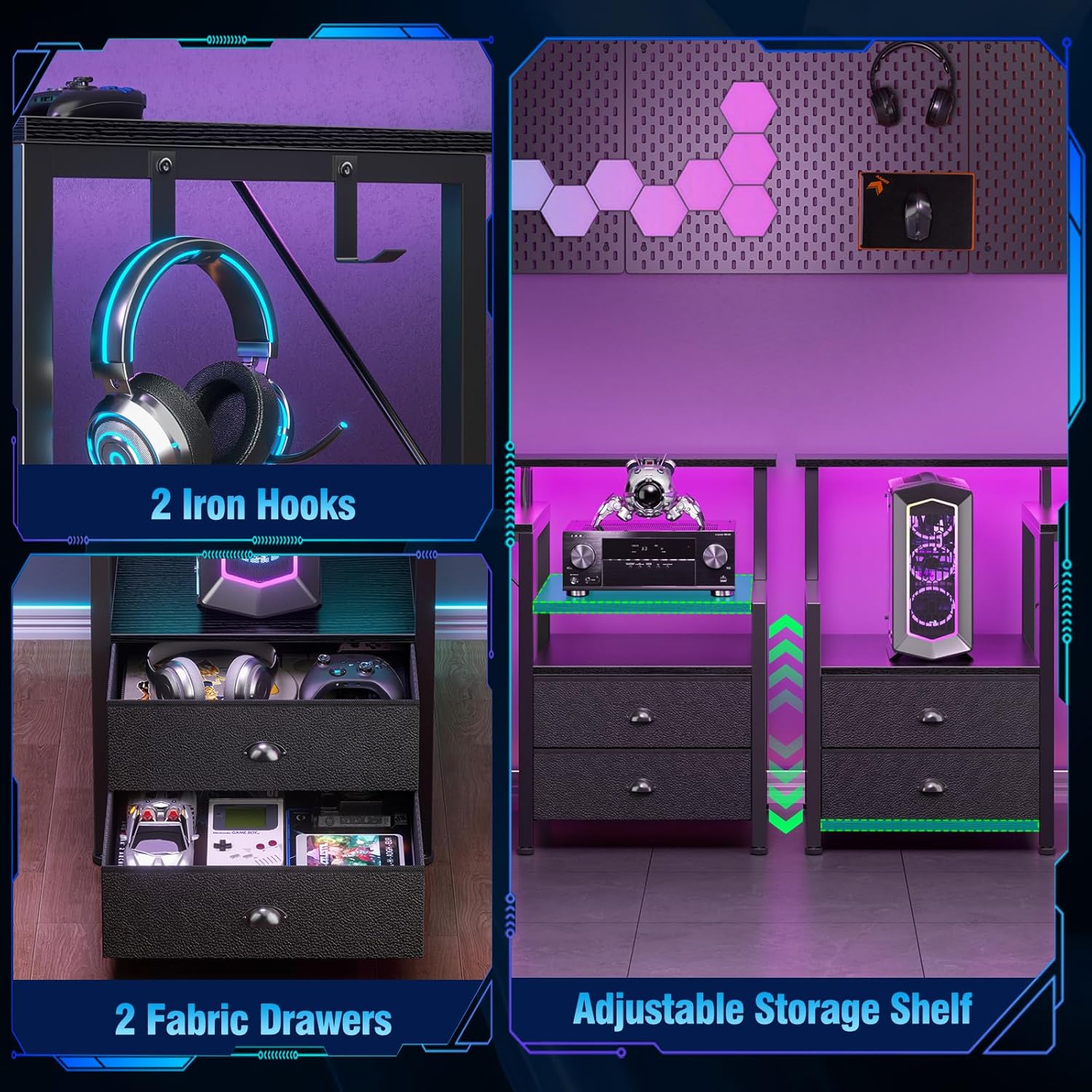
Figure 5.3: Storage and Organization. This image details the desk's storage capabilities, including two spacious fabric drawers, convenient headphone hooks, and an adjustable shelf for a CPU tower or other items.

Figure 5.4: Monitor Stand Ergonomics. This image demonstrates how the integrated monitor stand helps maintain correct posture and reduces neck strain by elevating your screen to an optimal viewing height.
5.4 Video Demonstration
Watch this video for a visual guide on the desk's features and functionality.
Video 5.1: Computer Desk CD050 Using Function. This video provides a comprehensive overview of the Korfile CD050 L-Shaped Gaming Desk, showcasing its various features, storage options, and how they can be utilized in a gaming or office setup.
6. Maintenance
6.1 Cleaning
- Wipe the desk surfaces with a soft, damp cloth. Avoid abrasive cleaners or harsh chemicals.
- The desktop is designed to be waterproof and scratch-resistant, making it easy to clean spills.
- For the fabric drawers, spot clean with a mild detergent and allow to air dry.

Figure 6.1: Waterproof and Scratch-Resistant Desktop. This image illustrates the durable surface of the desk, designed to resist water and scratches, simplifying cleaning and maintenance.
6.2 General Care
- Periodically check all fasteners and re-tighten if necessary to maintain stability.
- Avoid placing extremely hot items directly on the desktop without protection.
- Keep the desk away from direct sunlight or heat sources to prevent material degradation.
7. Troubleshooting
7.1 Desk Wobbles
- Ensure all assembly screws are securely tightened.
- Adjust the foot pads on the bottom of the desk legs to level the desk on uneven surfaces.
7.2 LED Lights Not Working
- Check if the LED light strip is properly connected to its power source.
- Ensure the remote control has working batteries and is pointed directly at the receiver.
- Verify that the power outlet the desk is plugged into is functional.
7.3 Power Outlets Not Functioning
- Ensure the desk's main power cord is securely plugged into a working wall outlet.
- Check if the power strip itself has a reset button or switch that may have tripped.
- Test the wall outlet with another device to confirm it is supplying power.
8. Specifications
| Feature | Detail |
|---|---|
| Brand | Korfile |
| Model Number | CD-050V1-CL-66-1-B |
| Desk Design | L-Shaped Computer Desk |
| Product Dimensions (D x W x H) | 42.5"D x 65.4"W x 36.5"H |
| Color | Black |
| Top Material Type | Engineered Wood |
| Base Material | Metal |
| Number of Drawers | 2 (Fabric Drawers) |
| Number of Shelves | 2 (including CPU stand shelf) |
| Power Outlets | 3 AC Outlets (125V/12A), 2 USB Ports (5V/2A) |
| LED Lights | 20 Colors, 22 Modes, 5 Brightness Levels |
| Assembly Required | Yes |
9. Warranty and Support
Korfile is committed to providing high-quality products and excellent customer service. Your Korfile 66-inch L-Shaped Gaming Desk comes with a manufacturer's guarantee for quality and craftsmanship.
- Customer Support: Our professional team offers a 24-hour response guarantee for any inquiries or issues you may encounter.
- Contact: For warranty claims, missing parts, assembly assistance, or any other support needs, please refer to the contact information provided on your purchase receipt or the Korfile official website.