
1. Introduction
Thank you for choosing the Godox iT32 X5L TTL Flash. This compact and versatile flash unit is designed to provide advanced lighting solutions for Leica M-Series cameras, including models like the M3, M4, M5, M6, M7, M8, M9, M10, M11, and Q3. Featuring a magnetic modular design, intuitive touchscreen interface, High-Speed Sync (HSS), and a 2.4G wireless triggering system, the iT32 X5L offers seamless integration and professional performance for various photographic needs. This manual provides detailed instructions for setup, operation, maintenance, and troubleshooting to ensure optimal use of your flash.
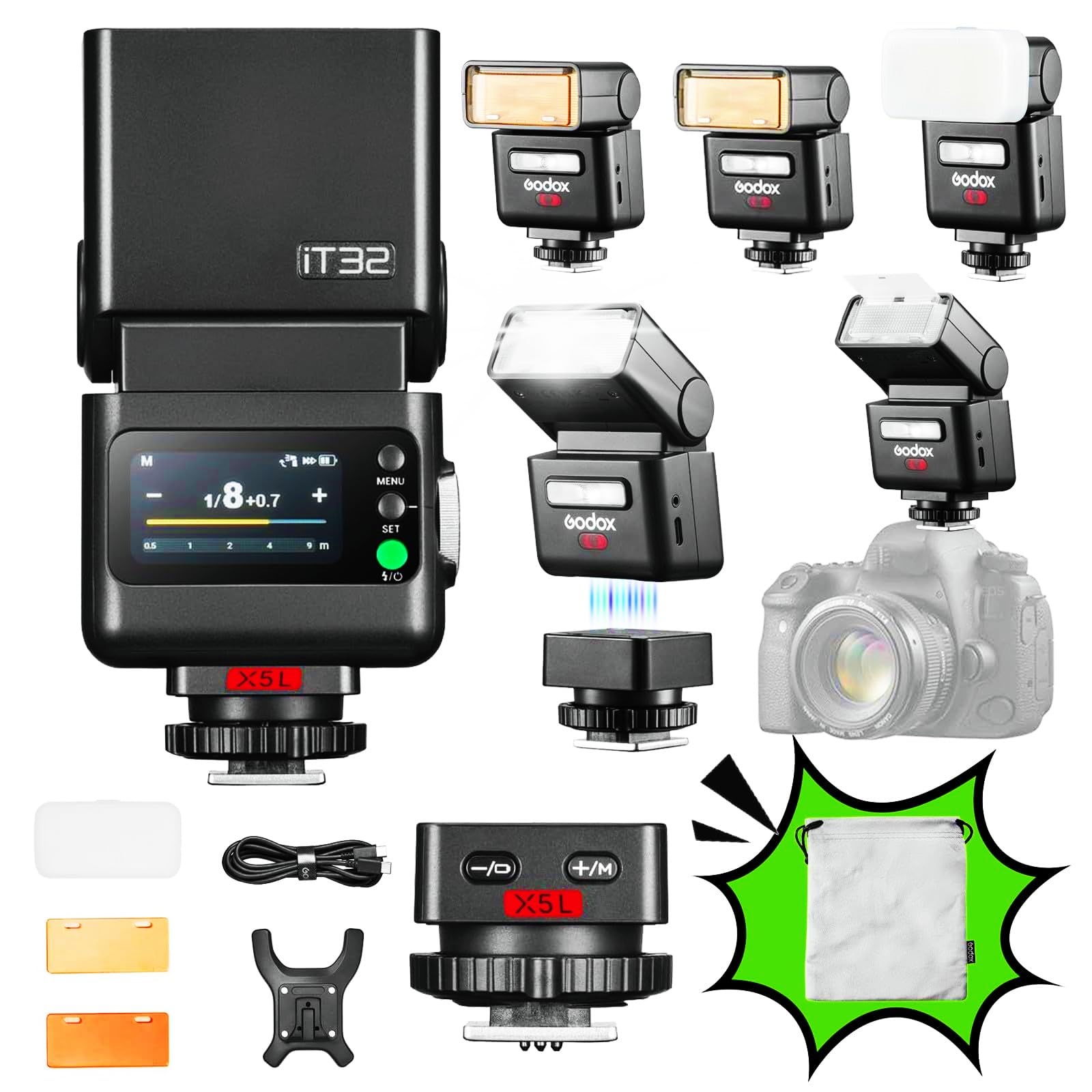
Image 1.1: Godox iT32 X5L TTL Flash with X5L trigger.
2. Setup
2.1. What's in the Box
Before you begin, please verify that all components are present:
- iT32 Flash Unit
- X5 Wireless Flash Trigger (for Leica)
- USB-C Charging Cable
- Mini Magnetic Stand
- Diffuser
- Magnetic Color Filter (1/2 Orange)
- Magnetic Color Filter (1/1 Orange)
- Storage Bag
- Instruction Manual
- Cleaning Cloth

Image 2.1: Included components of the Godox iT32 X5L package.
2.2. Charging the Battery
The iT32 flash unit is equipped with a built-in lithium battery. To charge:
- Connect the supplied USB-C charging cable to the USB-C port on the iT32 unit.
- Connect the other end of the cable to a USB power adapter (not included) or a computer's USB port.
- The charging status will be displayed on the unit's screen. A full charge provides over 500 flashes at full power.

Image 2.2: USB-C charging port on the iT32 unit.
2.3. Attaching the X5L Trigger and Flash Unit
The iT32 and X5L feature a revolutionary magnetic modular design for quick and secure attachment.
- Attaching X5L to Camera: Slide the X5L trigger onto your camera's hotshoe mount until it clicks into place. Ensure it is securely fastened.
- Attaching iT32 to X5L: Align the iT32 flash unit with the magnetic base of the X5L trigger. The strong magnets will snap the iT32 into place, establishing a secure connection.
This magnetic connection allows for instant transitions between on-camera and off-camera flash use without manual pairing. When detached from the iT32, the X5L automatically switches to trigger mode, wirelessly controlling the iT32 or other Godox Wireless X System flashes.
The iT32 and X5 offer a universal solution for photographers working across different camera systems. Its interchangeable magnetic X5 hotshoe allows instant switching between brands by simply changing the X5 version. This flexible design reduces cost and gear load while keeping your setup consistent, helping photographers focus more on creativity and less on equipment compatibility.

Image 2.3: Interchangeable X5 triggers for multi-brand compatibility.
The X5 serves both as a hotshoe mount and a wireless transmitter, enabling smooth transitions between on-camera and off-camera use. When attached to the iT32, it functions as the hotshoe for on-camera shooting; once detached, it automatically switches to trigger mode, wirelessly controlling the iT32 or other Godox Wireless X System flashes.

Image 2.4: X5 trigger functioning as both hotshoe and wireless transmitter.
3. Operating Instructions
3.1. Power On/Off
To power on the iT32 flash unit, press and hold the power button located on the side. Repeat the action to power off the unit.
3.2. Touchscreen Interface
The iT32 features an intuitive color touchscreen for easy navigation and setting adjustments. Tap to select options and swipe to navigate menus. Adjust power levels, modes, and other settings directly on the screen.
The iT32 automatically identifies the attached X5 version, displaying key information such as model type, battery level, and charging status on its screen. This smart detection ensures photographers always stay aware of system status, minimizing errors and keeping shooting sessions smooth and controlled.

Image 3.1: Intelligent recognition and real-time display on the iT32 screen.
3.3. Flash Modes (TTL & HSS)
The iT32 X5L supports both TTL (Through-The-Lens) automatic flash and HSS (High-Speed Sync) up to 1/8000s.
- TTL Mode: Provides automatic flash exposure by measuring the light through the camera's lens. Ideal for quick shooting and changing light conditions.
- HSS Mode: Allows you to use flash at shutter speeds faster than your camera's native sync speed, enabling wider apertures in bright conditions or freezing fast motion.
3.4. Rotating Flash Head
The flash head can be rotated horizontally 180° and tilted vertically 90° to bounce light off ceilings or walls, creating softer and more natural illumination.

Image 3.2: Rotating flash head for flexible lighting.
3.5. Built-in Reflector and Diffuser
The iT32 includes a built-in reflector and diffuser panel. Pull out the diffuser for softer light distribution, or use the reflector to create a catchlight in your subject's eyes.

Image 3.3: iT32 with diffuser panel.
3.6. 2.4G Wireless System and Multi-Light Sync
The integrated 2.4G wireless system allows the iT32 to communicate with other Godox X System flashes. The X5L acts as a master unit to trigger multiple flashes simultaneously, simplifying multi-light setups.

Image 3.4: Example of multi-light synchronization with the Godox 2.4G wireless system.
4. Maintenance
4.1. Cleaning
Use the provided cleaning cloth or a soft, dry cloth to gently wipe the flash unit and trigger. Avoid using harsh chemicals or abrasive materials that could damage the surface or screen.
4.2. Battery Care
To prolong the life of the built-in lithium battery:
- Avoid fully discharging the battery frequently.
- Charge the unit regularly, even if not in use, to maintain battery health.
- Store the unit in a cool, dry place when not in use for extended periods.
4.3. Storage
When not in use, store the iT32 X5L in the provided storage bag to protect it from dust and scratches. Ensure the unit is powered off before storing.
5. Troubleshooting
If you encounter issues with your Godox iT32 X5L, refer to the following common problems and solutions:
| Problem | Possible Cause | Solution |
|---|---|---|
| Flash does not fire | Low battery; Incorrect mode; Loose connection; Camera settings. | Charge the battery; Ensure flash is in TTL or Manual mode; Re-attach X5L securely to hotshoe; Check camera flash settings. |
| Flash exposure is inconsistent | Incorrect TTL compensation; Subject distance too far/close; Obstruction. | Adjust flash exposure compensation (FEC) on iT32 or camera; Ensure subject is within flash range; Remove any obstructions. |
| Wireless trigger not working | X5L not in trigger mode; Interference; Out of range. | Ensure X5L is detached from iT32 to activate trigger mode; Check for other 2.4G devices causing interference; Move closer to the flash unit. |
| Touchscreen unresponsive | Temporary software glitch; Screen protector issue. | Restart the flash unit; Ensure screen is clean and dry; If using a screen protector, check if it's interfering. |
| Flash not compatible with specific Leica model | Firmware outdated; Specific camera model not fully supported yet. | Check the Godox website for the latest firmware updates for the iT32 and X5L. Update if available. (Note: Some older Leica models may require specific firmware or may not be fully compatible). |
6. Specifications
| Feature | Detail |
|---|---|
| Brand | GODOX |
| Model Number | iT32+X5L |
| Compatible Mounts | Godox Magnetic Mount, Hotshoe Mount |
| Compatible Cameras | Leica M-Series (M3, M4, M5, M6, M7, M8, M9, M10), Leica M11, Leica Q3 |
| Flash Type | TTL Flash, Slave Flash |
| Flash Sync Speed | Up to 1/8000s (HSS) |
| Exposure Control Type | Automatic (TTL) |
| Wireless Connectivity | 2.4GHz Wireless Communication Technology |
| Power Source | Built-in Lithium Battery |
| Charging Port | USB-C |
| Flash Head Rotation | 180° Horizontal, 90° Vertical |
| Display | Color Touchscreen |
| Water Resistance Level | Not Waterproof |
| Country of Origin | China |
7. Warranty and Support
For warranty information and technical support, please refer to the warranty card included with your product or visit the official Godox website. Keep your purchase receipt as proof of purchase for any warranty claims.
Godox is committed to providing high-quality products and customer service. If you have any questions or require assistance, please do not hesitate to contact our support team.


