
1. Introduction
This manual provides detailed instructions for the installation, operation, and maintenance of your Blütezeit MS600 Solar Swing Gate Opener with the integrated WiFi Module. The MS600 system is designed for single-arm swing gates up to 880lb, featuring a 25W solar panel and a 24V lithium-ion battery for off-grid operation. The included WiFi module enables smart control via the eWeLink app and voice assistants like Alexa, Google Home, and Siri.
Please read this manual thoroughly before installation and use to ensure safe and efficient operation of your gate opener system.
2. Safety Information
WARNING: Failure to follow these safety instructions could result in serious injury or death.
- Always disconnect power to the gate opener before performing any service or maintenance.
- Keep children and pets away from the gate area, especially during operation.
- Do not allow children to operate the gate opener or play with its controls.
- Ensure the gate area is clear of obstructions before operating the gate.
- Install safety devices such as photo-electric sensors to prevent the gate from closing on people or objects.
- Only qualified personnel should install and service the gate opener.
- Do not attempt to repair the gate opener yourself. Contact customer support for assistance.
- Ensure all wiring connections are secure and properly insulated to prevent electrical hazards.
3. Package Contents
Verify that all components are present before beginning installation:
- Blütezeit MS600 Swing Gate Opener (Actuator)
- Control Box with 24V Lithium-Ion Battery
- 25W Monocrystalline Solar Panel with Adjustable Bracket
- WiFi Module with 5-inch External Antenna
- Remote Transmitters (Quantity may vary)
- Mounting Hardware and Brackets
- Instruction Manual

Image: Overview of the Blütezeit MS600 Solar Swing Gate Opener system, including the actuator, control box, solar panel, and WiFi module.
4. Setup and Installation
4.1 Gate Opener Installation
Refer to the separate MS600 Gate Opener installation guide for detailed instructions on mounting the actuator, control box, and connecting the main power and limit switches. Ensure the gate is properly balanced and moves freely before installing the opener.
4.2 Solar Panel Installation
Mount the 25W solar panel in a location that receives maximum direct sunlight throughout the day. Use the adjustable bracket to optimize the tilt angle for efficient charging of the 24V lithium-ion battery.

Image: The 25-inch 25W monocrystalline solar panel with its adjustable bracket, designed for efficient solar charging.
4.3 WiFi Module Installation
The WiFi module connects directly to the MS600 control box via wired terminals, ensuring a stable and reliable connection.
- Prepare the Control Box: Ensure the main power to the MS600 control box is disconnected before proceeding.
- Mount the WiFi Module: Secure the WiFi module inside or near the MS600 control box, ensuring the 5-inch external antenna has clear line of sight for optimal 2.4GHz WiFi signal reception.
- Wired Connection: Connect the WiFi module's wired terminals to the corresponding terminals on the MS600 control board. Refer to the wiring diagram provided with the WiFi module for specific connections (e.g., power, signal). This wired connection ensures fast response and minimal delay.
- Antenna Connection: Connect the 5-inch external antenna to the WiFi module. Position it for best signal.

Image: Detailed view of the WiFi module, highlighting its wide input DC 7-24V terminals and the SET button for configuration.

Image: The 5-inch external antenna, which provides stronger signal reception for the WiFi module's 2.4GHz connectivity.

Image: The WiFi module integrated within a gate operator's control box, demonstrating its placement for optimal functionality.
4.4 App Configuration (eWeLink)
- Download eWeLink App: Download and install the eWeLink app from your smartphone's app store.
- Create Account: Register for an eWeLink account if you don't already have one.
- Add Device: Follow the in-app instructions to add a new device. The WiFi module operates exclusively on 2.4GHz WiFi networks. Ensure your smartphone is connected to a 2.4GHz network during the pairing process.
- Pairing Mode: Press and hold the SET button on the WiFi module until the LED indicator blinks, indicating it's in pairing mode.
- Complete Setup: Follow the remaining prompts in the eWeLink app to complete the setup and connect the module to your home WiFi network.
5. Operating Instructions
5.1 Using the eWeLink App
Once the WiFi module is successfully paired with the eWeLink app, you can control your gate remotely:
- Open the eWeLink app on your smartphone.
- Select your Blütezeit MS600 gate opener device.
- Use the on-screen controls to open, close, or stop your gate.
- The app also allows for scheduling, loop timers, and other advanced automation features.
5.2 Voice Control (Alexa, Google Home, Siri)
The WiFi module supports integration with popular voice assistants. Ensure your eWeLink account is linked to your Alexa, Google Home, or Siri setup.
- Alexa: Enable the eWeLink skill in the Alexa app and discover devices. Then, use commands like, "Alexa, open the gate."
- Google Home: Link eWeLink in the Google Home app. Use commands such as, "Hey Google, close the gate."
- Siri: Create custom Siri Shortcuts within the eWeLink app for quick voice commands.

Image: Illustration of the Blütezeit MS600's compatibility with various smart home platforms, including Alexa, Google Home, and Siri, via the eWeLink app.
5.3 Remote Transmitters
The system includes 433MHz remote transmitters for convenient local control. The WiFi module enhances compatibility with these accessories.
- Pairing New Remotes: New remotes can be easily paired with the system. Refer to the MS600 control box manual for specific pairing instructions. The system uses 433MHz frequency with rolling code encryption for secure transmission.
- Operation: Press the designated button on the remote to open, close, or stop the gate.

Image: Two 433MHz remote transmitters, featuring secure transmission and quick pairing capabilities for the gate opener system.
6. Maintenance
Regular maintenance ensures the longevity and reliable operation of your Blütezeit MS600 gate opener system.
- Monthly:
- Inspect the gate for any obstructions or debris in its path.
- Check all mounting hardware for tightness.
- Clean the solar panel surface to ensure maximum charging efficiency.
- Quarterly:
- Lubricate moving parts of the gate and opener actuator as recommended in the MS600 manual.
- Inspect wiring for any signs of wear or damage.
- Test safety features like photo-electric sensors.
- Annually:
- Check the battery terminals for corrosion and clean if necessary.
- Verify the gate's balance and alignment.
7. Troubleshooting
If you encounter issues with your gate opener, refer to the following common problems and solutions:
| Problem | Possible Cause | Solution |
|---|---|---|
| Gate does not open/close. | No power, remote battery dead, obstruction, safety sensor triggered. | Check power supply, replace remote battery, clear gate path, inspect safety sensors. |
| WiFi module not connecting to app. | Incorrect WiFi password, 5GHz network, module not in pairing mode, weak signal. | Verify 2.4GHz WiFi, re-enter password, put module in pairing mode, check antenna position. |
| Gate stops unexpectedly. | Obstruction, motor overload, low battery. | Remove obstruction, check for binding, ensure solar panel is clean and charging. |
| Remote control not working. | Dead battery, out of range, not paired. | Replace battery, move closer to gate, re-pair remote. |
For further assistance, please contact Blütezeit customer support.
8. Specifications
| Feature | Specification |
|---|---|
| Model | MS600 |
| Gate Type | Single-Arm Swing Gate |
| Max Gate Weight | 880 lb (399 kg) |
| Power Source | Solar Powered (25W Monocrystalline Panel) |
| Battery | 24V Lithium-Ion Battery |
| WiFi Module Input | DC 7-24V |
| WiFi Frequency | 2.4GHz (IEEE 802.11 b/g/n) |
| App Control | eWeLink App |
| Voice Control Compatibility | Alexa, Google Home, Siri |
| Remote Frequency | 433MHz (Rolling Code Encryption) |
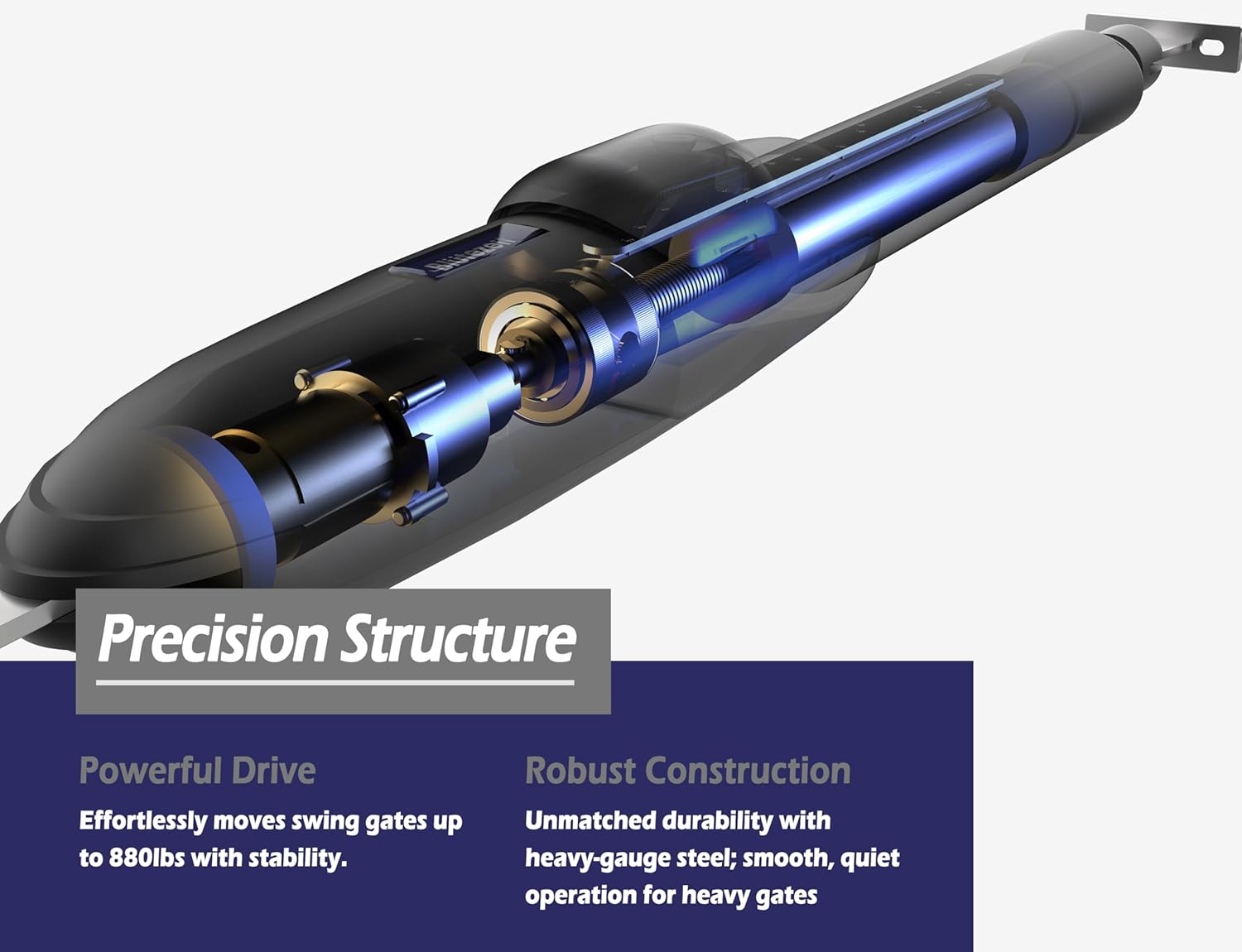
Image: An internal view of the MS600 gate opener actuator, illustrating its precision structure and robust construction designed for powerful and stable gate movement.
9. Warranty and Support
For warranty information and technical support, please contact Blütezeit Official customer service. Keep your purchase receipt as proof of purchase.
Blütezeit Official Support: Visit the Blütezeit Store on Amazon