
1. Overview
The DATOUBOSS UL1741 12000W Hybrid Solar Inverter (Model DT-4812) is a versatile power solution designed for off-grid backup and self-sufficient applications. This inverter converts 48V DC power from batteries or solar panels into 110V/240V AC split-phase or single-phase power. It features dual MPPT solar controllers for efficient solar energy harvesting and supports parallel operation for expanded capacity.
Key Features:
- Parallel Operation: Expandable up to 6 units for a maximum capacity of 72kW.
- Output: 12000W continuous output, 120V/240V AC split-phase/single-phase pure sine wave.
- Solar Input: Maximum 13kW PV input (6500W per MPPT), 500V DC maximum PV input.
- MPPT Controllers: Built-in dual 100A MPPT controllers with 99.9% tracking efficiency.
- Charging Modes: Four selectable battery charging modes (pure solar, AC-priority, solar-priority, AC/solar hybrid).
- AC Output Modes: Four AC output operating modes (PV-priority, AC-priority, inverter-priority, PV/AC hybrid).
- Battery Compatibility: Compatible with 48V lead-acid (sealed, AGM, gel, flooded) and lithium batteries. Supports battery-free operation.
- Safety: UL1741 compliant with comprehensive protection features.
- Monitoring: Supports optional WiFi monitoring module (sold separately).
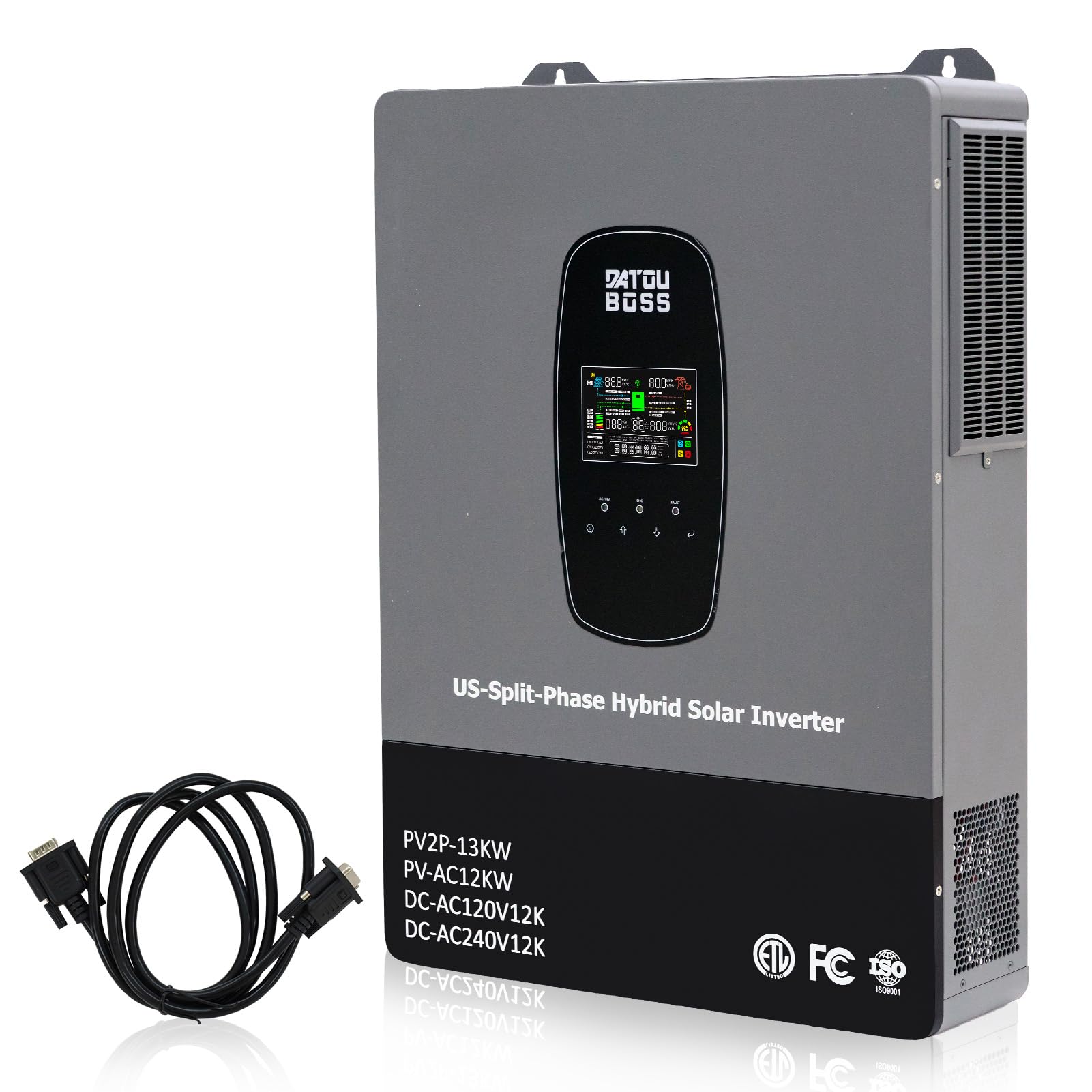
Image: The DATOUBOSS UL1741 12000W Hybrid Solar Inverter, showcasing its display and key specifications.
2. Safety Information
Please read all instructions and warnings carefully before installation and operation. Failure to follow these instructions may result in electric shock, fire, or severe injury.
- Installation must be performed by qualified personnel in accordance with local electrical codes.
- Ensure the inverter is disconnected from all power sources (PV, battery, AC grid) before performing any maintenance or wiring.
- Do not attempt to disassemble or repair the inverter yourself. Contact qualified service personnel.
- Ensure proper grounding of the inverter.
- Keep the inverter away from flammable materials, moisture, and direct sunlight.
- The inverter complies with UL1741 standards, including anti-islanding protection.
Integrated Protection Features:
- Short-circuit protection
- Overcurrent protection
- Overvoltage/Undervoltage protection
- Overload protection
- Reverse feed protection
- High temperature protection
- Over discharge protection
- Reverse connection protection

Image: Diagram illustrating the comprehensive 360-degree protection features of the DATOUBOSS hybrid solar inverter, including safeguards against high temperature, short circuit, reverse connection, over discharge, overload, overcurrent, and undervoltage.
3. Product Components and Features
Familiarize yourself with the inverter's external components and connection points.
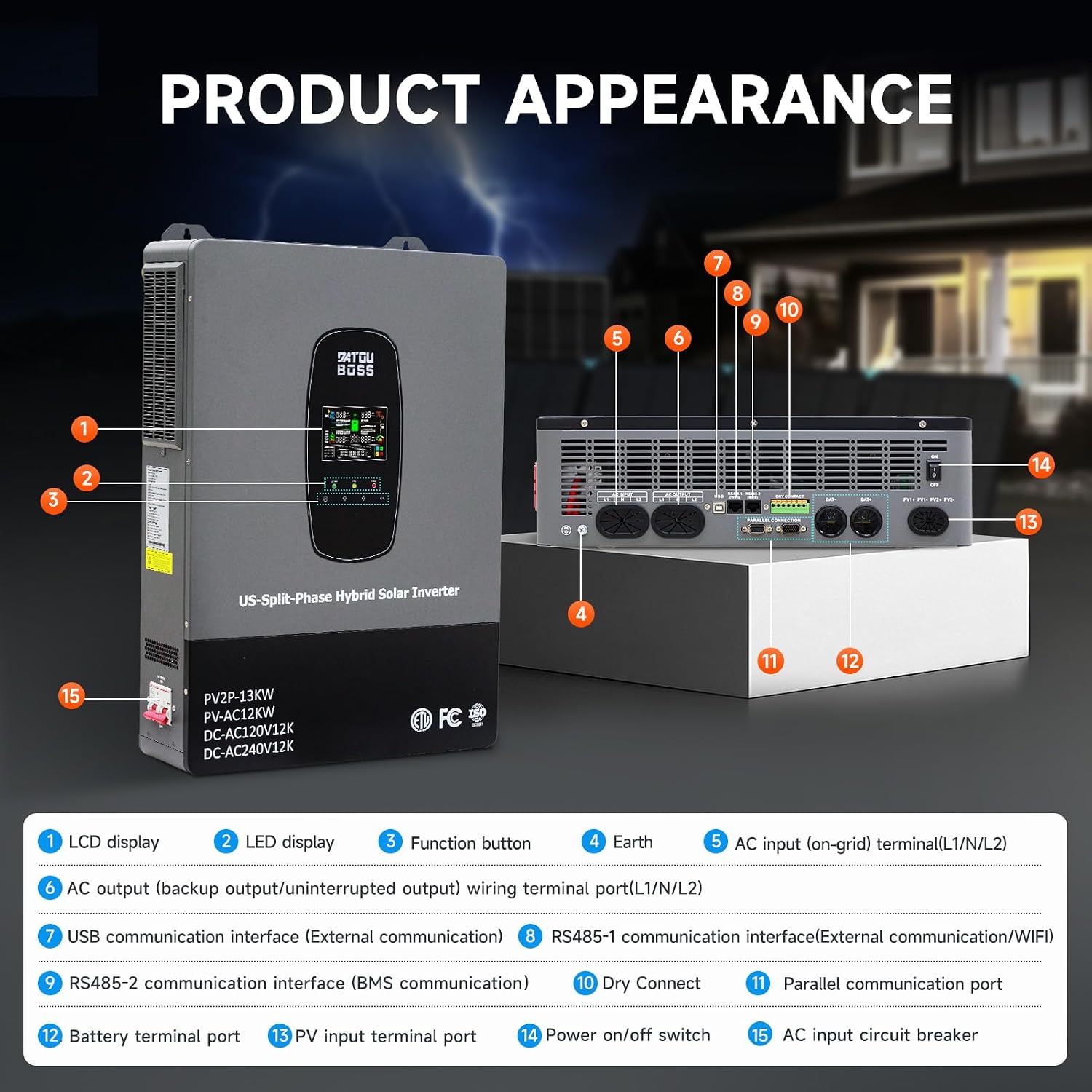
Image: Detailed view of the inverter's front and bottom panels, with numbered labels indicating various components such as the LCD display, LED indicators, function buttons, Earth terminal, AC input/output terminals, communication ports (USB, RS485), Dry Connect, Parallel communication port, Battery terminal port, PV input terminal port, Power on/off switch, and AC input circuit breaker.
- LCD Display: Shows system status and parameters.
- LED Display: Provides quick status indications.
- Function Button: For navigating menus and settings.
- Earth: Grounding terminal.
- AC Input (on-grid) Terminal (L1/N/L2): Connection for grid power.
- AC Output (backup output/uninterrupted output) Wiring Terminal (L1/N/L2): Connection for loads.
- USB Communication Interface (External Communication): For data transfer and monitoring.
- RS485-1 Communication Interface (External Communication/WiFi): For external communication modules.
- RS485-2 Communication Interface (BMS Communication): For Battery Management System integration.
- Dry Connect: For external control signals.
- Parallel Communication Port: For connecting multiple inverters in parallel.
- Battery Terminal Port: Connection for battery bank.
- PV Input Terminal Port: Connection for solar panels.
- Power On/Off Switch: Main power control.
- AC Input Circuit Breaker: Overcurrent protection for AC input.
4. Setup and Installation
Proper installation is crucial for the safe and efficient operation of your hybrid solar inverter. Consult a qualified electrician for installation.
4.1 Unboxing and Initial Inspection
Upon receiving the inverter, carefully unbox it and inspect for any physical damage. Ensure all components listed in the packing list are present.
Video: An unboxing and installation demonstration of the DATOUBOSS hybrid solar inverter, showing how to safely unpack the unit and connect the main terminals.
4.2 Mounting the Inverter
The inverter is designed for wall-mounted installation. Choose a location that is well-ventilated, protected from direct sunlight and moisture, and has sufficient clearance for air circulation and cable connections. Ensure the mounting surface can support the inverter's weight (21.5 kg).
4.3 Wiring Connections
All wiring must comply with local electrical codes. Ensure all connections are secure and properly insulated.
- Battery Connection: Connect the 48V battery bank to the battery terminal port. Observe correct polarity.
- PV Input Connection: Connect solar panels to the PV input terminal port. Ensure PV input voltage and current are within the inverter's specifications.
- AC Input (Grid) Connection: If connecting to the utility grid, connect it to the AC input terminal.
- AC Output (Load) Connection: Connect your loads to the AC output terminal.
- Grounding: Connect the Earth terminal to a reliable ground point.

Image: A wiring diagram illustrating a single-phase setup for the hybrid solar inverter, showing connections for PV panels, a 48V battery, the grid, and various household loads.
4.4 Parallel Operation
The inverter supports parallel operation of up to 6 units for increased power output. This can be configured for single-phase, split-phase, or three-phase systems. Use the parallel communication port for inter-inverter communication.

Image: A diagram illustrating various parallel wiring configurations for the DATOUBOSS hybrid solar inverter, including single-phase, two-phase split-phase (3+3), and two-phase split-phase (3+2+1) systems, demonstrating how multiple units can be connected for expanded capacity.
Video: A demonstration of the single-phase phase splitting function of the DATOUBOSS hybrid solar inverter, showing how it can output both 120V and 240V simultaneously.
5. Operating Modes
The inverter offers flexible operating modes to optimize energy management based on your specific needs.
5.1 Battery Compatibility
The inverter is compatible with various 48V battery types. You can configure the battery type via the LCD display.
- Lead-acid batteries (sealed, AGM, gel, flooded)
- Lithium batteries
- Supports battery-free operation.

Image: Diagram showing the multi-function battery compatibility of the inverter, supporting various types like GSL (Gel Sealed Lead-Acid), LN (Lithium-Ion), FLD (Flooded Lead-Acid), LI (LiFePO4 Battery), SLD (Sealed Lead-Acid), and USER-defined types, configurable via the LCD display.
5.2 Charging Modes
Select the charging mode that best suits your power environment:
- Pure Solar Charging: Prioritizes solar power for battery charging.
- AC-Priority Charging: Prioritizes AC grid power for battery charging.
- Solar-Priority Charging: Uses solar power first, then AC grid power if solar is insufficient.
- AC/Solar Hybrid Charging: Combines AC and solar power for charging.
5.3 AC Output Operating Modes
Choose the output mode for efficient power distribution:
- PV-Priority: Prioritizes solar power for loads.
- AC-Priority: Prioritizes AC grid power for loads.
- Inverter-Priority: Prioritizes battery power for loads.
- PV/AC Hybrid Mode: Combines solar and AC grid power for loads.

Image: Diagram illustrating various charging and output priority modes, including Grid-PV-Battery (UTI), PV-Grid-Battery (SOL), PV-Battery-Grid (SBU) for charging, and PV-Hybrid-Grid (SNU), Grid-PV (CBU), PV-Grid (CSO), and PV-Charging Only (OSO) for output, demonstrating flexible energy management options.
5.4 Time-Separated Charging/Discharging Function
This feature allows users to set specific charging and discharging periods based on local peak and valley electricity prices, optimizing the use of utility and photovoltaic energy.
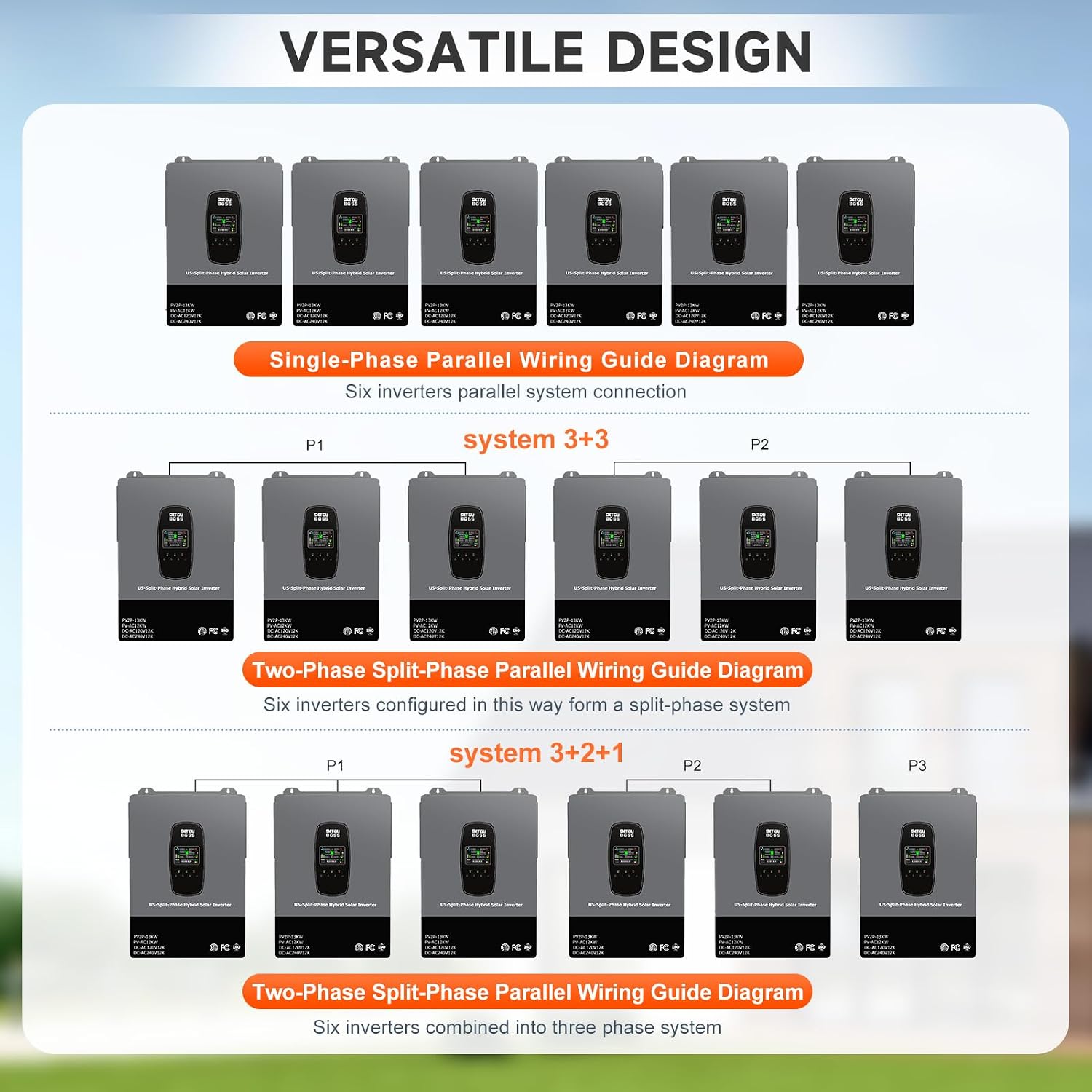
Image: Diagram explaining the time-separated mains charging/load-carrying function and time-separated battery discharge function, allowing users to define up to three time periods (e.g., 0h-6h, 6h-12h, 12h-18h, 18h-24h) for optimized energy usage and cost savings.
6. Maintenance
Regular maintenance ensures the longevity and optimal performance of your DATOUBOSS hybrid solar inverter.
- Regular Cleaning: Keep the inverter's ventilation openings clear of dust and debris to ensure proper airflow and prevent overheating. Use a soft, dry cloth for cleaning.
- Connection Checks: Periodically inspect all electrical connections (PV, battery, AC input/output, grounding) for tightness and signs of corrosion. Tighten any loose connections.
- Environmental Inspection: Ensure the installation environment remains within specified temperature and humidity ranges. Check for any signs of moisture ingress or pest activity.
- Firmware Updates: If using the optional WiFi monitoring module, check for available firmware updates to ensure the inverter operates with the latest features and improvements.
- Battery Health: For battery-connected systems, monitor battery health and performance as recommended by the battery manufacturer.
Always disconnect all power sources before performing any maintenance.
7. Troubleshooting
This section provides basic troubleshooting steps for common issues. For more complex problems, contact customer support.
| Problem | Possible Cause | Solution |
|---|---|---|
| Inverter not powering on | No battery power; AC input not connected; Power switch off | Check battery connections and voltage; Verify AC input connection; Ensure power switch is ON. |
| No AC output | Overload; Short circuit; Inverter fault | Reduce load; Check for short circuits in wiring; Restart inverter. If issue persists, contact support. |
| PV charging not working | No sunlight; PV panels disconnected; PV input voltage too low/high | Check sunlight conditions; Verify PV panel connections; Ensure PV voltage is within operating range. |
| Error code on display | Specific system fault | Refer to the detailed error code list in the full manual (if available) or contact customer support with the error code. |
For any persistent issues or complex troubleshooting, please contact DATOUBOSS customer support.
8. Specifications
Detailed technical specifications for the DATOUBOSS UL1741 12000W Hybrid Solar Inverter (Model DT-4812).
| Parameter | Value |
|---|---|
| Brand | DATOUBOSS |
| Model Name | 48V 12KM Hybrid Solar Inverter |
| Model Number | DT-4812 |
| Rated Output Power | 12000W |
| Peak Output Power | 13000W |
| Input Voltage | 48V DC |
| Output Voltage | 120V/240V AC |
| Electrical Output Waveform | Pure Sine Wave |
| Frequency | 60 Hz |
| Max PV Input Power | 13kW (6500W*2) |
| Max PV Input Voltage | 500V DC |
| Max PV Charging Current | 220A |
| MPPT Tracking Voltage Range | 125VDC-425VDC |
| Number of MPPTs | 2 |
| Max Parallel Connection | 6 Units |
| Battery Type Compatibility | Lead-acid (sealed, AGM, gel, flooded), Lithium |
| Energy Specifications Met | UL1741 |
| Item Dimensions (L x W x H) | 24.8"L x 17.52"W x 5.37"H (630x445x136.5 mm) |
| Net Weight | 21.5 kg |
| Operating Temperature | -10°C to 55°C |
| Protection Level | IP20 |
9. Warranty and Support
DATOUBOSS stands behind the quality of its products.
9.1 Warranty Information
This DATOUBOSS UL1741 12000W Hybrid Solar Inverter comes with a 5-Year Manufacturer Warranty. Please retain your proof of purchase for warranty claims. The warranty covers defects in materials and workmanship under normal use and service conditions.
9.2 Customer Support
For technical assistance, installation guidance, or any product-related concerns, please contact DATOUBOSS customer support. Our experienced team is available to provide prompt and helpful solutions.
Refer to the official DATOUBOSS website or your purchase documentation for the most current contact information.


