
Important Safety Information
Read all instructions carefully before using this appliance. Keep this manual for future reference.
- Ensure the treadmill is placed on a flat, stable surface.
- Keep children and pets away from the treadmill during operation.
- Always use the safety key. Attach it to your clothing before starting the treadmill.
- Do not operate the treadmill if it has a damaged cord or plug, or if it is not working correctly.
- Wear appropriate athletic footwear.
- Do not exceed the maximum weight capacity of 300 pounds.
- Consult a physician before starting any exercise program.
Package Contents
Verify all items are present in the package:
- Acezoe P11 Walking Pad Treadmill
- Power Cord
- Remote Control
- Safety Key
- User Manual (this document)
Product Overview
The Acezoe P11 is a versatile walking pad treadmill designed for home and office use, offering both walking and running modes with an adjustable incline.
Key Features:
- 2-in-1 Design: Functions as an under-desk walking pad or a traditional treadmill with a handlebar.
- Adjustable Incline: Manual 10% incline to simulate climbing and increase workout intensity.
- Speed Range: 0.6 to 6.2 MPH (Miles per Hour).
- Motor: 2.5 Horsepower for consistent performance.
- Weight Capacity: Supports users up to 300 pounds.
- Running Surface: 40" x 16" with a 7-layer anti-slip belt and 8 silicone shock absorbers for joint protection.
- LED Display: Tracks time, speed, distance, and calories burned.
- App Control: Bluetooth connectivity for smart app integration, offering various workout programs and data synchronization.
- Compact & Foldable: Designed for easy storage and mobility with built-in wheels.
- Quiet Operation: Motor operates at less than 45dB.
Visual Components:
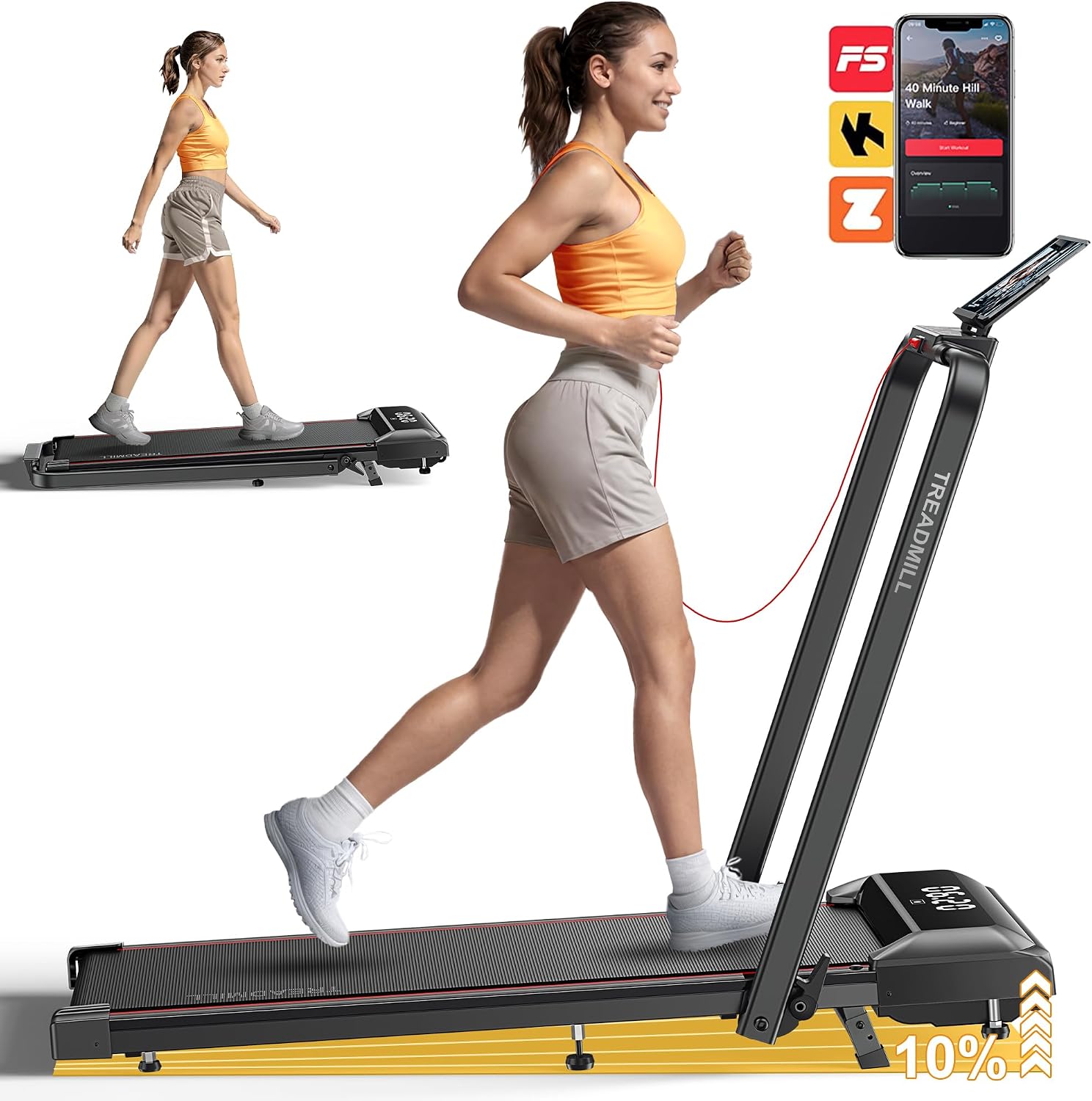
Figure 1: The Acezoe P11 Walking Pad Treadmill shown in both its flat walking pad configuration and with the handlebar raised for running. This illustrates its 2-in-1 functionality.

Figure 2: Detailed view of the treadmill's manual incline adjustment, highlighting the 10% incline capability. This feature allows users to simulate uphill walking or running.

Figure 3: An illustration of the treadmill's multi-layer running belt and integrated silicone shock absorbers, designed to reduce impact on joints during exercise.

Figure 4: The treadmill in its folded state, demonstrating its compact design for space-saving storage. The image also shows the integrated wheels for easy movement.
Setup
The Acezoe P11 Walking Pad Treadmill requires no assembly and is ready for use directly out of the box.
- Unpack: Carefully remove the treadmill from its packaging.
- Placement: Place the treadmill on a firm, level surface with adequate clearance around it (at least 2 feet on all sides).
- Handlebar (Optional): If using in treadmill mode, lift the handlebar into the upright position until it locks securely. Ensure both locking mechanisms are engaged.
- Power Connection: Plug the power cord into a grounded electrical outlet.
- Safety Key: Attach the safety key to the designated slot on the console and clip the other end to your clothing. The treadmill will not operate without the safety key in place.
Video 1: This video demonstrates the setup and various features of the Acezoe 2-in-1 Foldable Walking Pad Treadmill with Incline, including its transition between walking pad and treadmill modes, and the quick switch mechanism for incline adjustment.
Operating Instructions
Basic Operation:
- Power On: Press the power button on the console or remote control. The LED display will illuminate.
- Start: Press the "Start" button. The belt will begin moving at a low speed.
- Adjust Speed: Use the speed +/- buttons on the console or remote to increase or decrease the belt speed (0.6 - 6.2 MPH).
- Stop: Press the "Stop" button to gradually slow down and stop the belt. In an emergency, pull the safety key to immediately stop the treadmill.

Figure 5: The treadmill's control panel, showing the LED display and buttons for speed adjustment, start/stop, and mode selection. The remote control is also visible, offering convenient wireless operation.

Figure 6: An exposed view of the treadmill's 2.5HP motor, illustrating its compact design and highlighting its quiet operation, rated at less than 45dB.
Incline Adjustment:
The P11 features a manual incline system. To adjust the incline:
- Ensure the treadmill is stopped and powered off.
- Locate the incline adjustment levers at the rear base of the treadmill.
- Lift the rear of the treadmill slightly and adjust the levers to the desired incline level (up to 10%). Ensure both sides are set equally and securely.
- Lower the treadmill gently onto the adjusted supports.
App Control:
Connect your treadmill to a compatible fitness app via Bluetooth for enhanced workout tracking and programs.
- Download the recommended fitness app (refer to the product packaging or console for app name).
- Enable Bluetooth on your mobile device.
- Open the app and follow the on-screen instructions to pair with your Acezoe P11 treadmill.
- Once connected, you can control speed, monitor workout data, and access various training programs through the app.

Figure 7: A user engaging with a fitness application on a tablet, which is connected to the treadmill. The app displays various workout metrics and program options, enhancing the exercise experience.
Safety Key:
The safety key is a critical safety feature. The treadmill will not operate without it. In case of an emergency, pulling the safety key will immediately stop the belt, preventing potential injury.
Maintenance
Regular maintenance ensures the longevity and optimal performance of your treadmill.
- Cleaning: Wipe down the treadmill with a damp cloth after each use. Avoid abrasive cleaners.
- Belt Lubrication: Periodically lubricate the running belt according to the instructions provided with the lubricant. This typically involves applying a small amount of silicone lubricant under the belt.
- Belt Tension & Alignment: Check the running belt for proper tension and alignment regularly. Adjust as needed using the provided Allen wrench at the rear of the treadmill. Refer to the detailed instructions in the separate maintenance guide if available.
- Storage: When not in use, fold the treadmill and store it in a cool, dry place.
Troubleshooting
If you encounter issues, refer to the following common solutions:
| Problem | Possible Cause | Solution |
|---|---|---|
| Treadmill does not power on. | Power cord not plugged in, safety key not inserted, power switch off. | Ensure power cord is securely plugged in, safety key is fully inserted, and power switch is on. |
| Running belt stops unexpectedly. | Safety key dislodged, motor overload. | Re-insert safety key. If motor overload, reduce speed/incline or allow motor to cool. |
| Belt slips or feels loose. | Belt tension too low. | Adjust belt tension using the provided Allen wrench. Refer to maintenance section. |
| Unusual noise during operation. | Lack of lubrication, loose components. | Lubricate the running belt. Check for and tighten any loose screws or bolts. |
For issues not listed here, please contact customer support.
Specifications
| Feature | Detail |
|---|---|
| Brand | Acezoe |
| Model Number | P11 |
| Product Dimensions (D x W x H) | 51.2" x 22.1" x 5.3" |
| Folded Size | 51.2" x 22" x 5.3" |
| Item Weight | 51.8 Pounds |
| Material | Alloy Steel |
| Maximum Speed | 6.2 Miles per Hour |
| Minimum Speed | 0.6 Miles per Hour |
| Maximum Horsepower | 2.5 HP |
| Maximum Incline Percentage | 10.0% (Manual) |
| Maximum Weight Recommendation | 300 Pounds |
| Display Type | LED |
| Connectivity Technology | Bluetooth |
| Metrics Measured | Calories Burned, Distance, Speed, Time |
| Number of Programs | 4 |
| Assembly Required | No |
Warranty and Support
The Acezoe P11 Walking Pad Treadmill comes with a 1-year warranty. For technical support, warranty claims, or any other inquiries, please contact Acezoe customer service via the email provided in your purchase documentation.
Acezoe offers 24/7 service and lifetime technical support.
