
1. Product Overview
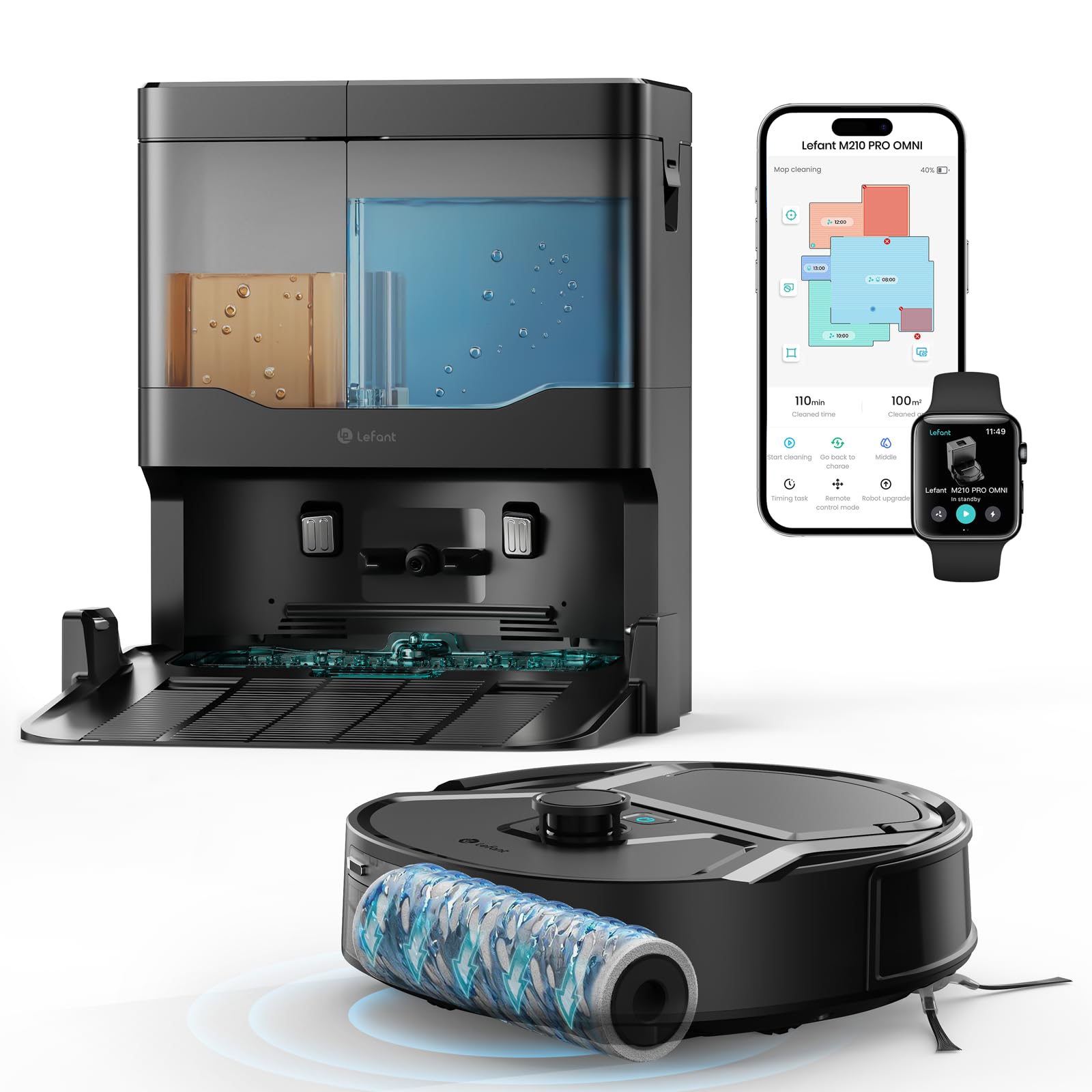
The Lefant M210 PRO OMNI is an advanced robot vacuum and mop designed for comprehensive floor cleaning. It features a self-cleaning roller, continuous clean water washing, multi-level mapping, and powerful suction to handle various floor types and debris, including pet hair.
Key Features:
- Self-Cleaning Roller: Ensures consistent cleaning with fresh water.
- Clean Water Washing: Separates clean and dirty water to prevent re-soiling.
- dToF Laser Navigation: Creates precise maps for efficient cleaning paths.
- Multi-Level Mapping: Supports up to 3 maps for multi-floor homes.
- 20,000Pa Suction: Powerful suction for dust, crumbs, and pet hair.
- Anti-Tangle Design: Brushless suction port reduces hair tangles.
- Compact Design: 280mm body allows access under furniture.
- Smart Control: Via Lefant App, Amazon Alexa, and Google Assistant.

2. Safety Information
Before using the Lefant M210 PRO OMNI, please read all safety instructions carefully to prevent injury or damage. Keep this manual for future reference.
- Do not allow children to operate the robot. Supervise children and pets when the robot is operating.
- Ensure the charging base is placed on a flat surface against a wall, with adequate space around it.
- Remove any loose cables, small objects, or fragile items from the floor before cleaning to prevent entanglement or damage.
- Do not use the robot to clean liquids, burning objects, or hazardous materials.
- Only use the original power adapter and charging base provided with the robot.
- Do not immerse the robot or its electronic components in water.
- For detailed safety guidelines, refer to the official Safety Information PDF: Safety Information (PDF).
3. Setup Guide
3.1 Unboxing and Initial Placement
- Carefully remove all components from the packaging.
- Place the charging base against a wall on a hard, level surface. Ensure there is at least 0.5 meters of clear space on either side and 1.5 meters in front of the base.
- Connect the power adapter to the charging base and plug it into a wall outlet.
- Remove any protective films or stickers from the robot and charging base.
3.2 Charging the Robot
Place the robot onto the charging base, ensuring the charging contacts align. The robot will begin charging automatically. For first-time use, fully charge the robot before operation (approximately 4-5 hours).
3.3 App Installation and Connection
The Lefant App allows you to control your robot, set schedules, view maps, and customize cleaning preferences.
- Download the Lefant App: Scan the QR code in the manual or search for "Lefant" in the App Store (iOS) or Google Play Store (Android). You can also visit mobile.useerobot.com.
- Turn on the Robot: Press and hold the Power/Pause button for 3 seconds to turn on the M210 PRO OMNI.
- Enter Pairing Mode: Press and hold the Power/Pause button for 6 seconds until the indicator light flashes.
- Add Device in App: Open the Lefant App, click "Add Device," and select "M210 PRO OMNI."
- Connect to Wi-Fi: Select your home Wi-Fi network (supports 2.4GHz and 5GHz) and enter the password.
- Complete Pairing: Follow the on-screen instructions to complete the pairing process.

3.4 Voice Assistant Integration (Alexa/Google Assistant)
Control your M210 PRO OMNI with voice commands through Amazon Alexa or Google Assistant.
- Enable Voice Assistant in Lefant App: Open the Lefant App, go to Profile, and select "Voice Access Service."
- Save Account Details: Note down the username and password displayed in the app.
- Open Alexa App: Go to "Skills & Games."
- Search for "Smart Life": Type "Smart Life" in the search bar and select the corresponding skill.
- Enable Skill: Click "Enable" to link your account.
- Link Your Account: Choose your region and enter the username and password saved from step 2.
- Complete Connection: Once the linking is successful, you can control your M210 PRO OMNI with voice commands.

4. Operating Instructions
4.1 Starting and Stopping Cleaning
- Start Cleaning: Press the Power/Pause button on the robot or tap "Start Cleaning" in the Lefant App.
- Pause Cleaning: Press the Power/Pause button again or tap "Pause" in the app.
- Return to Base: Press the Home button on the robot or tap "Return to Base" in the app. The robot will automatically return to its charging station.
4.2 Navigation and Mapping
The M210 PRO OMNI uses dToF laser navigation to create accurate maps of your home, ensuring efficient and thorough cleaning.
- Initial Mapping: During its first cleaning cycle, the robot will create a map of your home. Ensure all doors are open for a complete map.
- Multi-Level Maps: The robot can store up to 3 different maps, ideal for multi-story homes. Select the appropriate map in the app before cleaning.
- Virtual No-Go Zones: Use the Lefant App to set virtual boundaries or no-go zones to prevent the robot from entering specific areas (e.g., pet bowls, delicate furniture).
- Customized Cleaning: In the app, you can select specific rooms or areas for cleaning, adjust suction power, and water flow levels for each zone.


4.3 Vacuuming and Mopping
The M210 PRO OMNI combines vacuuming and mopping for a thorough clean.
- Powerful Suction: With 20,000Pa suction, it effectively picks up dust, crumbs, and pet hair from hard floors and carpets.
- Anti-Tangle Design: The brushless suction port minimizes hair tangles, making it ideal for homes with pets.
- Clean Water Mopping: The integrated self-cleaning roller continuously uses fresh water and separates dirty water, preventing cross-contamination.
- Carpet Detection: The robot can detect carpets and adjust its cleaning mode accordingly, protecting textile surfaces during mopping.


5. Maintenance
Regular maintenance ensures optimal performance and extends the lifespan of your Lefant M210 PRO OMNI.
5.1 Dustbin Emptying
The robot features an 800ml reusable dustbin. It is recommended to empty the dustbin after each cleaning cycle or as indicated by the app.
- Press the release button to remove the dustbin from the robot.
- Open the dustbin lid and empty its contents into a trash bin.
- Close the lid and reinsert the dustbin into the robot until it clicks into place.

5.2 Water Tank Management
The multi-function base includes a 2.4L clean water tank and a 1.5L dirty water tank.
- Refilling Clean Water: Regularly check the clean water tank and refill it with fresh water as needed.
- Emptying Dirty Water: Empty the dirty water tank after each mopping session to prevent odors and maintain hygiene.
- Cleaning Tanks: Periodically rinse both water tanks with clean water.

5.3 Self-Cleaning Roller and Air Drying
The robot's base automatically cleans and dries the roller mop.
- Automatic Roller Cleaning: The base washes the roller with clean water after each mopping cycle.
- Automatic Air Drying: After cleaning, the roller is automatically air-dried to prevent mold, bacteria, and odors.
- Manual Roller Cleaning: If necessary, the roller can be removed and rinsed under running water. Ensure it is completely dry before reinserting.

5.4 Side Brushes and Filters
- Side Brushes: Regularly check the side brushes for tangled hair or debris. Clean them as needed. Replace worn brushes to maintain cleaning efficiency.
- Filters: Clean the dustbin filter regularly. Tap it gently to remove dust or rinse it if heavily soiled (ensure it's completely dry before reuse). Replace filters every 3-6 months, depending on usage.
6. Troubleshooting
If you encounter issues with your Lefant M210 PRO OMNI, refer to the following common problems and solutions.
| Problem | Possible Cause | Solution |
|---|---|---|
| Robot does not turn on | Low battery; Power switch off | Place on charging base; Ensure power switch is on. |
| Robot cannot connect to Wi-Fi | Incorrect Wi-Fi password; Router too far; 5GHz network selected (if not supported) | Verify password; Move robot closer to router; Ensure 2.4GHz network is used if 5GHz is not supported. |
| Robot gets stuck frequently | Obstacles on floor; Robot stuck under furniture | Clear floor of cables and small items; Use virtual no-go zones for problem areas. |
| Poor cleaning performance | Full dustbin; Dirty filter; Worn side brushes; Low water in tank | Empty dustbin; Clean/replace filter; Clean/replace side brushes; Refill clean water tank. |
| Robot makes unusual noise | Debris in roller/brushes; Malfunctioning component | Check and clean roller/brushes; If noise persists, contact customer support. |
For more complex issues or if the problem persists, please refer to the full user manual PDF or contact Lefant customer support.
Official User Manual (PDF): Instructions for Use (PDF)
7. Technical Specifications
| Feature | Detail |
|---|---|
| Brand | Lefant |
| Model Name | M210 PRO OMNI |
| Suction Power | 20,000 Pa (Max) |
| Clean Water Tank Capacity | 2.4 Liters |
| Dirty Water Tank Capacity | 1.5 Liters |
| Dustbin Capacity | 800 ml |
| Battery Composition | Lithium Ion |
| Control Type | Button Control, App Control, Voice Control |
| Compatible Devices | Google Home, Smartphone, Smartwatch |
| Navigation Type | dToF Laser Mapping |
| Multi-Level Mapping | Up to 3 maps |
| Robot Dimensions (LxWxH) | 28L x 28W x 9.9H cm |
| Connectivity | Wi-Fi 2.4/5GHz |
| Special Features | Self-cleaning roller, Automatic air drying, Anti-tangle, Pet hair friendly |
8. Warranty and Support
Lefant products come with a standard manufacturer's warranty. For specific warranty terms and conditions, please refer to the documentation included with your product or visit the official Lefant website.
If you require technical assistance, have questions about your product, or need to claim warranty service, please contact Lefant customer support. Contact information can typically be found on the Lefant website or within the Lefant App.
Seller: Lefant Robotics