
1. Product Overview
The Garvee L-Shaped Gaming Computer Desk is designed for both gaming and home office environments, offering a spacious work surface and integrated storage solutions. This desk features a reversible design, allowing the storage shelves to be positioned on either the left or right side to suit your space requirements. It includes six fabric drawers, open shelving, a dedicated CPU stand area, a built-in power strip with multiple outlets, and integrated RGB LED lighting for customizable ambiance.

Figure 1: Garvee L-Shaped Gaming Computer Desk with multi-functional cabinet and shelves.
2. Safety Information
- Read all instructions carefully before assembly and use.
- Ensure all parts are present and undamaged before beginning assembly.
- Assemble the desk on a soft, clean surface to prevent scratches.
- Do not overtighten screws during assembly to avoid damaging components.
- Keep small parts away from children.
- Do not exceed the weight capacity of the desk or shelves.
- Ensure the power strip is connected to a grounded outlet. Do not overload the power strip.
3. Package Contents
Verify that all components listed below are included in your package. If any parts are missing or damaged, contact customer support.
- Desk Panels (Desktop, Shelf Boards)
- Metal Frame Components (Legs, Crossbars)
- Fabric Drawers (6 units)
- Hardware Pack (Screws, Allen wrench, etc.)
- Built-in Power Strip
- RGB LED Lighting Strip
- Adjustable Feet
4. Setup and Assembly
This desk features a reversible design. Decide whether you want the shelving unit on the left or right side before starting assembly.
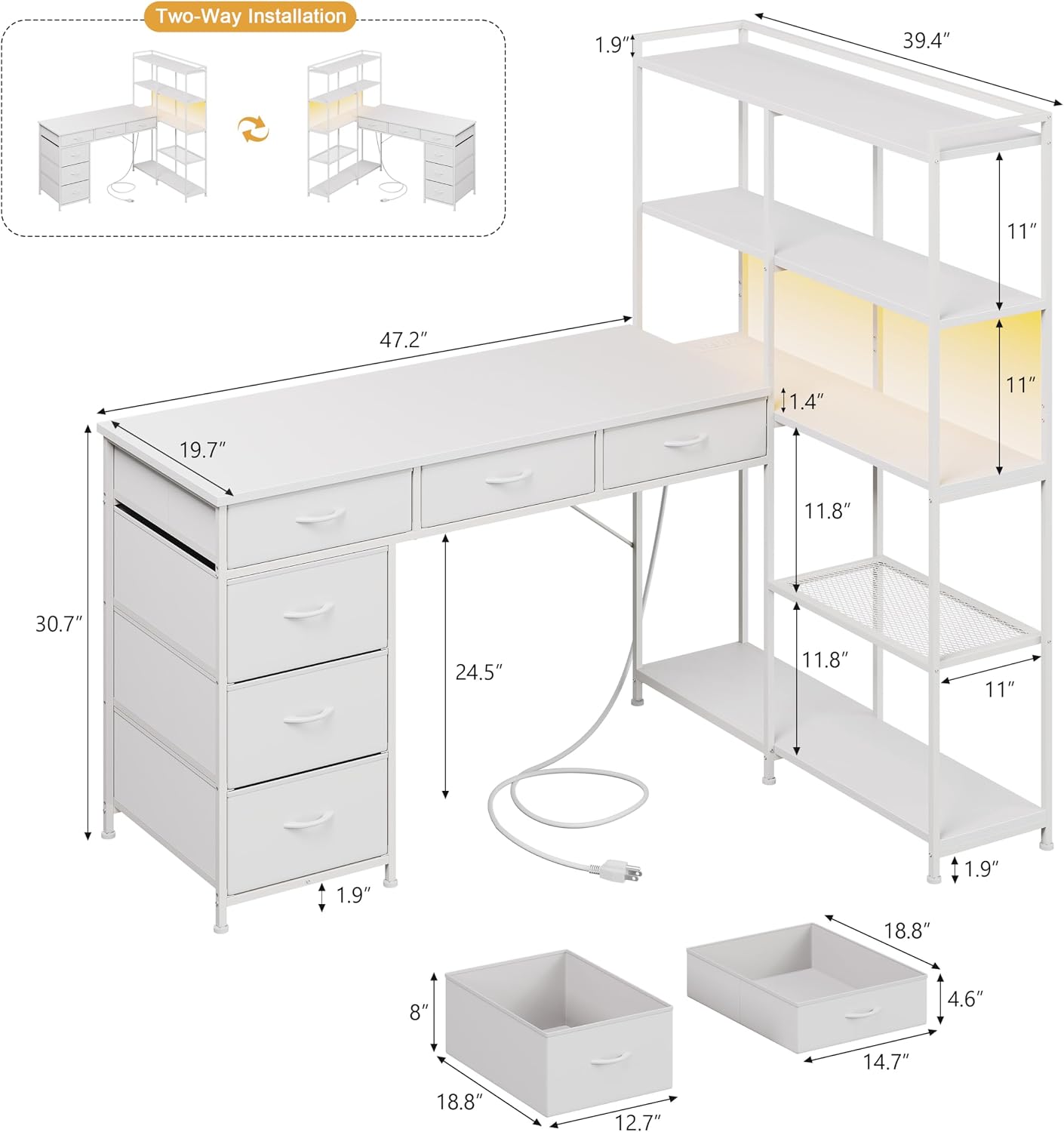
Figure 2: Two-way installation options for the desk, allowing the shelving unit to be on either side.
Assembly Steps:
- Unpack and Identify Parts: Carefully remove all components from the packaging. Lay them out and compare with the parts list in the included assembly guide.
- Assemble the Metal Frame: Follow the detailed diagrams in the separate assembly guide to connect the metal frame components using the provided screws and tools. Ensure all connections are secure but do not fully tighten until all major components are in place.
- Attach Desk Panels: Secure the main desktop and shelf boards to the assembled metal frame. Pay attention to the orientation for the reversible design.
- Install Fabric Drawers: Insert the six fabric drawers into their designated slots.
- Install Power Strip: Mount the built-in power strip in its designated location, typically under the desktop or on a shelf.
- Install RGB LED Lighting: Adhere the RGB LED lighting strip to the desired location, usually along the underside of shelves or the desktop edge, as indicated in the assembly guide.
- Final Tightening and Leveling: Once all components are in place, fully tighten all screws. Adjust the leveling feet at the bottom of the desk to ensure stability on uneven floors.
5. Operating Instructions
5.1 Built-in Power Strip
The desk is equipped with a built-in power strip for convenient device charging and power access.

Figure 3: Detail of the integrated power strip with various charging options.
- AC Outlets: Plug in up to three standard AC devices (e.g., monitors, PC, lamps).
- USB Port: Connect USB-A compatible devices for charging.
- Type-C Port: Connect USB-C compatible devices for charging.
Important: Ensure the power strip's main plug is securely connected to a wall outlet. Do not exceed the maximum power rating of the strip.
5.2 RGB LED Lighting
The integrated RGB LED lighting strip allows you to customize the desk's ambiance.

Figure 4: The desk illuminated by its RGB LED lighting feature.
- Connection: Connect the LED strip to its power source as instructed in the assembly guide.
- Control: The RGB LED lights are typically controlled via a mobile application. Download the recommended app (details usually provided in the LED light kit instructions) to access over 60,000 color options and various lighting modes.
- Power On/Off: Use the app or the physical controller (if included) to turn the lights on or off.
6. Maintenance
- Cleaning the Desktop: Wipe the waterproof desktop surface with a soft, damp cloth. Avoid abrasive cleaners or harsh chemicals that may damage the finish.
- Cleaning the Metal Frame: Use a soft cloth to wipe down the metal frame. For stubborn marks, a mild soap solution can be used, followed by drying thoroughly.
- Fabric Drawers: Fabric drawers can be spot cleaned with a mild detergent and water. Allow to air dry completely. Do not machine wash.
- Regular Checks: Periodically check all screws and connections to ensure they remain tight. Retighten if necessary.
7. Troubleshooting
- Desk is Unstable/Wobbly:
a. Ensure all assembly screws are fully tightened.
b. Adjust the leveling feet at the bottom of the desk legs to compensate for uneven flooring. - RGB LED Lights Not Working:
a. Check if the LED strip is properly connected to its power source.
b. Verify that the power source is active.
c. Ensure the mobile app (if used) is correctly paired and functioning. - Power Outlets Not Functioning:
a. Confirm the main power strip plug is securely inserted into a working wall outlet.
b. Check if the wall outlet itself is receiving power (test with another device).
c. Avoid overloading the power strip with too many high-power devices. - Fabric Drawers Do Not Slide Smoothly:
a. Ensure the drawers are inserted correctly and not obstructed.
b. Check for any debris in the drawer slots.
8. Specifications
| Feature | Detail |
|---|---|
| Brand | Garvee |
| Model Number | REpO148R2k9K384237iwSg58Y |
| Shape | L-Shape |
| Product Dimensions (D x W x H) | 39.37" x 58.27" x 54.33" |
| Color | White |
| Material | High-density Particle Boards, Metal Frame |
| Number of Drawers | 6 (Fabric) |
| Number of Shelves | 5 (Open) |
| Power Outlets | 3 AC Outlets, 1 USB Port, 1 Type-C Port |
| Special Features | Reversible Design, RGB LED Lighting, Adjustable Feet |
| Item Weight | 66.1 pounds |
9. Warranty Information
This Garvee L-Shaped Gaming Computer Desk comes with a Limited Warranty. For specific details regarding warranty coverage, duration, and claims process, please refer to the warranty card included with your product or contact Garvee customer support directly.
10. Customer Support
If you have any questions, require assistance with assembly, or encounter issues not covered in this manual, please contact Garvee customer support. Please have your model number (REpO148R2k9K384237iwSg58Y) and purchase information ready when contacting support.
- Online Support: Visit the official Garvee website for FAQs and support resources.
- Email Support: Refer to your product packaging or warranty card for contact email.