
1. Introduction
This manual provides detailed instructions for the installation, operation, and maintenance of your Albott 24000BTU 220V 18 SEER2 Mini Split Air Conditioner with Heat Pump. Please read this manual thoroughly before using the unit to ensure proper function and safety. Keep this manual for future reference.

Image: Overview of the Albott Mini Split Air Conditioner's rich functionality.
Video: An overview of the Albott Mini Split AC, highlighting comfort features.
2. Key Features
Your Albott Mini Split Air Conditioner is equipped with advanced features designed for optimal comfort and efficiency:
- All-in-One Comfort Control: Offers 5 operating modes: cooling, heating, fan, auto, and dehumidifying for year-round climate control.
- Energy Efficient Design: High-SEER2 efficiency (18 SEER2) reduces energy consumption while maintaining performance.
- Powerful & Quiet Performance: Delivers rapid cooling and heating with an ultra-quiet operation, as low as 29dB, suitable for quiet environments.
- Adjustable Airflow: Features three fan speeds with horizontal and vertical auto-swing louvers for even air distribution.
- Self-Cleaning Function: An automatic self-cleaning mode helps remove dust and odors, promoting cleaner air quality.
- WiFi Enabled: Control your unit remotely via a dedicated mobile application.

Image: Illustration of the energy-saving features and SEER2 rating.
3. Setup (Installation)
Professional installation is highly recommended for this mini split system to ensure safety and optimal performance. The system consists of an indoor unit and an outdoor condenser unit. Ensure proper electrical wiring and refrigerant line connections are made according to local codes and regulations.
3.1 Component Overview
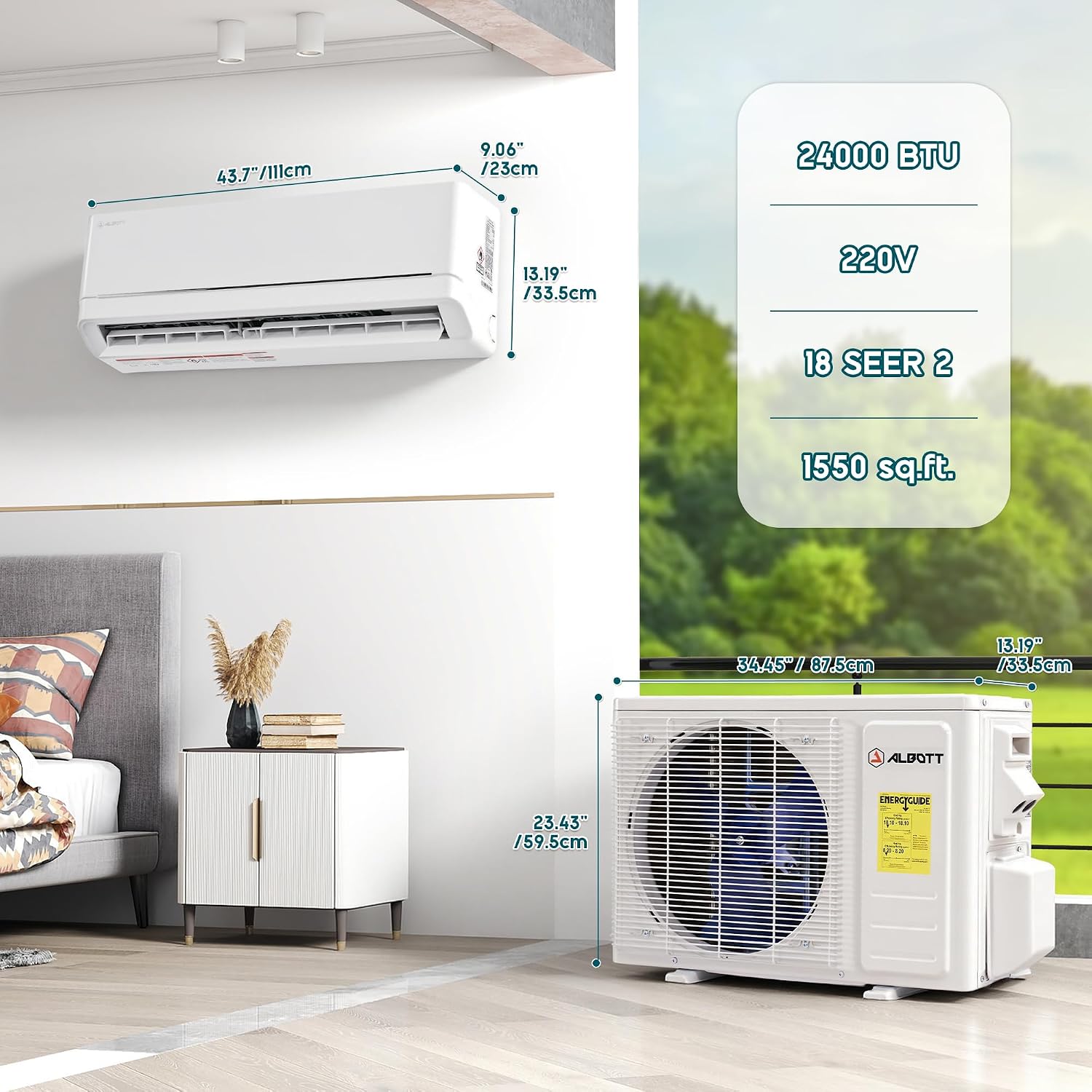
Image: Dimensions of the indoor and outdoor units for installation planning.
3.2 Electrical Wiring
Ensure all electrical connections are performed by a qualified electrician. Refer to the wiring diagram provided in the full installation manual. The following video demonstrates a general wiring process for a mini-split unit; specific connections may vary by model.
Video: General guide on how to correctly wire a mini-split unit. Note: Specific wiring may differ for your Albott model.
4. Operating Instructions
Your Albott Mini Split AC can be operated using the included remote control or via the WiFi app.
4.1 Remote Control Functions
The remote control allows you to adjust various settings. Insert two AAA batteries (not included) into the remote before use.

Image: Detailed view of the remote control with button descriptions.
- On/Off: Powers the unit on or off.
- Mode: Cycles through Cooling, Heating, Fan, Auto, and Dehumidify modes.
- Temp Up/Down: Adjusts the desired temperature.
- Fan Speed: Selects fan speed (Low, Medium, High, Auto).
- Swing: Controls vertical and horizontal louver movement for airflow direction.
- Sleep Mode: Optimizes temperature and fan speed for comfortable sleep.
- Quiet Mode: Reduces fan noise for ultra-quiet operation.
- Timer: Sets a timer for automatic on/off operations.
- ECO/Clean: Activates energy-saving or self-cleaning functions.
- Child Lock: Press Quiet + Timer simultaneously to activate/deactivate.
- Display °C/°F: Press Sleep + Display simultaneously to switch temperature units.
4.2 Airflow Adjustment
The unit features wide-angle airflow distribution to ensure even coverage throughout your space.

Image: Visual representation of wide-angle airflow distribution.
4.3 Quiet Operation
The unit is designed for quiet operation, especially in Sleep Mode, making it ideal for bedrooms.

Image: Illustrating quiet operation and sleep mode benefits.
4.4 WiFi App Control
Control your Albott Mini Split AC from your smartphone using the dedicated WiFi app. Follow the app's instructions for pairing your device. The following video provides a general guide on using a mini-split app; specific interface details may vary.
Video: General instructions on how to use a mini-split control app. Note: The app interface for your Albott model may differ.
5. Maintenance
Regular maintenance ensures the longevity and efficient operation of your Albott Mini Split Air Conditioner.
5.1 Self-Cleaning Function
Activate the self-cleaning mode periodically to remove accumulated dust and odors from the indoor unit's evaporator coil. This helps maintain air quality and unit efficiency.

Image: Illustration of the self-cleaning process for improved air quality.
5.2 Air Filter Cleaning
The air filters should be cleaned regularly, typically every two weeks or more often depending on usage and air quality. Dirty filters can reduce efficiency and airflow.
- Turn off the unit and disconnect power.
- Open the front panel of the indoor unit.
- Remove the air filters.
- Clean filters with a vacuum cleaner or wash with lukewarm water (below 40°C).
- Allow filters to dry completely in a shaded area before reinstalling.
- Close the front panel and restore power.
6. Troubleshooting
If you encounter issues with your Albott Mini Split Air Conditioner, refer to the following common troubleshooting steps. For complex problems, contact qualified service personnel.
| Problem | Possible Cause | Solution |
|---|---|---|
| Unit does not start | No power supply; Remote control batteries dead; Timer function active. | Check power connection and circuit breaker; Replace remote batteries; Deactivate timer. |
| Insufficient cooling/heating | Dirty air filters; Blocked air intake/outlet; Room too large; Doors/windows open. | Clean air filters; Clear obstructions; Ensure proper room size for BTU; Close doors/windows. |
| Unusual noise | Loose parts; Unit not level; Fan obstruction. | Check for loose components; Ensure unit is level; Remove any fan obstructions. |
| Water leakage from indoor unit | Clogged drain hose; Improper installation. | Clear drain hose; Contact installer for inspection. |
| Remote control not working | Batteries dead or incorrectly inserted; Obstruction between remote and unit. | Replace batteries; Ensure clear line of sight to indoor unit. |
7. Specifications
Detailed technical specifications for the Albott 24000BTU 220V 18 SEER2 Mini Split Air Conditioner.

Image: Coverage area and cooling capacity details.
| Feature | Detail |
|---|---|
| Brand | Albott |
| Model | 24000BTU 220V, 18 SEER2 |
| Cooling Power | 24000 British Thermal Units (BTU) |
| Seasonal Energy Efficiency Ratio (SEER2) | 18.0 |
| Coverage Area | Up to 1550 Sq.Ft. |
| Voltage | 220 Volts |
| Noise Level | 29 Decibels (Silent Mode) |
| Refrigerant | R-32, GWP: 675 |
| Product Dimensions (Indoor Unit) | 43.7"D x 9.06"W x 13.19"H |
| Control Method | App, Remote Control |
| Special Features | Auto Clean, Child Lock, Fast Cooling, Inverter Compressor, Sleep Mode, WiFi Enabled |
8. Warranty and Support
Your Albott Mini Split Air Conditioner comes with a standard warranty. For specific warranty details, please refer to the documentation included with your purchase or contact Albott customer support.
8.1 Returns Policy
A 30-day easy return policy is typically offered for this product. Please check your purchase terms for exact details.
8.2 Customer Support
For technical assistance, troubleshooting beyond this manual, or warranty claims, please contact Albott customer support through the vendor's contact information provided at the time of purchase or visit the official Albott website.
