
Introduction
Thank you for choosing the Monster Harmonic N22 Active Noise Cancelling Headphones. These headphones are designed to provide an immersive audio experience with advanced noise cancellation, multiple sound modes, and extended battery life. This manual will guide you through the setup, operation, and maintenance of your new headphones to ensure optimal performance and longevity.
Package Contents
Please check the package for the following items:
- Monster Harmonic N22 Active Noise Cancelling Headphones
- USB-C Charging Cable
- User Manual
Product Overview
Familiarize yourself with the various parts and controls of your Monster Harmonic N22 headphones.
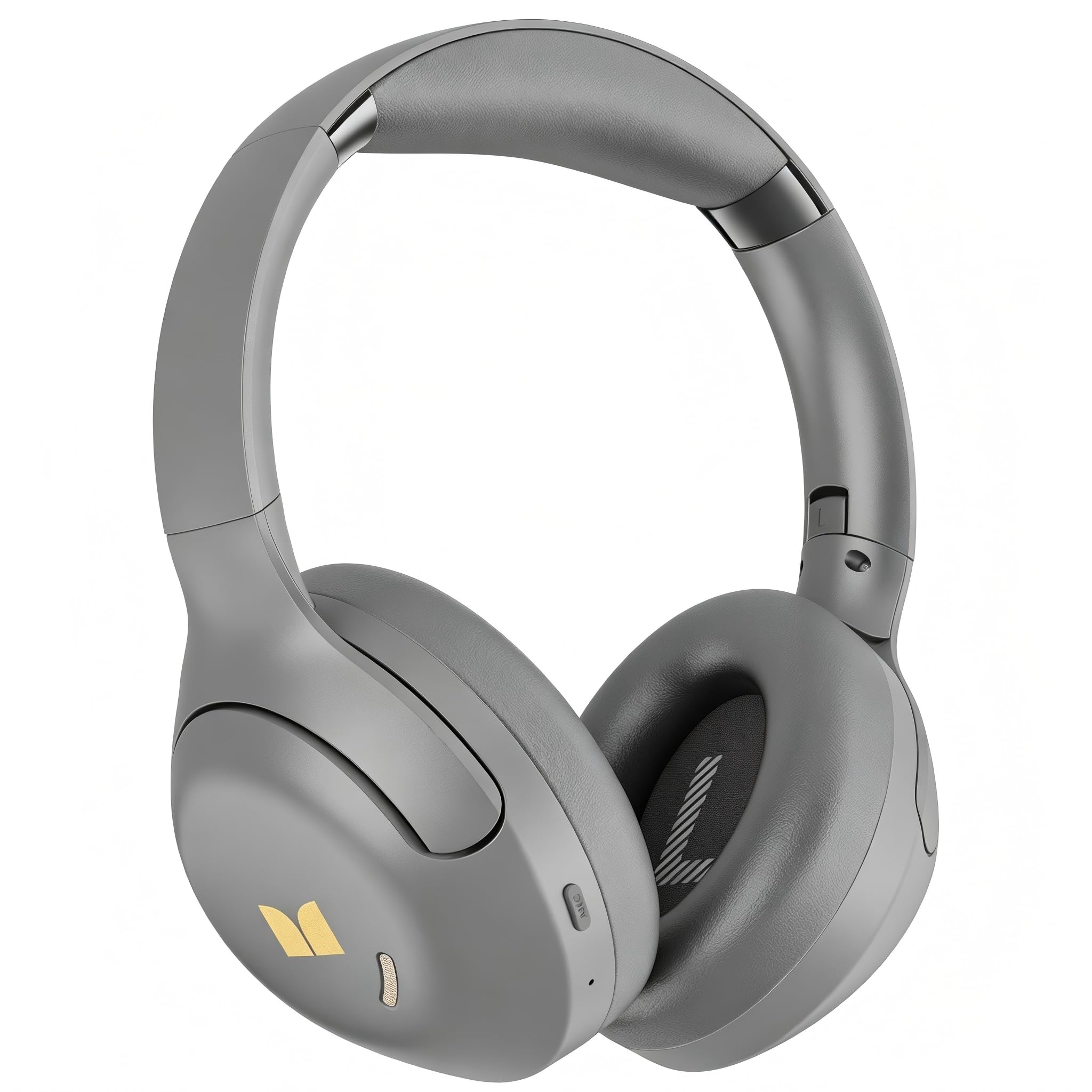
Image: Monster Harmonic N22 Active Noise Cancelling Headphones in Grey. This image displays the overall design of the headphones, including the earcups and headband.
Controls and Indicators:
- Power/Multi-function Button: Used for powering on/off, play/pause, answering/ending calls, and activating voice assistant.
- Volume Up Button (+): Increases volume, long press for next track.
- Volume Down Button (-): Decreases volume, long press for previous track.
- ANC/Transparency Mode Button: Toggles between Active Noise Cancellation, Transparency Mode, and Standard Mode.
- USB-C Charging Port: For charging the headphones.
- LED Indicator: Displays power status, charging status, and Bluetooth pairing status.
Setup
1. Charging the Headphones
- Connect the USB-C charging cable to the charging port on the headphones.
- Connect the other end of the cable to a USB power adapter (not included) or a computer's USB port.
- The LED indicator will show red during charging and turn off or change color (depending on model) when fully charged.
- A full charge provides up to 110 hours of listening time (ANC OFF). A quick 10-minute charge provides approximately 5 hours of playback.
2. Bluetooth Pairing
- Ensure the headphones are fully charged.
- Press and hold the Power/Multi-function button for approximately 3-5 seconds until the LED indicator flashes blue and red alternately, indicating pairing mode.
- On your device (smartphone, tablet, computer), enable Bluetooth and search for new devices.
- Select "Monster Harmonic N22" from the list of available devices.
- Once connected, the LED indicator will flash blue slowly or turn solid blue.
3. Dual Device Connection
The headphones support connecting to two Bluetooth devices simultaneously. After pairing with the first device, put the headphones back into pairing mode and connect to the second device. The headphones will intelligently switch between devices for calls and audio playback.
Operating Instructions
Power On/Off
- Power On: Press and hold the Power/Multi-function button for 2 seconds.
- Power Off: Press and hold the Power/Multi-function button for 3 seconds.
Music Playback
- Play/Pause: Press the Power/Multi-function button once.
- Volume Up: Press the '+' button once.
- Volume Down: Press the '-' button once.
- Next Track: Long press the '+' button.
- Previous Track: Long press the '-' button.
Call Management
- Answer/End Call: Press the Power/Multi-function button once.
- Reject Call: Press and hold the Power/Multi-function button for 2 seconds.
ANC, Transparency, and Standard Modes
Press the ANC/Transparency Mode button to cycle through the following modes:
- Active Noise Cancellation (ANC): Reduces ambient noise for an immersive listening experience.
- Transparency Mode: Allows you to hear your surroundings while listening to audio, ideal for awareness.
- Standard Mode: Disables both ANC and Transparency modes.
EQ Modes
The headphones feature 3 distinct EQ modes to customize your audio experience. To switch between EQ modes, double-press the Power/Multi-function button. Listen for an audible prompt indicating the current mode.
Maintenance
- Cleaning: Use a soft, dry cloth to clean the headphones. Do not use abrasive cleaners or solvents.
- Storage: When not in use, store the headphones in a cool, dry place, away from direct sunlight and extreme temperatures. The foldable structure allows for easy carrying and compact storage.
- Battery Care: To preserve battery life, charge the headphones regularly, even if not used frequently. Avoid fully depleting the battery for extended periods.
Troubleshooting
| Problem | Solution |
|---|---|
| Headphones do not power on. | Ensure the headphones are fully charged. Connect to a power source and check the charging indicator. |
| Cannot pair with a device. | Ensure headphones are in pairing mode (LED flashing blue/red). Turn off and on Bluetooth on your device. Move headphones closer to the device. Clear previous Bluetooth connections on your device. |
| No sound or low volume. | Check volume levels on both headphones and the connected device. Ensure headphones are properly connected via Bluetooth. Try re-pairing the headphones. |
| ANC is not effective. | Ensure ANC mode is activated. Check that the earcups form a good seal around your ears. ANC is most effective against low-frequency, constant noise. |
Specifications
- Model: Monster Harmonic N22
- Bluetooth Version: 5.4
- Audio Driver Type: 40mm High-Performance Dynamic Drivers
- Noise Control: Active Noise Cancellation, Transparency Mode
- Battery Life: Up to 110 hours (ANC OFF)
- Charging Port: USB Type-C
- Fast Charging: 10 minutes charge for 5 hours playback
- Earpiece Shape: Over-ear
- Dimensions: 21 x 15 x 9 cm
- Weight: 540 g
- Special Features: 3 EQ Modes, Dual Device Connection, Hands-free Calling
Warranty and Support
Monster products are built with quality and reliability in mind. For warranty information, technical support, or customer service inquiries, please refer to the warranty card included in your package or visit the official Monster website. Keep your proof of purchase for warranty claims.
For further assistance, please contact Monster customer support through their official channels.


